Introduction
Thank you for choosing the TRIGKEY S6 Pro 6900HX Mini PC. This compact yet powerful computer is designed for a wide range of applications, from daily office tasks and web browsing to light gaming and multimedia entertainment. Featuring an AMD Ryzen 9 6900HX processor, high-speed DDR5 RAM, and PCIe 4.0 NVMe SSD storage, it delivers efficient performance in a small form factor. This manual provides essential information for setting up, operating, maintaining, and troubleshooting your new Mini PC.
Пакеттин мазмуну
Баштоодон мурун, таңгактагы бардык буюмдардын бар экендигин текшериңиз:
- 1 x TRIGKEY S6 Pro 6900HX Mini PC
- 1 x User Manual
- 1 x Дубалга орнотуу кронштейн
- 2 x HDMI кабелдери
- 1 х кубат адаптери
Продукт бүттүview
The TRIGKEY S6 Pro 6900HX Mini PC is engineered for performance and versatility. Below is an overview анын негизги компоненттери жана өзгөчөлүктөрү жөнүндө.
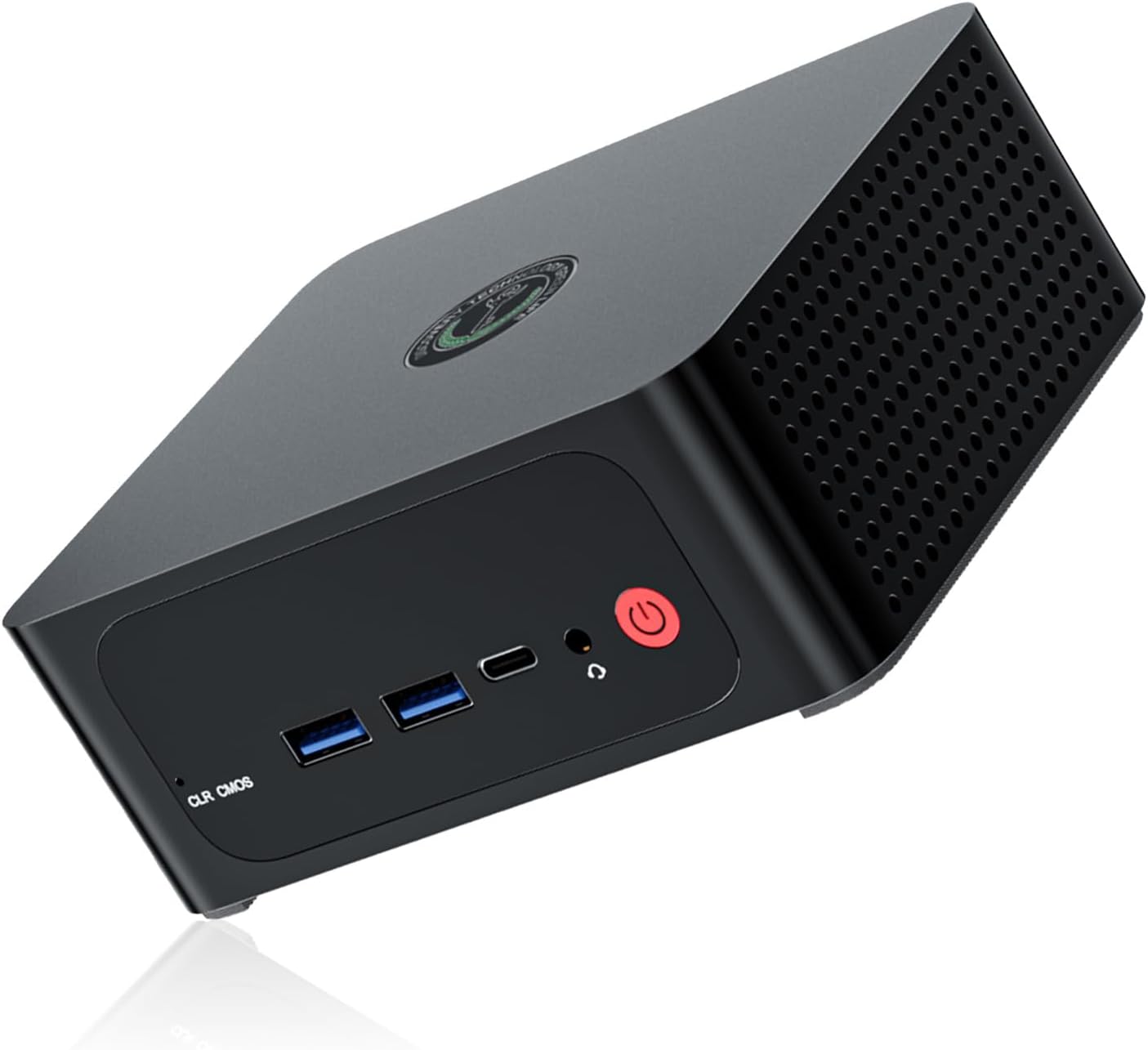
1-сүрөт: Фронт view of the TRIGKEY S6 Pro 6900HX Mini PC, showcasing its compact design and accessible front ports including USB and power button.

2-сүрөт: жарылды view illustrating the internal components of the Mini PC, including the motherboard, CPU, cooling fan, heat pipe, SO-DIMM DDR5 RAM, M.2 NVMe PCIe 4.0 SSD, ABS plastic case, and metal chassis.
Негизги өзгөчөлүктөрү:
- Жогорку өндүрүмдүү процессор: Equipped with an AMD Ryzen 9 6900HX (8 Cores/16 Threads, up to 4.9 GHz, 16MB L3 Cache) for efficient multitasking and demanding applications.
- Expandable Memory & Storage: 16GB DDR5 RAM (upgradable to 64GB) and 500GB PCIe 4.0 NVMe SSD storage (expandable to 2TB).
- Үч эселенген дисплейди колдоо: Connect up to three monitors via HDMI 2.0 (4K@60Hz), DisplayPort 1.4 (4K@144Hz), and USB4.0 (40Gbps).
- Өркүндөтүлгөн байланыш: Features 2.5Gbps LAN, WiFi 6 (2.4Gbps), and Bluetooth 5.2 for stable and fast network and peripheral connections.
- Компакт дизайн: Small footprint (4.96 x 4.44 x 1.92 inches) with VESA mount support for space-saving installation.
Орнотуу колдонмосу
1. Перифериялык түзүлүштөрдү туташтыруу
Мини компьютериңизди күйгүзүүдөн мурун, бардык керектүү перифериялык түзүлүштөрдү туташтырыңыз.
- Монитор: Connect your monitor(s) to the Mini PC using the provided HDMI cables or your own DisplayPort/USB4.0 cables. The Mini PC supports up to three displays simultaneously.
- Баскычтоп жана чычкан: Plug your USB keyboard and mouse into the available USB 2.0 or USB 3.0 ports.
- Тармак: For a wired connection, connect an Ethernet cable to the 2.5G LAN port. For wireless, ensure your WiFi network is available.
- Күч: Кубат адаптерин Мини PCдеги DC-in портуна туташтырыңыз, андан кийин адаптерди розеткага сайыңыз.
2. Баштапкы күйгүзүү
Once all peripherals are connected:
- Mini PCтин алдыңкы бетинде жайгашкан кубат баскычын басыңыз.
- The system will boot up. If it's the first time, it may guide you through the initial Windows 11 setup process.
3. VESA орнотуу (милдеттүү эмес)
The included VESA mount bracket allows you to attach the Mini PC to the back of a compatible monitor or to a wall, saving desk space.
- Attach the VESA bracket to the back of your monitor using the provided screws, aligning with the VESA mounting holes.
- Slide the Mini PC onto the bracket until it clicks securely into place.
Иштөө нускамалары
Power Management
- Күйгүзүү: Кубат баскычын басыңыз.
- Өчүрүү: Windows'тун Start баскычын чыкылдатып, андан кийин Кубат > Өчүрүү дегенди тандаңыз.
- Кайра баштоо: Windows'тун Start баскычын чыкылдатып, андан кийин Кубат > Кайра баштоону тандаңыз.
- Уйку: Windows'тун Start баскычын чыкылдатып, андан кийин Кубат > Уйку режимин тандаңыз.
BIOS Орнотуулары
BIOS/UEFI жөндөөлөрүнө кирүү үчүн баскычын басыңыз DEL key repeatedly during startup immediately after pressing the power button. Here you can configure boot options, system time, and other advanced settings.
Wake-on-LAN and Auto-Power-on
The Mini PC supports Wake-on-LAN (WoL) and Auto-Power-on features. These can be enabled and configured within the BIOS settings.
- LAN-да ойгонуу: Allows the computer to be woken up remotely over a network connection.
- Auto-Power-on: Configures the computer to automatically power on at a scheduled time.
Техникалык тейлөө
Системанын жаңыртуулары
Оптималдуу аткарууну жана коопсуздукту камсыз кылуу үчүн операциялык тутумуңузду жана драйверлериңизди үзгүлтүксүз жаңыртыңыз.
- Windows жаңыртуулары: Орнотуулар > Windows Update бөлүмүнө өтүп, жаңыртууларды текшериңиз.
- Драйвер жаңыртуулары: Visit the TRIGKEY official website for the latest drivers for your S6 Pro 6900HX Mini PC.
Тазалоо
Аба агымынын туура болушун камсыз кылуу жана ысып кетүүнүн алдын алуу үчүн, Mini PCтин сыртын мезгил-мезгили менен тазалап туруңуз.
- Use a soft, dry cloth to wipe down the casing.
- Желдеткичтерде чаң топтолушу үчүн кысылган абаны колдонуңуз. Тазалоодон мурун компьютердин өчүрүлгөнүн жана розеткадан суурулганын текшериңиз.
Storage and Memory Expansion
The TRIGKEY S6 Pro 6900HX Mini PC allows for easy expansion of its RAM and SSD storage.

3-сүрөт: Illustration of DDR5 4800MHz SO-DIMM modules, indicating the upgradability of RAM up to 64GB.

4-сүрөт: Diagram showing the dual PCIe 4.0 NVMe SSD slots, allowing for storage expansion up to 2TB.
Refer to the detailed instructions on the TRIGKEY support website or consult a qualified technician for guidance on hardware upgrades.
Проблемаларды чечүү
If you encounter issues with your Mini PC, refer to the following common troubleshooting steps.
| Көйгөй | Мүмкүн себеп | Чечим |
|---|---|---|
| Эч кандай кубат/система күйбөйт | Power adapter not connected; Faulty power outlet; Power button issue. | Ensure power adapter is securely connected to both PC and outlet. Try a different outlet. Contact support if issue persists. |
| Монитордо дисплей жок | Loose video cable; Incorrect input source on monitor; Monitor not powered on. | Check HDMI/DP/USB4.0 cable connections. Select correct input source on monitor. Ensure monitor is powered on. |
| Интернет байланышы жок (зымдуу) | Ethernet cable loose; Router/modem issue; Network driver issue. | Check Ethernet cable connection. Restart router/modem. Update network drivers. |
| Интернет байланышы жок (зымсыз) | WiFi disabled; Incorrect password; Router issue; WiFi driver issue. | Ensure WiFi is enabled in Windows. Re-enter WiFi password. Restart router. Update WiFi drivers. |
| Система жай же жооп бербей жатат | Too many applications running; Low disk space; Malware; Outdated drivers. | Керексиз тиркемелерди жабыңыз. Дисктеги орунду бошотуңуз. Антивирустук сканерлөөнү иштетиңиз. Драйверлерди жаңыртыңыз. |
For more complex issues or if the problem persists, please contact TRIGKEY customer support.
Техникалык шарттар
Detailed technical specifications for the TRIGKEY S6 Pro 6900HX Mini PC:
| Өзгөчөлүк | Деталь |
|---|---|
| Модел | S6 Pro 6900HX |
| Процессор | AMD Ryzen 9 6900HX (8 Cores, 16 Threads, up to 4.9 GHz, 16MB L3 Cache) |
| Графика | AMD Radeon 680M (12 Cores, 2400 MHz) |
| RAM | 16GB DDR5 (2x8GB, 4800MHz), expandable up to 64GB |
| Сактагыч | 500GB PCIe 4.0 NVMe SSD, expandable up to 2TB |
| Операция системасы | Windows 11 OS |
| Video Output | 1x HDMI 2.0 (4K@60Hz), 1x DisplayPort 1.4 (4K@144Hz), 1x USB4.0 (40Gbps) - Triple Display Support |
| Network | 2.5G Ethernet LAN, WiFi 6 (2.4Gbps) |
| Bluetooth | Bluetooth 5.2 |
| USB порттору | 2x USB 3.0, 2x USB 2.0 |
| Өлчөмдөр | 4.96 x 4.44 x 1.92 inches (12.6 x 11.3 x 4.9 cm approx) / 21.2 x 13.4 x 5.7 cm (package) |
| Салмагы | 1.2 kilograms (package) |

5-сүрөт: Visual summary of the TRIGKEY S6 Pro 6900HX's core specifications, including CPU, GPU, RAM, storage, and connectivity.

6-сүрөт: Деталдаштырылган view of the AMD Ryzen 9 6900HX processor, highlighting its 8 cores, 4.90 GHz max turbo frequency, and 16 threads.

7-сүрөт: Diagram illustrating the advanced connectivity features such as WiFi 6, 2.5Gbps network adapters, Bluetooth 5.2, triple display support, and VESA mount compatibility.
Кепилдик жана колдоо
TRIGKEY provides comprehensive support for your Mini PC.
- Кепилдик: Your TRIGKEY S6 Pro 6900HX Mini PC comes with a 1-year warranty from the date of purchase.
- Техникалык колдоо: Lifetime technical support is available for all TRIGKEY products.
- Кардарларды тейлөө: Individual 7x24 hour customer support is provided.
- Сертификаттар: All products have passed FCC, CE, and ROSH certifications.
For assistance, please contact TRIGKEY customer service through their official webсайт же сатып алуу менен камсыз болгон байланыш маалыматы.


