1. Киришүү
This manual provides essential information for the proper use and maintenance of your TEAMGROUP X1 MAX 128GB USB 3.2 Gen 2 Dual Interface Flash Drive. Please read these instructions carefully to ensure optimal performance and longevity of your device.
2. Продукт бүтүп калдыview
The TEAMGROUP X1 MAX is a high-speed USB flash drive designed for versatile data storage and transfer. It features both USB Type-A and USB Type-C connectors, allowing compatibility with a wide range of devices including smartphones, tablets, laptops, and desktop PCs. With USB 3.2 Gen 2 interface, it offers fast read and write speeds for efficient data management.
Негизги өзгөчөлүктөрү:
- Жогорку ылдамдыктагы берүү: Read speeds up to 1,000 MB/s and write speeds up to 900 MB/s.
- Dual Interface Design: Equipped with both USB Type-C and USB Type-A connectors for broad compatibility.
- Туруктуу курулуш: Features a robust design for reliable use.
- AmpСактагыч: Available in various capacities, including 128GB.
Продукт визуалдык көрүнүштөрү:


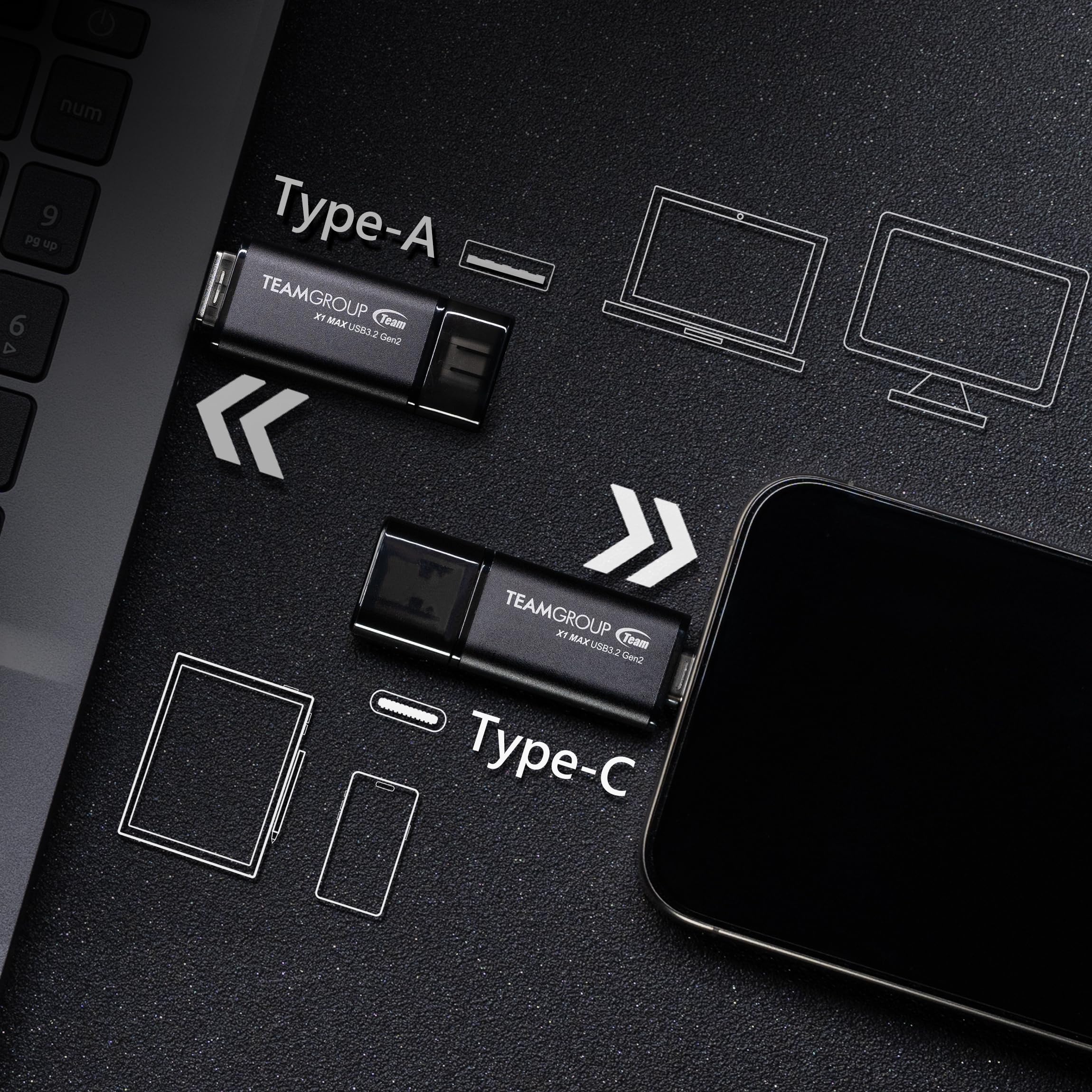
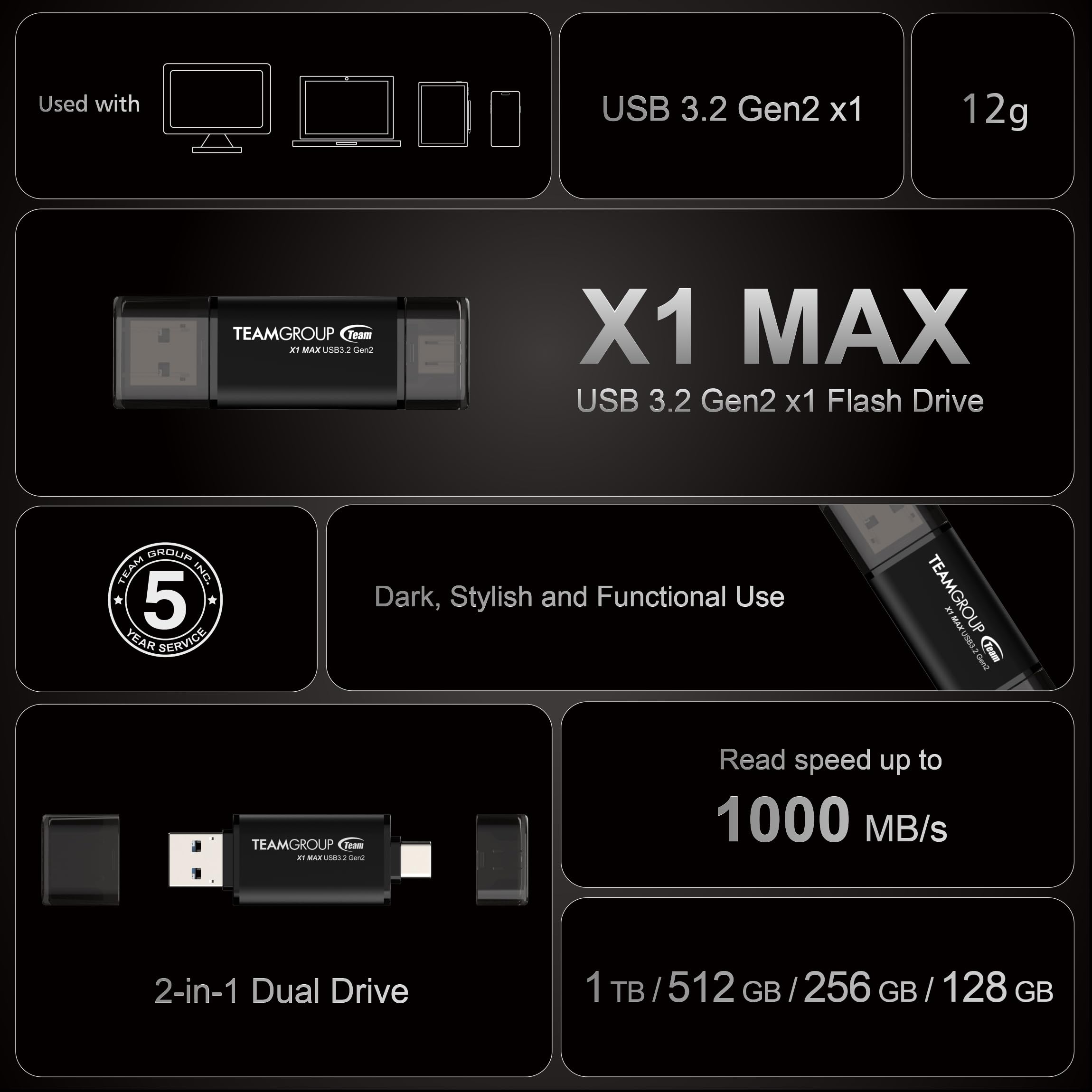
Продукциянын видеосу:
Расмий продукт бүттүview video for the TEAMGROUP X1 MAX USB Flash Drive, demonstrating its features and usage.
3. Орнотуу
The TEAMGROUP X1 MAX Flash Drive is a plug-and-play device, requiring no special driver installation for most operating systems.
- Туура портту аныктаңыз: Түзмөгүңүздө (компьютер, смартфон, планшет) USB Type-A же USB Type-C порту бар экенин аныктаңыз.
- Дискти туташтыруу: Gently insert the appropriate connector (Type-A or Type-C) of the flash drive into the corresponding port on your device. Ensure the connection is firm.
- Түзмөктү таануу: Your operating system should automatically detect the flash drive and display it as a removable storage device.
4. Иштөө нускамалары
Once connected, the flash drive functions like any standard external storage device.
- Кирүү Files: Navigate to 'My Computer' or 'This PC' on Windows, or 'Finder' on macOS, to locate the drive. On mobile devices, use a file менеджер колдонмо.
- Өткөрүлүүдө Files: Сүйрөп барып таштаңыз files or folders to and from the flash drive. For large files, utilize the high-speed capabilities of USB 3.2 Gen 2 by connecting to compatible ports.
- Коопсуз алып салуу: Always safely eject the flash drive from your device before physically removing it to prevent data corruption. On Windows, click the 'Safely Remove Hardware' icon in the taskbar. On macOS, drag the drive icon to the Trash or use the Eject option in Finder.
5. Техникалык тейлөө
- Тазалыкты сактоо: Periodically clean the connectors with a dry, lint-free cloth to ensure good contact.
- Физикалык зыянды болтурбоо: Protect the drive from drops, impacts, and extreme temperatures.
- Маалыматтын камдык көчүрмөсү: Regularly back up important data stored on the flash drive to another location.
- Сактагыч: When not in use, store the drive in a cool, dry place.
6. Кыйынчылыктарды
- USB Disk Not Displayed:
If the USB disk is detected by the PC but not displayed in 'My Computer' or 'This PC', it may be due to a drive letter conflict. To resolve this, right-click 'This PC' (or 'My Computer'), select 'Manage', then 'Disk Management'. Right-click the USB disk and select 'Change Drive Letter and Paths' to assign a new letter.
- Displayed Capacity Lower Than Actual:
This is a common occurrence due to differences in unit capacity conversion (hardware manufacturers use 1K=1000 bytes, software uses 1K=1024 bytes) and a small percentage of capacity reserved for firmware and maintenance. The actual usable capacity will be slightly less than the advertised capacity.
- When to Safely Remove:
Always use the 'Safely Remove Hardware' option (Windows) or eject the drive (macOS) before unplugging to prevent data loss or corruption.
- Understanding USB 3.2:
USB 3.2 Gen 1 (SuperSpeed USB) offers 5Gbps. USB 3.2 Gen 2 (SuperSpeed+ USB) offers 10Gbps. The X1 MAX utilizes USB 3.2 Gen 2 for its high-speed performance.
7. Техникалык шарттар
| Атрибут | Нарк |
|---|---|
| Модель аты | X1 MAX |
| Эстутум сактоо сыйымдуулугу | 128 ГБ |
| Окуу ылдамдыгы | 1000 МБ/сек чейин |
| Жазуу ылдамдыгы | 900 МБ/сек чейин |
| Аппараттык интерфейс | USB, USB 3.2 Gen 2 |
| Аппараттык байланыш технологиясы | USB Type A, USB Type C |
| Түс | Кара |
| Элемент Салмагы | 0.423 унция |
| Продукциянын өлчөмдөрү (LxWxH) | 2.48 x 0.79 x 0.1 дюйм |
| Өзгөчө өзгөчөлүк | Dual USB Connector, Type-C & Type-A 2-in-1 Dual Drive, USB 3.2 Gen2 FLASH DRIVE |
8. Кепилдик жана колдоо
Your TEAMGROUP X1 MAX Flash Drive comes with a 5-year Product Warranty.
For free technical support and customer service, please contact TEAMGROUP Inc. You can typically find a 'Contact Seller' or 'Ask a question' button on the product's purchase page, or visit the official TEAMGROUP webколдоо булактары үчүн сайт.
Please refer to the latest version of warranty and support information on the official TEAMGROUP website. In case of discrepancies, the official website prevails.


