1. Киришүү
This manual provides detailed instructions for the Kactoily 4-in-1 Freshwater Aquarium Monitor. This device is designed to measure four critical water parameters simultaneously: pH, Total Dissolved Solids (TDS), Electrical Conductivity (EC), and Temperature. It features a split design with a separate probe unit and display unit, utilizing 2.4GHz technology for data transmission, allowing for convenient real-time monitoring of your aquarium's water quality.

Figure 1: Kactoily 4-in-1 Freshwater Aquarium Monitor
2. Пакеттин мазмуну
Төмөндө тизмеленген нерселердин баары пакетиңизге камтылганын текшериңиз:
- Kactoily Wireless Monitor (Display Unit) x1
- Probe Unit x1
- Calibration Powder x6
- USB кубаттоо кабели x2
- Сорох чөйчөк x2
- Acrylic Stand x1
- Plastic Screw x2
- Колдонуучунун колдонмосу x1
- Charger Plug (Optional) x2
- Paste (Optional) x1

2-сүрөт: Камтылган компоненттер
3. Продукт бүтүп калдыview жана өзгөчөлүктөрү
The Kactoily 4-in-1 Aquarium Monitor offers advanced features for comprehensive water quality assessment:
- 4-бирде өлчөө: Measures pH, TDS, EC, and Temperature simultaneously.
- Реалдуу убакыттагы мониторинг: Provides continuous data display on a clear LCD screen.
- Бөлүнгөн дизайн: Probe and main unit are separate, connected via 2.4GHz technology for flexible placement and observation.
- High-Precision Probes: Equipped with platinum probes for enhanced longevity and accurate measurements. Probes are easily replaceable.
- IP67 Суу өткөрбөйт: The probe unit is designed to be waterproof for reliable underwater operation.
- Multiple Fixation Methods: Includes an acrylic stand and suction cups to suit various aquarium setups.
- Колдонуучуга ыңгайлуу дисплей: Features a 1.6-inch color LCD screen for high-resolution and clear data visibility.
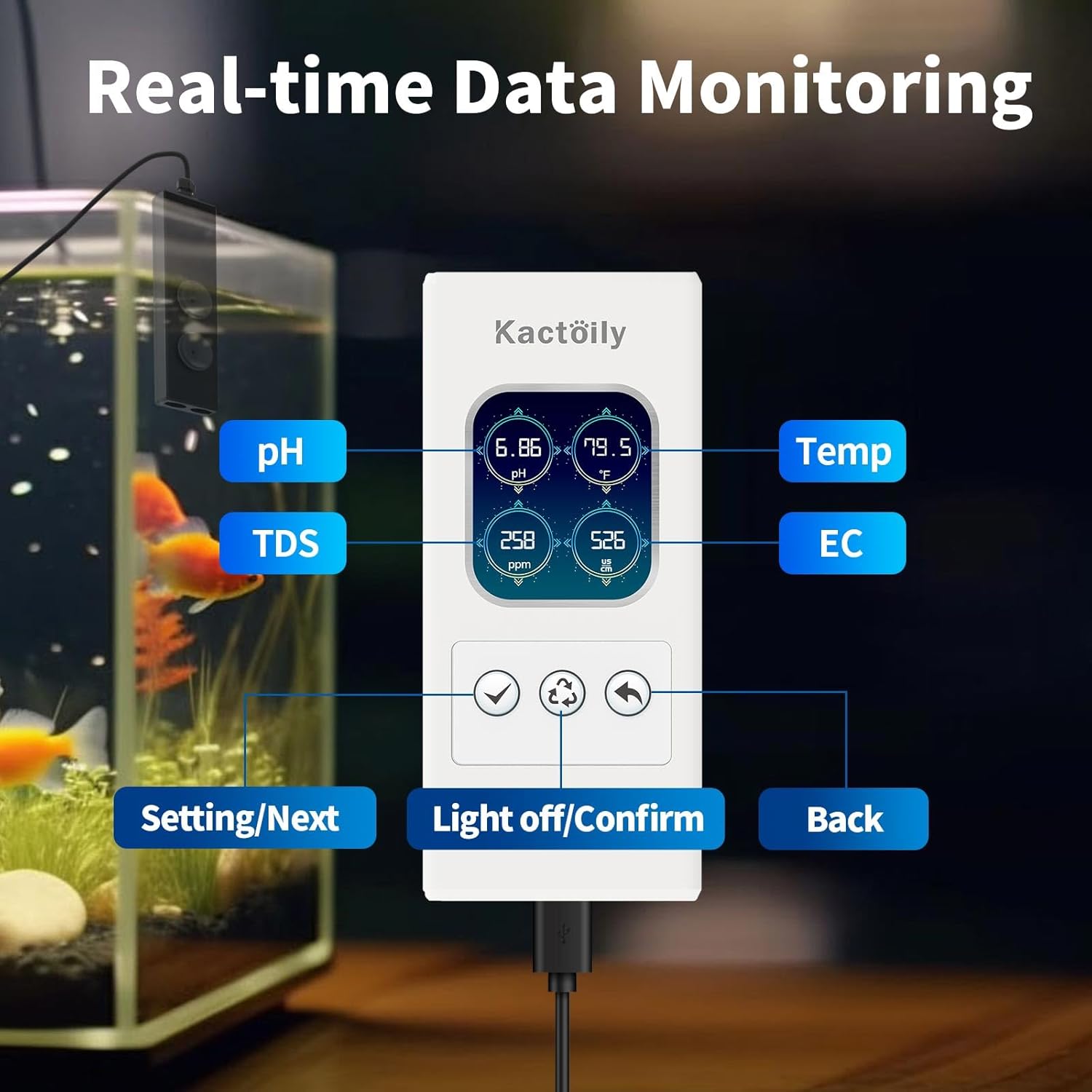
Figure 3: Real-time Data Monitoring Display

Figure 4: High-Precision Probe Design
4. Орнотуу нускамалары
- Компоненттерди таңгактан чыгаруу: Carefully remove all items from the packaging and verify against the package contents list.
- Prepare the Probe: Unscrew the probe protection cap clockwise. The cap contains protection fluid; this can be replenished with pure water if needed.
- Attach Suction Cups/Stand: Snap the provided suction cups into the sensor unit or attach the acrylic stand as desired. The device supports various fixation methods to suit different fish tank styles.
- Зондду жайгаштырыңыз: Place the probe unit into the aquarium water, ensuring it is submerged to the appropriate level (between the 'Min level' and 'Max level' markings on the probe unit).
- Туташуу кубаты: Plug the data cable from the probe unit into the display unit, and then connect the display unit to a power source using the USB charging cable and adapter. The display will illuminate and begin showing readings.

Figure 5: Probe Installation with Suction Cups and Acrylic Stand

Figure 6: Product Dimensions for Placement Consideration
5. Иштөө нускамалары
5.1. Реалдуу убакыттагы мониторинг
Once powered on, the monitor will automatically display real-time readings for pH, TDS, EC, and Temperature on its LCD screen. The display is backlit for clear visibility.
5.2. Manual Calibration and Adjustment
To ensure accurate measurements, periodic calibration is necessary. The monitor allows for manual calibration of pH, EC, and temperature settings.
5.2.1. рН калибрлөө
- Access the settings menu on the display unit.
- Navigate to the 'pH-set' option.
- Follow the on-screen prompts to perform 2-point or 3-point calibration using standard pH buffer solutions (e.g., pH 4.01, pH 7.00, pH 9.18).
- Adjust the pH value if necessary using the 'pH-Adj' option.

Figure 7: pH Calibration Process
5.2.2. EC Calibration
- Орнотуулар менюсуна кириңиз.
- Navigate to the 'EC-set' option.
- Perform calibration using a standard EC solution (e.g., 1413 µS/cm).
- Adjust the EC or TDS value if necessary using the 'EC-Adj' or 'TDS-Adj' option.

Figure 8: EC Calibration Process
5.2.3. Температураны жөндөө
- Орнотуулар менюсуна кириңиз.
- Navigate to the 'Temp-set' option.
- Select your preferred unit (Celsius or Fahrenheit) and set any necessary temperature compensation values.

Figure 9: Temperature Unit and Compensation Setting
6. Техникалык тейлөө
- Зонд тазалоо: Regularly clean the probe tips to prevent buildup that can affect accuracy. Use distilled water or a mild cleaning solution specifically designed for pH/EC probes.
- Зонд сактоочу жай: When not in use, ensure the probe protection cap is securely in place and contains the appropriate storage solution (or pure water) to keep the probe hydrated.
- Кайра калибрлөө: Calibrate the device regularly, especially if readings appear inconsistent or after cleaning the probes, to maintain accuracy.
- Электр камсыздоо: Ensure the device is connected to a stable power source.
7. Кыйынчылыктарды
- Туура эмес окуулар:
- Ensure probes are clean and free from debris.
- Perform a full calibration for pH and EC as described in Section 5.2.
- Check if the probe protection fluid needs replenishment.
- pH Value Does Not Change During Calibration:
- Go to the calibration page and select the 'Reset' option to restore factory settings. This will delete all calibration data, requiring a full recalibration.

Figure 10: Factory Reset Option
- Дисплей/кубат жок:
- Verify that the USB charging cable is securely connected to both the display unit and the power adapter, and that the adapter is plugged into a working power outlet.
- Ensure the data cable connecting the probe unit to the display unit is properly inserted.
- Connectivity Issues (Probe to Display):
- Ensure the probe unit and display unit are within the specified operating range (6.5 feet).
- Check for any obstructions that might interfere with the 2.4GHz signal.
8. Техникалык шарттар
| Параметр | Диапазон | Резолюция | Тактык |
|---|---|---|---|
| pH | 0-14 | 0.01 | ±0.05 |
| Температура | 0-60°C (32-140°F) | 0.1°C / 0.5°F | ± 0.1 ° C / ± 0.1 ° F |
| Жалпы эриген катуу заттар (TDS) | 0-999ppm / 1-200ppt | 1ppm / 1ppt | ± 5% FS |
| Electrical Conductivity (EC) | 0-999µs/cm / 1-400ms/cm | 1µs/cm / 1ms/cm | ± 5% FS |
| туздуулук | 0.01%-25% | / | ±0.1% (0.01%-5%) / ±1% (5.1%-25%) |
| Салыштырмалуу тартылуу | 1-1.222 | / | / |
Table 1: Measurement Specifications

Figure 11: Detailed Specifications Chart
Жалпы мүнөздөмөлөрү:
- Бренд: кактуил
- Модель номери: 4-in-1
- Пакеттин өлчөмдөрү: 11.81 x 3.74 x 2.44 дюйм
- Элемент Салмагы: 1.65 фунт
- Монтаж түрү: Wall Mount (with included accessories)
- Батарея: No batteries required (powered via USB)
9. Кепилдик жана Кардарларды колдоо
Kactoily is committed to the quality of this digital pH meter and provides a warranty or refund for the product. If you encounter any questions or issues regarding your purchase or the operation of the device, please do not hesitate to contact our customer service team. We aim to resolve your problem within 24 hours.
For support, please refer to the contact information provided with your purchase documentation or visit the official kactoily webсайт.


