1. Продукт бүтүп калдыview
The Pknight DR & PB MINI is a compact DMX recorder and playback controller designed for efficient management of DMX lighting programs. It offers robust recording capabilities, flexible playback options, and essential tools for DMX system verification.

Figure 1: Pknight DR & PB MINI DMX Recorder and Playback Controller.
Негизги өзгөчөлүктөрү:
- Effortless Recording and Playback: Record up to 255 DMX programs and play them back using intuitive Record ID assignments.
- Flexible Playback Options: Seamlessly play recorded DMX programs manually or via External Device Control, allowing real-time management through DMX consoles, computer software, or mobile applications.
- Колдонуучуга ыңгайлуу интерфейс: Simple button controls and an OLED screen facilitate quick DMX recording and playback.
- Removable Micro SD Card: Equipped with a default 32GB Micro-SD card, easily removable for quick storage and capable of holding hours of playback programs.
- Secure and Easy Storage: Programs are safely recorded as files on the SD card, ensuring easy backup and transfer, preventing loss of playback programs.
- Packet Loss Detection Mode: Ensure signal stability with Packet Loss Detection Mode, which tests and verifies the reliability of your DMX system.
2. Пакеттин мазмуну
Пакетте бардык буюмдар бар экенин текшериңиз:
- Pknight DMX Recorder and Playback Controller DR & PB MINI
- 32GB Micro-SD Card (pre-installed)
- USB Type-C Кубат кабели
- Колдонуучунун Колдонмосу (бул документ)
3. Орнотуу колдонмосу
3.1. Түзмөк бүттүview жана Байланыштар

Figure 2: Device layout with labeled buttons and ports.
- DMX IN: Connect your DMX console or signal source here.
- DMX OUT: Connect to your DMX lighting fixtures.
- USB Type-C: Power input (DC 5V).
- Micro SD оюгу: Insert/remove Micro SD card for program storage.
- MENU баскычы: Меню параметрлери боюнча чабыттоо.
- ЖОГОРУ/ТӨМӨН баскычтары: Adjust values or scroll through options.
- ENTER баскычы: Confirm selection or start/stop actions.
3.2. Баштапкы кубаттуулук
- Ensure the Micro SD card is properly inserted into the slot.
- Connect the USB Type-C cable to the device and a 5V DC power source.
- The OLED screen will power on, displaying the current status.
4. Иштөө нускамалары
4.1. DMX Recording Mode
The device allows recording of up to 255 DMX programs. Each program is assigned a unique Record ID from 1 to 255.

Figure 3: OLED screen displaying DMX Recording Mode with Record ID and status.
- Connect your DMX console or signal source to the DMX IN порт.
- басыңыз МЕНЮ button to navigate to the '2. Record Show' option.
- колдонуу ЖОГОРУ/ТӨМӨН buttons to select an empty Record ID (e.g., 001). The screen will show 'Empty Program' and 'Ready to record'.
- басыңыз ENTER button to start recording. The screen will display the recording duration.
- Operate your DMX console to create the desired lighting sequence.
- басыңыз ENTER button again to stop recording. The program will be saved to the Micro SD card.
4.2. DMX Playback Mode
Recorded DMX programs can be played back manually or triggered by external devices.
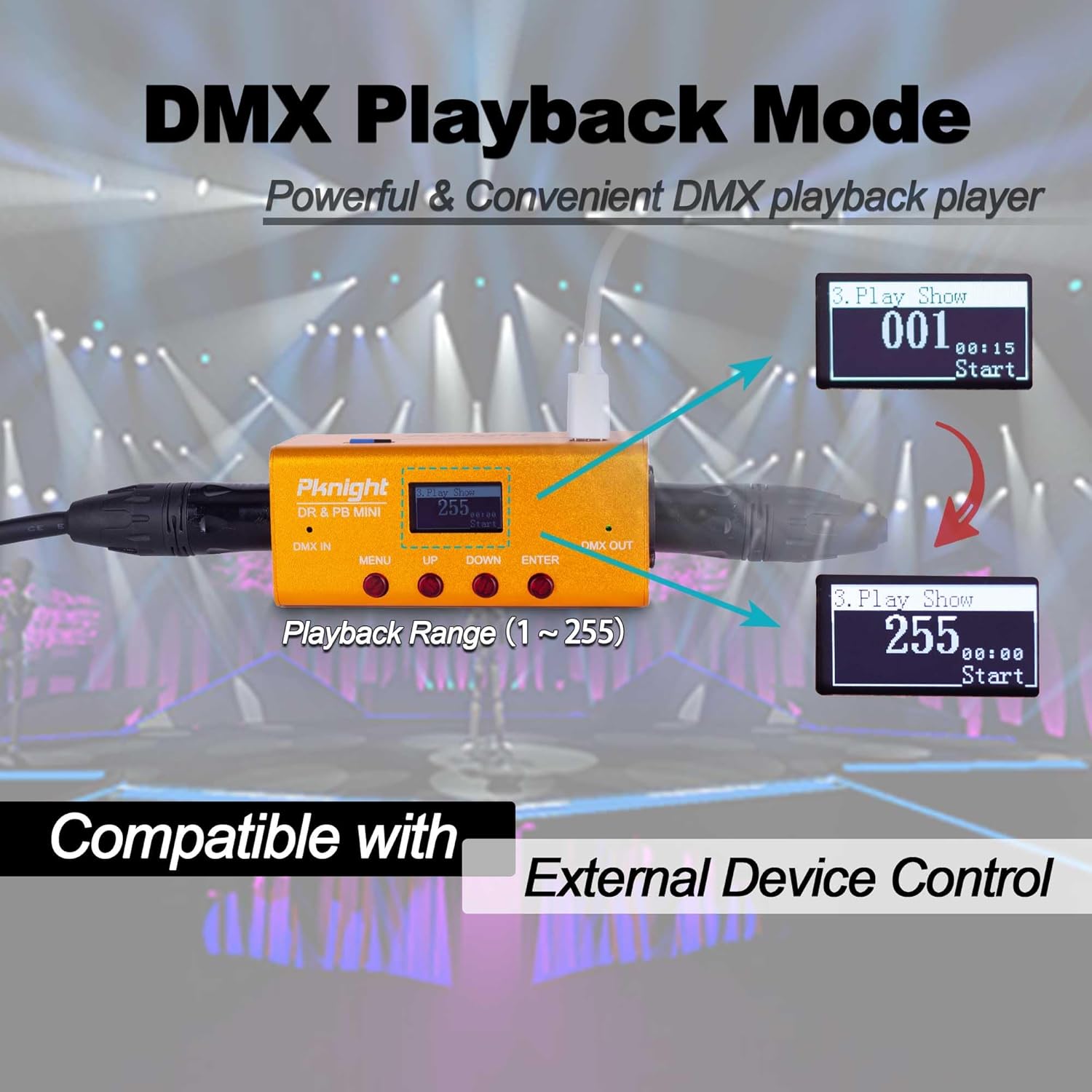
Figure 4: OLED screen displaying DMX Playback Mode with Playback Range.
- туташтыруу DMX OUT port to your DMX lighting fixtures.
- басыңыз МЕНЮ button to navigate to the '3. Play Show' option.
- колдонуу ЖОГОРУ/ТӨМӨН buttons to select the desired Record ID (1-255) for playback.
- басыңыз ENTER button to start playback. The screen will display the playback duration.
- басыңыз ENTER ойнотууну токтотуу үчүн кайра баскычын басыңыз.
4.3. External Device Control
The DR & PB MINI supports external device control for flexible playback integration.
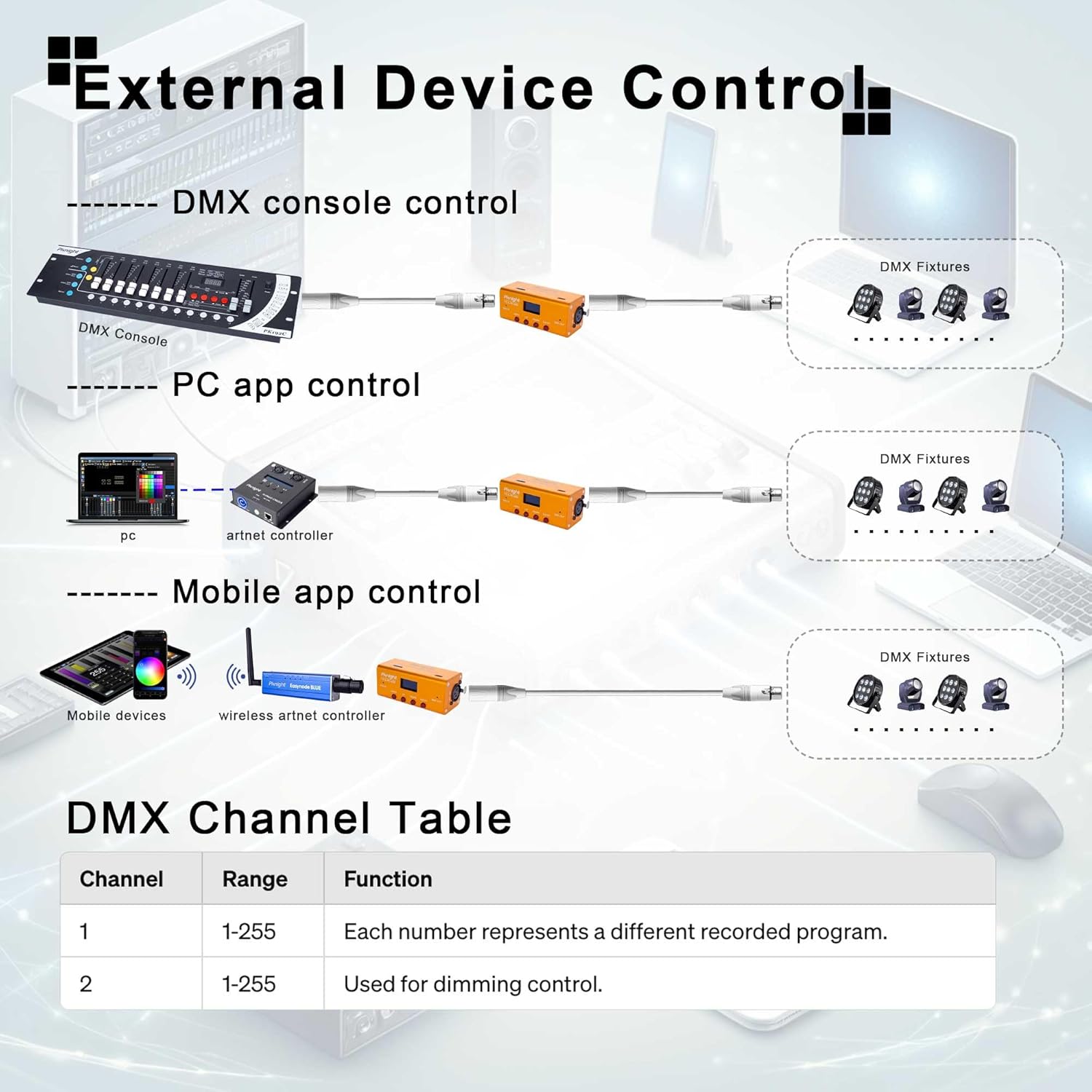
Figure 5: Various methods for external device control, including DMX consoles, PC applications, and mobile applications.
The device utilizes two DMX channels for external control:
- 1-канал: Range 1-255, each number represents a different recorded program to be triggered.
- 2-канал: Range 1-255, used for dimming control of the output.
4.4. Packet Loss Detection Mode
This mode helps verify the reliability of your DMX system by detecting packet loss.
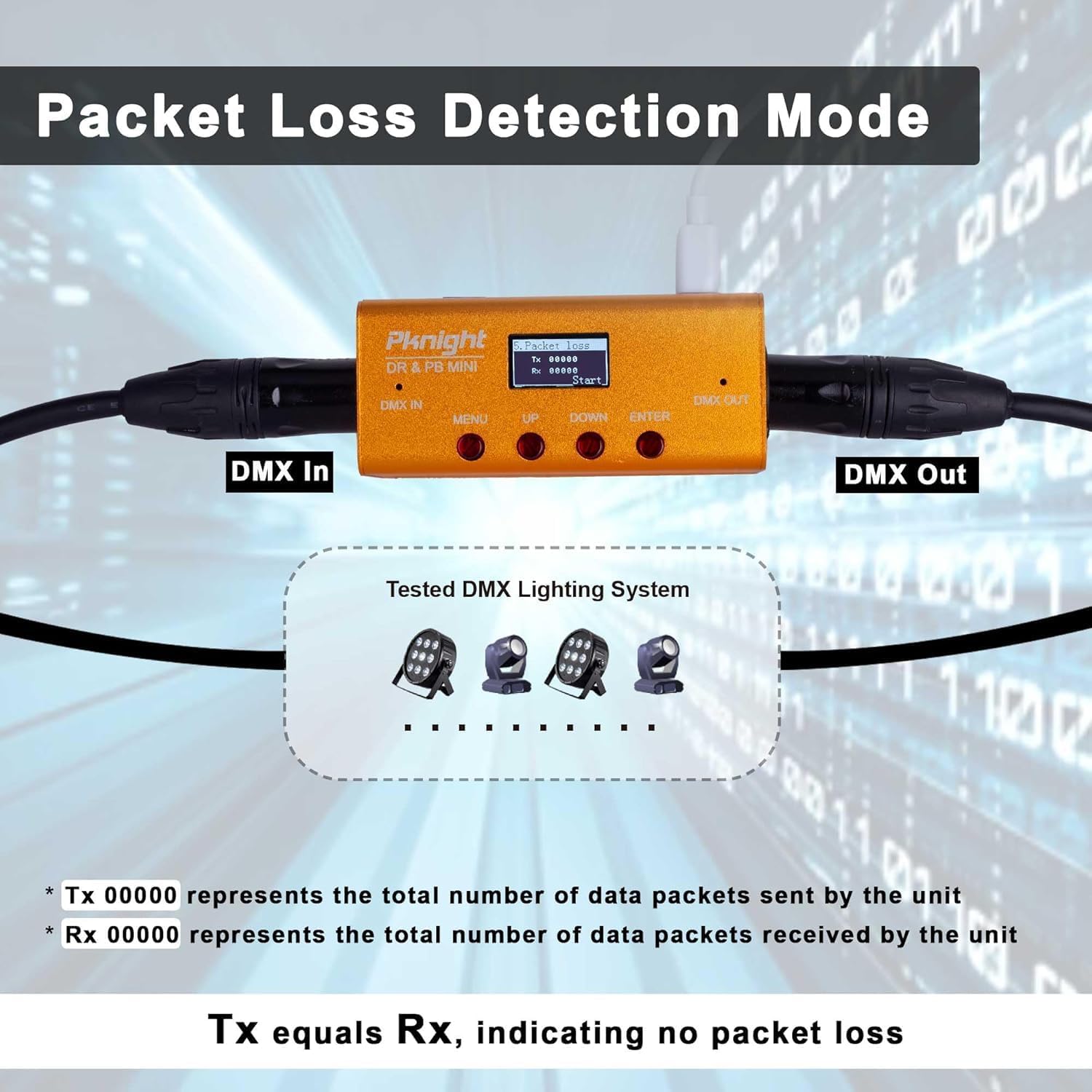
Figure 6: OLED screen displaying Packet Loss Detection Mode with Tx and Rx counts.
- туташтыруу DMX IN жана DMX OUT ports to your DMX system.
- басыңыз МЕНЮ button to navigate to the '5. Packet Loss' option.
- басыңыз ENTER button to start the test. The screen will display 'Tx' (transmitted packets) and 'Rx' (received packets).
- If 'Tx' equals 'Rx', it indicates no packet loss and a stable DMX signal.
- If there is a discrepancy, it suggests potential issues with your DMX cabling or devices.
5. Техникалык тейлөө
5.1. Micro SD картаны башкаруу
The Micro SD card stores all recorded DMX programs. Regular backup is recommended.
- To remove the Micro SD card, gently push it inward until it clicks, then release. The card will eject.
- Connect the Micro SD card to a computer to back up your program files.
- Ensure the card is properly formatted (FAT32) if replacing or re-using.

Figure 7: Removable Micro SD card for program storage and backup.
5.2. Жалпы кам көрүү
- Аппаратты таза жана чаңдан алыс кармаңыз. Тазалоо үчүн жумшак, кургак чүпүрөктү колдонуңуз.
- Аппаратты экстремалдык температуранын, нымдуулуктун же тике күн нурунун таасиринен сактаңыз.
- Аппаратты өзүңүз ачууга же оңдоого аракет кылбаңыз, анткени бул кепилдикти жокко чыгарат.
6. Кыйынчылыктарды
6.1. Жалпы маселелер
- Түзмөк күйбөй жатат: Ensure the USB Type-C cable is securely connected to a 5V DC power source.
- No DMX output during playback: Verify that the DMX OUT cable is correctly connected to your fixtures. Check the selected Record ID for playback.
- Жаздыруу маселелери: Ensure the DMX IN cable is properly connected to your console. Check for 'Empty Program' status before starting a new recording.
- Packet Loss Detection shows discrepancies: Inspect DMX cables for damage, ensure proper termination, and check all DMX devices in the chain.
- Playback not in sync with music: This device is primarily for DMX signal recording and playback. Precise musical synchronization may require external MIDI or timecode integration, which is beyond the scope of this device's direct functionality.
7. Техникалык шарттар
| Спецификация | Нарк |
|---|---|
| Модель номери | DR & PB MINI |
| Бренд | Pknight |
| Элемент Салмагы | 10.5 унция (0.3 килограмм) |
| Пакеттин өлчөмдөрү | 7.01 x 4.37 x 2.2 дюйм |
| Байланыш технологиясы | USB |
| Каналдардын саны | 512 (1 аалам) |
| Сактагыч | 32GB Micro-SD card (default) |
| Программанын кубаттуулугу | 255 программага чейин |
| Шайкеш түзмөктөр | DMX consoles, PC, Laptop, Tablet, Smartphone (for external control) |
8. Расмий продукт Videos
8.1. DMX Recorder and Playback Controller Tutorial
This video provides a detailed tutorial on how to use the Pknight DMX Recorder and Playback Controller, covering its various functions and modes of operation.
8.2. DMX Recorder Tips: Remember to Backup Your Micro SD to Prevent Data Loss!
Learn essential tips for managing your DMX recordings, including the importance of backing up your Micro SD card to prevent data loss.
8.3. Pknight DMX Recorder Tutorial & How to Use
An instructional video demonstrating the basic functions and usage of the Pknight DMX Recorder.
9. Кепилдик жана колдоо
Pknight products are designed for reliability and performance. For warranty information and technical support, please refer to the official Pknight website or contact Pknight tech directly through your purchase platform.
Кошумча жардам алуу үчүн кайрылыңыз Pknight Store on Amazon.


