1. Киришүү
This manual provides comprehensive instructions for the setup, operation, and maintenance of your Nokia 2780 Flip phone. Designed for ease of use, the Nokia 2780 Flip combines classic flip phone functionality with modern 4G connectivity and essential smart features.

Image: Nokia 2780 Flip phone, open, showing the main screen with time and notifications.
2. Орнотуу
2.1 Кутуда эмне бар
Your Nokia 2780 Flip package includes the following items:
- Nokia 2780 Flip Phone
- Кубаттуу адаптер
- USB кабели
- SIM лоток чыгаруучу
- Ыкчам баштоо колдонмосу (бул санариптик колдонмодо камтылган эмес)

Image: Nokia 2780 Flip phone shown with its physical dimensions and a list of included accessories.
2.2 Батареяны орнотуу
- Locate the battery, which is typically found under the packaging divider in a plastic bag.
- Gently pry off the back cover of the device to access the battery compartment.
- Insert the battery into the designated compartment, ensuring proper alignment of the contacts.
- Reattach the back cover securely.
- Charge the phone fully before its first use.
2.3 SIM картаны орнотуу
- With the phone powered off and the back cover removed, locate the SIM card slot.
- If your SIM card is in a tray, use the provided SIM tray ejector tool to open the tray.
- Place your SIM card into the tray or slot, ensuring it is correctly oriented.
- Close the SIM tray or reinsert the SIM card securely.
2.4 Оператордун шайкештиги
The Nokia 2780 Flip is designed to be universally compatible with various mobile carriers. However, it is essential to confirm compatibility with your specific carrier before use, as LTE/4G functionality depends on your carrier's network and regional availability.
This device is compatible with carriers including, but not limited to: AT&T, Boost, Cricket, H2O Wireless, Metro, Net10, Simple Mobile, T-Mobile, and Tracfone.

Image: Nokia 2780 Flip phone displayed with logos of several mobile carriers, indicating universal compatibility.
3. Иштөө нускамалары
3.1 Негизги функциялар
The Nokia 2780 Flip features an intuitive interface for essential phone functions.
- Чалууларды жасоо: Чалуу үчүн баскычтопту колдонуп номерди терип, жашыл баскычты басыңыз.
- Чалууларды кабыл алуу: Open the flip to answer an incoming call, or press the green call button. Close the flip to end a call.
- Text Messaging: Use the alphanumeric keypad to compose messages. The phone supports predictive text input.
- Outer Screen: The external display shows caller ID and time, allowing you to see who is calling without opening the phone.

Image: The Nokia 2780 Flip phone in an open position, highlighting its main screen and physical keypad for operation.

Image: The Nokia 2780 Flip phone in a closed position, displaying the current time on its external screen.
3.2 KaiOS Interface and Navigation
The Nokia 2780 Flip operates on KaiOS, a user-friendly operating system designed for feature phones. Navigate through menus and applications using the directional pad and selection buttons.

Image: The Nokia 2780 Flip phone's screen showing the Call Log and other application icons, demonstrating the KaiOS interface.
3.3 Камераны колдонуу
Capture moments with the integrated 5 MP rear camera. The phone supports both still photography and video recording.
- Камера тиркемесине негизги менюдан кириңиз.
- Use the navigation buttons to frame your shot.
- Press the center selection button to take a photo or start/stop video recording.

Image: A detailed close-up of the Nokia 2780 Flip's rear camera and flash module.
3.4 Internet Browsing and Applications
Leverage 4G connectivity to browse the internet and access various applications available on the KaiOS platform.
- The phone supports essential apps and web серептөө.
- VoLTE 4G ensures clear, HD quality voice calls.
3.5 Жеткиликтүүлүк функциялары
The Nokia 2780 Flip includes features designed to enhance usability for all users:
- Чоң баскычтар: For easier dialing and navigation.
- Угуу аппаратынын шайкештиги (HAC): For users with hearing aids.
- Real-Time Text (RTT): Allows text to be sent character-by-character as it is typed.
- Programmable Side Button: Can be configured for quick dialing of an emergency contact.

Image: An infographic detailing key features: functional flip design, long-lasting battery, 4G connectivity, and enhanced accessibility.
3.6 Аудио өзгөчөлүктөрү
- FM радиосу: Сүйүктүү радиостанцияларыңызды угуңуз.
- 3.5 мм аудио уячасы: Жеке угуу үчүн гарнитураны туташтырыңыз.
- Катуу сүйлөткүч: For hands-free calls and media playback with adjustable volume.
4. Техникалык тейлөө
4.1 Батареяга кам көрүү
Батареянын иштөө мөөнөтүн жана иштешин жогорулатуу үчүн:
- The Nokia 2780 Flip offers up to 18 days of standby time and 7 hours of talk time.
- Charge the battery fully using the provided power adapter and USB cable. A full charge typically takes 3 hours.
- Телефонду экстремалдык температурага тийгизүүдөн сактаңыз.
- Battery capacity may decrease over time with usage.
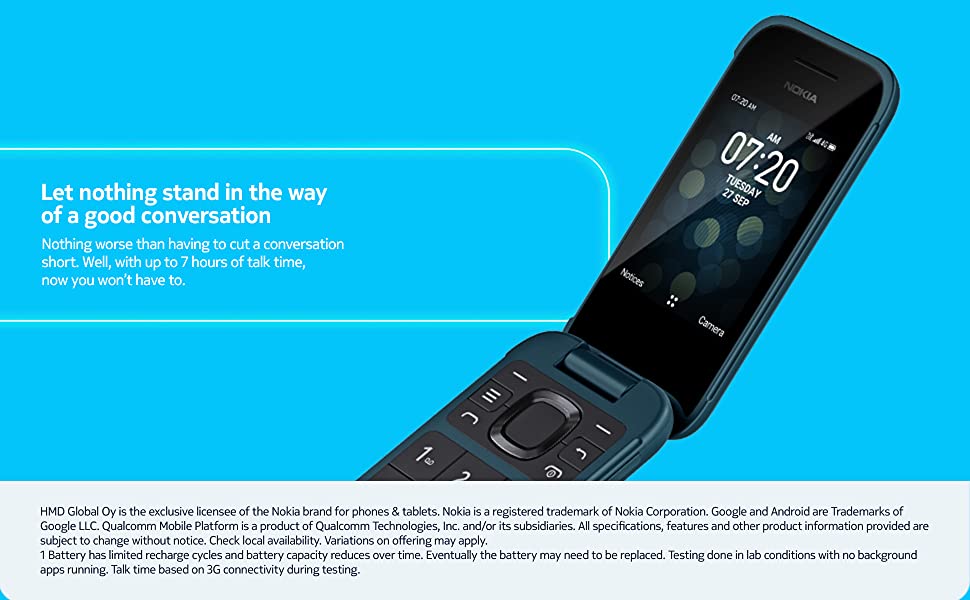
Image: The Nokia 2780 Flip phone, illustrating its capability for extended conversations with up to 7 hours of talk time.
4.2 Тазалоо
Телефондун экранын жана корпусун тазалоо үчүн жумшак, мамыксыз чүпүрөктү колдонуңуз. Катуу химиялык заттарды же абразивдүү материалдарды колдонуудан алыс болуңуз.
4.3 Программалык камсыздоо жаңыртуулары
Periodically check for software updates through the phone's settings menu to ensure optimal performance and access to the latest features and security enhancements.
5. Кыйынчылыктарды
If you encounter issues with your Nokia 2780 Flip, consider the following:
- Телефон күйбөй жатат: Батарея туура орнотулганын жана толук заряддалганын текшериңиз.
- Тармак сигналы жок: Verify your SIM card is properly inserted and that your carrier's network is available in your area. Confirm carrier compatibility.
- Жай аткаруу: While KaiOS is optimized for efficiency, excessive background applications or a full memory can affect speed. Restarting the device can often resolve minor performance issues.
- кубаттоо маселелери: Ensure the USB cable and power adapter are securely connected and undamaged. If using a third-party charger, ensure it meets the phone's specifications.
- Bluetooth жупташууда: If experiencing difficulty pairing with other devices, ensure both devices are in pairing mode and within range.
6. Техникалык шарттар
| Өзгөчөлүк | Деталь |
|---|---|
| Модель аты | 2780 |
| Элемент моделинин номери | TA-1420 |
| Операция системасы | KaiOS |
| CPU ылдамдыгы | 1.3 ГГц |
| RAM эстутум орнотулган өлчөмү | 512 MB |
| Эстутум сактоо сыйымдуулугу | 4 ГБ |
| Screen Size | 2.7 дюйм (туруктуу экрандын дисплей өлчөмү) |
| Резолюция | 240 x 320 |
| Жаңыртуу ылдамдыгы | 60 Гц |
| Connectivity Technologies | Bluetooth, USB, Wi-Fi, Cellular (4G) |
| GPS | True (Built-In GPS) |
| Өзгөчөлүктөр | Basic Phone, Expandable Memory |
| Адам интерфейсинин киргизүү | Buttons, Keypad, Microphone |
| Камеранын башка өзгөчөлүктөрү | Rear (5 MP) |
| Аудио Jack | 3.5 мм |
| Форма фактору | Foldable Case (Flip) |
| Батарея түрү | 1 Литий-ион (кошулган) |
| Батарея сыйымдуулугу | 1450 мАч |
| Телефон менен сүйлөшүү убактысы | 7 саат |
| Заряддоо убактысы | 3 саат |
| Продукциянын өлчөмдөрү | 7.96 x 2.28 x 0.45 дюйм |
| Элемент Салмагы | 4.6 унция |
| Өндүрүүчү | HMD Global Oy |
| Дата биринчи жеткиликтүү | 9-май, 2024-жыл |

Image: The Nokia 2780 Flip phone, illustrating its 4G connectivity, memory specifications (512 MB RAM, 4 MB internal storage), and clear VoLTE call capabilities.
7. Кепилдик жана колдоо
Your Nokia 2780 Flip phone is covered by a manufacturer's warranty. Please refer to the warranty card included with your purchase for specific terms and conditions.
Кошумча жардам, техникалык колдоо же үчүн view Кепилдиктин толук маалыматы үчүн, Nokiaнын расмий колдоо кызматына кайрылыңыз webсайтка же кардарларды тейлөөгө кайрылыңыз.


