1. Киришүү
This manual provides detailed instructions for the setup, operation, and maintenance of your Pyle PHSKR33 4-Piece Mini Hi-Fi Bluetooth Stereo System. This versatile audio system is designed to deliver a premium entertainment experience with its comprehensive features and robust sound output. Please read this manual thoroughly before using the product to ensure proper operation and to maximize its performance.
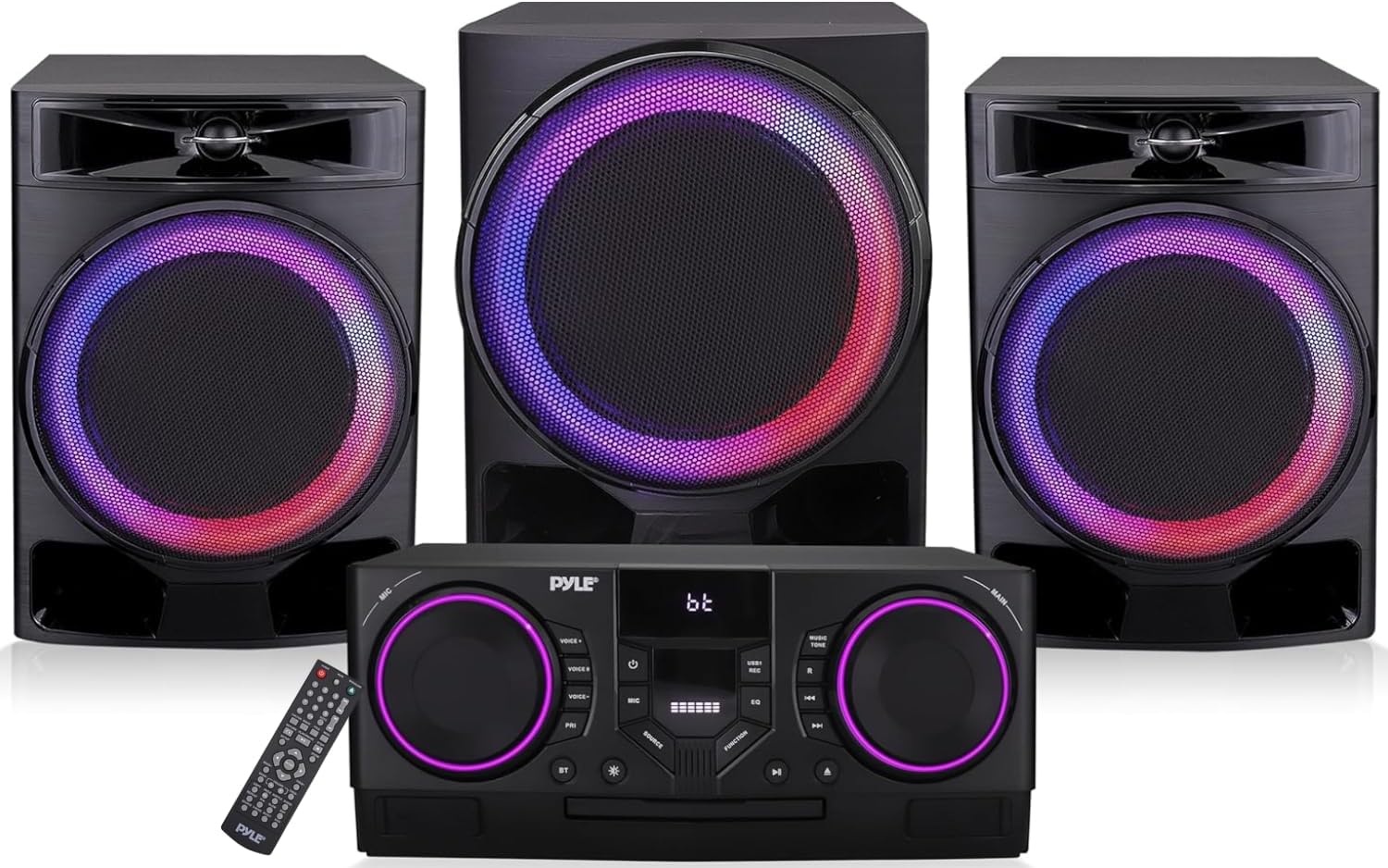
Figure 1.1: Pyle PHSKR33 Stereo System Components
2. Пакеттин мазмуну
Бардык буюмдарды кылдаттык менен ачып, төмөнкү компоненттерди алганыңызды текшериңиз:
- BT Stereo System (Main Unit)
- Алыстан башкаруу
- AV туташуу кабели
- Бир зымсыз микрофон
- Электр кабели
- FM антенна кабели
- Эки стерео динамик
- Бир сабвуфер

2.1-сүрөт: Камтылган компоненттер жана өлчөмдөр
3. Продукциянын өзгөчөлүктөрү
The Pyle PHSKR33 system offers a range of features for a comprehensive audio experience:
- Күчтүү аудио чыгаруу: 1000W санариптик amplifier for clear and robust sound.
- Bluetooth байланышы: Built-in Bluetooth 5.0 for wireless audio streaming from compatible devices with a 30+ ft range.
- Көп форматтуу ойнотуу: Supports DVD, VCD, CD, CD-R, CD-RW, and MP3 formats.
- USB жаздыруу: Dual USB ports for playing media and recording source signals or microphone audio.
- FM радиосу: Integrated FM tuner for listening to radio stations.
- Микрофон кириштери: Features microphone inputs with adjustable volume, bass, treble, reverb, and echo effects.
- Видео чыгуулары: HDMI and Coaxial outputs for video connectivity.
- LED көрсөткүчтөрү: Dynamic LED lights on speakers and main unit for visual enhancement.
- Алыстан башкаруу: Ыңгайлуу иштөө үчүн толук функциялуу пульт.

Figure 3.1: Wireless Audio Streaming via Bluetooth

Figure 3.2: Tray-Loading CD/DVD Player

Figure 3.3: Microphone Effects and HD Output
4. Башкаруу элементтери жана байланыштар
Familiarize yourself with the main unit's front panel controls and rear panel connections for optimal use.

Figure 4.1: Front Panel Controls and Rear Panel Connections
Алдыңкы панелдин башкаруу элементтери:
- MIC Көлөмү: Микрофондун киргизүү үнүн тууралайт.
- Үн алмаштыргыч: Activates and cycles through microphone voice effects.
- Микрофон приоритети: Prioritizes microphone audio over music.
- Микрофон режими: Selects microphone operating mode.
- Кубат баскычы: Аппаратты күйгүзөт/өчүрөт.
- Эквалайзер режими: Алдын ала коюлган эквалайзер жөндөөлөрү аркылуу айланып өтөт.
- Music Tone: Adjusts music bass and treble.
- Негизги көлөмү: Жалпы системанын үнүн тууралайт.
- Булак баскычы: Selects input source (DVD, USB1, USB2, FM, BT, AUX).
- Функция режими: Selects various function modes.
- Кайталоо баскычы: Учурдагы тректи же ойнотмо тизмесин кайталайт.
- Мурунку кийинки: Тректерди же радиостанцияларды багыт алат.
- CD/DVD ойноткуч: Tray for disc insertion.
- Ойнотуу/тындыруу баскычы: Медианы ойнотот же тындырат.
- Open/Close CD: Opens and closes the CD/DVD tray.
- USB1 порту: For media playback and recording.
- LED жарыктары: Visual indicators for various functions.
- BT режими: Bluetooth жупташтыруу режимин иштетет.
Арткы панелдин туташуулары:
- USB2 порту: For CD ripping and video playback.
- Aux Киргизүү: Тышкы аудио түзмөктөр үчүн 3.5 мм стерео киргизүү.
- FM антеннасы: Connects the included FM antenna.
- Сап киргизүү: RCA stereo input for external audio devices.
- HD чыгаруу: HDMI output for video to a display.
- Оптикалык киргизүү: Санариптик аудио киргизүү.
- Коаксиалдуу чыгаруу: Санарип аудио чыгаруу.
- Видео Чыгуу: RCA видео чыгаруу.
- Аудио чыгышы: RCA stereo audio output.
- Speaker/LED Output: Connects to the included speakers and subwoofer.
5. Орнотуу
Follow these steps to set up your Pyle PHSKR33 stereo system:
- Жайгашкан жери: Place the main unit, speakers, and subwoofer on a stable, flat surface. Ensure adequate ventilation around the unit.
- Динамик туташуу: Connect the two stereo speakers and the subwoofer to the corresponding Speaker/LED Output terminals on the rear panel of the main unit. Ensure correct polarity (+ to + and - to -) for optimal sound.
- FM антенна туташуу: Connect the supplied FM antenna cable to the FM Antenna input on the rear panel. Extend the antenna for better reception.
- Кубат туташуу: Connect the power cord to the AC IN socket on the rear panel of the main unit, then plug the other end into a standard wall outlet (AC 110-240V, 50/60Hz).
- Баштапкы күйгүзүү: Press the Power Button on the front panel or the remote control to turn on the unit.
6. Операция
6.1 Булакты тандоо
басыңыз Булак баскычы on the front panel or the remote control to cycle through available input sources: DVD, USB1, USB2, FM, BT (Bluetooth), and AUX (Line Input).
6.2 Bluetooth операциясы
- тандаңыз BT source using the Source Button. The display will show "BT" and the unit will enter pairing mode.
- Bluetooth иштетилген түзмөгүңүздө (мисалы, смартфон, планшет) Bluetooth'ду иштетиңиз жана жеткиликтүү түзмөктөрдү издеңиз.
- Select "Pyle PHSKR33" (or similar name) from the list of devices.
- Once paired, the unit will indicate a successful connection. You can now stream audio wirelessly from your device.
6.3 CD/DVD ойнотуу
- тандаңыз DVD булак.
- басыңыз Open/Close CD диск баскычын ачуу үчүн баскыч.
- Place a CD or DVD disc gently into the tray with the label side facing up.
- басыңыз Open/Close CD button again to close the tray. The unit will begin playing automatically or display the disc menu.
- колдонуу Ойнотуу/Тыныгуу жана Мурунку/Кийинки башкаруу үчүн баскычтар.
6.4 USB ойнотуу
- Insert a USB flash drive into either the USB1 or USB2 порт.
- Тиешелүүсүн тандаңыз USB1 or USB2 булак.
- The unit will automatically detect and begin playing compatible audio or video files.
- колдонуу Ойнотуу/Тыныгуу жана Мурунку/Кийинки башкаруу үчүн баскычтар.
6.5 FM радиосунун иштеши
- тандаңыз FM булак.
- басыңыз Мурунку/Кийинки станцияга кол менен күүлдөө үчүн баскычтар.
- To auto-scan and save stations, refer to the remote control instructions for the specific auto-scan function.
6.6 Микрофонду колдонуу
- Connect the wireless microphone (or a wired microphone to the MIC input if applicable).
- тууралаңыз MIC көлөмү knob to your desired level.
- колдонуу Үн алмаштыргыч жана Микрофон режими buttons to apply effects or change microphone settings.
- Иштетүү Микрофон приоритети if you want the microphone audio to automatically lower background music.
7. Жазуу функциясы
The PHSKR33 allows recording to a USB drive:
- USB флэш-дискти салыңыз USB1 порт.
- Select the desired audio source you wish to record (e.g., FM radio, AUX input, or microphone).
- басыңыз Жаздыруу button on the remote control (or front panel if available) to start recording.
- басыңыз Токто button to end the recording. The recorded file USB дискке сакталат.
8. Кыйынчылыктарды
If you encounter issues with your Pyle PHSKR33 system, refer to the following common problems and solutions:
| Көйгөй | Мүмкүн себеп | Чечим |
|---|---|---|
| Күч жок | Электр зымы туташкан эмес; розетка туура эмес. | Ensure power cord is securely plugged into the unit and a working outlet. |
| Үн чыгышы жок | Volume too low; Incorrect source selected; Speaker connections loose. | Increase volume; Select correct input source; Check speaker wire connections for proper polarity. |
| Bluetooth туташпай жатат | Unit not in BT mode; Device too far; Device already connected to another unit. | Ensure unit is in BT mode; Move device closer; Disconnect from other devices and try again. |
| CD/DVD skipping or not playing | Disc dirty or scratched; Disc inserted incorrectly; Unsupported disc format. | Clean disc with a soft cloth; Reinsert disc correctly; Ensure disc format is supported (DVD, VCD, CD, CD-R, CD-RW, MP3). |
| FM радиосун кабыл алуу начар | Antenna not properly connected or extended; Interference. | Ensure FM antenna is fully extended and positioned for best reception. Try repositioning the unit. |
| Пульт иштебей жатат | Батареялары түгөнгөн; Алыстан жана аппараттын ортосундагы тоскоолдук. | Replace remote batteries; Remove any obstructions and ensure direct line of sight. |
| Input reverts to DVD on startup | Default system behavior. | This is a known characteristic. Manually select your desired input source after powering on. |
| Volume is low on startup | Default system behavior. | This is a known characteristic. Adjust the volume to your desired level after powering on. |
9. Техникалык шарттар
Detailed technical specifications for the Pyle PHSKR33 system:
- Модель номери: PHSKR33
- Продукциянын өлчөмдөрү (L x W x Y): 15 x 10 x 20 inches (Main Unit and Speakers combined)
- Элемент Салмагы: 39 фунт
- Байланыш технологиясы: Bluetooth, USB
- Түсү: Кара
- Динамик түрү: Stereo (with Subwoofer)
- Чыгуу кубаттуулугу: 1000 Вт (чоку)
- Колдоого алынган медиа: DVD, VCD, CD, CD-R, CD-RW, MP3
- Радио тюнер: FM
- Киргизүүлөр: USB (x2), AUX (3.5mm), Line In (RCA), Optical
- Чыгуулары: HDMI, Coaxial, Video Out (RCA), Audio Out (RCA)
10. Техникалык тейлөө
Proper care and maintenance will ensure the longevity and optimal performance of your stereo system:
- Тазалоо: Use a soft, dry cloth to clean the exterior surfaces of the main unit, speakers, and subwoofer. Do not use liquid cleaners or abrasive materials, as they may damage the finish.
- Вентиляция: Түзмөктүн желдетүү тешиктери бүтөлүп калбаганын текшериңиз. Тийиштүү аба агымы ысып кетүүдөн сактайт.
- Дискке кам көрүү: Handle discs by their edges. Store them in their cases to prevent scratches and dust accumulation. Clean dirty discs with a soft, lint-free cloth wiping from the center outwards.
- Сактагыч: Эгерде түзмөктү көпкө сактасаңыз, аны розеткадан сууруп, салкын, кургак жерде, күн нуру түз тийбеген жана өтө жогорку температурадан алыс сактаңыз.
- Электр кабели: Regularly inspect the power cord for any damage. If damaged, discontinue use and replace it with an authorized replacement.
11. Кепилдик жана колдоо
For warranty information and technical support, please refer to the documentation included with your product or visit the official Pyle webсайт. Сатып алуу квитанциясын кепилдик дооматтары үчүн сатып алуунун далили катары сактаңыз.


