Introduction
Welcome to your new eKids Bluey Kids Camera! This digital camera is designed for young users, allowing them to capture photos and videos with ease. It features a built-in screen, digital stickers, and fun games, all inspired by the popular Bluey series. This manual provides detailed instructions for setup, operation, maintenance, and troubleshooting to ensure a fun and seamless experience.
Кутуда эмне бар
- eKids Bluey Kids Camera
- 512MB SD Card
- Билек боо
- Микро USB кабели

The eKids Bluey Kids Camera package includes the camera unit, a 512MB SD card for storage, a wrist strap for secure handling, and a micro USB cable for connectivity.
Жайгашуу
Батарея орнотуу
The camera requires 3 AA batteries (not included).
- Батарея бөлүмүн камеранын астыңкы жагына жайгаштырыңыз.
- Батарея уясынын капкагын ачыңыз.
- Туура полярдуулукту (+/-) камсыз кылуу менен 3 AA батарейкасын салыңыз.
- Батарея уясынын капкагын бекем жабыңыз.
SD картаны орнотуу
A 512MB SD card is included for storing photos and videos.
- SD карта уячасын камеранын капталынан табыңыз.
- Insert the 512MB SD card into the slot until it clicks into place.
- Чыгаруу үчүн картаны акырын чыккыча түртүңүз.

This image illustrates the battery compartment and SD card slot on the eKids Bluey Kids Camera, highlighting where to insert the 3 AA batteries and the included 512MB SD card.
Иштөө нускамалары
Күйгүзүү/өчүрүү
Press and hold the Power button (located on the back) to turn the camera on or off.
This video demonstrates how to power on the eKids Bluey Digital Camera and navigate its main menu, showcasing the user-friendly interface for children.
Сүрөт тартуу
In photo mode, press the Camera Shutter / OK Button (top right) to capture a picture.

A child is shown holding the eKids Bluey Kids Camera, demonstrating the ease of use for taking photos.
Видеолорду жаздыруу
Switch to video mode using the Mode Select button, then press the Camera Shutter / OK Button to start and stop recording.
This image captures a child actively recording a video with the eKids Bluey Kids Camera, highlighting its video recording capability.
Менюларды навигациялоо
Use the Up, Down, Forward, and Reverse buttons to navigate through menus and options on the 2-inch full-color screen.

А деталдуу view of the back of the eKids Bluey Kids Camera, labeling all control buttons including the Camera Shutter/OK, Power, Up, Forward/Photo Frames, Reverse/Mode Select, Down, and Reset buttons, along with the Display Speaker and Mic.
Өзгөчөлүктөрү
Digital Stickers & Photo Frames
Decorate your images with over 25 built-in photo frames and stickers inspired by Bluey characters.

This image demonstrates the fun digital stickers and photo frames available on the eKids Bluey Kids Camera, allowing users to add Bluey characters to their pictures.
Камтылган оюндар
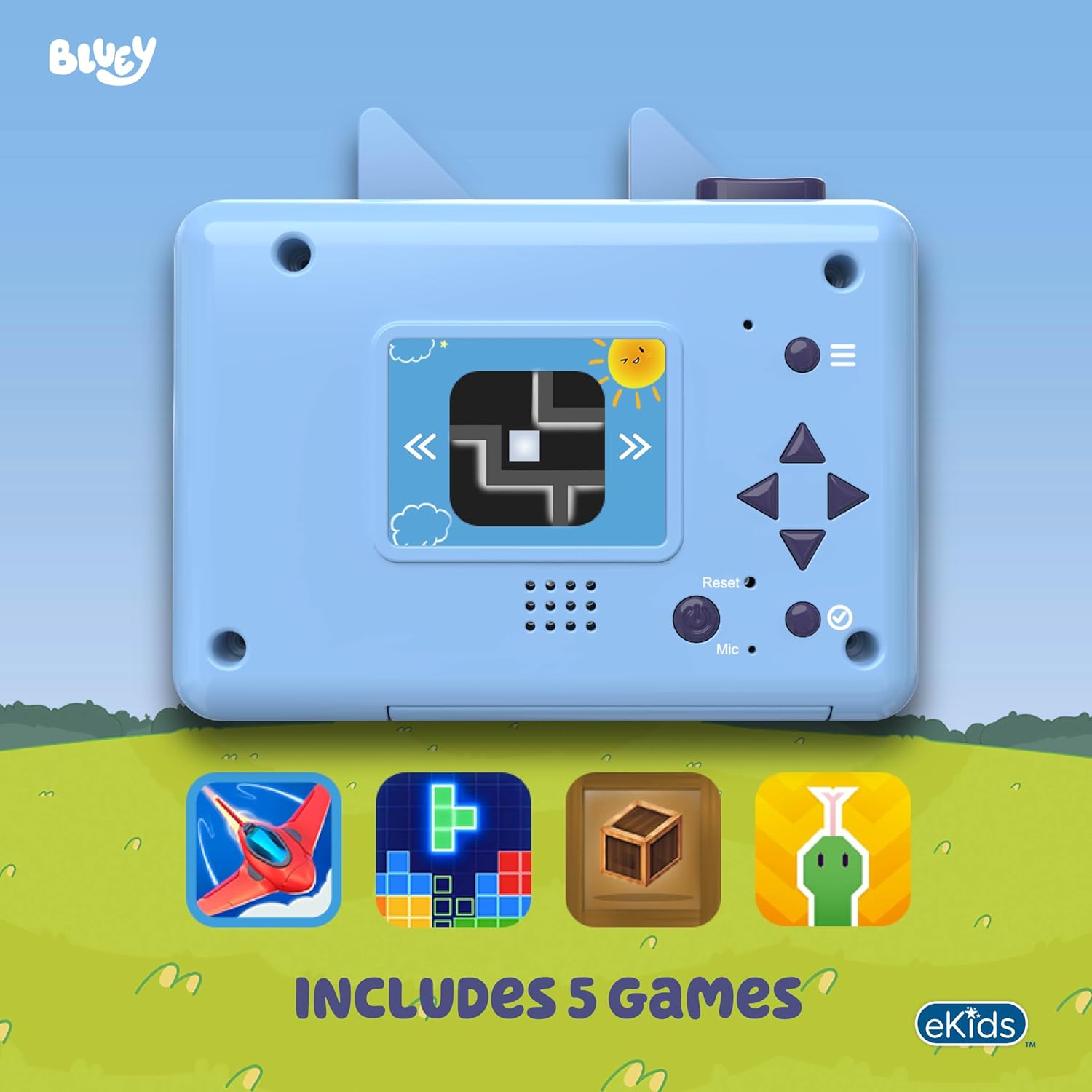
The camera includes 5 built-in games for entertainment. Access them through the main menu.

The eKids Bluey Kids Camera features 5 built-in games, as shown on the camera's screen, providing additional entertainment for children.
2-inch Full Color Screen
View your photos and videos directly on the camera's vibrant 2-inch full-color LCD screen.
Expandable Memory
While a 512MB SD card is included, you can replace it with your own SD memory card (up to 32GB max) to store even more content.
Байланыш
Connect the camera to your computer using the micro USB cable to transfer and share your captured memories.

The eKids Bluey Kids Camera connected to a laptop via its micro USB cable, illustrating the ease of transferring photos and videos to a computer.
Техникалык тейлөө
- Камераны таза кармоо үчүн аны жумшак, кургак чүпүрөк менен сүртүңүз.
- Avoid exposing the camera to extreme temperatures or direct sunlight.
- Do not immerse the camera in water, as it is not water resistant.
- Камера узак убакыт бою колдонулбаса, батареяларды алып салыңыз.
Проблемаларды чечүү
| Көйгөй | Чечим |
|---|---|
| Камера күйбөйт. | Батарея орнотулганын текшерип, батарейкалардын жаңы экенин текшериңиз. |
| Сүрөткө/видео тартууга болбойт. | SD карта туура салынганын жана жетиштүү бош орун бар экенин текшериңиз. |
| Экран бош же катып калган. | Try resetting the camera using the Reset button (if available) or remove and reinsert batteries. |
| Сүрөт/видео сапаты начар. | Ensure adequate lighting. The camera is designed for children and may not produce professional-grade images. |
Техникалык шарттар
- Бренд: eKids
- Model Name: BU-533
- Дисплей түрү: LCD
- Экрандын өлчөмү: 2 дюйм
- Photo Sensor Resolution: 4 MP
- Видеонун чечилиши: 720p
- Flash Memory Type: SD (512MB included, expandable up to 32GB)
- Battery Type: AA Alkaline (3 required, not included)
- Connectivity Technology: Micro USB
- Түсү: көк
- Item Dimensions (D x W x H): 4.02" x 1.3" x 3.85"
- Special Feature: Built-In Microphone
- Сууга туруштук берүү деңгээли: сууга туруктуу эмес
Кепилдик жана колдоо
This product comes with a 1 Year Limited Warranty. For support or more information, please visit the official eKids brand store.


