1. Киришүү
Thank you for choosing the DreamSky DS216 AM/FM Portable Radio. This manual provides essential information for the safe and efficient operation of your new radio. Please read it thoroughly before use and retain it for future reference.
Пакеттин мазмуну:
- DreamSky AM/FM Radio
- Кубаттуу адаптер
- Колдонуучунун колдонмосу
2. Негизги өзгөчөлүктөрү
- Strong Reception: Pulls in both AM and FM signals effectively.
- Clear Loud Sound: Equipped with a large speaker for crisp audio quality.
- Жеңил операция: Features a smooth, large analog dial for simple tuning and volume control.
- Кош кубат параметрлери: Operates via AC plug-in (adapter included) or 4 AA alkaline batteries (not supplied).
- Портативдик дизайн: Compact and lightweight with a convenient handle for easy transport.
- Жеке угуу: Includes a 3.5mm earphone jack.
3. Продукциянын компоненттери
Familiarize yourself with the main components of your DreamSky DS216 radio:
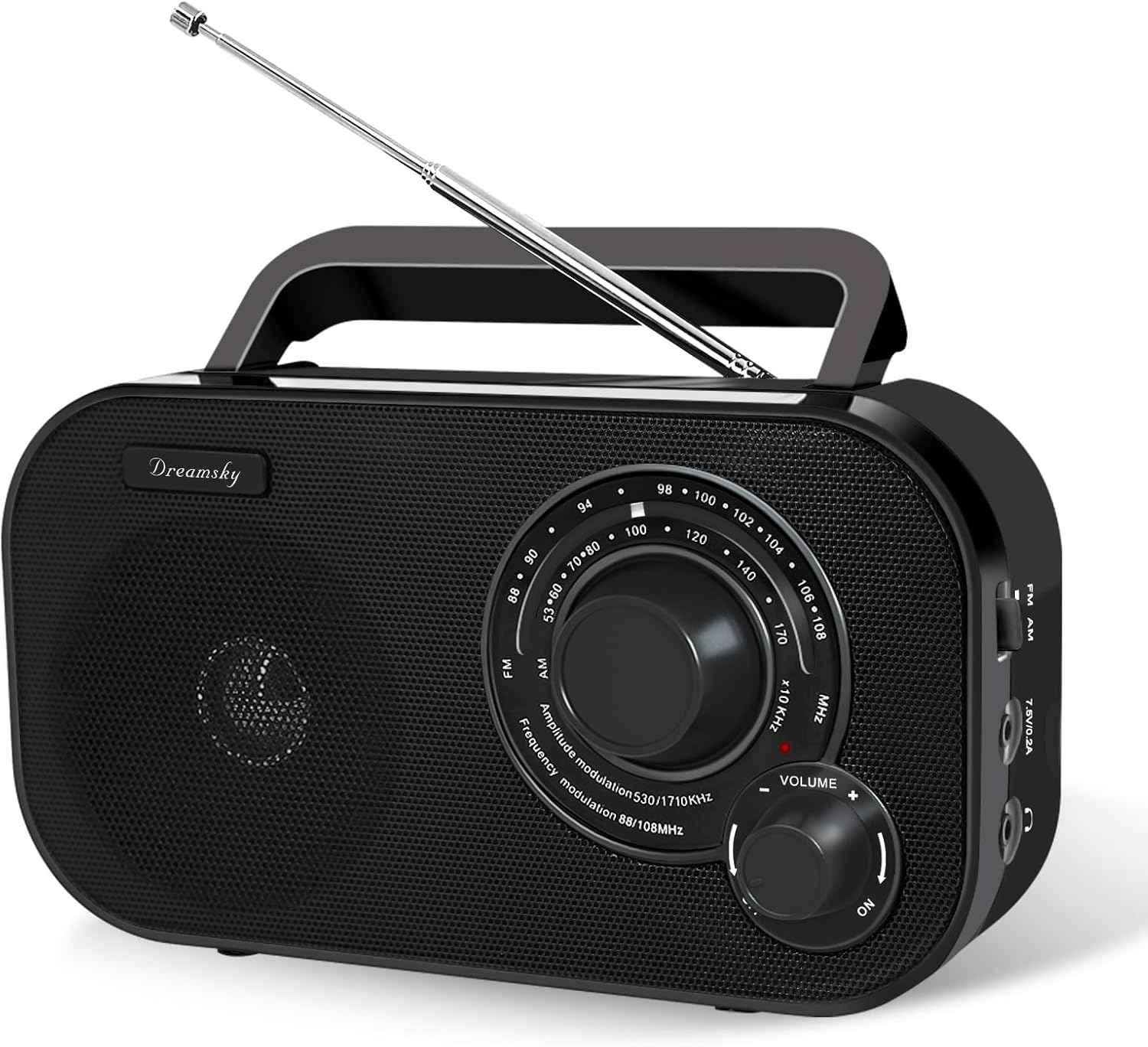
This image displays the front of the radio, highlighting the large tuning dial for station selection, the volume control knob, and the integrated speaker. The "DreamSky" brand name is visible on the left side.

This image shows the side panel of the radio, detailing the slide switch for selecting between AM and FM bands, the power input port for the AC adapter, and the 3.5mm headphone jack for private listening.

Бул сүрөт а view of the radio's top and rear, highlighting the integrated carrying handle for portability and the extendable telescopic antenna for improved reception.
4. Орнотуу
4.1 Powering Your Radio
Your DreamSky DS216 radio offers two power options:
- AC кубаттуулугу: Connect the included power adapter to the "7.5V/0.2A" port on the side of the radio and plug it into a standard wall outlet.
- Батарея кубаттуулугу: For portable use, open the battery compartment on the back of the radio and insert 4 AA alkaline batteries (not supplied), ensuring correct polarity. Close the compartment securely.

This image visually demonstrates how to power the radio using either the provided AC adapter or by inserting four AA batteries into the rear compartment.
4.2 Антеннаны тууралоо
For optimal FM reception, extend the telescopic antenna located on the back of the radio. Adjust its position and angle to achieve the clearest signal. For AM reception, the internal antenna is generally sufficient, but rotating the radio itself may improve signal strength.
5. Иштөө нускамалары
5.1 Күйгүзүү/өчүрүү жана үндү башкаруу
айлантыңыз VOLUME knob clockwise to turn the radio ON and increase the volume. Rotate counter-clockwise to decrease the volume and turn the radio OFF.
5.2 Selecting a Band (AM/FM)
колдонуу FM/AM slide switch located on the side of the radio to select your desired band.
5.3 Станцияга тюнинг
Чоңду айлантыңыз TUNING dial on the front of the radio to scan for stations. The red indicator light will illuminate when a strong signal is detected.

This image highlights the radio's capability for strong reception and clear audio output, with visual cues representing radio waves and sound quality.
5.4 Наушниктерди колдонуу
For private listening, plug any standard 3.5mm headphones (not included) into the headphone jack on the side of the radio. The internal speaker will automatically mute.

This image focuses on the 3.5mm earphone jack, indicating its location for connecting headphones for personal listening.
6. Техникалык тейлөө жана кам көрүү
- Keep the radio dry and away from moisture.
- Сыртын жумшак, кургак чүпүрөк менен тазалаңыз. Абразивдүү тазалоочу каражаттарды же эриткичтерди колдонбоңуз.
- Радио агып кетпеши үчүн узак убакыт бою колдонулбай турган болсо, батарейкаларды алып салыңыз.
- Ашыкча температурадан жана түздөн-түз күн нурунан сактаныңыз.
7. Кыйынчылыктарды
| Көйгөй | Мүмкүн себеп | Чечим |
|---|---|---|
| Күч жок | Батареялар түгөнгөн же туура эмес салынган; AC адаптери туташтырылган эмес же бузук. | Replace batteries, check polarity; ensure AC adapter is securely connected and functional. |
| Начар кабыл алуу/статикалык | Weak signal; antenna not extended or positioned correctly; interference from other electronics. | Extend and adjust the telescopic antenna (FM); rotate the radio (AM); move away from electronic devices. |
| Динамиктен үн жок | Volume too low; headphones plugged in. | Increase volume; unplug headphones. |
8. Техникалык шарттар
- Модел: DS216
- Өлчөмдөрү: 8.2 x 2.2 x 4.6 дюйм
- Салмагы: 1.41 фунт
- Кубат булагы: AC 120V/60Hz or DC 6V (4 x AA batteries)
- FM Frequency колому: 87 - 108 МГц
- AM жыштык диапазону: 520 - 1710 KHz
- Байланыш: AM/FM Tuner, 3.5mm Headphone Jack
- Өндүрүүчү: ShenZhen litian technology Co.,Ltd
9. Кепилдик жана колдоо
For warranty information or customer support, please refer to the contact details provided in your original purchase documentation or visit the official DreamSky website. You may also contact the manufacturer directly at info@dreamskyu.com.
Бул продукт болуп саналат Verified by Transparency, ensuring authenticity and product information.
10. Коопсуздук маалыматы
- Өрт же электр тогуна урунуп калбаш үчүн аппаратты жамгырга же нымга тийгизбеңиз.
- в ачпагылаasinг. Бардык тейлөөлөрдү квалификациялуу кызматкерлерге тапшырыңыз.
- Батареяларды жергиликтүү эрежелерге ылайык туура жок кылыңыз.
11. Продукт видеолору
DreamSky Portable AM FM Radio - Overview
Бул видеодо толук маалымат берилетview of the DreamSky Portable AM FM Radio, demonstrating its features, ease of use, and portable design. It highlights the tuning process, power options, and overall functionality of the device.
DreamSky AM FM Radio Portable - Features Showcase
This video showcases various features of the DreamSky AM FM Portable Radio, including its compact size, handle for easy carrying, and the simple controls for tuning and volume. It also briefly touches upon its dual power capabilities.


