Introduction
The NOKLEAD Indoor Thermometer and Hygrometer is designed to monitor temperature and humidity levels in various indoor environments. This compact device provides real-time readings and features a comfort level indicator to help maintain an optimal living climate. It is suitable for use in baby rooms, greenhouses, offices, and other spaces where environmental monitoring is beneficial.
Кутуда эмне бар
- 2 x NOKLEAD Thermometer and Humidity Meters
- 2 x CR2032 Button Batteries
- 2 x Double-Sided Stickers
Продукт өзгөчөлүктөрү
- Так өлчөө: Температуранын жана нымдуулуктун так көрсөткүчтөрүн камсыз кылат.
- Комфорт индикатору: Displays a face symbol to indicate dry, comfortable, or wet conditions.
- Компакт дизайн: Small and lightweight for easy placement and portability.
- ℃/℉ Switch: Easily switch between Celsius and Fahrenheit temperature units.
- Бир нече орнотуу параметрлери: Can be placed on a tabletop or mounted using adhesive.
- Коопсуз Батарея отсеги: Features a screw-secured battery cover.
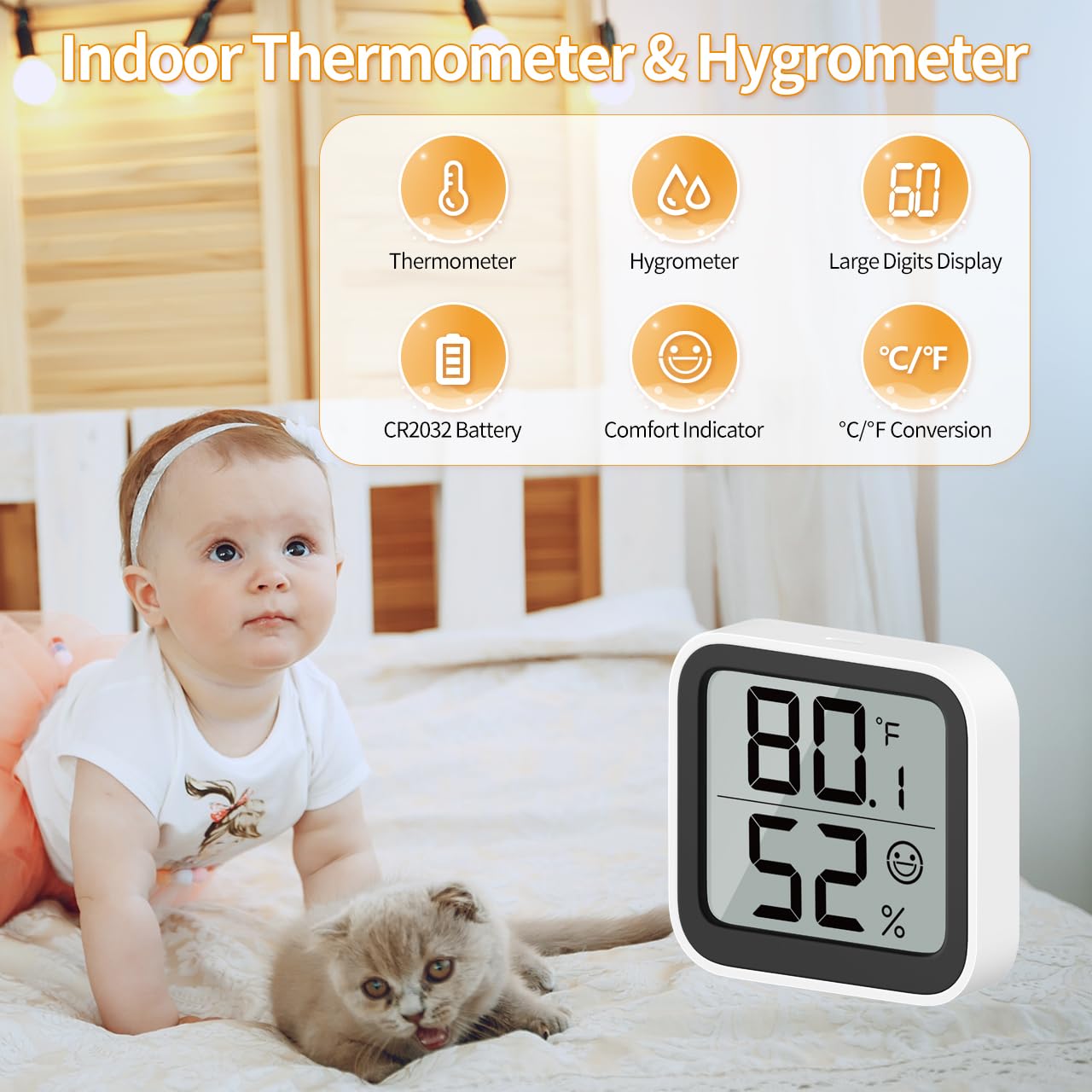
Сүрөт 1: Бүттүview of the NOKLEAD Indoor Thermometer and Hygrometer, highlighting its main functions and compact size. The display shows temperature, humidity, and a comfort indicator.
Жайгашуу
- Батарея орнотуу:
The device uses one CR2032 button battery. To install or replace the battery:
- Аппараттын артындагы батарея бөлүкчөсүн табыңыз.
- Use a small screwdriver to unscrew the safety screw on the battery cover.
- Капкагын алып салып, CR2032 батареясын оң (+) тарабын өйдө каратып салыңыз.
- Батареянын капкагын ордуна коюп, аны бурама менен бекитиңиз.
- Баштапкы күйгүзүү:
Once the battery is installed, the device will automatically power on and begin displaying temperature and humidity readings.

Сүрөт 2: Арткы view of the device, indicating the battery safety screwgate and the ℃/℉ switch.
Иштөө нускамалары
- Дисплейди окуу:
The large LCD screen displays the current temperature (top number) and humidity (bottom number). Readings are updated approximately every 30 seconds.
- Switching Temperature Units (℃/℉):
On the back of the device, locate the "℃/℉" switch button. Press this button to toggle between Celsius and Fahrenheit temperature displays.
Комфорт деңгээлинин көрсөткүчү
The device features a comfort symbol on the display to visually indicate the current environmental conditions. This symbol changes based on both temperature and humidity levels:
- Dry (Sad Face): Humidity below 20% and temperature below 19°C (66.2°F).
- Comfortable (Smiling Face): Humidity between 20% and 60% and temperature between 19°C and 27°C (66.2°F - 80.6°F).
- Wet (Sad Face): Humidity above 60% and temperature above 27°C (80.6°F).
This indicator helps you quickly assess if adjustments to a humidifier or dehumidifier are needed.
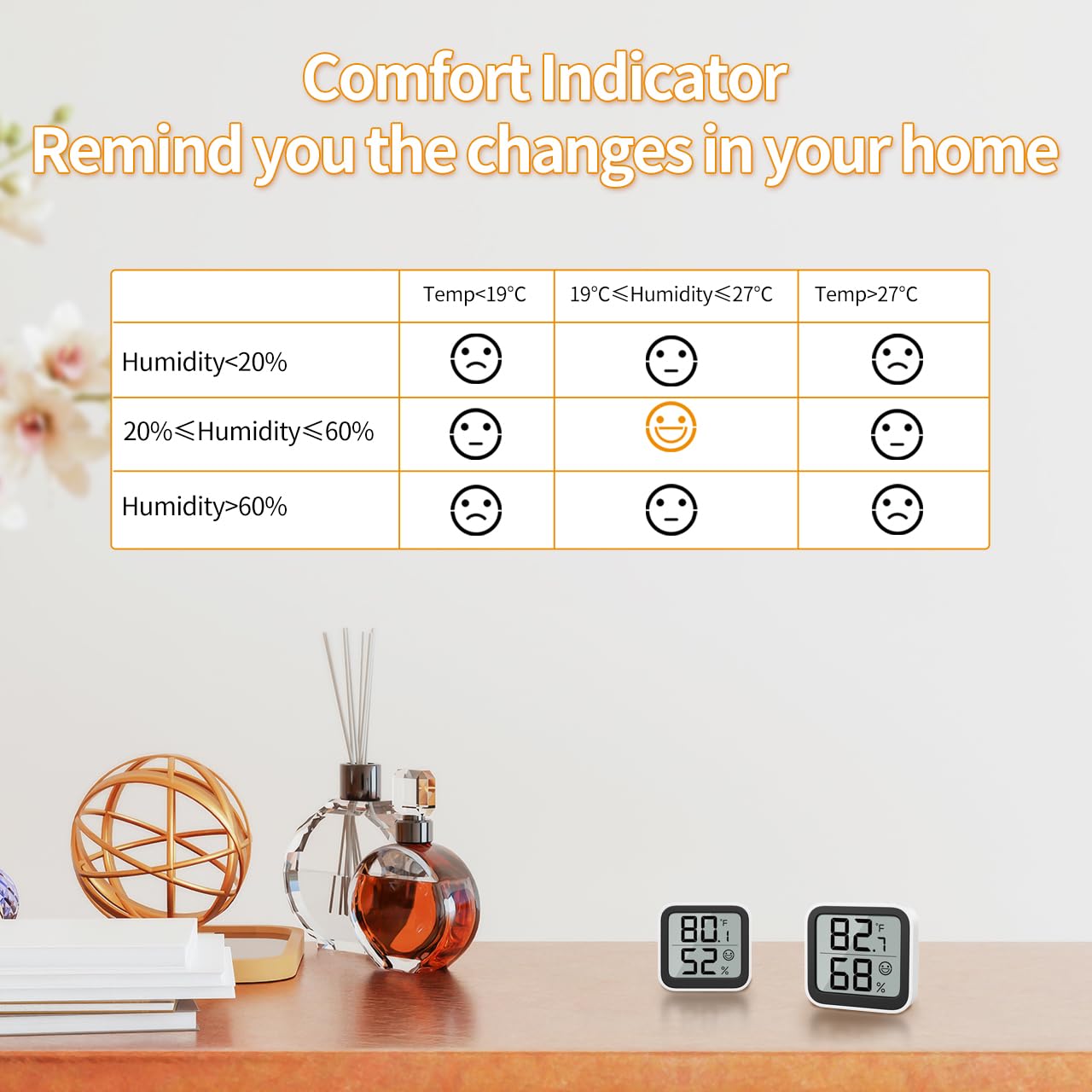
Image 3: Detailed table explaining the comfort indicator symbols based on specific temperature and humidity ranges.
Монтаждоо параметрлери
The NOKLEAD Thermometer and Hygrometer offers versatile placement options:
- Столдун үстүнө жайгаштыруу: The device can stand freely on any flat surface, such as a desk, shelf, or nightstand.
- Клей монтаждоо: Use the provided double-sided stickers to attach the device to a wall or other smooth vertical surface. Ensure the surface is clean and dry before applying the sticker.

Сүрөт 4: Мисamples of mounting options, including adhesive wall mounting and tabletop placement.
Техникалык тейлөө
- Батареяны алмаштыруу: Replace the CR2032 battery when the display becomes dim or stops functioning. Follow the battery installation steps in the "Setup" section.
- Тазалоо: Аппаратты жумшак, кургак чүпүрөк менен сүртүңүз. Абразивдүү тазалагычтарды колдонбоңуз же аппаратты сууга салбаңыз.
- Сактагыч: If storing the device for an extended period, remove the battery to prevent leakage.
Проблемаларды чечүү
| Көйгөй | Мүмкүн себеп | Чечим |
|---|---|---|
| Дисплей жок же күңүрт дисплей | Батарея өлүп калган же туура эмес орнотулган. | Туура полярдуулукту камсыз кылуу менен CR2032 батареясын алмаштырыңыз. |
| Так эмес окуулар | Device placed near heat/cold sources or in direct sunlight/drafts. | Relocate the device to a stable environment away from extreme temperature fluctuations. Allow time for readings to stabilize. |
| ℃/℉ switch not working | Button not pressed firmly or device malfunction. | Ensure the button is pressed firmly. If issue persists, contact customer support. |
Техникалык шарттар

Image 5: Visual representation of the device dimensions and key technical specifications.
| Параметр | Нарк |
|---|---|
| Модель номери | 6223P2 |
| Температураны өлчөө диапазону | -9.9°Cден 60°Cге чейин (14.18°Fтен 140°Fге чейин) |
| Температуранын тактыгы | ±1.0°C |
| Температуранын чечилиши | 0.1°C |
| Нымдуулукту өлчөө диапазону | 10% RH 95% RH |
| Нымдуулуктун тактыгы | ±3-5% RH |
| Нымдуулукту жоюу | 1% RH |
| Жаңыртуу ылдамдыгы | 30 секунд |
| Продукциянын өлчөмдөрү | 46 x 50 x 12 мм |
| Элемент Салмагы | 26 г (бир бирдик үчүн) |
| Батарея түрү | CR2032 баскыч батареясы |
| Монтаж түрү | Tabletop, Surface Mount |
Кепилдик жана колдоо
For warranty information and customer support, please refer to the documentation provided at the time of purchase or contact your retailer. You may also visit the official NOKLEAD webкошумча жардам үчүн сайт.


