1. Киришүү
This manual provides essential information for the safe and efficient operation, maintenance, and troubleshooting of your LIECTROUX C7 Robotic Vacuum Cleaner and Mop. Please read this manual thoroughly before using the product and retain it for future reference.

Image: The LIECTROUX C7 Robotic Vacuum Cleaner and Mop, showcasing its sleek design and the model name.
2. Маанилүү коопсуздук нускамалары
To reduce the risk of injury or damage, read these safety instructions carefully before setting up, using, and maintaining your robot.
- Бул шайманды 8 жаштан жогорку балдар жана физикалык, сезүү же акыл-эс жөндөмү начар же тажрыйбасы жана билими жок адамдар колдонсо болот, эгерде алар көзөмөлгө алынган же шайманды коопсуз колдонуу боюнча нускама алган болсо жана коркунучтарды түшүнсө. тартылган.
- Балдар шайман менен ойнобошу үчүн аларды көзөмөлгө алуу керек.
- Тазалоо жана колдонуучу тейлөөнү балдар көзөмөлсүз жасабашы керек.
- Роботту ачык жалын же морт буюмдар бар чөйрөдө колдонбоңуз.
- Ensure the charging dock is placed on a level surface against a wall, with no obstacles within 1 meter in front and 0.5 meters on either side.
- Роботту же анын кубаттоочу док-станциясын сууга салбаңыз.
- Чагылган түшкөндө же көпкө чейин колдонулбай турганда кубаттоочу докту сууруп коюңуз.
- Only use the original power adapter provided with the robot.
- Before cleaning, remove loose cables, small objects, and fragile items from the floor.
3. Пакеттин мазмуну
Төмөндө тизмеленген нерселердин баары пакетиңизге камтылганын текшериңиз:
- 1 x Robotic Vacuum
- 1 x заряддоо док
- 1 x заряддоо адаптери
- 1 x 2-in-1 Dustbin and Water Tank
- 2 x Pairs of Side Brushes
- 2 x Re-usable Wet Mopping Cloth
- 1 x Швабра төшөгүч
- 1 x тазалоочу щетка
- 2 х HEPA чыпкасы
- 1 x User Manual
- 1 x Алыстан башкаруу
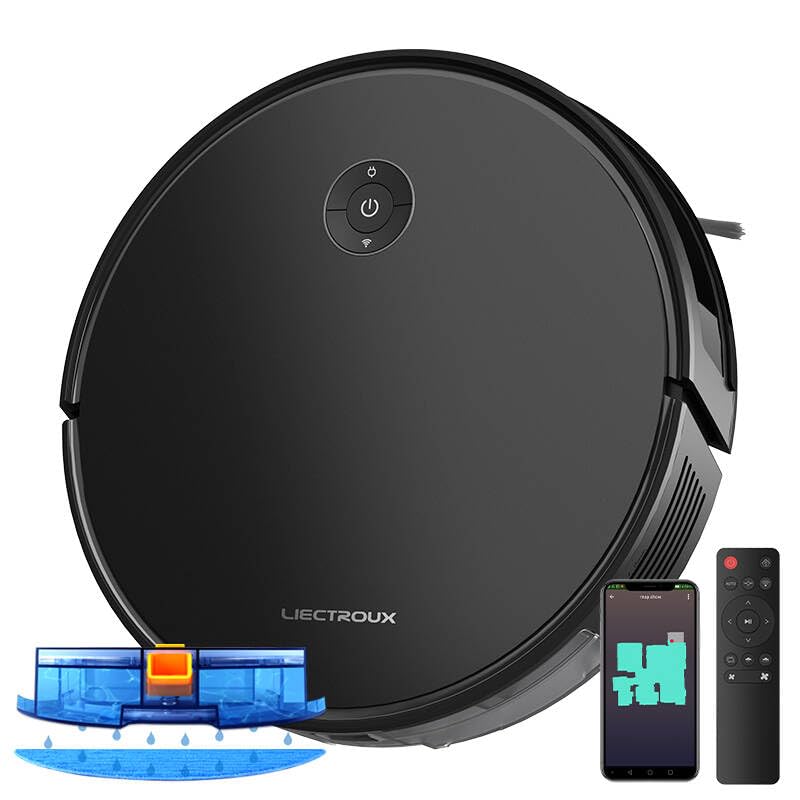
Image: The LIECTROUX C7 Robotic Vacuum Cleaner shown with its charging dock, remote control, and the 2-in-1 dustbin and water tank.
4. Продукт бүтүп калдыview
4.1 Робот схемасы
Familiarize yourself with the main components of your LIECTROUX C7 robot.

Image: An illustration of the LIECTROUX C7 highlighting the integrated 2-in-1 dustbin and water tank, demonstrating its simultaneous sweep and mop capability.
4.2 Негизги өзгөчөлүктөрү
- 6000Па Соруу кубаттуулугу: Provides strong suction for effective cleaning of various floor types, including carpets and hard floors.
- Smart Navigation System: Utilizes accurate gyroscope positioning and advanced zig-zag mapping for systematic and efficient cleaning paths.
- 2-in-1 Dustbin and Water Tank: Allows for simultaneous vacuuming and mopping, streamlining the cleaning process.
- Smart Electric Water Tank: Offers 3-level water flow control suitable for different floor types (low for tiles, medium for wood, high for greasy floors).
- Floating Roller Brush: Designed to pick up common debris, pet hair, and dust effectively, adjusting to floor contours.
- Тамчыга каршы сенсорлор: Prevents the robot from falling down stairs or off elevated surfaces.
- Ичке дененин дизайны: At 7.4cm, it can easily glide under furniture for thorough cleaning.
- Slope-Climbing Ability: Capable of climbing over obstacles up to 1.6cm high.
- Тынч иштөө: Operates at a noise level below 45dB, minimizing disturbance.
- Wi-Fi байланышы жана үн менен башкаруу: Compatible with mobile app and voice assistants (e.g., Google Home) for remote control and scheduling.

Image: The LIECTROUX C7 in action, illustrating its powerful 6000Pa suction and the effectiveness of its floating roller brush in picking up debris.

Image: Three LIECTROUX C7 robots on different floor types, illustrating the 3-level water flow control of the smart electric water tank for optimal mopping.

Image: The LIECTROUX C7 with an illustration of cleaning solution being dispersed, indicating its compatibility with specific cleaning solutions for enhanced hygiene.

Image: The LIECTROUX C7 approaching a staircase, with an overlay illustrating the function of its anti-drop sensors to prevent falls.
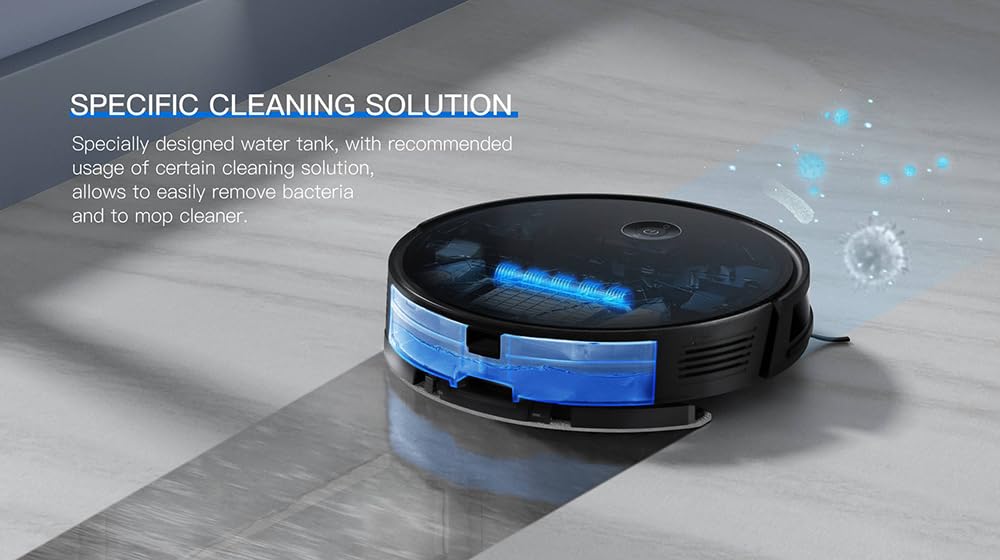
Image: The LIECTROUX C7 cleaning a floor next to a sleeping child, emphasizing its quiet operation with a noise level below 45dB.

Image: The LIECTROUX C7 cleaning underneath a sofa, illustrating its 7.4cm slim body design that allows it to access hard-to-reach areas.

Image: A close-up of the LIECTROUX C7's wheels, demonstrating its ability to climb over obstacles up to 1.6cm high, such as door thresholds.
5. Орнотуу колдонмосу
5.1 Заряддоо докунун жайгашуусу
Place the charging dock on a hard, level surface against a wall. Ensure there are no obstacles within 1 meter (3.3 feet) in front of the dock and 0.5 meters (1.6 feet) on either side to allow the robot to return and dock properly.
5.2 Алгачкы заряддоо
Connect the charging adapter to the charging dock and plug it into a power outlet. Place the robot onto the charging dock. The indicator light on the robot will show charging status. For first-time use, charge the robot fully for approximately 4-6 hours.
5.3 Каптал щеткаларды орнотуу
Turn the robot over. Align the side brushes with the corresponding slots (L and R) on the bottom of the robot and press them down until they click into place.
5.4 Installing 2-in-1 Dustbin and Water Tank
Open the top cover of the robot. Insert the 2-in-1 dustbin and water tank into the designated compartment until it clicks securely. Ensure the HEPA filter is properly installed inside the dustbin.
5.5 App Connection (Wi-Fi)
- Download the "LIECTROUX" app from your smartphone's app store (iOS or Android).
- Каттоо эсебин жана кирүү.
- Роботуңуздун кубатталганын жана күйүп турганын текшериңиз.
- Follow the in-app instructions to connect your robot to your home Wi-Fi network. This typically involves selecting your Wi-Fi network, entering the password, and putting the robot into pairing mode (refer to the app for specific button presses).
- Туташкандан кийин, сиз роботту башкарып, тазалоолорду пландаштырып, анын абалын смартфонуңуздан көзөмөлдөй аласыз.
6. Иштөө нускамалары
6.1 Тазалоону баштоо жана токтотуу
- Тазалоону баштоо: Press the power button on the robot, the "Clean" button on the remote control, or tap "Start Cleaning" in the app. The robot will begin cleaning in Auto mode.
- Тазалоону тындыруу: Press the power button on the robot, the "Pause" button on the remote, or tap "Pause" in the app.
- Кубаттоочу станцияга кайтуу: Press the "Home" button on the remote or in the app. The robot will return to its charging dock.
6.2 Тазалоо режимдери
- Автоматтык тазалоо: The robot intelligently navigates and cleans the entire accessible area. This is the default mode.
- Тазалоо: Place the robot in a specific dirty area and select Spot Cleaning. The robot will clean in a spiral pattern around that area.
- Четтерин тазалоо: The robot cleans along walls and furniture edges. Select this mode via the remote or app.
6.3 Чыпкалоо функциясы
To use the mopping function, ensure the 2-in-1 dustbin and water tank is filled with clean water (and suitable cleaning solution if desired). Attach the mop pad to the bottom of the water tank. The robot will automatically dispense water during cleaning in mopping-enabled modes.
6.4 Алыстан башкаруу жана колдонмону башкаруу
The robot can be controlled using the included remote control or the LIECTROUX mobile app. Both allow you to start/stop cleaning, select cleaning modes, adjust suction power, and send the robot back to its charging dock.

Image: A person interacting with the LIECTROUX mobile application on a smartphone, demonstrating the remote control capabilities for custom cleaning schedules, suction adjustment, and map management.
6.5 Үн менен башкаруу
The LIECTROUX C7 is compatible with voice assistants like Google Home. Link your robot to your voice assistant account through the LIECTROUX app settings. Once linked, you can use voice commands such as "Hey Google, start cleaning with LIECTROUX C7" or "Hey Google, stop cleaning with LIECTROUX C7."
Image: The LIECTROUX C7 robot vacuum positioned near a smart speaker, illustrating its intelligent voice control capabilities with commands like "Start Cleaning" and "Stop Cleaning."
6.6 Пландаштыруу
Use the LIECTROUX app to set up cleaning schedules. You can choose specific days and times for the robot to automatically start cleaning, ensuring your home stays tidy without manual intervention.
7. Техникалык тейлөө
Regular maintenance is crucial for optimal performance and longevity of your robot. Always power off the robot before performing any maintenance.
7.1 Чаң урнасын бошотуу
After each cleaning cycle, or when the dustbin full indicator appears, remove the 2-in-1 dustbin and water tank, open the dustbin compartment, and empty its contents into a trash bin.
7.2 Cleaning Filters (HEPA)
Tap the HEPA filter to remove loose dirt. Do not wash the HEPA filter with water. Replace the HEPA filter every 3-6 months, or more frequently depending on usage.
7.3 Каптал щеткаларды тазалоо
Regularly check the side brushes for tangled hair or debris. Gently pull them off, remove any obstructions, and reattach them. Replace worn brushes as needed.
7.4 Cleaning Main Brush
Remove the main brush cover and lift out the main brush. Use the provided cleaning tool to cut and remove any tangled hair or fibers. Reinstall the main brush and cover.
7.5 Сенсорлорду тазалоо
Wipe the anti-drop sensors (located on the bottom of the robot) and the bumper sensor (on the front bumper) with a clean, dry cloth to ensure they function correctly.
7.6 Тазалоочу суу багы жана швабра
After mopping, empty any remaining water from the tank. Rinse the water tank thoroughly with clean water. Remove the mop pad and wash it by hand or machine. Allow all components to air dry completely before reassembling.
8. Кыйынчылыктарды
If your robot encounters an issue, refer to the following table for common problems and solutions.
| Көйгөй | Мүмкүн себеп | Чечим |
|---|---|---|
| Робот күйбөйт. | Батареянын аздыгы; Кубат өчүрүү. | Charge the robot fully; Ensure the main power switch is ON. |
| Робот заряддоочу жайга кайтып келе албайт. | Charging dock obstructed; Robot too far from dock. | Clear obstacles around the dock; Place robot closer to the dock. |
| Соруу күчү начар. | таштанды челек толгон; Фильтр тыгылып калган; Негизги щетка чаташып калган. | бош таштанды челек; Чыпканы тазалоо/алмаштыруу; Таза негизги щетка. |
| Робот бат-баттан тыгылып калат. | Loose cables; Small objects on floor; High thresholds. | Clear floor of obstructions; Use virtual barriers if available. |
| Чыпкалоо функциясы иштебейт. | Water tank empty; Mop pad not attached; Water outlet clogged. | Fill water tank; Attach mop pad correctly; Clean water outlet. |
| App connection failed. | Incorrect Wi-Fi password; Robot not in pairing mode; Router issues. | Verify Wi-Fi password; Re-enter pairing mode; Restart router. |
9. Техникалык шарттар
| Өзгөчөлүк | Деталь |
|---|---|
| Бренд | LIECTROUX |
| Модель аты | C7 |
| Соруу күчү | 6000Па |
| Навигация системасы | Smart Navigation System (Gyroscope, Zig-zag mapping) |
| Таштанды кутусунун сыйымдуулугу | Integrated with Water Tank |
| Суу резервуарынын сыйымдуулугу | 340 миллилитр |
| Батареянын иштөө мөөнөтү | 140 мүнөткө чейин |
| Контролдоо ыкмалары | App, Remote, Touch, Voice (Google Home compatible) |
| Чыпка түрү | Multiple Layer Filter, HEPA Filter System |
| Продукциянын өлчөмдөрү | 33L x 33W x 7H Сантиметр |
| Элемент Салмагы | 2 кг 700 г |
| Ызы-чуу деңгээли | <45дБ |
10. Кепилдик жана колдоо
10.1 Кепилдик маалыматы
Please refer to the warranty card included in your product packaging for detailed warranty terms and conditions. The warranty typically covers manufacturing defects for a specified period from the date of purchase.
10.2 Кардарларды колдоо
For technical assistance, troubleshooting beyond this manual, or warranty claims, please contact LIECTROUX customer support. Contact details can usually be found on the official LIECTROUX webсайтында же продуктунун таңгагында.
Сиз да зыярат кылсаңыз болот LIECTROUX Store on Amazon көбүрөөк маалымат жана продукт жаңыртуу үчүн.


