1. Киришүү
This manual provides detailed instructions for the installation, operation, and maintenance of your Leadfan Car Stereo. This unit is specifically designed for Nissan Altima models manufactured between 2008 and 2012, equipped with manual air conditioning. Please read this manual thoroughly before installation and use to ensure proper function and safety.
The Leadfan Car Stereo features a 9-inch touchscreen display, wireless Apple CarPlay, Android Auto, GPS navigation, Bluetooth 5.1, WiFi connectivity, and supports a backup camera. It operates on an Android 12 system with 2GB RAM and 32GB ROM.
2. Коопсуздук маалыматы
- Кесиптик орнотуу сунушталат: Due to the complexity of car electrical systems, professional installation is highly recommended. Incorrect wiring can cause damage to the unit or your vehicle.
- Электр энергиясын өчүрүү: Always disconnect the vehicle's battery negative terminal before beginning any installation or wiring work to prevent electrical shorts and damage.
- Зымдар: Ensure all wires are properly insulated and secured to prevent short circuits or interference. Do not route wires where they can be pinched or damaged.
- Айдоо коопсуздугу: Do not operate the unit's advanced features or watch videos while driving. Distracted driving can lead to accidents.
- Вентиляция: Ensure the unit has adequate ventilation and is not installed in an enclosed space that could lead to overheating.
3. Пакеттин мазмуну
Төмөндө тизмеленген нерселердин баары пакетиңизге камтылганын текшериңиз. Эгерде кандайдыр бир нерселер жок болсо же бузулса, кардарларды колдоо менен байланышыңыз.

Image: Package contents and dimensions of the Leadfan Car Stereo.
- Leadfan 9-inch Car Stereo Unit
- Электр кабели
- RCA кабели
- USB кабелдери (x2)
- GPS антеннасы
- Радио антенна адаптери
- Камера
- Арткы View Кирүү кабели
- WiFi антеннасы
- Bluetooth антеннасы
- User Manual
4. Орнотуу жана орнотуу
This unit is designed for a plug-and-play installation in compatible Nissan Altima models (2008-2012 with Manual A/C). Ensure your vehicle matches these specifications before proceeding.
4.1 Орнотууга чейинки текшерүү
- Verify your Nissan Altima model year (2008-2012) and confirm it has manual A/C controls.
- Compare the shape and size of your vehicle's center console with the product images to ensure compatibility.
- Gather necessary tools (e.g., trim removal tools, screwdrivers).
4.2 Орнотуу кадамдары
- Батареяны ажыратыңыз: Унааңыздын аккумуляторунун терс терминалын ажыратыңыз.
- Эски бирдикти алып салуу: Carefully remove the existing car stereo and trim panels from your dashboard. Refer to your vehicle's service manual for specific instructions.
- Зымдарды туташтыруу: Connect the provided wiring harness to the car stereo and the vehicle's factory wiring. Ensure all connections are secure.
- Антенналарды туташтыруу: Connect the GPS antenna, WiFi antenna, Bluetooth antenna, and radio antenna adapter to the corresponding ports on the back of the stereo unit. Position the GPS antenna in a location with a clear view асмандын (мисалы, башкаруу панелинин).
- Backup Camera Installation (Optional):

Image: Backup camera wiring diagram.
- Mount the backup camera at the rear of your vehicle, typically near the license plate.
- Connect the camera's power cable (red wire) to the car's reversing light positive (+) and the black wire to ground (-).
- Connect the video signal cable from the camera to the "Camera Input" port on the car stereo.
- Connect the pink wire from the stereo's power cable to the reversing trigger cable (usually the positive wire of the reverse light) to enable automatic camera display when reversing.
- Сыноо байланыштары: Before fully reassembling, reconnect the car battery and perform a basic test of the stereo's functions (power on, radio, touchscreen response).
- Коопсуздук бирдиги: Mount the new car stereo into the dashboard opening and secure it with screws or clips.
- Кайра чогултуу: Reinstall all trim panels and ensure they are securely fastened.
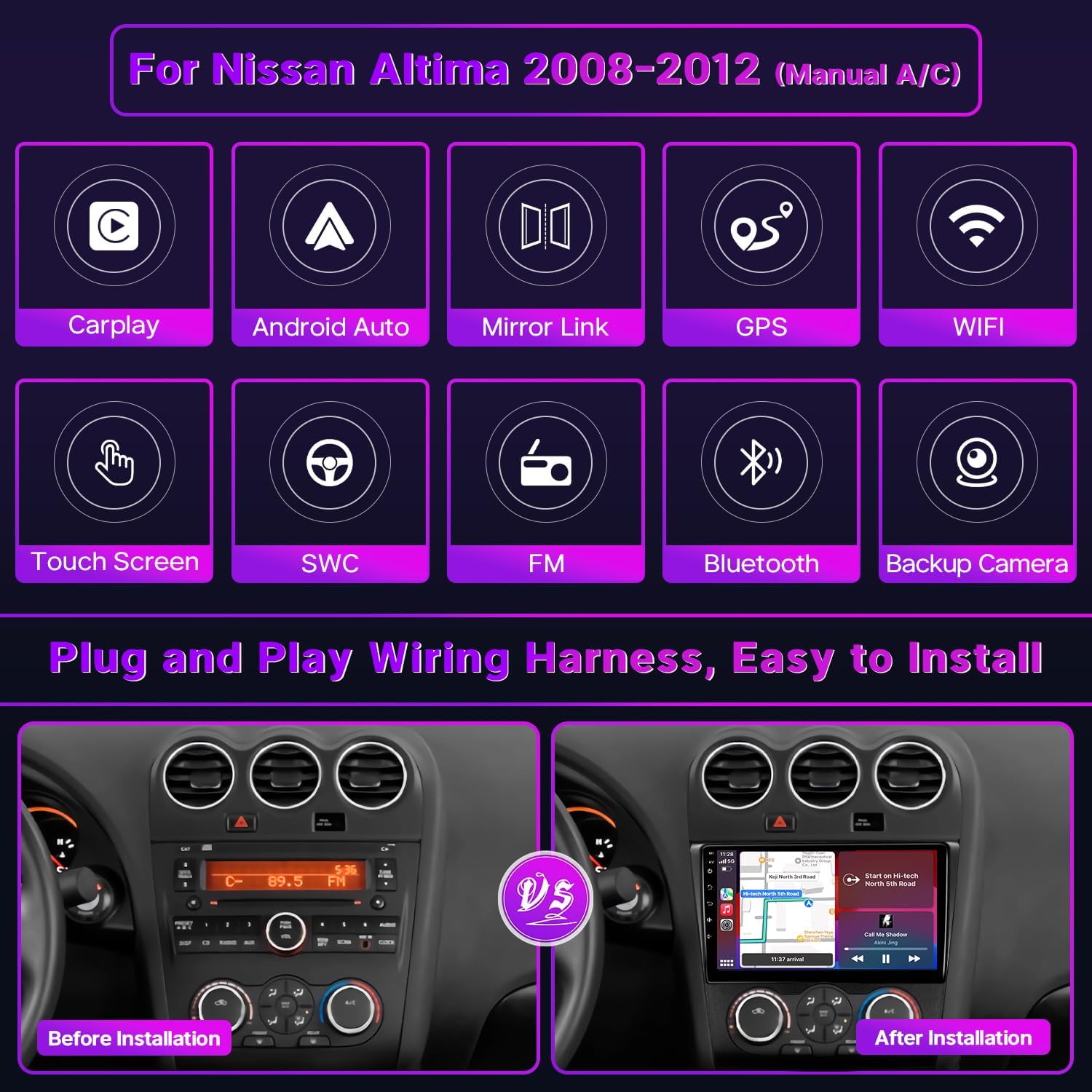
Сүрөт: Орнотуудан мурун жана кийин view of the car stereo in a Nissan Altima dashboard.
5. Иштөө нускамалары
Your Leadfan Car Stereo features an intuitive Android interface. Here are basic operating instructions for key functions.
5.1 Сенсордук экрандын негизги иштеши
- Күйгүзүү/өчүрүү: Press and hold the power button (usually on the front panel) to turn the unit on or off. A short press typically mutes or unmutes audio.
- Үндү көзөмөлдөө: Use the physical volume knob or the on-screen controls to adjust audio levels.
- Башкы экран: Негизги Android интерфейсине кайтуу үчүн Башкы бет сөлөкөтүн таптаңыз.
- Навигация: Swipe left/right on the screen to access different app pages. Tap icons to open applications.
- Бөлүнгөн экран: Some applications support split-screen mode. To activate, long-press an app icon or use the recent apps button and drag an app to one side of the screen.
5.2 Зымсыз Apple CarPlay & Android Auto
Бул түзмөк смартфондорду үзгүлтүксүз интеграциялоо үчүн Apple CarPlay жана Android Auto зымсыз функцияларын колдойт.

Image: Apple CarPlay, Android Auto, and Mirror Link interfaces.
- Enable Bluetooth & WiFi: Ensure Bluetooth and WiFi are enabled on your smartphone and the car stereo.
- Түзмөктү жупташтыруу: On the car stereo, go to the Bluetooth settings and pair your phone.
- CarPlay/Android Auto иштетиңиз: Once paired, the CarPlay or Android Auto icon should appear on the stereo's home screen. Tap it to launch. Follow any on-screen prompts on your phone to grant permissions.
- Үн менен башкаруу: Use voice commands (e.g., "Hey Siri" or "OK Google") for navigation, music, calls, and messages.
5.3 GPS багыттоо & WiFi
The stereo includes a GPS navigation system and WiFi connectivity.

Image: WiFi connection and GPS navigation display.
- WiFi туташуусу: Go to Settings > Network & Internet > Wi-Fi. Select your desired network and enter the password to connect. This allows you to download apps, stream content, and update maps.
- GPS навигациясы: Open the pre-installed navigation app (e.g., Google Maps). You can use both online and offline maps. Download offline maps via WiFi for navigation without an internet connection.
5.4 Bluetooth 5.1 жана FM радиосу
Enjoy hands-free calling and audio streaming via Bluetooth, and listen to your favorite radio stations.

Image: Bluetooth, FM Radio, Steering Wheel Controls, and Backup Camera features.
- Bluetooth жупташууда: Go to Settings > Connected devices > Pair new device. Издөө your phone and pair. Once connected, you can make/receive calls and stream audio.
- FM радиосу: Open the FM Radio app. Use the on-screen controls to scan for stations, save presets, and adjust frequency.
- EQ Орнотуулары: Access the Equalizer (EQ) settings from the audio menu to customize sound output.
5.5 Рулдун башкаруу каражаттары (SWC)
The unit supports your vehicle's existing steering wheel controls.
- Зымдар: Ensure the SWC wires from the stereo harness are correctly connected to your vehicle's SWC wires during installation.
- Окуу функциясы: Go to Settings > Steering Wheel Control. Follow the on-screen instructions to program each button on your steering wheel to the desired function on the stereo.
5.6 Камера
When properly installed, the backup camera automatically displays the rear view машина артка которулганда.
- The camera provides a 170° wide-angle view with IP68 waterproof rating and night vision for clear visibility in various conditions.
- Parking guidelines will appear on the screen to assist with maneuvering.
6. Техникалык тейлөө
- Экранды тазалоо: Сенсордук экранды акырын сүртүү үчүн жумшак, түксүз чүпүрөктү колдонуңуз. өжөр тактар үчүн, бир аз гampчүпүрөккө суу же экранды тазалоо эритмеси. Катуу химиялык заттардан же абразивдүү материалдардан алыс болуңуз.
- Программалык камсыздоо жаңыртуулары: Periodically check for software updates via the system settings (if available) to ensure optimal performance and access to new features. Connect to a stable WiFi network for updates.
- Жалпы кам көрүү: Аппаратты экстремалдык температурага, түз күн нуруна узак убакытка же ашыкча нымдуулукка дуушар кылуудан алыс болуңуз.
7. Кыйынчылыктарды
If you encounter issues with your car stereo, refer to the following common problems and solutions.
| Көйгөй | Мүмкүн себеп | Чечим |
|---|---|---|
| Түзмөк күйбөйт. | Электр туташуусу бошоп калган, сактагыч күйүп кеткен, зымдар туура эмес туташкан. | Check all power connections. Inspect vehicle fuses and the unit's fuse. Verify wiring according to the installation diagram. |
| Динамиктерден үн жок. | Speaker wires disconnected, volume muted, incorrect audio settings. | Check speaker wire connections. Ensure volume is not muted. Verify audio output settings in the stereo menu. |
| GPS сигналы начар же так эмес. | GPS антеннасы туура эмес жайгаштырылган, антенна бузук, айлана-чөйрөнүн кийлигишүүсү. | GPS антеннасынын таза болушун текшериңиз view of the sky. Check antenna connection. Try moving the antenna to a different location. |
| Bluetooth байланышы көйгөйлөрү. | Phone not discoverable, incorrect pairing process, interference. | Эки түзмөктө тең Bluetooth иштетилгенин текшериңиз. Мурунку жупташтырууларды өчүрүп, кайра жупташтырыңыз. Эки түзмөктү тең өчүрүп-күйгүзүңүз. |
| Камдык камера көрсөтүлбөй жатат. | Camera power or video cable disconnected, reverse trigger wire not connected. | Check all camera wiring, especially the reverse trigger wire connection to the car's reverse light. |
| Рулдун башкаруу элементтери иштебейт. | SWC wires not connected, controls not programmed. | Verify SWC wiring. Go to the Steering Wheel Control settings in the stereo and re-program the buttons. |
If these solutions do not resolve the issue, please contact Leadfan customer support for further assistance.
8. Техникалык шарттар
| Өзгөчөлүк | Спецификация |
|---|---|
| Дисплей өлчөмү | 9 дюйм |
| Резолюция | 1024 x 600 |
| Операция системасы | Android 12 |
| RAM | 2 ГБ |
| ROM | 32 ГБ |
| Процессор | 4-өзөктүү |
| Байланыш | Bluetooth 5.1, USB, Wi-Fi |
| Өзгөчөлүктөр | Wireless Apple CarPlay, Android Auto, GPS Navigation, Touchscreen, Mirror Link, Split Screen, Backup Camera Support, Steering Wheel Control (SWC) |
| Аудио чыгаруу режими | Стерео |
| Монтаж түрү | Куралдар тактасы |
| Элемент Салмагы | 4.4 фунт |
| Пакеттин өлчөмдөрү | 11.81 x 11.02 x 3.54 дюйм |
| Шайкеш келген унаа тейлөө түрү | Car (Nissan Altima 2008-2012 with Manual AC) |
9. Кепилдик жана колдоо
Leadfan is committed to providing high-quality products and customer service.

Image: Leadfan customer support and warranty information.
- 30 күндүк акысыз кайтаруу: You are eligible for a free return within 30 days of purchase.
- 12 айлык алмаштыруу: The product is covered by a 12-month replacement policy for quality-related issues.
- Өмүр бою техникалык колдоо: Leadfan provides lifetime technical support. Our team will respond to your inquiries within 24 hours.
- Кесипкөй кардарларды тейлөө: Our dedicated customer service team is available to assist you with any questions or concerns.
For support, please refer to the contact information provided with your purchase or visit the official Leadfan webсайт.


