1. Киришүү
Thank you for choosing the Mycket DAB Plus Portable Digital Radio HS-D009. This device offers a versatile listening experience with DAB, DAB+, FM radio, and Bluetooth connectivity. It features a 2.4-inch color display, dual alarms, a sleep timer, and 40 station presets. This manual provides essential information for setting up, operating, and maintaining your radio to ensure optimal performance.
2. Продукт бүтүп калдыview
Familiarize yourself with the components and controls of your Mycket HS-D009 radio.

Сүрөт 2.1: Алдыңкы View of the Mycket HS-D009 Radio. This image displays the front of the radio, highlighting the speaker grille on the left, the 2.4-inch color display on the right, and the control buttons below the display. Key buttons visible include MODE, OK, directional arrows, FAV, and numbered preset buttons (1-4).

Image 2.2: Mycket HS-D009 Radio Dimensions. This image illustrates the compact size of the radio, showing its approximate dimensions: 5.5 inches in length, 3.1 inches in height, and 1.6 inches in depth. A glass with a drink is placed next to it for scale.
2.1 Башкаруу каражаттары жана порттор
- Кубат / режим баскычы: Turns the radio on/off and switches between DAB, FM, and Bluetooth modes.
- OK баскычы: Confirms selections and enters menus.
- Directional Buttons (Left/Right): Менюларды карап чыгып, жөндөөлөрдү тууралайт.
- FAV баскычы: Accesses and saves favorite stations.
- Алдын ала коюлган баскычтар (1-4): Сакталган сүйүктүү станцияларга тез жетүү.
- Үн баскычы: Үндү тууралайт жана менюнун параметрлерин башкарат.
- DC 5V порт: Радиону заряддоо үчүн.
- Гарнитура уячасы: Жеке угуу үчүн.
- Антенна: Extendable telescopic antenna for radio reception.
- Калыбына келтирүү баскычы: Түзмөктү баштапкы абалга келтирүү үчүн кичинекей ийне тешиги бар баскыч.
3. Орнотуу
3.1 Батареяны заряддоо
The radio is equipped with a built-in 2200mAh rechargeable Lithium-ion battery. Before first use, fully charge the radio.
- Connect the provided USB charging cable to the DC 5V port on the side of the radio.
- USB кабелинин экинчи учун туура келген USB кубат адаптерине (кошумча эмес) же компьютердин USB портуна туташтырыңыз.
- The charging indicator on the display will show the charging status. Once fully charged, the indicator will change.
Толук заряд 12 сааттан ашык ойнотуу убактысын камсыз кылат.

Image 3.1: Battery Life Indication. This image highlights the radio's capability to play for more than 12 hours on its built-in 2200mAh rechargeable battery, emphasizing its portability.
3.2 Баштапкы күйгүзүү
- Жакшыраак кабыл алуу үчүн телескоптук антеннаны узартыңыз.
- басып, кармап туруңуз Кубат/Режим радиону күйгүзүү үчүн баскыч.
- Upon first use, the radio may automatically initiate a DAB station scan.
4. Иштөө нускамалары
4.1 Режимди тандоо
басыңыз Кубат/Режим button repeatedly to cycle through the available modes: DAB, FM, and Bluetooth.
4.2 DAB/DAB+ радиосу
- Switch to DAB mode using the Кубат/Режим баскычы.
- If it's the first time or if you want to rescan, the radio will automatically perform a full scan for available DAB/DAB+ stations.
- колдонуу Көлөм баскычы or Багыттуу баскычтар to navigate through the list of found stations.
- басыңыз OK станцияны тандоо жана угуу үчүн баскычты басыңыз.
Saving DAB Presets
The radio supports saving up to 20 DAB presets.
- Tune to the desired DAB station.
- басып, кармап туруңуз FAV button for 1-2 seconds until the preset recall menu appears on the screen.
- колдонуу Көлөм баскычы or Багыттуу баскычтар алдын ала коюлган номерди (1-20) тандоо үчүн.
- Басыңыз OK to confirm and save the station. A confirmation message will appear.
Recalling DAB Presets
To quickly access saved stations:
- For presets 1-4, simply press the corresponding numbered button (1, 2, 3, же 4).
- Башка алдын ала коюлган жөндөөлөр (5-20) үчүн, баскычын басыңыз FAV button briefly. Use the Көлөм баскычы or Багыттуу баскычтар to select the desired preset, then press OK.

Image 4.1: Auto Scan and Presets. This image illustrates the radio's auto-scan function for radio stations and its capacity to save up to 40 presets (20 DAB and 20 FM) using the FAV button.
4.3 FM радиосу
- колдонуп FM режимине которулуңуз Кубат/Режим баскычы.
- FM станцияларын автоматтык түрдө издөө үчүн, баскычын басып кармап туруңуз OK button. The radio will scan and save stations automatically.
- Же болбосо, колдонуңуз Багыттуу баскычтар жыштыкка кол менен тууралоо үчүн.
- Басыңыз OK тандоону ырастоо үчүн.
Saving FM Presets
The radio supports saving up to 20 FM presets.
- Каалаган FM станциясына коюңуз.
- басып, кармап туруңуз FAV button for 1-2 seconds until the preset recall menu appears.
- колдонуу Көлөм баскычы or Багыттуу баскычтар алдын ала коюлган номерди (1-20) тандоо үчүн.
- Басыңыз OK станцияны ырастоо жана сактоо үчүн.
Recalling FM Presets
To quickly access saved stations:
- For presets 1-4, simply press the corresponding numbered button (1, 2, 3, же 4).
- Башка алдын ала коюлган жөндөөлөр (5-20) үчүн, баскычын басыңыз FAV button briefly. Use the Көлөм баскычы or Багыттуу баскычтар to select the desired preset, then press OK.
4.4 Bluetooth режими
Connect your smartphone, tablet, or other Bluetooth-enabled device to play audio wirelessly.
- колдонуп, Bluetooth режимине которулуңуз Кубат/Режим button. The display will show "Bluetooth" and indicate it's ready for pairing.
- Тышкы түзмөгүңүздө Bluetooth'ду иштетип, жеткиликтүү түзмөктөрдү издеңиз.
- Select "Mycket D009" from the list of devices.
- Once paired, the radio will confirm the connection, and you can play audio from your device through the radio's speaker.
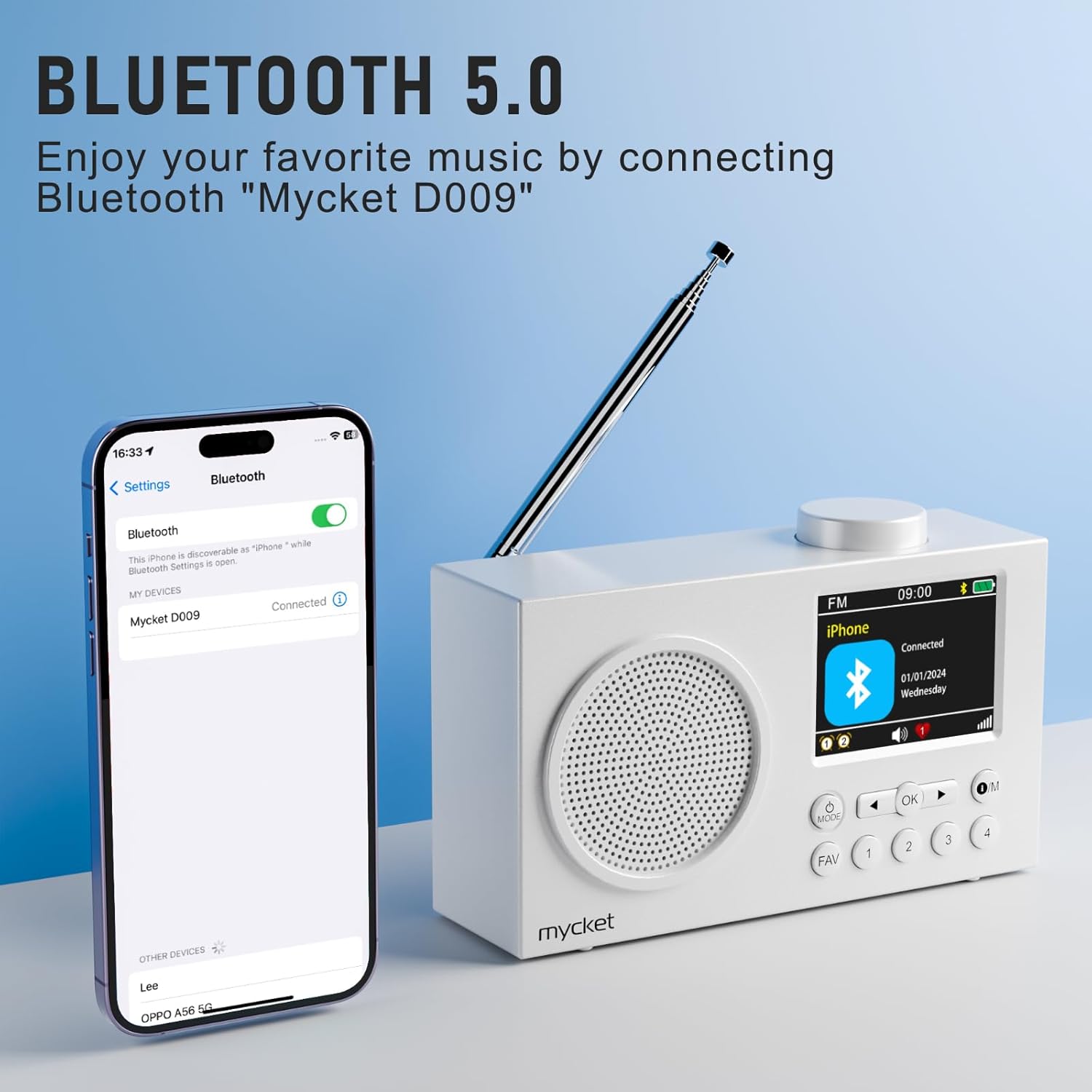
Image 4.2: Bluetooth 5.0 Connectivity. This image demonstrates the radio's Bluetooth 5.0 capability, showing it connected to a smartphone for wireless audio playback. The radio's display shows 'Mycket D009' as the connected device.
4.5 Dual Alarm Function
The radio features a dual alarm function. Refer to the on-screen menu for setting alarm times, sources (DAB/FM/Buzzer), and recurrence.
4.6 Уйку таймери
The sleep timer allows the radio to turn off automatically after a set period. Access the sleep timer settings through the menu to choose your desired duration.
4.7 Маалыматты көрсөтүү
The 2.4-inch TFT color display provides clear information about the current mode, station, time, battery status, and other settings.

Image 4.3: Large Color Screen. This image highlights the radio's 2.4-inch TFT large color display, which allows for clear visibility of content such as station information, time, and battery status.

Image 4.4: Hi-Fi Sound. This image emphasizes the radio's built-in Hi-Fi speaker, designed to provide enhanced audio quality for an improved listening experience.
5. Техникалык тейлөө
5.1 Тазалоо
- Always turn off the radio and disconnect it from the power source before cleaning.
- Сырткы беттерди сүртүү үчүн жумшак, кургак чүпүрөктү колдонуңуз.
- Абразивдүү тазалагычтарды, момдорду же эриткичтерди колдонбоңуз, анткени алар финишке зыян келтириши мүмкүн.
5.2 Батареяга кам көрүү
- Батареянын иштөө мөөнөтүн узартуу үчүн, бат-баттан батарейканы толук зарядсыздандырбаңыз.
- Charge the radio regularly, even if not in use for extended periods.
- Радиону салкын, кургак жерде, түз күндүн нурунан жана экстремалдык температурадан алыс сактаңыз.
5.3 Сактоо
When storing the radio for a long time, ensure it is fully charged and then turn it off. Store it in a protective case or original packaging to prevent dust and damage.
6. Кыйынчылыктарды
| Көйгөй | Мүмкүн себеп | Чечим |
|---|---|---|
| Кубат жок / Радио күйбөйт | Батарея түгөнүп калды. | Радиону USB кабели аркылуу кубаттаңыз. |
| Радио кабыл алуу начар (DAB/FM) | Антенна узартылган эмес же сигналдын начар аймагы. | Fully extend the telescopic antenna. Try repositioning the radio or moving to an area with better signal. Perform a full scan for stations. |
| Bluetooth түзмөгү жупташпай жатат | Радио Bluetooth режиминде эмес же түзмөк өтө алыс. | Ensure the radio is in Bluetooth mode. Make sure your device's Bluetooth is on and within range (approx. 10 meters). Forget "Mycket D009" on your device and try pairing again. |
| Үн жок | Үн өтө төмөн же үнсүз. | Increase the volume using the volume knob. Check if headphones are connected. |
| Radio unresponsive | Убактылуу программалык ката. | Press the reset button with a thin object (e.g., a paperclip). This will restart the radio without losing presets. |
7. Техникалык шарттар
| Өзгөчөлүк | Деталь |
|---|---|
| Бренд | Mycket |
| Модель номери | HS-D009 |
| Түс | Ак |
| Тюнинг технологиясы | DAB, DAB+, FM |
| Байланыш технологиясы | Bluetooth 5.0 |
| Колдоого алынган радио тилкелери | FM, DAB, DAB+ |
| Power Source | Battery powered (Rechargeable Lithium-ion) |
| Батарея сыйымдуулугу | 2200mAh |
| Батареянын иштөө мөөнөтү | 12 сааттан ашык |
| Тtage | 3.7 вольт |
| Спикердин максималдуу чыгаруу күчү | 5 Ватт |
| Дисплей | 2.4 дюймдук TFT түстүү экран |
| Алдын ала орнотуулар | 40 (20 DAB, 20 FM) |
| Шайкеш түзмөктөр | Headphones, Tablet, Smartphone, MP3 Player, Laptop, Earphones, Speakers |
8. Кепилдик жана колдоо
Mycket is committed to providing high-quality products and customer satisfaction.
- Кепилдик: Бул продукт сатып алынган күндөн тартып 12 айлык кепилдик менен келет. Кепилдик дооматтары үчүн сатып алганыңызды тастыктаган документти сактап коюңуз.
- Кардарларды колдоо: For any questions, technical assistance, or warranty inquiries, please contact our customer support team. We offer 24-hour customer support to assist you.

Image 8.1: Warranty and Support Information. This image details the customer support offerings, including a 12-month warranty and 24-hour customer support.
Көбүрөөк жардам алуу үчүн биздин расмий дарекке кайрылыңыз webсайтына кириңиз же продуктуну сатып алган сатуучуга кайрылыңыз.


