Introduction
Welcome to the user manual for the Lawmate PV-DY40UWW 4K Covert Camera DIY Kit. This innovative kit provides the components necessary to create your own customized covert surveillance solution. Designed for versatility, it allows for discreet integration into various environments while capturing high-quality video footage.
This manual provides essential information for the proper setup, operation, and maintenance of your PV-DY40UWW kit. Please read it thoroughly before use to ensure optimal performance and to understand all features.
Пакеттин мазмуну

The image displays the primary components of the Lawmate PV-DY40UWW DIY Camera Kit. It includes the compact camera module with its ribbon cable, the main DVR unit, a small remote control, and a Micro SD card. These are the core elements for assembling your covert camera system.
- Lawmate PV-DY40UWW Main DVR Unit
- 4K Wide Angle Camera Module
- 128 ГБ Micro SD карта (алдын ала орнотулган же өзүнчө камтылган)
- Алыстан башкаруу
- USB Cable (for power/data transfer)
- Battery (if applicable, typically integrated or provided)
Продукт өзгөчөлүктөрү
The Lawmate PV-DY40UWW DIY Kit is equipped with advanced features for high-performance covert surveillance:
- 4K Ultra HD Video Resolution: Records crisp and clear video at 3840×2160 pixels at 25/30 frames per second (fps).
- Adjustable Resolutions: Supports recording in 1080p and 720p resolutions, with up to 120fps for 720p.
- Кең бурчтуу линза: Features a 96° Field of View (FOV) for broader coverage.
- Wi-Fi туташуусу: Enables remote viewing, control, and settings adjustment via a dedicated smartphone application.
- P2P Connectivity: Direct peer-to-peer connection up to 30 feet for local access without an internet router.
- Кеңири сактоочу жай: Supports Micro SD cards up to 256GB (128GB card included).
- DIY Integration: Designed for easy integration into various objects to create custom hidden cameras.
- Кыймылды аныктоо: Configurable alert type for motion-only recording.
Коопсуздук маалыматы
Please adhere to the following safety guidelines to ensure safe and proper operation of your device:
- Аппаратты экстремалдык температурага, нымдуулукка же түз күн нуруна калтырбаңыз.
- Аппаратты түшүрүүдөн же катуу таасирлерден сактаныңыз.
- Аппаратты суудан жана башка суюктуктардан алыс кармаңыз.
- Do not attempt to disassemble or modify the device beyond the intended DIY assembly. This may void the warranty and cause damage.
- Берилген же сунушталган электр жабдууларын гана колдонуңуз.
- Ensure proper ventilation when the device is in operation.
- Мыйзамга ылайык келүү: Always be aware of and comply with all local, state, and federal laws regarding audio and video recording, privacy, and surveillance. It is the user's responsibility to use this product legally and ethically.
Жайгашуу
Follow these steps to set up your Lawmate PV-DY40UWW DIY Camera Kit:
- Микро SD картаны салыңыз: Locate the Micro SD card slot on the main DVR unit. Gently insert the included 128GB Micro SD card (or your own up to 256GB) until it clicks into place. Ensure the card is inserted in the correct orientation.

This image shows the main DVR unit of the Lawmate PV-DY40UWW kit with a Micro SD card positioned near its designated slot, illustrating where the storage card should be inserted for recording functionality.
- Connect Camera Module: Carefully connect the ribbon cable of the camera module to the corresponding port on the main DVR unit. Ensure a secure and proper connection.
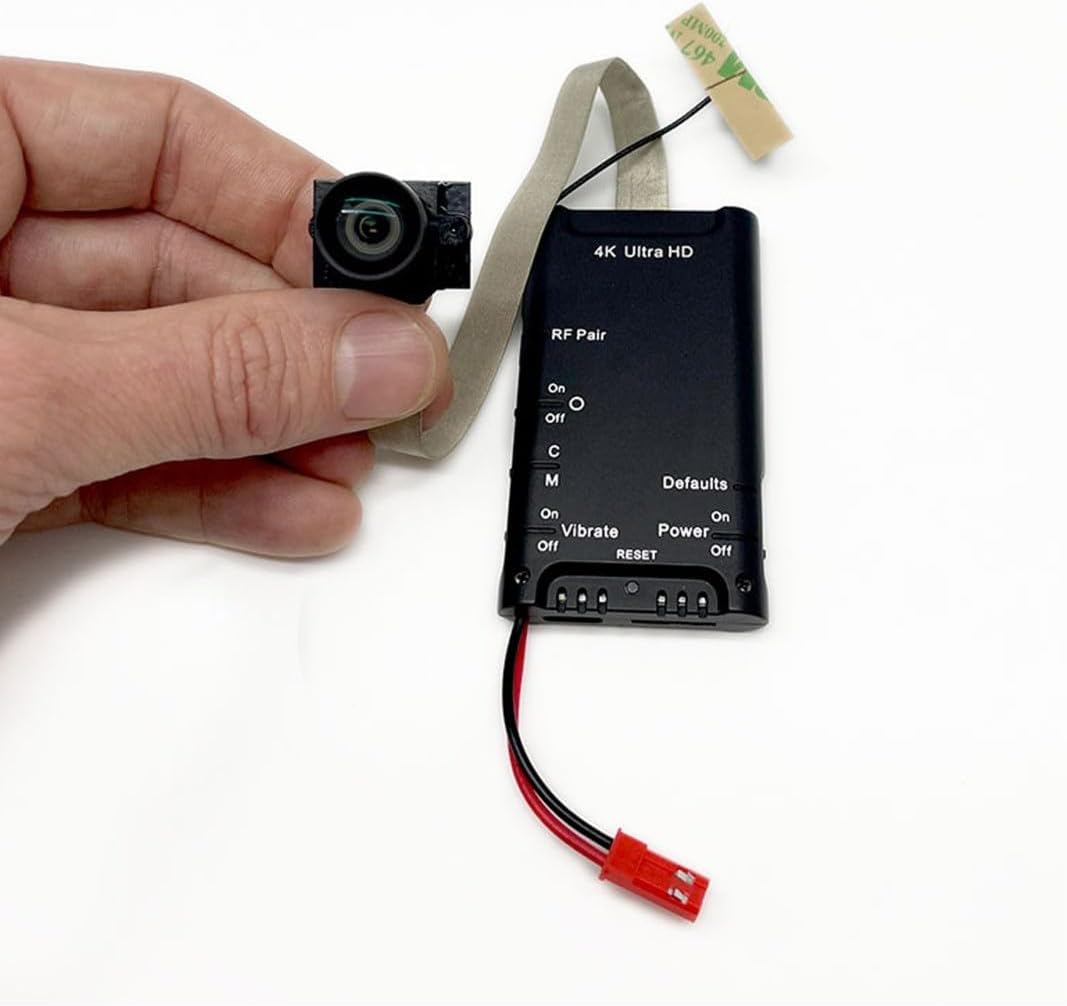
The image provides a close-up of the Lawmate PV-DY40UWW main DVR unit, highlighting the connection point for the camera module's ribbon cable. This view emphasizes the compact size of the components and the "4K Ultra HD" labeling on the unit.
- Кубат туташуу: Connect the power cable to the DVR unit and a suitable power source (e.g., USB adapter, battery pack). The device will typically power on automatically or can be powered on using the remote control/switch.
- Колдонмону жүктөп алуу: For Wi-Fi functionality, download the official Lawmate app (e.g., "PV Cam Viewer" or similar, check product packaging for exact name) from your smartphone's app store (iOS/Android).
- Алгачкы жайгаштыруу: Before final integration, test the camera's functionality and field of view in your desired covert location.
Иштөө нускамалары
This section details how to operate your PV-DY40UWW camera kit.
Күйгүзүү/өчүрүү
- Күйгүзүү: Connect the device to power. If it doesn't power on automatically, use the power button on the remote control or the physical switch on the DVR unit (if available). An indicator light will typically illuminate.
- Өчүрүү: Press and hold the power button on the remote or switch off the physical power switch. Ensure recording has stopped before powering off to prevent data corruption.
Wi-Fi Connection and App Usage
- Wi-Fi иштетүү: On the DVR unit, locate the Wi-Fi switch or button and activate it. The Wi-Fi indicator light will flash.
- Камеранын Wi-Fi тармагына туташыңыз: On your smartphone, go to Wi-Fi settings and connect to the camera's Wi-Fi network (e.g., "PV-DY40UWW_XXXX"). The default password is usually "88888888" or found in the app/manual.
- Колдонмону ачуу: Launch the Lawmate control app on your smartphone. The camera feed should appear, allowing live viewing and access to settings.
- Орнотууларды тууралоо: Колдонмонун ичинде сиз:
- Change video resolution (4K, 1080p, 720p).
- Configure recording modes (continuous, motion detection).
- Дата менен убакытты коюу.
- Micro SD картаны форматтаңыз.
Видео жаздыруу
- Кол менен жаздыруу: Press the record button on the remote control or within the app to start/stop recording.
- Кыймылды аныктоо жазуусу: Enable motion detection via the app. The camera will automatically record when motion is detected within its field of view.
- Индикатор жарыктары: Pay attention to the indicator lights on the DVR unit, which typically signal recording status (e.g., solid light for standby, flashing for recording).
Жаздырууларга кирүү
- Колдонмо аркылуу: Connect to the camera's Wi-Fi, open the app, and navigate to the playback or file management section to view or download recordings directly to your phone.
- Компьютер аркылуу: Power off the device, remove the Micro SD card, and insert it into a computer's card reader. Video files will be accessible as standard video formats (e.g., .MOV, .MP4).
Техникалык тейлөө
- Микро SD картаны башкаруу: Regularly back up important recordings and format the Micro SD card every few weeks to maintain optimal performance and prevent data corruption. Use the format function within the app or a computer.
- Тазалоо: Use a soft, dry cloth to clean the camera lens and the main unit. Do not use liquid cleaners or abrasive materials.
- Батареяга кам көрүү: If using a rechargeable battery, avoid fully discharging it frequently. Store the device with a partial charge if not used for extended periods.
- Программалык камсыздоонун жаңыртуулары: Мезгил-мезгили менен өндүрүүчүнүн текшерүү website or the app for any available firmware updates to improve performance and add new features.
Проблемаларды чечүү
| Көйгөй | Мүмкүн себеп | Чечим |
|---|---|---|
| Түзмөк күйбөйт. | Батареянын заряды аз; кубат булагы туташкан эмес; кубат булагы бузук. | Charge the battery; ensure power cable is securely connected; try a different USB port or power adapter. |
| Wi-Fi'га туташпай жатат. | Wi-Fi not enabled on device; incorrect password; too far from device. | Ensure Wi-Fi is enabled; verify Wi-Fi password; move closer to the device (within 30ft for P2P). |
| No recording or corrupted files. | Micro SD card full or faulty; card not formatted; device powered off during recording. | Format the Micro SD card; try a different card; ensure device remains powered during recording. |
| Видеонун сапаты начар. | Lens dirty; low light conditions; incorrect resolution setting. | Clean the camera lens; ensure adequate lighting; set resolution to 4K in the app. |
| Пульт иштебей жатат. | Remote battery low; remote not paired; obstruction. | Replace remote battery; refer to pairing instructions (if applicable); ensure clear line of sight. |
Эгер сиз бул жерде көрсөтүлбөгөн көйгөйлөргө туш болсоңуз, өндүрүүчүнүн колдоо ресурстарына кайрылыңыз же кардарларды тейлөө кызматына кайрылыңыз.
Техникалык шарттар
| Өзгөчөлүк | Деталь |
|---|---|
| Бренд | Lawmate |
| Модель номери | PV-DY40UWW |
| Видео тартуунун резолюциясы | 4K (3840x2160p), 1080p, 720p |
| талаасы View (FOV) | 96° кең бурч |
| Байланыш технологиясы | Wireless (Wi-Fi, P2P) |
| Maximum Range (P2P) | 30 Фут |
| Сактоо колдоо | 256 ГБ чейин Micro SD карта (128 ГБ кошулган) |
| Power Source | Battery Powered (details not specified, typically internal rechargeable) |
| Башкаруу ыкмасы | Колдонмо, алыстан башкаруу |
| Эскертүү түрү | Кыймыл гана |
| Өлчөмдөрү (Негизги бирдик) | Болжол менен 3 x 2 x 1 дюйм (узундугу x туурасы x бийиктиги) |
| Камтылган компоненттер | 128GB SD Card, DVR KIT (Main Unit, Camera Module, Remote) |
Кепилдик жана колдоо
Specific warranty terms for the Lawmate PV-DY40UWW DIY Kit are typically provided by the retailer or manufacturer at the time of purchase. Please retain your proof of purchase for warranty claims.
For technical support, troubleshooting assistance beyond this manual, or warranty inquiries, please contact the authorized Lawmate distributor or the seller from whom you purchased the product. You may also visit the official Lawmate webкошумча ресурстар жана байланыш маалыматы үчүн сайт.
Note: Unauthorized modifications or improper use of the device may void the warranty.


