1. Киришүү
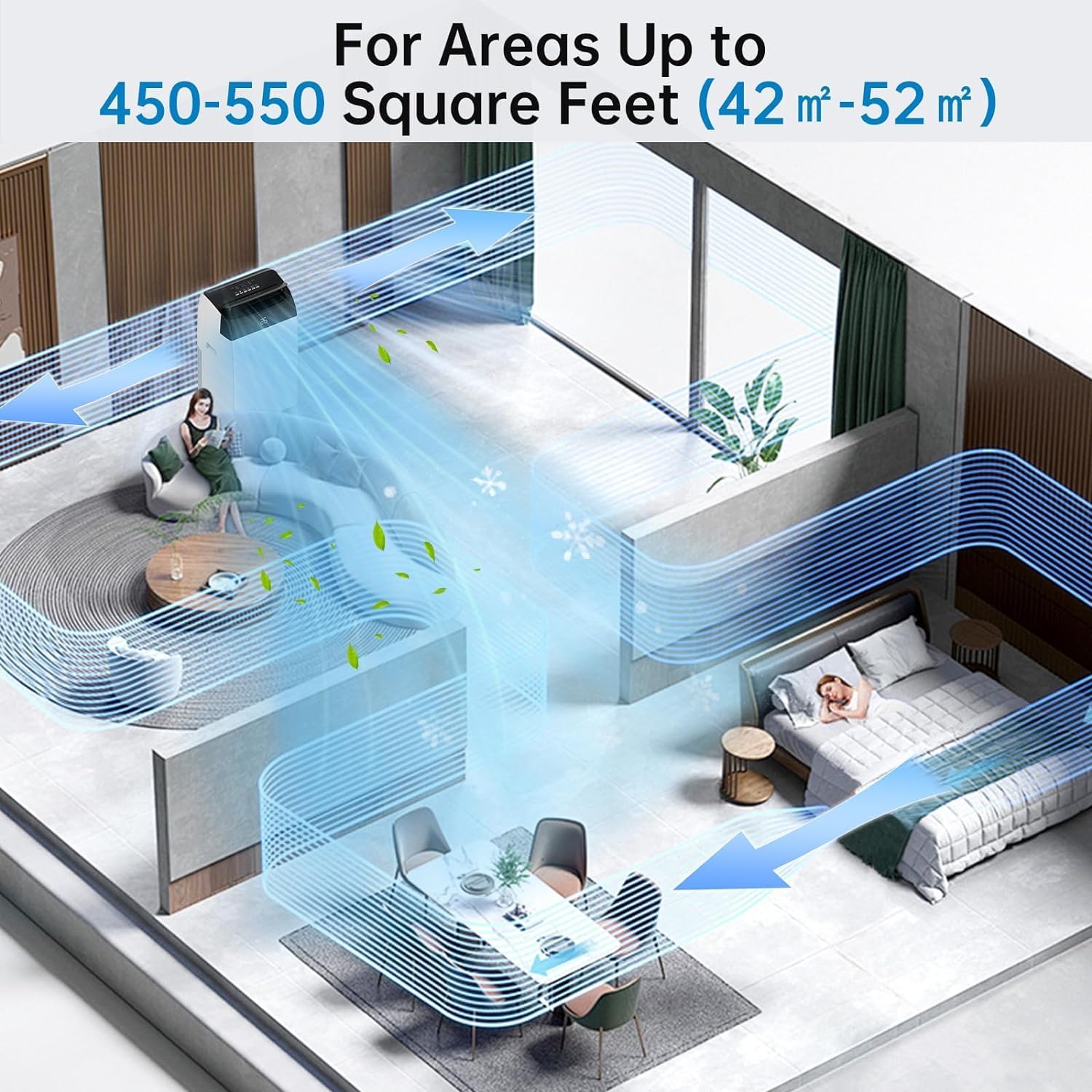
Thank you for choosing the Acekool Mobile Air Conditioner. This 3-in-1 unit provides cooling, dehumidifying, and fan functions, designed for optimal comfort in your home or office. With a powerful 12000 BTUs cooling capacity, it is suitable for rooms up to 550 square feet (approximately 52 square meters). This manual provides essential information for safe operation, installation, maintenance, and troubleshooting to ensure long-lasting performance of your appliance.
Please read this manual thoroughly before operating the unit and keep it for future reference.
2. Коопсуздук нускамалары
Колдонуучуга же башка адамдарга зыян келтирбөө жана мүлктүк зыян келтирбөө үчүн төмөнкү көрсөтмөлөрдү аткаруу керек. Көрсөтмөлөрдү этибарга албагандыктан туура эмес иштөө зыян келтириши же бузулушу мүмкүн.
Жалпы коопсуздук чаралары:
- Always use the unit on a flat, stable surface to prevent tipping.
- Do not block air inlets or outlets. Maintain at least 20 cm clearance from walls or other objects.
- Манжаларды же бөтөн нерселерди аба кирүүчү/чыгаруучу тешиктерине киргизбеңиз.
- Агрегатты күйүүчү газдардан же күйүүчү материалдардан алыс кармаңыз.
- Электр шнурунун бузулбаганын же кысылып калбаганын текшериңиз.
- Аппаратты нымдуу колдор менен иштетпеңиз.
- Тазалоодон же техникалык тейлөөдөн мурун блокту электр розеткасынан сууруп алыңыз.
- Бул шайман физикалык, сезүү же акыл-эс жөндөмү начар же тажрыйбасы жана билими жок адамдар (анын ичинде балдар) үчүн, эгерде алардын коопсуздугуна жооптуу адам тарабынан көзөмөлсүз же шайманды колдонуу боюнча көрсөтмө болбосо, колдонууга арналбайт.
- Балдар шайман менен ойнобошу үчүн аларды көзөмөлгө алуу керек.
Электр коопсуздугу:
- Connect the unit to a properly grounded electrical outlet with the correct voltage (220V).
- Do not use extension cords or multi-sockets with this appliance.
- Электр зымы бузулган болсо, коркунучту болтурбоо үчүн аны өндүрүүчү, анын тейлөө агенти же ушуга окшогон квалификациялуу адамдар алмаштырышы керек.
3. Продукт бүтүп калдыview
Familiarize yourself with the components and controls of your Acekool Mobile Air Conditioner.
Пакеттин мазмуну:
- Mobile Air Conditioner Unit
- Алыстан башкаруу
- Чыгаруучу шланг
- Slide Bar (Window Kit)
- Слайд тилкесин туташтыргыч
- Exhaust Pipe Joint (2 pieces)

3.1-сүрөт: Package Contents and Dimensions. This image shows the main unit with its dimensions (36cm depth, 42cm width, 70cm height) and all accessories included in the box, such as the remote control, exhaust hose, slide bar, slide bar connector, and two exhaust pipe joints.

3.2-сүрөт: Бүттүview of the Acekool Portable Air Conditioner and its accessories, including the main unit, remote control, and various components for window installation.
Башкаруу панели жана алыстан башкаруу:
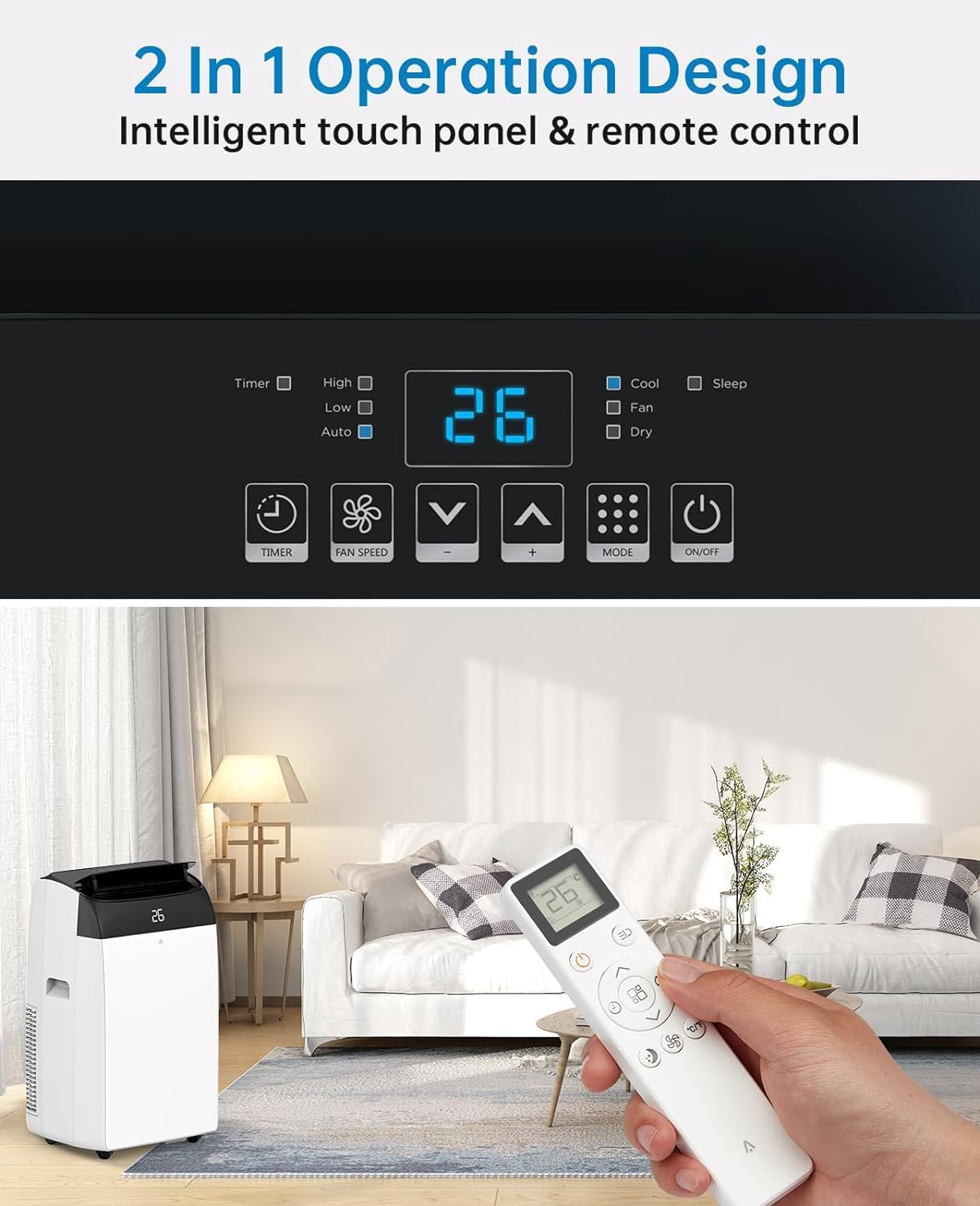
The unit can be operated via the intelligent touch panel on top of the unit or the included remote control.
3.3-сүрөт: Control Panel and Remote Control. This image highlights the digital display showing "26" and various touch buttons for Timer, Fan Speed, Mode, and Power. Below, a hand holds the remote control, demonstrating its use with the air conditioner in a living room setting.
- Санариптик дисплей: Shows current temperature or timer settings.
- Кубат баскычы: Аппаратты күйгүзөт/өчүрөт.
- Режим баскычы: Муздатуу, Вентилятор жана Нымдуулукту азайтуу режимдери аркылуу циклде иштейт.
- Температураны жогорулатуу/төмөндөө баскычтары: Муздатуу режиминде каалаган температураны тууралайт.
- Желдетүүчү ылдамдык баскычы: Желдетүүчү ылдамдыкты тандайт (Төмөн, Орто, Жогорку).
- Таймер баскычы: Автоматтык түрдө иштөө үчүн 24 сааттык таймерди орнотот.
- Уйку режиминин баскычы: Activates quiet operation for nighttime use.
4. Орнотуу
Proper installation of the exhaust hose is crucial for efficient cooling. This unit is designed for window installation.
Чыгуучу түтүктү орнотуу:
- Attach the exhaust pipe joint to one end of the exhaust hose by twisting it clockwise until secure.
- Attach the slide bar connector to the other end of the exhaust hose.
- Connect the assembled exhaust hose to the exhaust outlet on the back of the air conditioner unit.
- Adjust the slide bar (window kit) to fit your window opening. Secure it in place.
- Insert the slide bar connector into the opening of the adjusted window kit, ensuring a tight seal to prevent air leakage.

4.1-сүрөт: Easy Installation Steps. This image illustrates the process of connecting the exhaust hose to the unit and the window kit, ensuring proper ventilation for the air conditioner.
Маанилүү: Ensure the exhaust hose is as straight and short as possible to maximize cooling efficiency. Avoid kinks or sharp bends.
5. Иштөө нускамалары
Your Acekool Mobile Air Conditioner offers three primary functions: Cooling, Fan, and Dehumidifying.
Иштөө режимдери:
5.1-сүрөт: Multipurpose 3-in-1 Function. This graphic illustrates the three main operating modes: Cool Mode (18°C-32°C), Dry Mode (45L/Days dehumidification), and Fan Mode (3 Speeds).
- Муздак режим:
Cools your room by expelling hot air outside. Set your desired temperature between 18°C and 32°C using the Up/Down buttons. The unit will cycle on and off to maintain the set temperature.
- Күйөрман режими:
Circulates air without cooling. Ideal for improving air circulation. Select from three fan speeds (Low, Medium, High) using the Fan Speed button.
- Нымдуулукту азайтуу режими (Кургак режим):
Removes excess moisture from the air, with a capacity of up to 45 liters per day. This mode helps maintain indoor humidity between 40% and 60%. The fan speed is typically fixed in this mode.
Таймер функциясы:
The 24-hour timer allows you to set a specific time for the unit to turn on or off automatically. Press the Timer button and use the Up/Down buttons to set the desired duration.
Уйку режими:
Activate Sleep Mode for quieter operation during nighttime. In this mode, the fan speed is reduced, and the temperature may gradually increase to save energy and ensure comfortable sleep. The noise level can be as low as 48dB.

5.2-сүрөт: Sleep Mode & Quiet Operation. This image shows the air conditioner in a bedroom setting, highlighting its quiet operation at 48dB, along with features like 24h Smart Timer, Sleep Mode, Auto Shut Off, and Ultra Quiet.
6. Техникалык тейлөө
Үзгүлтүксүз тейлөө оптималдуу иштешин камсыз кылат жана кондиционериңиздин иштөө мөөнөтүн узартат.
Аба чыпкасын тазалоо:
The air filter should be cleaned every two weeks or more frequently depending on usage and air quality. A clean filter improves air quality and unit efficiency.
- Кондиционерди розеткадан сууруп алыңыз.
- Аба чыпкасынын панелин, адатта, блоктун арткы же каптал жагында жайгашканын табыңыз.
- Фильтрди акырын тартып чыгарып алыңыз.
- Wash the filter under running water (warm, soapy water can be used for heavy dirt).
- Кайра салуудан мурун чыпканы жакшылап чайкап, толугу менен кургатыңыз. Түз күн нуруна тийгизбеңиз.
- Once dry, reinsert the filter into its slot.

6.1-сүрөт: Washable Filter. This image demonstrates how to remove the air filter from the back of the unit and wash it under a faucet, emphasizing its reusability and ease of cleaning.
Конденсацияланган сууну төгүү:
This air conditioner features an advanced self-evaporation technology, which automatically evaporates most of the condensed water and expels it with the exhaust air. This significantly reduces the need for manual drainage.

6.2-сүрөт: Self-Evaporation System and Efficient Condensing System. This diagram illustrates the internal workings of the air conditioner, showing how condensed water is evaporated and how the efficient condensing system operates.
However, in high humidity conditions or during prolonged dehumidification mode, the internal water tank may fill up. When this happens, the unit will stop operating and display an error code (refer to troubleshooting section). You will need to manually drain the water:
- Агрегатты сууруп алыңыз.
- Түзмөктүн арткы ылдый жагындагы дренаждык тешиктин астына тайыз көмөч казан же табак коюңуз.
- Дренаждык тығынды алып салыңыз.
- Бардык суу толугу менен агып кетсин.
- Replace the drain plug firmly.
7. Кыйынчылыктарды
Кардарларды тейлөө кызматына кайрылуудан мурун, жалпы маселелер жана аларды чечүү үчүн төмөнкү таблицага кайрылыңыз.
| Көйгөй | Мүмкүн себеп | Чечим |
|---|---|---|
| Түзмөк күйбөйт. | No power; Power cord damaged; Water tank full. | Check power connection; Inspect power cord; Drain water tank. |
| Агрегат эффективдүү муздабайт. | Аба чыпкасы кир; Чыгаруучу түтүк бүтөлүп/кыйшайып калган; Бөлмө өтө чоң; Эшиктер/терезелер ачык. | Clean air filter; Check exhaust hose for obstructions; Ensure room size is within capacity; Close all doors and windows. |
| Агрегат ызы-чуу. | Агрегат түз жерде эмес; желдеткич ылдамдыгы өтө жогору; желдеткичте тоскоолдук. | Place on a flat surface; Reduce fan speed; Check for foreign objects. |
| Суунун агып чыгышы. | Drain plug not secured; Unit tilted. | Ensure drain plug is firmly in place; Place unit on a level surface. |
| Пульт иштебей жатат. | Batteries dead/incorrectly inserted; Obstruction between remote and unit. | Батареяларды алмаштыруу; Бирдиктин кабылдагычын көрүүнүн так болушун камсыз кылыңыз. |
8. Техникалык шарттар
Detailed technical specifications for the Acekool Mobile Air Conditioner.
| Өзгөчөлүк | Спецификация |
|---|---|
| Бренд | Acekool |
| Модель номери | TAC-12CHPB/DM7 |
| Муздатуу кубаттуулугу | 12000 BTUs |
| нымдуулуктун күч жөндөмдүүлүгү | Күнүнө 45 литр |
| Продукциянын өлчөмдөрү (L x W x Y) | 35.8 x 41.9 x 68.8 см |
| Салмагы | 30.8 килограмм |
| Тtage | 220 вольт |
| Ватtage | 1780 Ватт |
| Ызы-чуу деңгээли | 65 dB (Operating), as low as 48dB (Sleep Mode) |
| Энергия эффективдүүлүгү классы | A |
| Орнотуу түрү | Терезе |
| Өзгөчөлүктөр | Dehumidifier, 24H Timer, Digital Display, Remote Control, Self-Evaporation System |
9. Кепилдик жана колдоо
For warranty information and customer support, please refer to the warranty card included with your product packaging or visit the official Acekool website. Ensure you have your model number (TAC-12CHPB/DM7) and purchase details ready when contacting support.
For further assistance, please contact Acekool customer service through their official channels.


