1. Киришүү
Thank you for choosing the BAOFENG 5RM Multi-Band Handheld Ham Radio. This device is designed to provide reliable and instant communication, suitable for various outdoor activities, work environments, and emergency preparedness. The 5RM model is an upgraded version, offering enhanced features and performance.
This manual provides essential information for the proper setup, operation, and maintenance of your BAOFENG 5RM radio. Please read it thoroughly before use to ensure optimal performance and safety.

Figure 1: BAOFENG 5RM Handheld Ham Radio
2. Негизги өзгөчөлүктөрү
- 10W жогорку кубаттуулугу: Provides extended communication range.
- Multi-Band Operation: Supports AM aircraft band, 2M, 1.25M, 70CM, and FM frequencies.
- NOAA аба ырайы каналдары: Pre-programmed channels for weather alerts.
- 1.77" TFT Large Color Display: Intuitive main menu for easy function browsing.
- One-Touch Frequency Match: Convenient search and copy function for quick setup.
- USB-C заряддоо: 2500mAh battery with Type-C port for versatile charging.
- 999 Memory Channels: Ampкаалаган жыштыктарыңыз үчүн сактагыч.
- Кошумча функциялар: Includes power-on password management, stopwatch, VOX, LED flashlight, scanning, squelch, DTMF, battery save, 50 CTCSS / 210 DCS, TOT, BCL, and alarm.
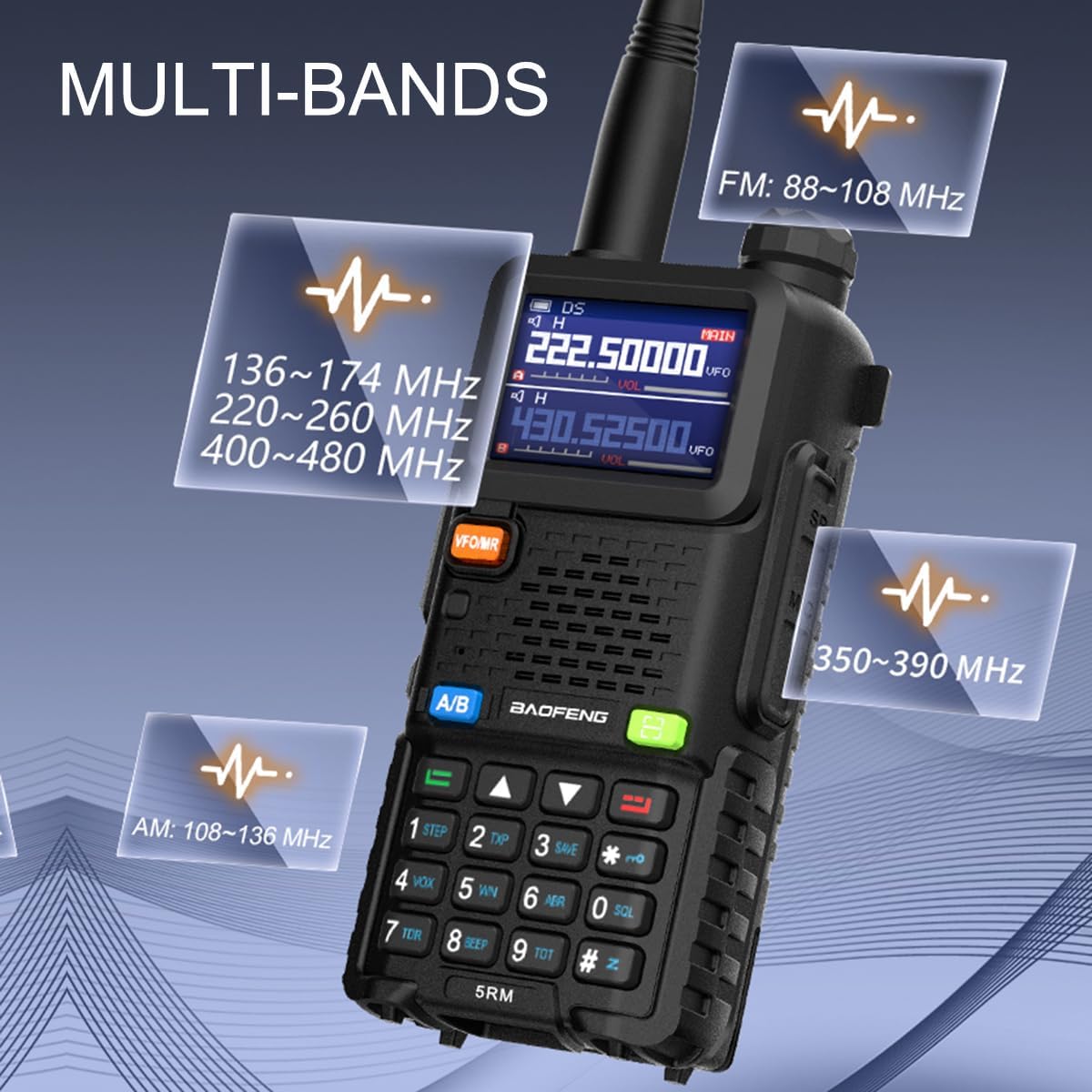
Figure 2: Multi-Band Frequency Support
Видео 1: Бүттүview of BAOFENG 5RM Ham Radio features and long-range capabilities.
3. Орнотуу
3.1 Кутуда эмне бар
The BAOFENG 5RM package includes the following components:
- BAOFENG 5RM Radio with Original Antenna (x2)
- 2500mAh Rechargeable Battery (x2)
- Earpiece (x2)
- Desktop Charger (x2)
- Кур клип (x2)
- Кол боосу (x2)
- Колдонуучунун колдонмосу (x1)

3-сүрөт: Пакеттин мазмуну
3.2 Алгачкы Ассамблея
- Антеннаны тиркөө: Screw the antenna clockwise onto the connector at the top of the radio until secure.
- Батареяны орнотуу: Align the battery pack with the grooves on the back of the radio and slide it upwards until it clicks into place.
- Attach the Belt Clip (Optional): Secure the belt clip to the back of the radio using the provided screws.
- Батареяны заряддоо: Before first use, fully charge the battery using one of the methods described in Section 5.
4. Иштөө нускамалары
4.1 Негизги башкаруу каражаттары
- Кубат/үн баскычы: Located at the top, turn clockwise to power on and increase volume, counter-clockwise to decrease volume and power off.
- Антенна: Connects to the top of the radio.
- PTT (баскыч менен сүйлөшүү) баскычы: Located on the left side, press and hold to transmit, release to receive.
- VFO/MR Button: Switches between Frequency Mode (VFO) and Channel Mode (MR).
- A/B баскычы: Selects the upper (A) or lower (B) display frequency for operation.
- Баскычтоп: Used for direct frequency input, menu navigation, and function activation.
- MENU Button (Green): Радионун жөндөөлөр менюсуна кирет.
- EXIT Button (Red): Менюдан чыгат же операцияларды жокко чыгарат.
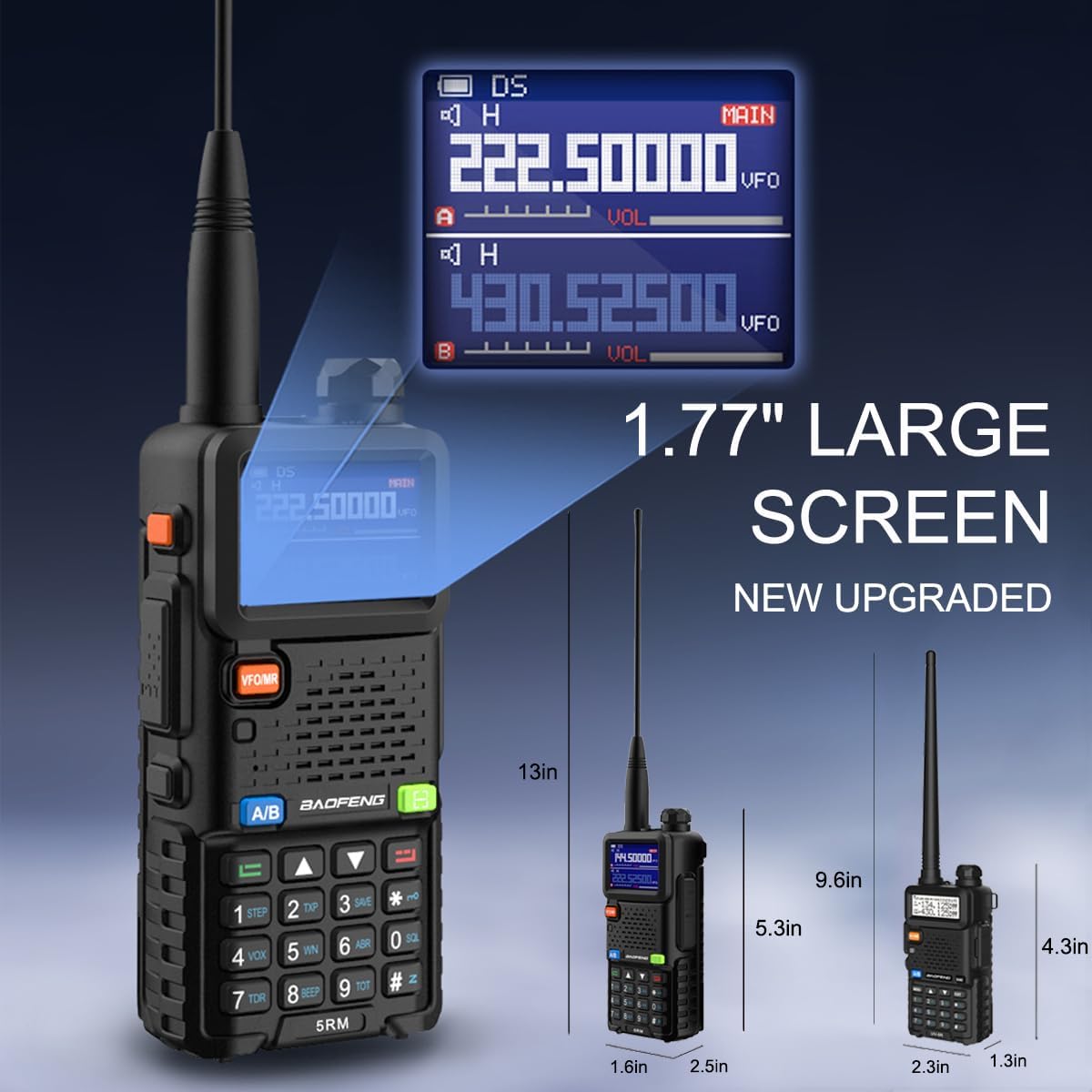
Figure 4: 1.77" Large Color Display
4.2 Multi-Band Operation
The BAOFENG 5RM supports a wide range of frequencies for both reception (RX) and transmission (TX):
- FM: 65-108 МГц (RX)
- AM Aircraft Band: 108-136 МГц (RX)
- VHF: 136-174MHz (RX/TX)
- 1.25M: 220-260MHz (RX/TX)
- UHF: 400-480MHz (RX/TX)
- UHF Extended: 480-520 МГц (RX)
- Police Band: 350-390 МГц (RX)
To switch between bands, use the A/B button to select the desired display, then enter the frequency directly or use the VFO/MR button to navigate channels.
Video 2: Demonstration of BAOFENG 5RM's multi-band capabilities and 10W high power output.
4.3 NOAA Weather Receiver
The radio includes pre-programmed NOAA weather channels to keep you informed of severe weather conditions. To activate the NOAA Weather function, press and hold the '0' key on the keypad.

Figure 5: Activating NOAA Weather
4.4 One-Key Frequency Match
The one-touch search and copy function allows for quick frequency matching with other radios. Press and hold the 'green scan' key to activate this feature. Press '#' to switch the band during the matching process.

Figure 6: One-Key Frequency Match Feature
4.5 Программалоо
The BAOFENG 5RM supports programming via CHIRP software and phone applications. This allows for easy management of memory channels, frequencies, and other settings.
- CHIRP Programming: Connect the radio to a computer using a programming cable (not included) and use CHIRP software to program frequencies and settings. Ensure the radio is turned on before programming.
- Phone Programming: Utilize compatible phone applications (e.g., Oudi Master) with a Bluetooth programming adapter (not included) to read, program, and save channel lists. This is convenient for on-the-go adjustments.
Video 3: Programming demonstration for a similar BAOFENG model (K5Plus) using CHIRP software.
Video 4: K5 Plus Function overview, including programming options.
4.6 Чыгуу кубаттуулугу
The BAOFENG 5RM offers adjustable power output settings (High, Middle, Low) up to 10 watts. Higher power output increases range but consumes more battery. Select the appropriate power level for your communication needs.
Video 5: BAOFENG 5RM Ham Radio highlighting 10W max output and other features.
5. Заряддоо
The BAOFENG 5RM offers multiple convenient charging methods for its 2500mAh battery:
- USB-C Direct Charging: Connect a USB-C cable directly to the radio for charging from a power bank, car charger, or USB wall adapter.
- Үстөл үстүндөгү кубаттагыч: Place the radio or just the battery into the included desktop charging cradle.

Figure 7: USB-C and Desktop Charging Options
6. Техникалык тейлөө
Proper maintenance ensures the longevity and optimal performance of your BAOFENG 5RM radio:
- Тазалоо: жумшак колдонуу, damp Радионун сыртын тазалоо үчүн кездеме колдонуңуз. Катуу химиялык заттардан же абразивдүү тазалоочу каражаттардан алыс болуңуз.
- Батареяга кам көрүү: Store batteries in a cool, dry place. Avoid overcharging or fully discharging the battery frequently.
- Антеннага кам көрүү: Handle the antenna carefully to prevent bending or damage. Ensure it is securely attached during use.
- Сактагыч: When not in use for extended periods, remove the battery and store the radio in a dry, dust-free environment.
7. Кыйынчылыктарды
If you encounter issues with your BAOFENG 5RM, consider the following common troubleshooting steps:
- Кубат жок: Батарея туура орнотулганын жана заряддалганын текшериңиз. Кубат/үн баскычы күйүк экенин текшериңиз.
- Берүү/кабыл алуу мүмкүн эмес: Verify that the antenna is securely attached. Check the frequency and channel settings. Ensure the battery has sufficient charge.
- Начар аудио сапаты: Adjust the volume. Check the earpiece connection if in use. Ensure you are within range of the other radio.
- Программалоо маселелери: Ensure the programming cable is correctly connected and the correct drivers are installed on your computer. Verify the radio is turned on during programming.
For persistent issues, refer to the detailed user manual included in the package or contact customer support.
8. Техникалык шарттар
| Өзгөчөлүк | Спецификация |
|---|---|
| Элемент Салмагы | 2.48 фунт |
| Пакеттин өлчөмдөрү | 8.78 x 7.87 x 4.09 дюйм |
| Элемент моделинин номери | 5RM |
| Батареялар | 2 литий-иондук батарейкалар талап кылынат (кошулган) |
| Бренд | БАОФЕНГ |
| Түс | Кара |
| Каналдардын саны | 999 |
| Өзгөчөлүктөр | Frequency Copy, Integrated Flashlight, Long Range, NOAA Weather Receiver, USB C Charging |
| Жыштык диапазону | VHF/UHF (See Section 4.2 for detailed ranges) |
| Сүйлөшүү диапазону максималдуу | 8 километр |
| Сууга туруктуулук деңгээли | Сууга чыдамдуу эмес |
| Өндүрүүчү | Fujian Baofeng Electronics Co.,Ltd. |
9. Кепилдик жана колдоо
For any problems or suggestions regarding your BAOFENG 5RM ham radio, please feel free to contact us through the Amazon platform. We are committed to assisting you wholeheartedly.


