1. Киришүү
This manual provides detailed instructions for the safe and effective operation of your MakerHawk Digital Temperature Controller Thermostat Timer, encompassing both the TC816 and TC819 models. These devices are designed for precise temperature control and timing functions across various applications, including greenhouses, reptile enclosures, incubators, and home brewing.
Please read this manual thoroughly before operating the device to ensure proper usage and to prevent damage.
2. Коопсуздук маалыматы
- Ensure the power supply matches the device's specifications (230V AC 50HZ).
- Do not exceed the maximum output load (Max 16A 3680W).
- Keep the device and sensor away from water or excessive moisture.
- Аппаратты ажыратпаңыз же өзгөртпөңүз. Бардык тейлөөлөрдү квалификациялуу кызматкерлерге тапшырыңыз.
- Аппараттын айланасында туура желдетүүнү камсыз кылыңыз.
- The safety socket design prevents children from misinserting objects. However, always supervise children around electrical devices.
- The PC flame-retardant material provides high-temperature flame retardancy for safety.
3. Продукт бүтүп калдыview
The MakerHawk Digital Temperature Controller system includes two distinct models: TC816 and TC819, each offering unique features for versatile temperature and timing control.

3.1-сүрөт: Бүттүview of TC816 and TC819 Digital Temperature Controllers. The image displays both units side-by-side, showcasing their LCD screens, control buttons, and the attached temperature probes.
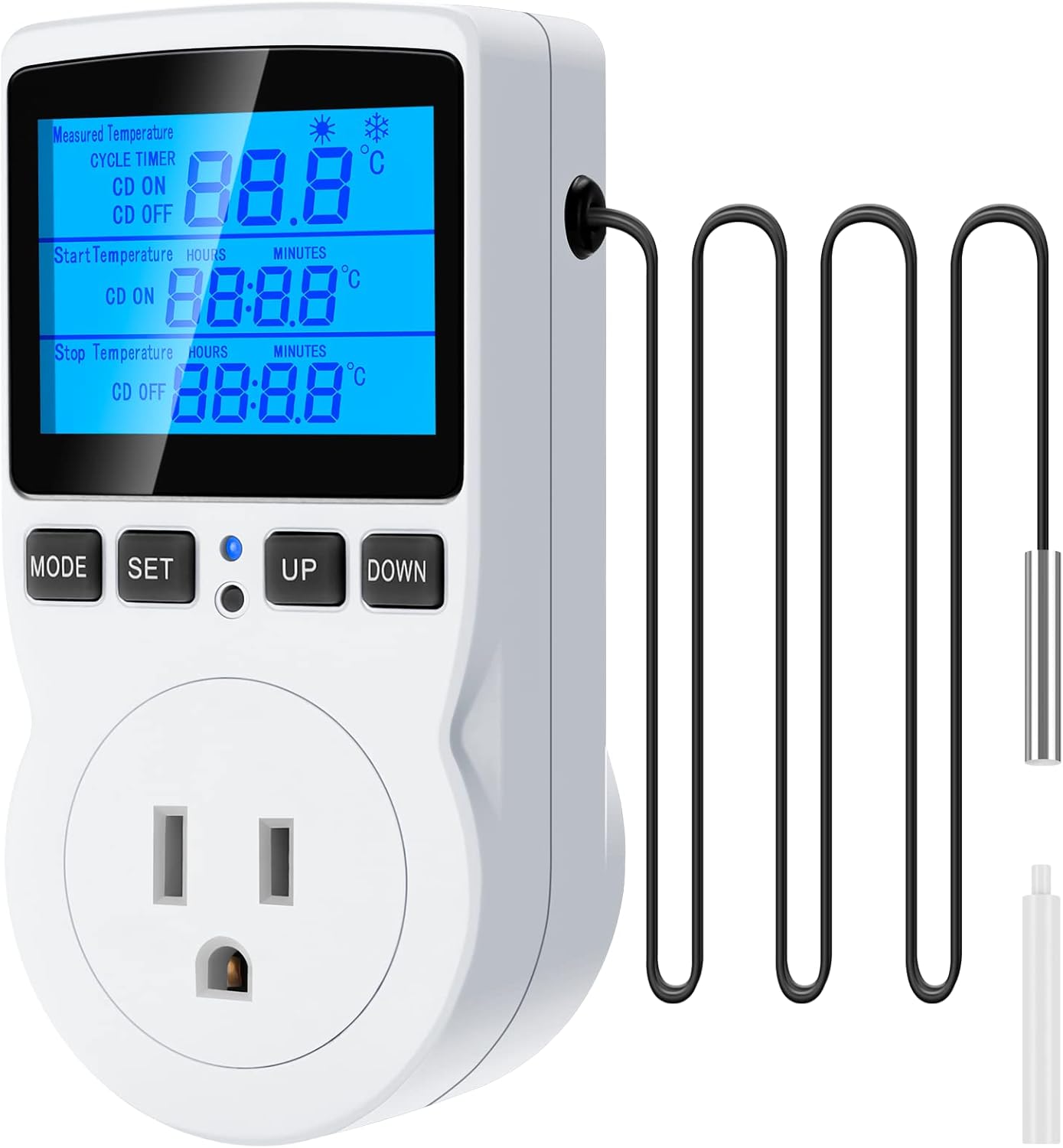
3.2-сүрөт: MakerHawk TC816 Unit. This image focuses on the TC816 model, highlighting its display showing measured temperature, cycle timer settings, and start/stop temperatures, along with its control buttons (MODE, SET, UP, DOWN) and power outlet.
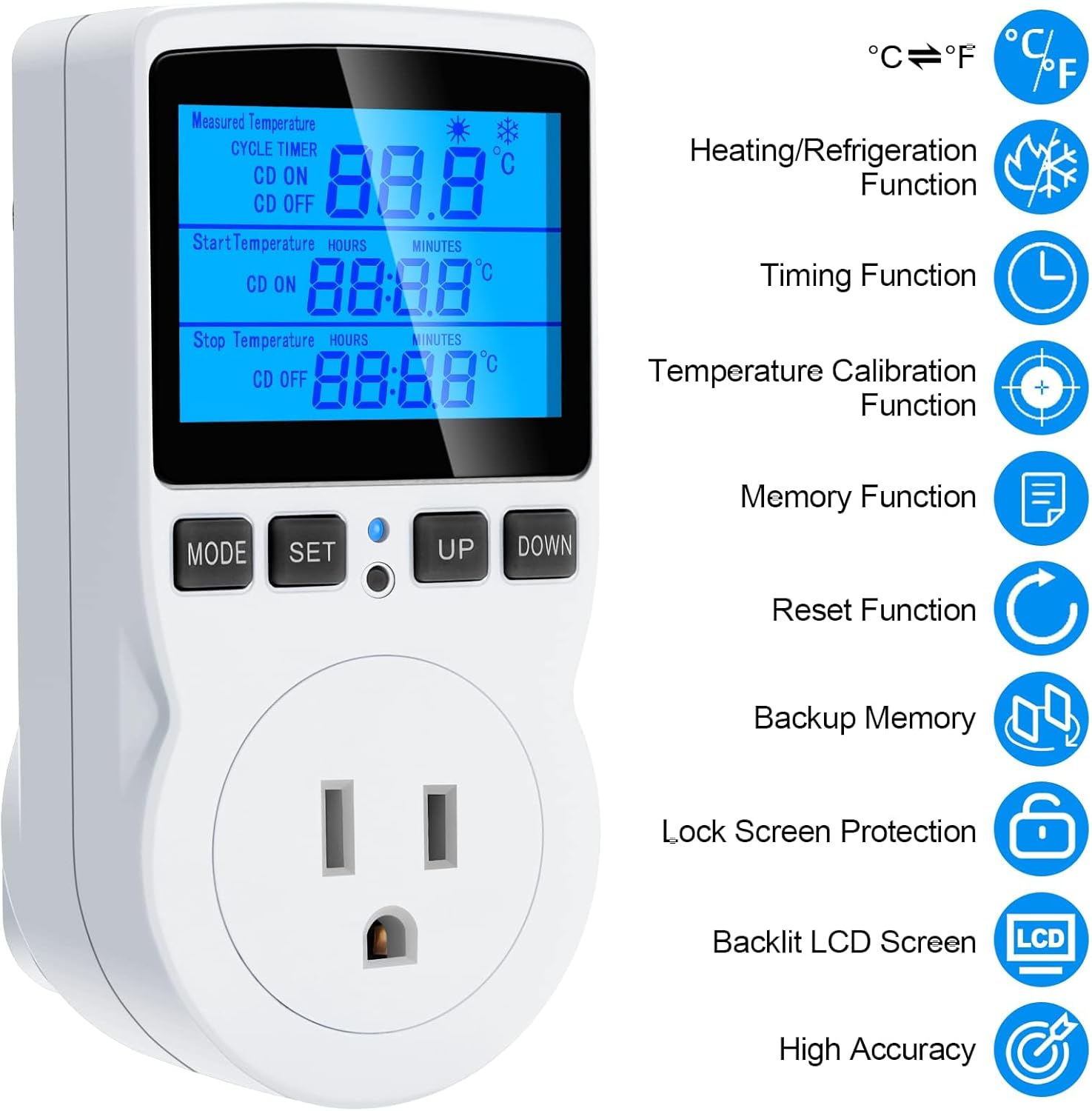
3.3-сүрөт: TC816 Key Features. This diagram illustrates the various functions of the TC816, such as Celsius/Fahrenheit switching, heating/refrigeration, timing, temperature calibration, memory, reset, backup memory, lock screen protection, backlit LCD screen, and high accuracy.

3.4-сүрөт: TC819 Key Features. Similar to the TC816, this diagram highlights the functions of the TC819, including Celsius/Fahrenheit switching, heating/refrigeration, timing, temperature calibration, memory, reset, backup memory, lock screen protection, backlit LCD screen, and high accuracy.
4. Орнотуу
4.1 Баштапкы туташуу
- Unpack the temperature controller and its accessories.
- Insert the temperature probe into the designated port on the controller. Ensure it is securely connected.
- Plug the temperature controller into a standard 230V AC 50HZ power outlet. The display will illuminate.
- Plug your heating or cooling device (e.g., heater, fan, pump) into the controlled outlet on the temperature controller.
4.2 Зондду жайгаштыруу
Place the temperature probe in the environment where you wish to monitor and control the temperature. Ensure the probe is not directly exposed to heat sources or drafts that could skew readings. For liquids, ensure the probe is fully submerged if applicable.
5. Иштөө нускамалары
5.1 General Operation (Both Models)
- Күйгүзүү/өчүрүү: The device powers on automatically when plugged in.
- Дисплей: The LCD screen displays the measured temperature, set parameters, and current mode.
- Celsius/Fahrenheit Switching: For TC819, press and hold the SET button for 3 seconds to switch between °C and °F. For TC816, this function is typically integrated into the settings menu.
- Жарыкты башкаруу: For TC819, press the ылдый button to turn off the backlight. Press any button to turn it on again.
- Эстутум функциясы: All current settings are saved automatically after power off.
5.2 TC816 Specific Modes and Settings
The TC816 offers various timing and temperature control modes:
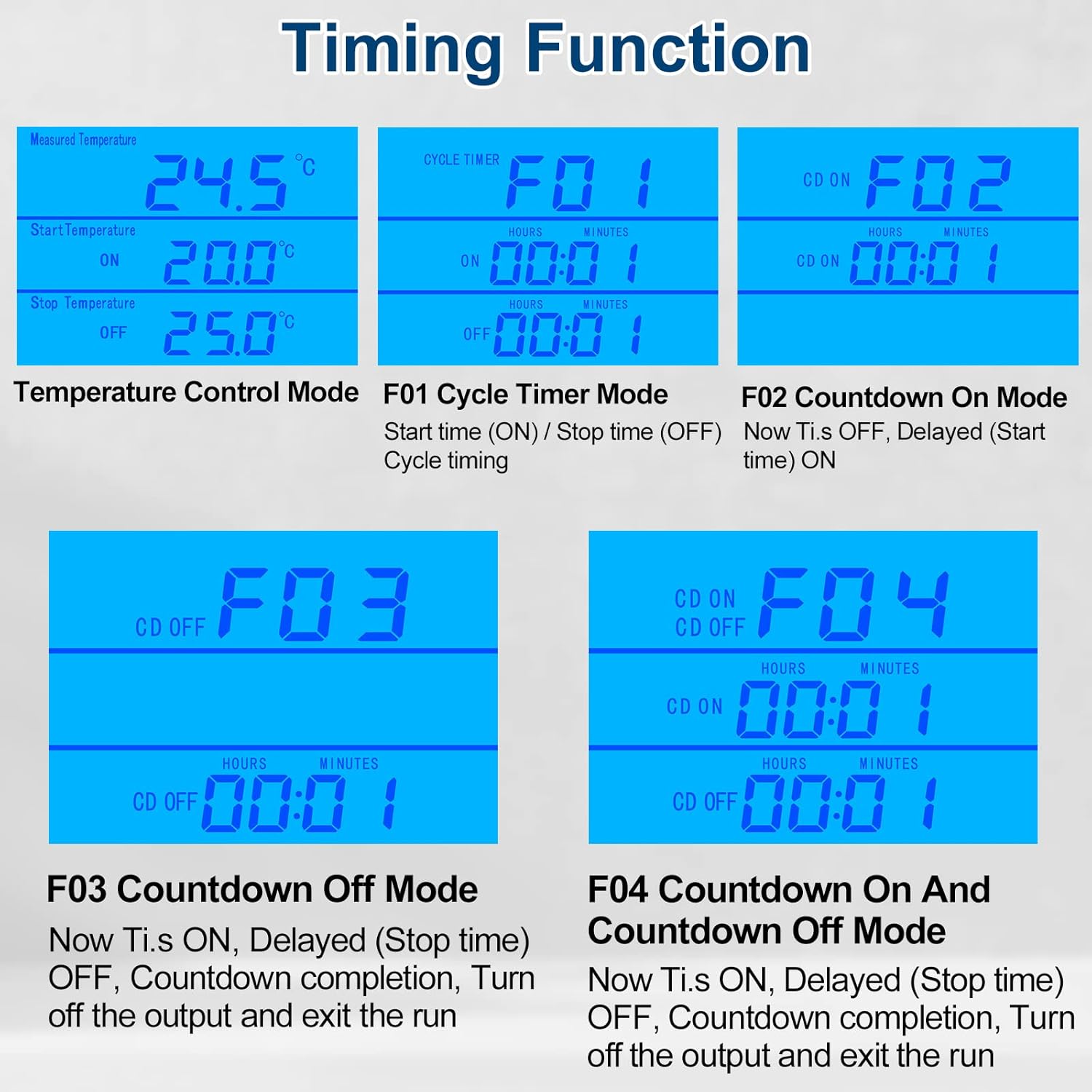
5.1-сүрөт: TC816 Timing Functions. This image displays the four main timing modes of the TC816: F01 (Cycle Timer), F02 (Countdown On), F03 (Countdown Off), and F04 (Countdown On and Countdown Off), along with brief descriptions of each.
- F01 Cycle Timer Mode: Sets a repeating ON/OFF cycle. Useful for intermittent operation.
- F02 Countdown On Mode: The device remains OFF for a set countdown period, then turns ON.
- F03 Countdown Off Mode: The device remains ON for a set countdown period, then turns OFF.
- F04 Countdown On and Countdown Off Mode: Combines F02 and F03, allowing for a delayed ON followed by a delayed OFF.
Температура диапазонун орнотуу:
- басыңыз SET button to enter temperature setting mode.
- колдонуу UP жана ылдый buttons to adjust the start temperature.
- Басыңыз SET again to move to the stop temperature setting.
- Колдонуу UP жана ылдый to adjust the stop temperature.
- Басыңыз SET ырастоо жана чыгуу.
Temperature Calibration (TC816):
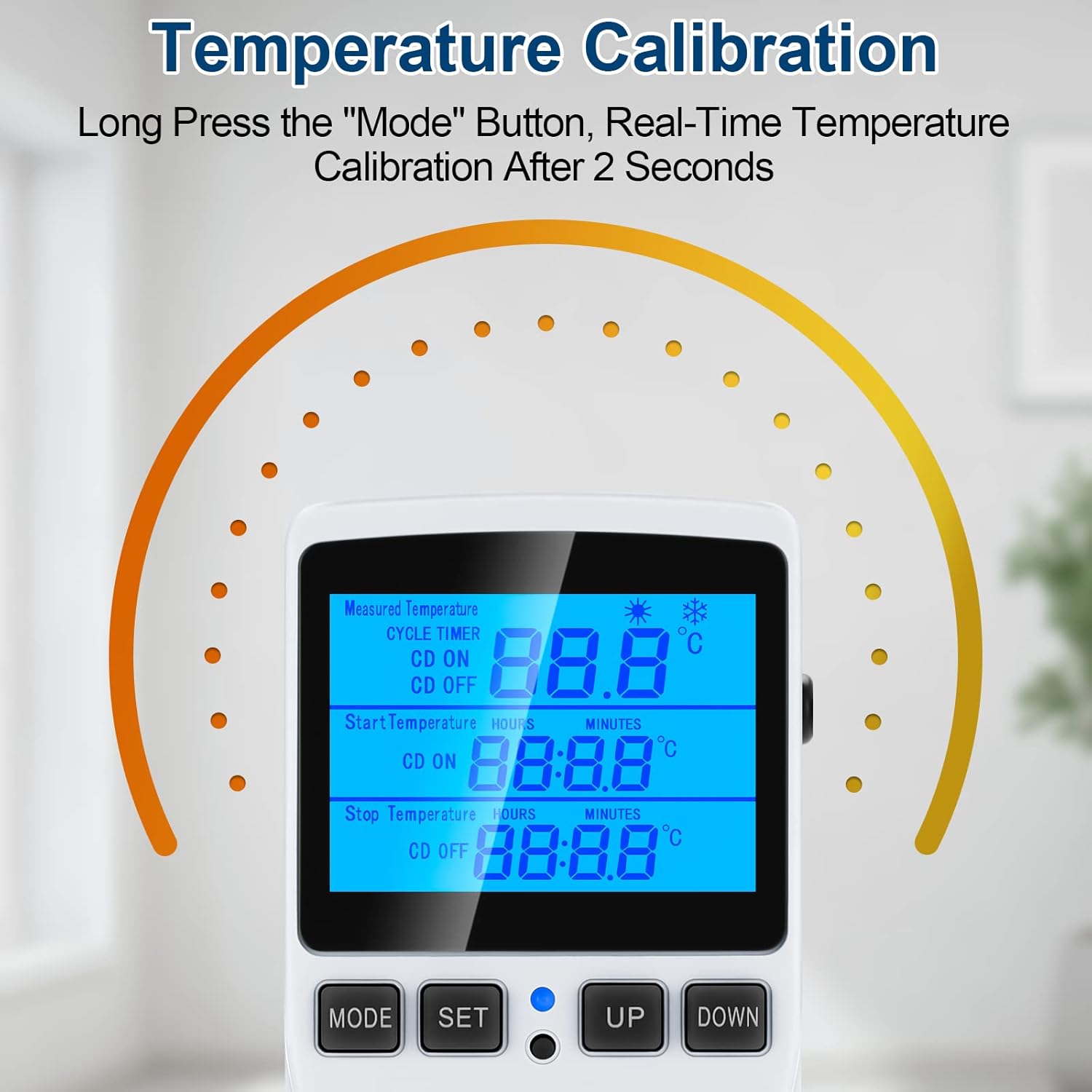
5.2-сүрөт: TC816 Temperature Calibration. This image illustrates the process of calibrating the temperature on the TC816 by long-pressing the 'Mode' button for 2 seconds to enter real-time temperature calibration.
To correct temperature readings if they deviate from a known standard:
- көпкө басыңыз РЕЖИМ button for 2 seconds to enter real-time temperature calibration.
- колдонуу UP жана ылдый buttons to adjust the calibration value.
- Басыңыз РЕЖИМ сактоо жана чыгуу үчүн кайра.
5.3 TC819 Specific Modes and Settings
The TC819 offers 5 distinct modes for temperature and countdown control:

5.3-сүрөт: TC819 Instructions for Use. This diagram details the functions of the TC819's buttons and features, including how to switch modes, set parameters, adjust temperature correction, switch between Celsius/Fahrenheit, control backlight, and the memory function.
- TC MODE (Temperature Control): Standard temperature control mode, allowing setting of start and stop temperatures for heating or cooling.
- CD TC ON MODE (Countdown to Turn On Temperature Control): The device counts down for a set period, then activates temperature control.
- CD TC OFF MODE (Countdown to Turn Off Temperature Control): Temperature control is active, then deactivates after a set countdown period.
- CD ON MODE (Countdown On): The device turns on after a set countdown period.
- CD OFF MODE (Countdown Off): The device turns off after a set countdown period.
Switching Modes (TC819):
- басыңыз РЕЖИМ button (represented by the house icon) to cycle through the 5 available modes.
Setting Temperature and Countdown (TC819):
- басыңыз SET button (represented by the gear icon) to enter setting mode for the currently selected mode.
- колдонуу UP жана ылдый buttons (triangle icons) to adjust values (temperatures, hours, minutes).
- Басыңыз SET again to confirm and move to the next parameter or exit setting mode.
Temperature Correction (TC819):
- басып, кармап туруңуз РЕЖИМ button for 5 seconds to enter real-time temperature calibration.
- колдонуу UP жана ылдый оодарууну тууралоо үчүн баскычтар.
- басып, кармап туруңуз РЕЖИМ button again to exit and save the calibration.
6. Тиркемелер
The MakerHawk Digital Temperature Controllers are highly versatile and can be used in a wide range of environments requiring precise temperature and timing control:

6.1-сүрөт: Diverse Applications. This collage illustrates common uses for the temperature controller, including maintaining optimal conditions for reptiles, aquariums, greenhouses, fermentation processes, refrigerators, and the storage of aquatic products.
- Reptile Enclosures: Maintain precise temperature gradients for reptiles.
- Аквариумдар: Control water temperature for aquatic life.
- Күнөсканалар: Regulate temperature for optimal plant growth.
- Инкубаторлор: Ensure stable temperatures for hatching eggs or culturing.
- Террариумдар: Create controlled environments for various species.
- Freezers/Refrigerators: Monitor and control temperatures for storage.
- Home Brewing/Fermentation: Maintain consistent temperatures crucial for yeast activity.
- Жылытуу төшөктөрү: Control the temperature of heating pads for various uses.
7. Техникалык тейлөө
- Тазалоо: Disconnect the device from power before cleaning. Wipe the exterior with a soft, dry cloth. Do not use abrasive cleaners or immerse the device in water.
- Пробка кам көрүү: Температура датчигин таза жана таштандылардан алыс кармаңыз. Зонддун кабелин өтө ийип же майыштырып албаңыз.
- Сактагыч: Колдонулбаганда, аспапты түз күн нурунан жана өтө температурадан алыс салкын, кургак жерде сактаңыз.
- Текшерүү: Periodically inspect the power cord and probe cable for any signs of damage. Do not use if damaged.
8. Кыйынчылыктарды
| Көйгөй | Мүмкүн себеп | Чечим |
|---|---|---|
| Түзмөк күйбөйт. | Розеткадан электр кубаты жок; түзмөк бузук. | Check power outlet with another device. Ensure device is properly plugged in. |
| Температураны туура эмес окуу. | Probe dirty or damaged; incorrect calibration; probe not in optimal position. | Clean probe. Perform temperature calibration (refer to section 5.2/5.3). Reposition probe away from direct heat/cold sources. |
| Connected appliance not turning on/off. | Incorrect temperature/timer settings; appliance malfunction; device mode error. | Verify start/stop temperatures and timer settings. Check if the appliance works directly from a wall outlet. Ensure correct operating mode is selected (TC, CD ON, etc.). |
| Дисплей ката кодун көрсөтөт. | Sensor fault; internal error. | Check probe connection. If error persists, contact customer support. |
9. Техникалык шарттар
- Модел: TC816, TC819
- Электр камсыздоо: 230V AC 50HZ
- Чыгуу: Макс 16A 3680W
- Температураны көзөмөлдөө диапазону: (Specific range varies by model and setting, typically -40°C to 100°C or equivalent Fahrenheit)
- Убакыт диапазону: 0 to 99 hours 59 minutes
- Материал: PC Flame Retardant Material
- Сенсор: External Temperature Detector
10. Кепилдик жана колдоо
For warranty information and technical support, please refer to the product packaging or contact MakerHawk customer service directly. Keep your purchase receipt as proof of purchase.
Байланыш маалыматы:
- Visit the MakerHawk Store on Amazon: MakerHawk Store
- Refer to your product packaging for specific customer service contact details.


