1. Introduction and Overview
The ATOTO AC-44F6 Watchband Style Wireless Remote Control is designed to provide convenient and safe control over your compatible car stereo system. It allows you to manage audio and media functions without diverting your attention from the road. This remote control features luminous buttons for enhanced visibility in low-light conditions and offers multiple functions for an improved driving experience.
This device is compatible with ATOTO P5, P8, and P9 series portable car stereos. It is not compatible with ATOTO A5, A6, F7, or S8 series units.

Figure 1: ATOTO AC-44F6 Watchband Style Wireless Remote Control.
2. Продукциянын өзгөчөлүктөрү
- Жөнөкөйлөштүрүлгөн башкаруу: Manage your car stereo effortlessly, keeping your focus on the road.
- Бир нече функциялар: Features 5 buttons and a rotary knob, offering 10 functions including voice commands, volume adjustment, track skipping, mute, and play/pause.
- Оңой орнотуу: Equipped with a pre-installed receiver, eliminating the need for complex wiring to the car stereo. Simply map the keys.
- Luminous Keys: Buttons illuminate to assist navigation and control in nighttime driving conditions.

Figure 2: ашыкview of ATOTO AC-44F6 key features.
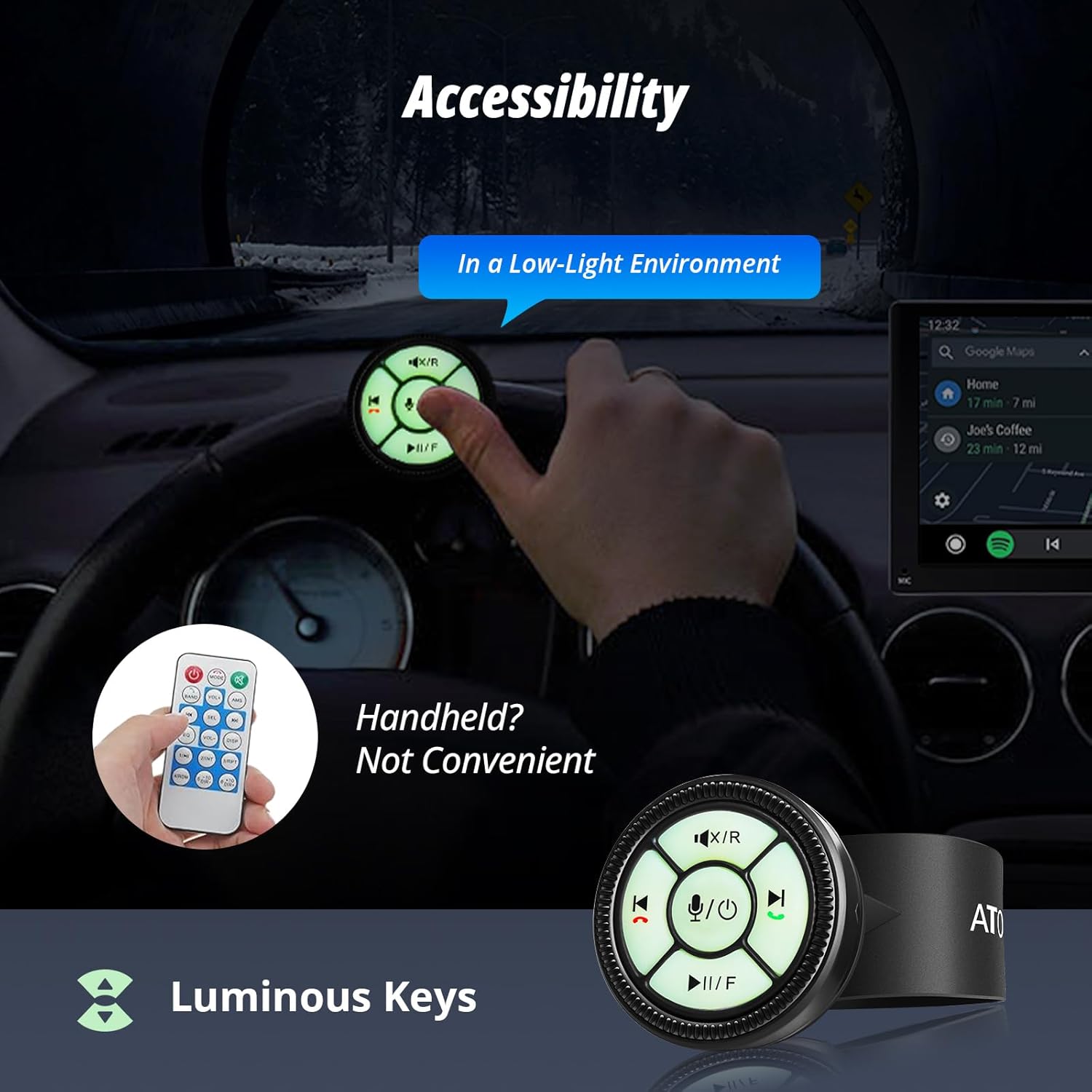
Figure 3: Luminous keys provide visibility in low-light environments.
3. Пакеттин мазмуну
The ATOTO AC-44F6 package includes the following components:
- Main Unit (Wireless Remote Control)
- Battery Cell (CR2025)
- IR Receiver End
Video 1: This video demonstrates the components of a similar ATOTO wireless remote control (AC-44F5), which are identical to the AC-44F6. It shows the main unit, battery cell, and IR receiver end.

Figure 4: The ATOTO AC-44F6 remote control and its IR receiver.
4. Орнотуу жана орнотуу
4.1. Attaching the Remote Control
The AC-44F6 can be installed in two primary ways:
- Around the Steering Wheel: Use the integrated watchband-style strap to secure the remote control directly onto your steering wheel.
- Клей монтаждоо: Utilize the provided adhesive pad to stick the remote control at any convenient location within your vehicle.

Figure 5: The remote can be tied to the steering wheel or pasted at a convenient location.
4.2. Connecting the IR Receiver
The IR receiver should be plugged into the SWC-IR jack of your ATOTO car stereo unit. The AC-44F6 has a pre-installed receiver, simplifying the connection process. Ensure the receiver is securely connected to allow communication between the remote and the stereo.
Video 2: This video demonstrates the installation process of a similar ATOTO wireless remote control (AC-44F5), including connecting the IR receiver to the car stereo's SWC-IR jack.
4.3. Батареяны орнотуу/алмаштыруу
The remote control uses a CR2025 battery. If the remote is unresponsive or its range decreases, the battery may need replacement. To replace the battery, carefully open the remote control unit, remove the old battery, and insert a new CR2025 battery, ensuring correct polarity. Then, reassemble the unit.
Video 3: This video provides instructions on how to replace or install batteries in a similar remote control unit.
5. Операция жана функциялар
The AC-44F6 offers intuitive control over various car stereo functions:
- Үндү көзөмөлдөө: Rotate the edge knob to adjust the volume up or down.
- Ойнотуу/тындыруу: Press the central play/pause button to control music playback. For certain ATOTO car stereo models, this button may also function as a mute button in FM mode.
- Трек навигациясы: Use the left/right arrow buttons to skip to the previous or next track.
- Чалууларды башкаруу: The green button is used to answer incoming calls, while the red button is used to hang up calls.
- Үн жардамчысы: Press the microphone button to activate your car's voice assistant (e.g., Google Assistant, Apple Siri) or to turn the display screen on/off.
- Mute/Rear View: The top button can mute the car stereo or switch to the rear camera view.
- Play/Pause & Front View: The bottom button can play/pause or switch to the front camera view.
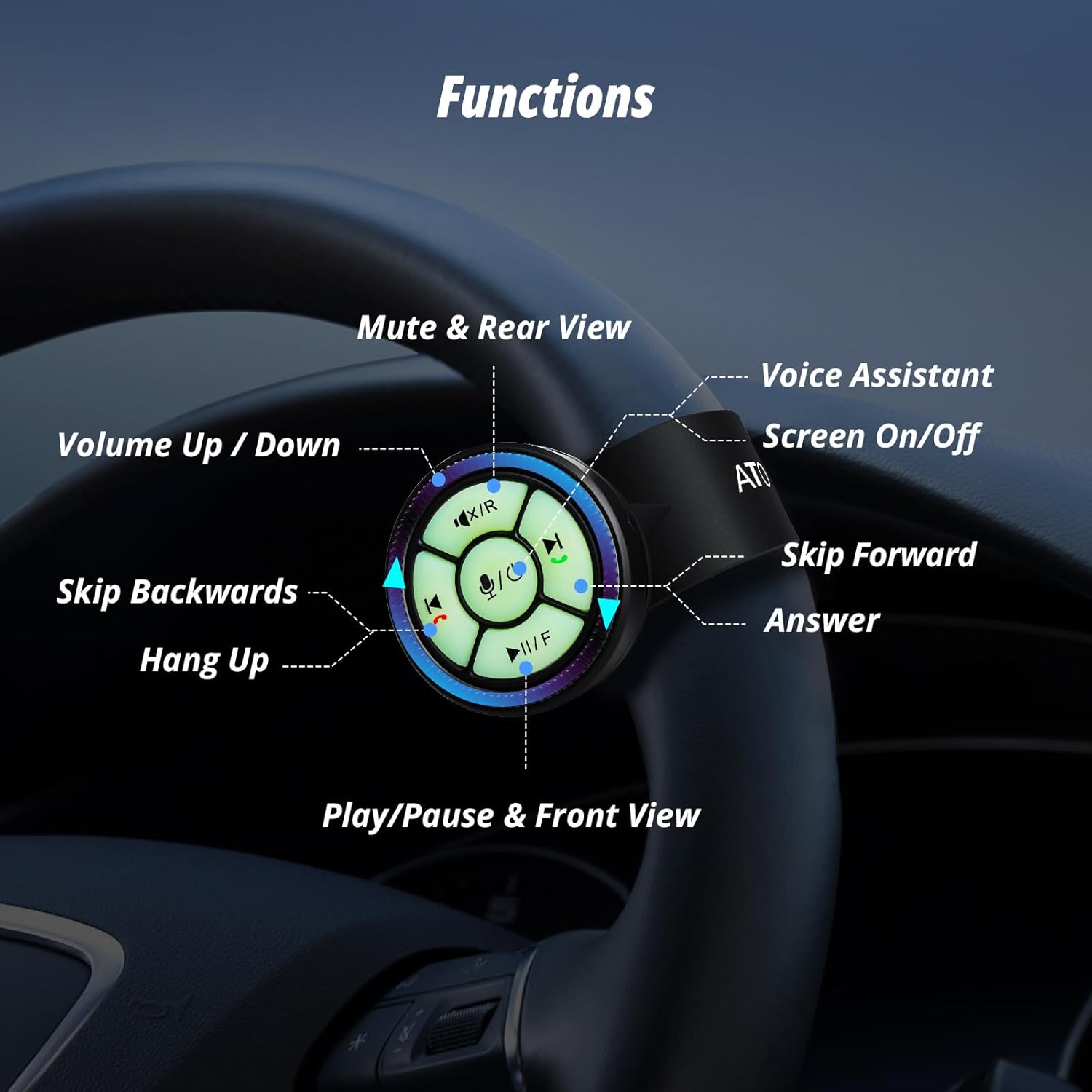
Figure 6: Detailed button functionality of the ATOTO AC-44F6.
Video 4: This video demonstrates how each button on a similar ATOTO wireless remote control (AC-44F5) works with an ATOTO car stereo, including volume, track, and call controls.
5.1. Key Mapping
After installation, you will need to map the keys on the AC-44F6 to the desired functions on your ATOTO car stereo. Refer to your car stereo's user manual for specific instructions on how to access the steering wheel control (SWC) learning interface. Once in the learning interface, follow the on-screen prompts to assign each button on the AC-44F6 to its corresponding function.
Video 5: This video demonstrates the key mapping process for a similar ATOTO wireless remote control (AC-44F8) with an ATOTO car stereo.
6. Шайкештик
The ATOTO AC-44F6 Wireless Remote Control is specifically designed for and compatible with the following ATOTO Portable Car Stereo series:
- ATOTO P5 Series
- ATOTO P8 Series
- ATOTO P9 Series
Бул туура келбейт with ATOTO A5, A6, F7, or S8 series car stereos. While it may work with some third-party car stereos, optimal functionality is guaranteed with the specified ATOTO P-series units.

Figure 7: The AC-44F6 is compatible with ATOTO P5, P8, and P9 series car stereos.
7. Кыйынчылыктарды
If your ATOTO AC-44F6 remote control is not responding to operations, consider the following potential causes and solutions:
- Натыйжалуу аралык: The maximum effective distance of the remote control is 100 cm (approximately 39.4 inches). Ensure the remote is within this range of the IR receiver. The effective distance may decrease if the battery is insufficient or if physical barriers block the transmission of the remote signal.
- Батарея аз: If the battery has low power, the remote may only work when placed very close to the ATOTO car stereo. In this case, replace the CR2025 battery.
- Loose IR Receiver: The IR receiver cable may be loose. Remove it from the ATOTO car stereo and reconnect it securely.
- Incorrect Key Mapping: The remote control may not have learned the key mapping correctly. Refer to Section 5.1 for instructions on how to perform key mapping.
Video 6: This video includes troubleshooting tips for a similar ATOTO wireless remote control (AC-44F5), addressing issues like non-responsiveness due to distance, battery, or receiver connection.
Video 7: This video demonstrates troubleshooting steps related to key mapping for a similar ATOTO wireless remote control (AC-44F8).
8. Техникалык шарттар
- Пакеттин өлчөмдөрү: 2.83 x 2.83 x 1.73 дюйм
- Элемент Салмагы: 2.39 унция
- Модель номери: AC-44F6
- Бренд: ATOTO
- Өзгөчө өзгөчөлүгү: Үн жардамчысы
- Түсү: Кара
- Колдоого алынган түзмөктөрдүн максималдуу саны: 1
- Шайкеш түзмөктөр: Only Compatible with ATOTO P5/P8/P9 Series

Figure 8: Product dimensions of the ATOTO AC-44F6.
9. Кепилдик жана колдоо
ATOTO provides product care for your AC-44F6 Wireless Remote Control. The standard product care period is 12 months from the date of purchase. Additionally, an extended product care of 12 + 6 months may be available. For detailed information regarding warranty terms and conditions, please refer to the official ATOTO webсайтка же кардарларды колдоо менен байланышыңыз.
9.1. Seeking Assistance
If you encounter any issues or have questions regarding your ATOTO AC-44F6, you can seek help via your order center, eproductcase, or by contacting support at atotoglobal.com.
Figure 9: Standard 12-month product care.

Figure 10: Extended 12+6 months product care.


