Introduction
Сатып алганыңыз үчүн рахматasing the VGN V98Pro V2 Gaming Keyboard. This manual provides detailed instructions for setting up, operating, and maintaining your new keyboard. Please read this manual thoroughly before use to ensure optimal performance and longevity of your device.
Пакеттин мазмуну
- VGN V98Pro V2 Gaming Keyboard
- USB-C - USB-A кабели
- Баскыч капкагын тарткыч
- User Manual
Продукт бүттүview
The VGN V98Pro V2 is a high-performance gaming keyboard designed for durability and responsiveness. It features a compact layout with a dedicated number pad, customizable keycaps, and a robust build quality.
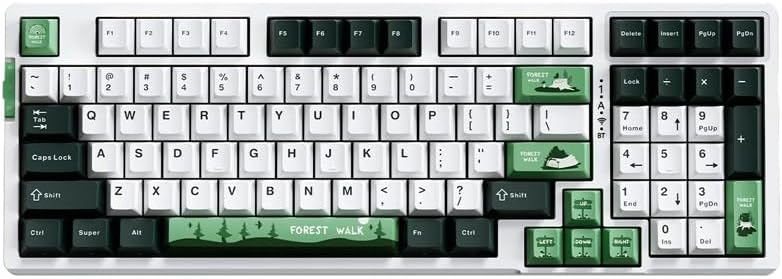
1-сүрөт: Жогорудан төмөн view of the VGN V98Pro V2 Gaming Keyboard. This image displays the full keyboard layout, including the main alphanumeric keys, function row, navigation cluster, and numeric keypad. The keycaps feature a white, dark green, and light green color scheme, with specific keys like 'Forest Walk' and 'Forest' having unique designs.
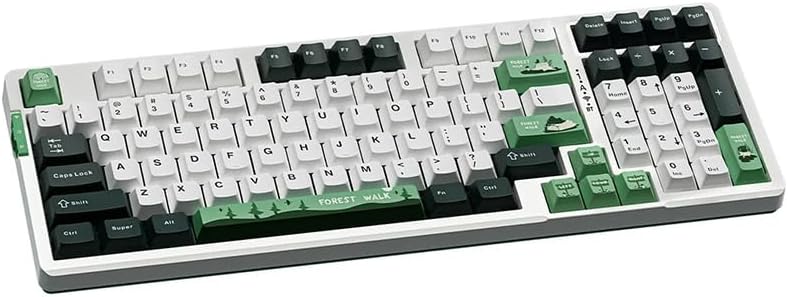
2-сүрөт: Бурчтуу view of the VGN V98Pro V2 Gaming Keyboard. This perspective highlights the profile of the keycaps and the overall ergonomic design of the keyboard. The side view shows the slight incline of the keyboard base and the texture of the keycaps.
Жайгашуу
- Баскычтопту таңгактан чыгаруу: Баскычтопту жана бардык аксессуарларды таңгактан кылдаттык менен чыгарып алыңыз.
- USB кабелин туташтыруу:
- Insert the USB-C end of the provided cable into the port on the back or side of the VGN V98Pro V2 keyboard.
- Insert the USB-A end of the cable into an available USB port on your computer or laptop.
- Системаны таануу: Your operating system should automatically detect and install the necessary drivers for the keyboard. This process may take a few moments. No additional software installation is typically required for basic functionality.
- Сыноо функциясы: Open a text editor or browser and type to ensure all keys are functioning correctly.
Иштөө нускамалары
Негизги колдонуу
The VGN V98Pro V2 functions as a standard QWERTY keyboard. Simply connect it to your computer, and it will be ready for use. The numeric keypad provides convenient data entry.
Функционалдык баскычтардын айкалышы (Fn баскычы)
The keyboard features an Fn (Function) key, typically located near the left Ctrl or Alt key. This key, when pressed in combination with other keys, activates secondary functions. Common Fn key combinations include:
- Fn + F1-F12: Multimedia controls (e.g., volume up/down, play/pause, stop, next/previous track). Specific functions may vary.
- Fn + Windows ачкычы: Оюн учурунда кокусунан басылып калбашы үчүн Windows баскычын кулпулайт/ачат.
- Fn + Жебе баскычтары: May control backlight brightness or effects (if applicable).
- Fn + PrtSc/ScrLk/Pause: May offer additional system functions.
Refer to the keycap legends for specific Fn key functions on your V98Pro V2 keyboard.
Техникалык тейлөө жана кам көрүү
- Тазалоо:
- Тазалоодон мурун клавиатураны компьютерден ажыратыңыз.
- Бир аз жумшак, түксүз кездемени колдонуңуз dampачкыч капкактарын жана шассиди сүртүү үчүн суу же жумшак тазалоо эритмеси менен жабыңыз.
- Ачкычтардын ортосундагы чаң жана таштанды үчүн кысылган абаны колдонуңуз.
- Катуу химиялык заттарды, абразивдерди же эриткичтерди колдонуудан алыс болуңуз.
- Клавиатураны алып салуу: Use the provided keycap puller to carefully remove keycaps for deeper cleaning or replacement. Gently pull straight up to avoid damaging the switch.
- Сактагыч: Клавиатураны таза, кургак жерде, өтө жогорку температурадан жана түз күн нурунан алыс сактаңыз.
- Суюктук таасири: Avoid spilling liquids on the keyboard. If a spill occurs, immediately disconnect it, turn it upside down to drain, and allow it to dry completely before reconnecting.
Проблемаларды чечүү
- Баскычтоп жооп бербейт:
- USB кабели клавиатурага жана компьютерге бекем туташып турганын текшериңиз.
- Баскычтопту компьютериңиздин башка USB портуна туташтырууга аракет кылыңыз.
- Системага тиешелүү маселени болтурбоо үчүн баскычтопту башка компьютерде сынап көрүңүз.
- Компьютериңизди өчүрүп күйгүзүңүз.
- Атайын ачкычтар иштебейт:
- Remove the keycap using the keycap puller and check for any debris obstructing the switch. Clean if necessary.
- Эгер маселе чечилбесе, бул аппараттык катаны көрсөтүшү мүмкүн.
- Input Lag or Delays:
- Компьютериңиздин USB драйверлери жаңыртылганын текшериңиз.
- Avoid connecting the keyboard through unpowered USB hubs. Connect directly to the computer.
Техникалык шарттар
| Бренд | VGN |
| Модель номери | V98PROV2BBICF |
| Баскычтоптун түрү | Оюн клавиатурасы |
| Шайкеш түзмөктөр | Ноутбук, компьютер |
| Байланыш | Зымдуу (USB-C) |
| Элемент Салмагы | 1 кг |
| Түс схемасы | Blueberry Ice Cream - Forest (White, Dark Green, Light Green) |
Кепилдик жана колдоо
The VGN V98Pro V2 Gaming Keyboard comes with a standard manufacturer's warranty. Please refer to the warranty card included in your package for specific terms and conditions. For technical support, troubleshooting assistance, or warranty claims, please contact VGN customer service through their official webсайтка же продуктуну сатып алган сатуучуга.


