1. Киришүү
This manual provides detailed instructions for the setup, operation, and maintenance of your SABLUTE Wireless Keyboard and Mouse Combo, model KC213D. Please read this manual thoroughly before use to ensure optimal performance and longevity of your device.

Image 1.1: SABLUTE Wireless Keyboard and Mouse Combo (Champagne Pink) with USB receiver and batteries.
2. Пакеттин мазмуну
Пакетиңизде бардык буюмдар бар экенин текшериңиз:
- 1 x SABLUTE Wireless Keyboard (KC213D)
- 1 x SABLUTE Wireless Mouse
- 1 x USB 2.4G Receiver (stored in the mouse battery compartment)
- 2 x AAA батарейкалары (клавиатура үчүн)
- 1 x AA батареясы (чычкан үчүн)

Image 2.1: Illustration of the keyboard, mouse, USB receiver, and batteries included in the package.
3. Орнотуу нускамалары
3.1 Батареяны орнотуу
Баскычтоп үчүн:
- Баскычтоптун астыңкы жагындагы батарея бөлүкчөсүн табыңыз.
- Батарея уясынын капкагын ачыңыз.
- Туура полярдуулукту (+/-) камсыз кылып, эки (2) AAA батарейкасын салыңыз.
- Батарея уясынын капкагын жабыңыз.
Чычкан үчүн:
- Locate the battery compartment on the underside of the mouse. The USB receiver is typically stored here.
- Батарея уясынын капкагын ачыңыз.
- Insert one (1) AA battery, ensuring correct polarity (+/-).
- Батарея уясынын капкагын жабыңыз.

Image 3.1: Keyboard battery compartment with AAA batteries and USB receiver.

Image 3.2: Mouse battery compartment with AA battery.
3.2 USB кабылдагычты туташтыруу
- Remove the USB 2.4G receiver from the mouse battery compartment.
- USB кабыл алгычты компьютериңиздеги же ноутбугуңуздагы жеткиликтүү USB-A портуна сайыңыз.
- The keyboard and mouse should automatically connect within a few seconds. No additional drivers are typically required.
The wireless connection operates on a 2.4G frequency, providing a reliable range of up to 33 feet (10 meters).

Image 3.3: The USB 2.4G receiver and its effective wireless range.
3.3 Шайкештик
This keyboard and mouse combo is compatible with a variety of operating systems and devices:
- Windows операциялык системалары
- macOS
- Chrome OS
- Үстөл компьютерлери
- Ноутбуктар
- Chromebook'тар
- Dell Inspiron, HP ENVY, HUAWEI MateBook, Macbook Air, iMac, Personal Computer, Television (with USB-A port)
Эскертүү: A USB-C dongle is not included. This combo cannot connect directly to tablets or phones without an appropriate adapter.

Image 3.4: Visual representation of compatible operating systems and device types.
4. Иштөө нускамалары
4.1 Ergonomic Design Features
The keyboard is designed for comfort during extended use:
- Интегралдык билек эс алуу: Features a 2.8-inch wide wrist rest to provide support and reduce strain.
- 10° Tilt Angle: The keyboard is designed with a 10-degree tilt for a more natural typing posture.

Image 4.1: The ergonomic wrist rest and 10-degree tilt angle of the keyboard.
4.2 Integrated Phone and Tablet Holder
The keyboard includes a built-in holder for mobile devices:
- The holder accommodates phones and tablets up to 11.9 inches in width.
- Dimensions of the holder: 8.87 inches (length) x 0.59 inches (width).

Image 4.2: A tablet positioned in the keyboard's integrated holder.
4.3 Мультимедиа жана кыска жол баскычтары
The keyboard features 6 multimedia hotkeys for quick access to common functions:
- Мурунку бет: Navigates to the previous page in a browser or document.
- Кийинки бет: Navigates to the next page in a browser or document.
- Refresh/Search: Refreshes the current page or activates search function.
- Издөө: Opens the search utility.
- Stop Loading: Halts the loading of a web бет.
- Калькулятор: Opens the system calculator.

Сүрөт 4.3: Детальдуу view of the dedicated multimedia and shortcut keys.
4.4 Silent Typing and Clicking
- The keyboard utilizes soft membrane keys designed to reduce typing noise by up to 95%.
- The wireless mouse features Silent Micro Motion technology, resulting in nearly silent clicks.

Image 4.4: Comparison of noise levels, highlighting the 95% noise reduction of the combo.
4.5 Чычкан менен иштөө
The wireless mouse is equipped with 6 buttons and adjustable tracking speed:
- 6 баскычтуу дизайн: Includes standard left/right click, scroll wheel, DPI adjustment, and forward/backward buttons.
- 3 Levels of Tracking Speed (DPI): Adjust the mouse sensitivity to your preference. Press the DPI button (usually located below the scroll wheel) to cycle through the settings.
- Алдыга/Артка баскычтары: Located on the side of the mouse for convenient navigation in web браузерлер же file изилдөөчүлөр.
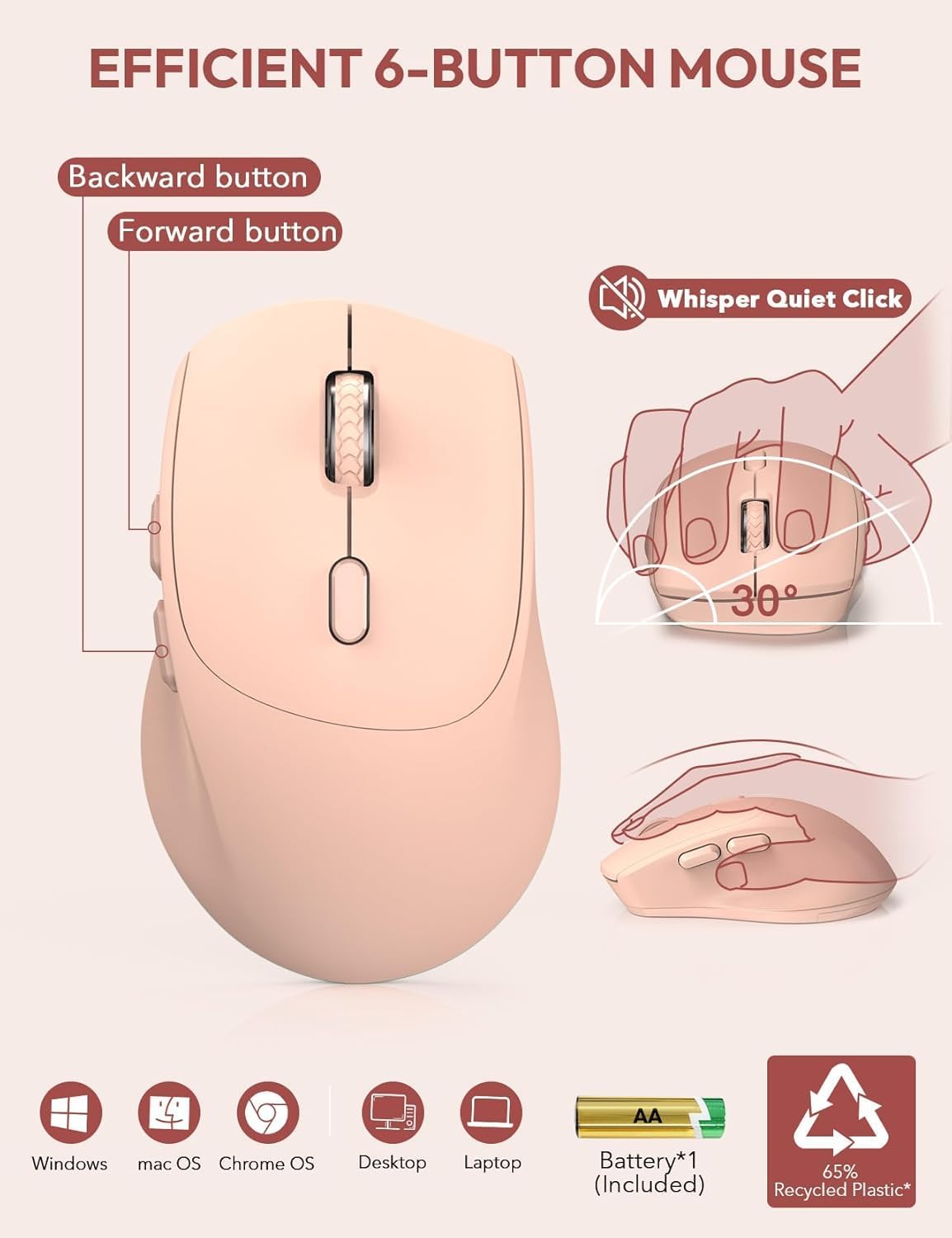
Image 4.5: Features of the 6-button mouse, including silent click and ergonomic design.
4.6 Энергияны үнөмдөө функциясы
Батареянын кубатын үнөмдөө үчүн, клавиатура жана чычкан автоматтык түрдө уйку режимине ээ:
- Авто уйку режими: Both devices will enter sleep mode after 10 minutes of inactivity.
- Quick Wake-up: To wake the keyboard, press any key. To wake the mouse, click any button. The devices will become active within 1 second.
- Узартылган күтүү режими: Provides up to 365 days of standby time for the keyboard and up to 400 hours of working time for the mouse on a single set of batteries.

Image 4.6: Details on the power-saving functions and battery life.
5. Техникалык тейлөө
Proper maintenance ensures the longevity and performance of your SABLUTE Wireless Keyboard and Mouse Combo:
- Тазалоо: Баскычтоптун жана чычкандын беттерин тазалоо үчүн жумшак, кургак чүпүрөктү колдонуңуз. өжөр кир үчүн, бир аз гamp жумшак самын менен кездеме колдонсо болот, бул аппаратка суюктук кирбесин.
- Батареяны алмаштыруу: Replace batteries when performance degrades or the low battery indicator (if present) illuminates. Always use new batteries of the specified type (AAA for keyboard, AA for mouse).
- Сактагыч: Түзмөктөрдү күн нурунан жана экстремалдык температурадан алыс салкын, кургак жерде сактаңыз.
- USB кабыл алгыч: When not in use, the USB receiver can be stored in the mouse's battery compartment to prevent loss.
6. Кыйынчылыктарды
If you encounter issues with your SABLUTE Wireless Keyboard and Mouse Combo, refer to the following common solutions:
- Түзмөк жооп бербейт:
- Ensure the USB receiver is securely plugged into a functional USB-A port on your computer.
- Клавиатурадагы жана чычкандагы батарейкалар туура орнотулганын жана жетиштүү заряддалганын текшериңиз. Зарыл болсо, алмаштырыңыз.
- Диапазон көйгөйлөрүн болтурбоо үчүн баскычтопту жана чычканды USB кабыл алгычка жакыныраак жылдырыңыз.
- Try plugging the USB receiver into a different USB-A port, preferably directly on your computer rather than a USB hub, as some hubs may cause connectivity issues.
- USB донгл жок:
- The USB receiver is typically stored in a sealed bag within the product packaging or inside the mouse's battery compartment. Please check all packaging materials and the mouse compartment carefully.
- If still missing, contact customer support for assistance.
- Кечүү же үзгүлтүктүү туташуу:
- Ensure there are no large metallic objects or other wireless devices (like Wi-Fi routers, cordless phones) operating too close to the receiver, which could cause interference.
- As noted in reviews, connecting the USB receiver directly to a computer's USB-A port, rather than a USB-A hub, can resolve lag issues.
- Keys Wearing Off:
- Keycap legends may show wear over time with heavy use. Gentle typing and regular cleaning can help preserve them.
- If excessive wear occurs prematurely, contact customer support.
- Жалпы көйгөйлөр:
- For any other issues not covered here, refer to the support section or contact SABLUTE customer service.
7. Техникалык шарттар
| Өзгөчөлүк | Деталь |
|---|---|
| Модель номери | KC213D |
| Продукциянын өлчөмдөрү (клавиатура) | 16.54 x 8.27 x 1.38 дюйм |
| Элемент Салмагы | 2.2 фунт |
| Байланыш технологиясы | 2.4G USB зымсыз |
| Баскычтоп батареялары | 2 x AAA батарейкалар (киргизилген) |
| Чычкандын батареялары | 1 x AA батарейка (кошулган) |
| Өзгөчөлүктөр | Эргономикалык билек таянычы, телефон кармагыч, толук өлчөмдөгү, тез баскычтар, аз профессионалдууfile баскычтоп капкагы, суу өткөрбөөчү каражат |
| Шайкеш түзмөктөр | Chromebook, Dell Inspiron, HP ENVY, HUAWEI MateBook, Laptop, Notebook, Macbook Air, iMac, Personal Computer, Television |
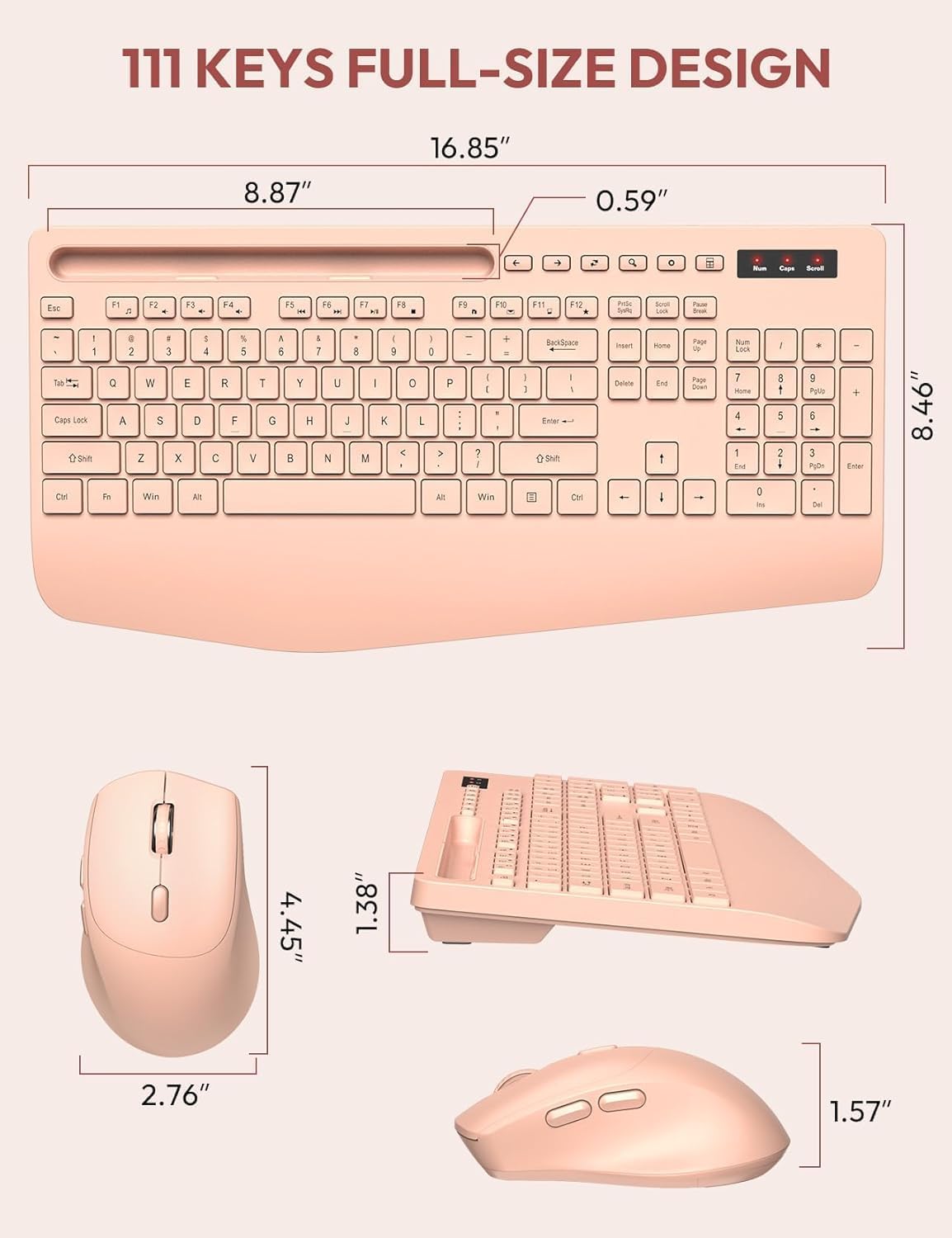
Image 7.1: Detailed dimensions of the keyboard and mouse.
8. Кепилдик жана колдоо
SABLUTE сапаттуу продукцияларды жана кардарлардын канааттануусун камсыз кылууга умтулат.
- 90 күндүк алмаштыруу: We offer a 90-day replacement policy for product defects.
- Өндүрүүчүнүн 360 күндүк кепилдиги: Your product is covered by a 360-day manufacturer warranty from the date of purchase.
- Кардарларды тейлөө: For any inquiries, troubleshooting assistance, or warranty claims, please contact our support team.
Байланыш электрондук почтасы: sabluteservices@outlook.com

Image 8.1: SABLUTE customer support details.


