1. Киришүү
The LAUNCH X431 SmartLink C 2.0 is a state-of-the-art heavy-duty diagnostic module designed for professional vehicle diagnostics. It serves as an advanced interface for connecting with various commercial vehicles, including trucks, buses, and construction machinery, to perform in-depth system analysis. This module is an upgraded version of the X431 HD3, offering superior performance, broader vehicle coverage, and enhanced diagnostic capabilities.
It is engineered to work seamlessly with LAUNCH X431 V+, X431 PRO5, and X-431 PAD series diagnostic tablets, providing a comprehensive solution for reading and clearing diagnostic trouble codes (DTCs), viewing live data streams, and executing special functions such as component replacement resets and coding.

Image: The LAUNCH X431 SmartLink C 2.0 diagnostic module shown alongside its complete accessory kit, including various cables and adapters, all neatly organized within a durable storage case.
2. Орнотуу
2.1 Кутудан чыгаруу жана алгачкы текшерүү
Upon receiving your LAUNCH X431 SmartLink C 2.0, carefully open the packaging and inspect all components for any signs of damage. Ensure all items listed in the 'What's in the Box' section are present.
2.2 Кутуда эмне бар
- X431 SmartLink C 2.0 Diagnostic Module
- Quick Start Guide
- Купуя кат
- Сактоочу куту
- Various diagnostic cables and adapters (e.g., FUSE, Power Cable Clips, HY 16, M/F 12+16, USB Cable, Jumper 10, Lighter Cable, OBDI Adaptor, Electric switch lines, Network Cable, IV-30, BZ-14, OBD-16, Type II OBD-9, MAN-37, OBD 6, CT-9, IV-38, M-12, VO-8, RE-12, OBDII 16)
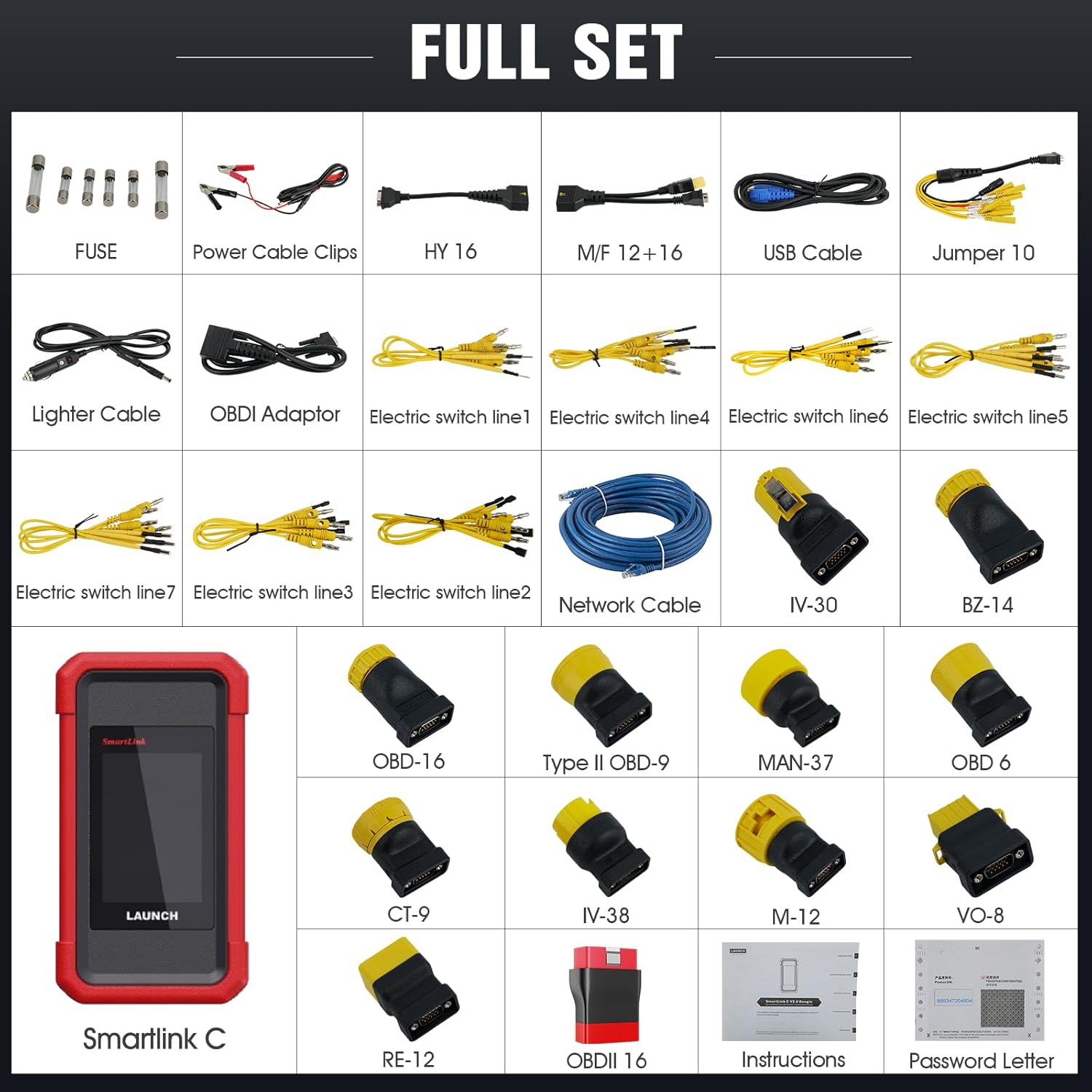
Image: A detailed layout of the complete set of components included with the LAUNCH X431 SmartLink C 2.0, showcasing the main module, various diagnostic cables, power adapters, and connectors.
2.3 SmartLink C 2.0 туташтыруу
The SmartLink C 2.0 module is not a standalone device and requires connection to a compatible LAUNCH diagnostic tablet (X431 V+, PRO5, or PAD series) for operation. Connection can be established via USB, Bluetooth, Wi-Fi, or Ethernet.
- USB туташуу: Connect the SmartLink C 2.0 to your diagnostic tablet using the provided USB cable.
- Bluetooth байланыш: Ensure Bluetooth is enabled on both the SmartLink C 2.0 and your diagnostic tablet. Pair the devices through the tablet's settings.
- Wi-Fi туташуусу: Configure the SmartLink C 2.0 to connect to the same Wi-Fi network as your diagnostic tablet.
- Ethernet туташуусу: For stable and high-speed data transfer, connect the SmartLink C 2.0 to your network via an Ethernet cable.

Image: A visual guide illustrating how to connect the X431 SmartLink C 2.0 to a LAUNCH X431 Pro3S+ diagnostic tablet, highlighting the wireless (Wi-Fi and Bluetooth) connection options for data transfer to a commercial vehicle.
3. Иштөө нускамалары
3.1 Powering On and Interface Overview
Connect the SmartLink C 2.0 to a power source or the vehicle's OBD port. The 3.97-inch TFT display will illuminate, showing the device status. The module features a diagnostic interface, power interface, USB B interface, and DC interface.

Сүрөт: жарылган view of the LAUNCH X431 SmartLink C 2.0, detailing its various interfaces including the diagnostic interface, screen, power interface, USB B interface, and DC interface.
3.2 Диагностикалык функциялар
Once connected to a compatible LAUNCH tablet and the vehicle, the SmartLink C 2.0 enables a range of diagnostic functions:
- Кодду окуу: Retrieve current, pending, and historic diagnostic trouble codes (DTCs) from various vehicle systems.
- Кодду тазалоо: Erase DTCs from the vehicle's ECU after repairs are completed.
- Маалымат агымын талдоо: View live data parameters from vehicle sensors and components in real-time, often displayed as graphs or numerical values.
- Action Tests (Bi-directional Control): Perform active tests on vehicle components to verify their functionality.
- Атайын функциялар: Access specific vehicle functions such as component replacement resets, coding, and adaptations.

Image: A visual comparison highlighting the upgraded visualization and user interface of the LAUNCH X431 SmartLink C 2.0 compared to its predecessor, the X431 HDIII, indicating an easier diagnostic experience.
3.3 Унаанын камтуусу
The SmartLink C 2.0 supports a wide range of heavy-duty vehicles, including but not limited to:
- Trucks (e.g., Hino, FOTIAN, ISUZU Heavy Vehicle, KENWORTH heavy truck, VOLVO heavy truck, Freightliner heavy truck, SCANIA, Mack, Kenworth)
- Buses (e.g., YUTONG BUS, Higer Bus, ZHONGTONG BUS)
- Construction Machinery (e.g., JCB, An Excavator)
- Айыл чарба машиналары
- Трейлерлер
- Деңиз кыймылдаткычтары
It supports brands such as Mitsubishi, Isuzu, Fuso, Mercedes-Benz Commercial Vehicles, Bosch, Weichai, Shangchai, Yuchai, Xichai, Chaogai, Yangchai, and Quanchai, and over 80 other heavy-duty truck brands.

Image: A collage demonstrating the diverse range of commercial vehicles supported by the LAUNCH X431 SmartLink C 2.0, including large trucks, buses, construction excavators, and smaller commercial vehicles.
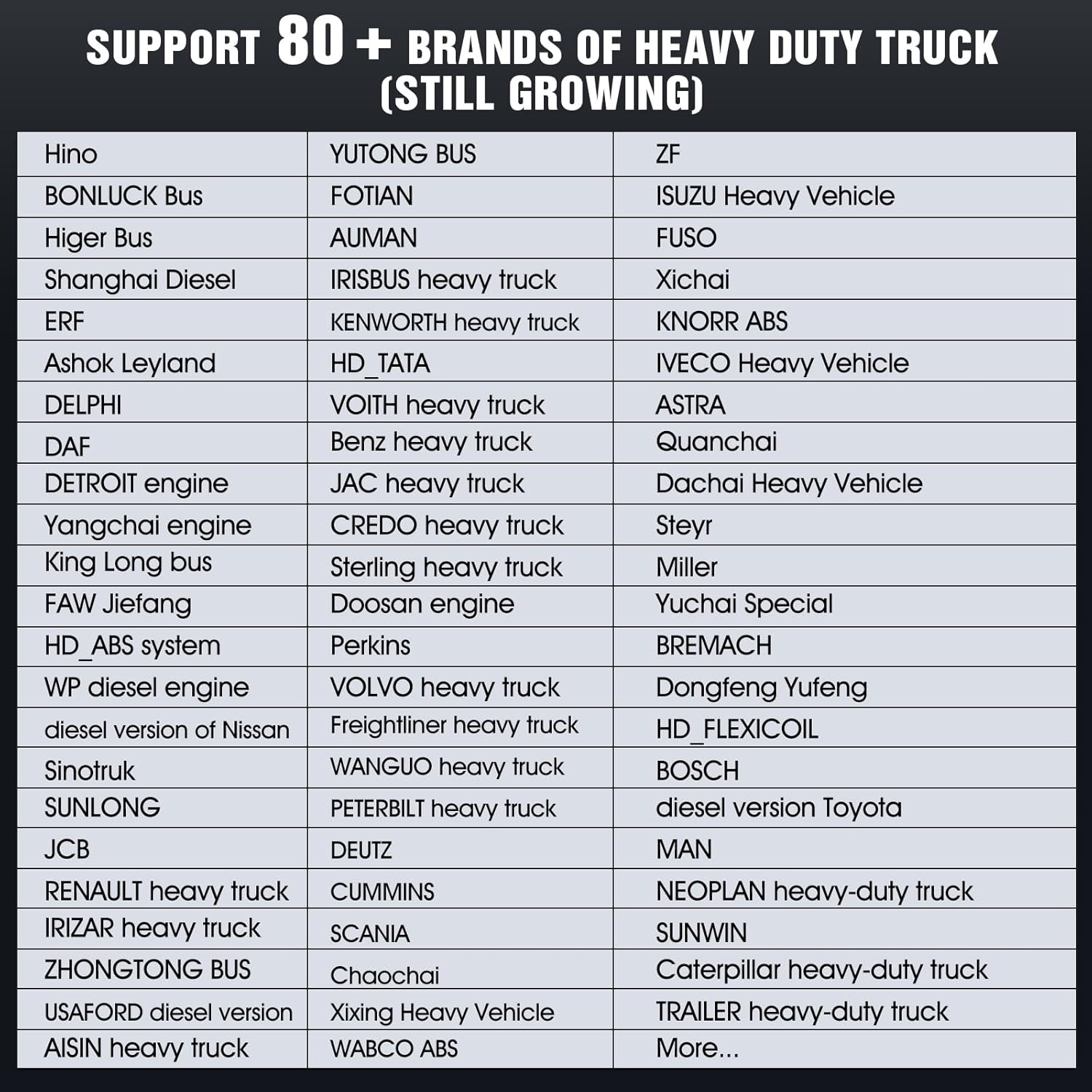
Image: A comprehensive list displaying over 80 heavy-duty truck brands that are supported by the LAUNCH X431 SmartLink C 2.0 diagnostic module, indicating its broad compatibility.
3.4 Remote Diagnosis
The SmartLink C 2.0 features advanced remote diagnostic capabilities. This allows expert technicians to connect to your device remotely to assist in resolving complex diagnostic issues, providing real-time support and guidance.

Image: A conceptual diagram illustrating the cloud and remote diagnosis features of the SmartLink C 2.0, showing data being sent and received between the diagnostic module and a remote server, enabling faster diagnosis.
4. Техникалык тейлөө
- Тазалоо: Аппаратты тазалоо үчүн жумшак, кургак чүпүрөктү колдонуңуз. Абразивдүү тазалагычтарды же эриткичтерди колдонуудан алыс болуңуз.
- Сактагыч: Store the SmartLink C 2.0 in its provided storage case in a cool, dry place when not in use.
- Программалык камсыздоо жаңыртуулары: Regularly check for and install software updates to ensure optimal performance and access to the latest vehicle models and diagnostic features. The product includes 2 years of free updates.
- Кабелдик текшерүү: Periodically inspect all cables and connectors for wear or damage. Replace any damaged components immediately to prevent malfunction.
5. Кыйынчылыктарды
- Түзмөк күйбөй жатат: Ensure the device is properly connected to a power source or the vehicle's OBD port. Check the power cable and vehicle battery.
- Connection issues (Bluetooth/Wi-Fi): Verify that Bluetooth/Wi-Fi is enabled on both the SmartLink C 2.0 and the diagnostic tablet. Ensure devices are within range and there is no interference. For Wi-Fi, confirm the network connection is stable.
- Unable to communicate with vehicle: Check that the diagnostic cable is securely connected to both the SmartLink C 2.0 and the vehicle's OBD port. Ensure the vehicle's ignition is on. Verify that the correct vehicle make/model is selected on the diagnostic tablet.
- Software freezing/slow performance: Ensure the device has sufficient storage space. Perform a software update if available. Restart the device and the diagnostic tablet.
- Diagnostic results are inconsistent: Ensure all connections are secure. Verify that the vehicle's battery voltage is stable. Consult the vehicle's service manual for specific diagnostic procedures.
For complex issues not resolved by these steps, utilize the remote diagnosis feature or contact LAUNCH technical support.
6. Техникалык шарттар
| Өзгөчөлүк | Спецификация |
|---|---|
| Модел | X431 Smartlink C 2.0 |
| CPU | Dual Cortex-A7 and Cortex-M7 processors |
| Операция системасы | Linux |
| ROM | 8 ГБ |
| RAM | 256MB |
| Дисплей | 3.97 дюймдук TFT экран, 320x480 чечилиште |
| Өлчөмдөр | 200мм x 110мм x 47мм |
| Байланыш | USB, Bluetooth, Wi-Fi (2.4/5.0GHz), Ethernet |
| Power Input | 9V DC - 36V DC |
| Колдоого алынган тилдер | English, German, French, Spanish, Italian, Chinese, Japanese, Russian |
| Элемент Салмагы | 12.92 фунт (таңгакталган) |
| Пакеттин өлчөмдөрү | 16.8 x 14 x 6.65 дюйм |

Image: An illustration highlighting the multiple transmission modes supported by the SmartLink C 2.0, including USB, Wi-Fi, Bluetooth, and Ethernet, which enhance diagnostic convenience.
7. Кепилдик жана колдоо
7.1 Кепилдик маалыматы
The LAUNCH X431 SmartLink C 2.0 comes with a manufacturer's warranty. Please refer to the 'Confidential Letter' included in your package for specific warranty terms and conditions. Keep your proof of purchase for warranty claims.
7.2 Техникалык колдоо
For technical assistance, software updates, or any operational queries, please contact LAUNCH customer support. Leveraging the SmartLink C 2.0's remote diagnostic capabilities, expert technicians can provide online assistance to resolve complex diagnostic issues efficiently.
Visit the official LAUNCH webколдоо булактары, көп берилүүчү суроолор жана байланыш маалыматы үчүн сайт.


