1. Киришүү
This manual provides detailed instructions for the installation, operation, and maintenance of your Tenveo VHD630A AI Auto Tracking PTZ Camera and KB200 Joystick Controller. This bundle is designed for high-quality video capture and live streaming in various environments, including church services, video conferences, and educational settings. Please read this manual thoroughly before using the product to ensure optimal performance and safety.
2. Коопсуздук маалыматы
- Ensure the product is installed in a stable location to prevent falls.
- Do not expose the camera or controller to moisture or extreme temperatures.
- Аппарат менен кошо берилген кубат адаптерин гана колдонуңуз.
- Түзмөктү бөлүктөргө бөлүп алуудан алыс болуңуз; тейлөөнү квалификациялуу адистерге тапшырыңыз.
- Ашыкча ысып кетүүнүн алдын алуу үчүн желдетүү тешиктерин ачык кармаңыз.
3. Пакеттин мазмуну
Пакетиңизде бардык буюмдар бар экенин текшериңиз:
- Tenveo VHD630A PTZ Camera
- Tenveo KB200 PTZ Controller Joystick Keyboard
- Камера үчүн кубат адаптери
- Power Adapter for Controller
- USB кабели
- RS232 кабели
- Wall Mount Bracket & Screws
- Колдонуучунун Колдонмосу (бул документ)
4. Продукт бүтүп калдыview
4.1 Tenveo VHD630A PTZ Camera
The VHD630A camera features a 30X optical zoom lens with an additional 8X digital zoom, capable of capturing video up to 1080p at 60fps. It includes AI Auto Tracking for automatic subject framing and multiple output options for versatile connectivity.
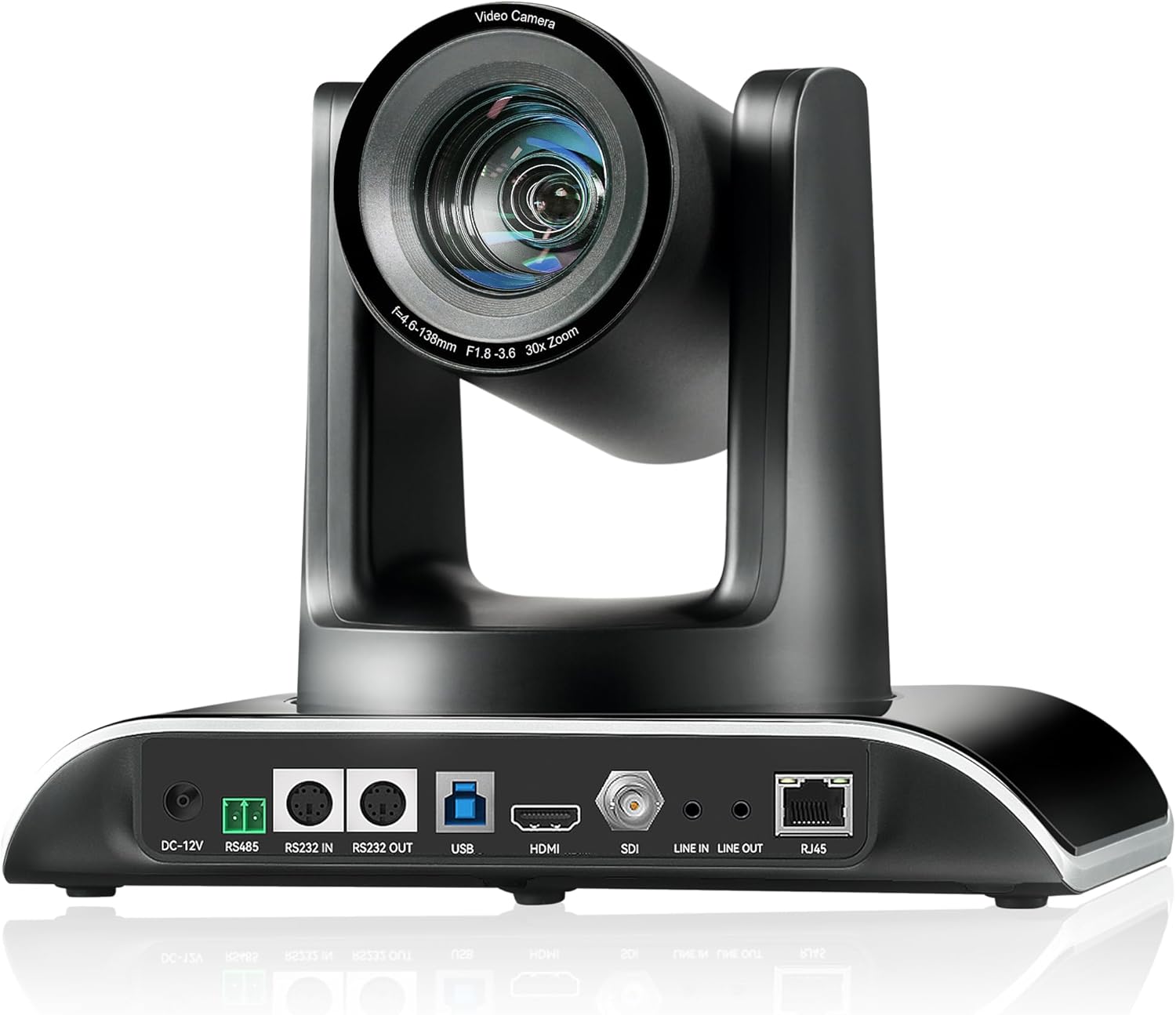
4.1-сүрөт: Tenveo VHD630A PTZ Camera Rear Panel. This image displays the rear panel of the camera, highlighting its connectivity ports including DC-12V power input, RS485, RS232 IN/OUT, USB, HDMI, SDI, Line IN/OUT audio, and RJ45 (PoE) for network and power.
Негизги өзгөчөлүктөрү:
- Оптикалык масштаб: 30X optical zoom with 8X digital zoom.
- Чечим: Up to 1080p at 60fps.
- Жасалма интеллект менен автоматтык көзөмөлдөө: Automatically detects and tracks subjects.
- Видео чыгуулары: SDI, HDMI, USB3.0, RJ45 (PoE) IP.
- Кең талаа View: 69.5° FOV.
- Ethernet аркылуу күч (PoE): Стандарттык PoE электр менен жабдууну колдойт.

4.2-сүрөт: Tenveo PTZ Camera Feature Overview. This graphic visually summarizes the camera's capabilities, including 30X optical zoom, 69.5° wide FOV, PoE support, IR remote control, OSD menu, auto/manual focus, live streaming capability, AI tracking and auto framing, 1080P 60FPS video, and multiple video output options (USB3.0, HDMI, RJ45, SDI).
4.2 Tenveo KB200 PTZ Controller
The KB200 is a 4D joystick controller designed for precise control over PTZ camera movements. It supports both network and analog control modes and is compatible with various protocols.

4.3-сүрөт: Tenveo KB200 PTZ Controller. This image shows the top panel of the controller, featuring the 4D joystick, various control buttons for pan, tilt, zoom, focus, exposure, white balance, and a numeric keypad for preset recall.
Негизги өзгөчөлүктөрү:
- Башкаруу режимдери: Network and Analog.
- Протоколдор: Supports VISCA, VISCA over IP, PELCO-P, PELCO-D.
- Джойстик: High-quality 4D joystick for variable speed control.
- Жарлык баскычтары: Up to 7 shortcut buttons for quick operations.
5. Орнотуу
5.1 Физикалык байланыштар
Connect the camera and controller using the appropriate cables based on your desired setup. The VHD630A camera offers multiple output options:
- SDI: For professional video mixers and long cable runs.
- HDMI: For direct connection to displays or capture cards.
- USB3.0: For direct connection to a computer for video conferencing or streaming software.
- RJ45 (PoE): For network connectivity and power via a single Ethernet cable (requires PoE-enabled switch or injector).
The KB200 controller connects to the camera via RS232, RS485, or Ethernet (RJ45).

5.1-сүрөт: Camera Connection Methods. This diagram illustrates various connection setups for the PTZ camera, including USB PTZ Camera to PC, Ethernet PTZ Camera to Network Switch to PC, HDMI PTZ Camera to Blackmagic ATEM HDMI to PC, and SDI PTZ Camera to Blackmagic ATEM SDI to PC, all leading to YouTube/Facebook Live streaming.

5.2-сүрөт: Network and Analog Control Modes. This image demonstrates how a conference camera, dome camera, or PTZ camera can be connected via cable to a network switch, which then connects to the KB200 controller, supporting Power over Ethernet (PoE).

5.3-сүрөт: KB200 Controller Rear Connections. This image details the rear panel of the KB200 controller, labeling ports such as RS232, RS422, Ethernet (RJ-45 PoE), USB (for upgrading), DC12V power interface, and the power switch.
5.2 Монтаждоо параметрлери
The VHD630A camera supports desktop, monitor, wall, or ceiling mounting. A wall mount bracket and screws are included in the package. Ensure the mounting surface is sturdy enough to support the camera's weight.
5.3 Тармактын конфигурациясы
For network control and IP streaming, connect the camera's RJ45 port to your network. If using PoE, ensure your network switch or injector provides PoE power. The KB200 controller can also be connected to the network for IP control of multiple cameras.
6. Operating the Camera (VHD630A)
6.1 Негизги башкаруу каражаттары
The camera's pan, tilt, and zoom functions can be controlled via the KB200 joystick controller or compatible software. Adjust focus manually or use the auto-focus feature.
6.2 Жасалма интеллект менен автоматтык көзөмөлдөө
Activate the AI Auto Tracking feature to automatically detect and follow a designated subject. This ensures the subject remains centered and in focus without manual intervention. Refer to the camera's OSD menu for specific AI tracking settings.

6.1-сүрөт: AI Tracking Auto Framing in Use. This image demonstrates the AI tracking feature, where the camera automatically frames a speaker during a presentation, keeping them in the center of the shot.
6.3 Video Output Modes
Select the appropriate video output (SDI, HDMI, USB3.0, or IP) based on your streaming or recording setup. The camera can output 1080p at 60 frames per second for high-quality video.
7. Operating the Controller (KB200)
7.1 Joystick Functions
The 4D joystick provides intuitive control over camera pan, tilt, and zoom. Push the joystick in different directions to pan and tilt, and twist it to control zoom speed. The joystick also allows for variable speed control for smooth camera movements.
7.2 Алдын ала коюлган башкаруу
The KB200 controller allows you to save and recall camera presets. Position the camera to a desired view, then use the preset buttons to store the position. You can then recall these positions quickly during operation.

7.1-сүрөт: KB200 Controller Feature Overview. This graphic highlights the controller's key attributes: PoE Support, Multi Interface Control (RS422, RS232, RJ45), Protocols (VISCA, VISCA over IP, PELCO-P, PELCO-D), High-Quality 4D joystick, Two Control Modes (Network and Analog), and up to 7 shortcut control buttons.
7.3 Протоколду колдоо
The controller supports VISCA, VISCA over IP, PELCO-P, and PELCO-D protocols, ensuring compatibility with a wide range of PTZ cameras and control systems. It can operate in both network and analog control modes, with independent IP addresses in network mode.
8. Техникалык тейлөө
8.1 Тазалоо
Gently wipe the camera lens and body with a soft, dry cloth. For stubborn marks, use a slightly damp чүпүрөк, анан кылдат кургатуу. Катуу химиялык заттарды же абразивдүү материалдарды колдонуудан алыс болуңуз.
8.2 Микропрограмма жаңыртуулары
Periodically check the Tenveo website for firmware updates to ensure your camera and controller have the latest features and performance enhancements. Follow the provided instructions for firmware installation.
9. Кыйынчылыктарды
Эгер көйгөйлөргө туш болсоңуз, төмөнкү жалпы көйгөйлөрдү жана чечимдерди караңыз:
- Кубат жок: Ensure all power cables are securely connected and power outlets are active. Check the power adapters.
- Видео чыгаруу жок: Verify cable connections (HDMI, SDI, USB, Ethernet). Ensure the correct input source is selected on your display or capture device. Check camera settings.
- Контроллер жооп бербей жатат: Check the control cable connections (RS232, RS485, Ethernet). Ensure the controller and camera are on the same network if using IP control. Verify protocol settings.
- Жасалма интеллектти көзөмөлдөө көйгөйлөрү: Ensure the subject is clearly visible and well-lit. Avoid rapid, erratic movements. Check tracking sensitivity settings in the OSD menu.
- Сүрөттүн сапаты маселелери: Check lighting conditions. Ensure the lens is clean. Adjust exposure and white balance settings.
For further assistance, contact Tenveo technical support.
10. Техникалык шарттар
Tenveo VHD630A PTZ Camera
- Видео тартуу токтому: 1080p
- Оптикалык масштаб: 30x
- Digital Zoom: 8x
- Сенсор: 1/2.8" CMOS
- Байланыш технологиясы: HDMI, USB, SDI, RJ45 (PoE)
- Видео тартуу форматы: MP4, MOV
- Шайкеш түзмөктөр: Blackmagic Design ATEM, Facebook Live, OBS, Professional Video Mixer, Skype, Teams, YouTube, Zoom, vMix
Tenveo KB200 PTZ Controller
- Башкаруу режимдери: Network, Analog
- Колдоого алынган протоколдор: VISCA, VISCA over IP, PELCO-P, PELCO-D
- Джойстик: 4D
- Интерфейс: RS232, RS422, Ethernet (RJ45), USB
11. Кепилдик жана колдоо
Tenveo offers a 3-year warranty and lifetime technical support service, including firmware upgrades. If you have any questions or require assistance, please contact Tenveo customer service. They aim to reply within 24 hours and provide a satisfactory solution.
For support, visit the official Tenveo webсайтына кириңиз же продуктуңуздун документтеринде берилген байланыш маалыматын караңыз.


