1. Киришүү
Welcome to the Blackstar ID:Core V4 Stereo 10 Digital Combo Amplifier user manual. This document provides essential information for the safe and effective operation of your new amplifier. The ID:Core V4 Stereo 10 is a versatile 10-watt, 2x3 inch digital combo amplifier featuring Bluetooth connectivity and a 4-channel USB-C output, designed for guitarists seeking a compact yet powerful practice and recording solution.
Please read this manual thoroughly before using the amplifier to ensure proper setup, operation, and to maximize your experience with its advanced features.
2. Коопсуздук нускамалары
- Электр камсыздоо: Only use the power adapter supplied with your ID:Core V4 Stereo 10 amplifier. Ensure the voltage сиздин жергиликтүү электр камсыздооңузга дал келет.
- Вентиляция: Эч кандай вентиляция тешиктерин жаап албаңыз. айланасында адекваттуу аба агымын камсыз кылуу ampысып кетүүнүн алдын алуу үчүн көтөргүч.
- Нымдуулук: ачыкка чыгарбагыла amplifier to rain, moisture, or any liquids. Avoid placing objects filled with liquids on or near the ampөмүрлүү.
- Жылуулук булактары: сактаңыз ampрадиаторлор, жылуулук регистрлери, мештер же жылуулук чыгарган башка аппараттар сыяктуу жылуулук булактарынан алыс көтөргүч.
- Кабелдер: Электр шнурунун басылып кетүүсүнөн же кысып калуудан сактаңыз, өзгөчө сайгычтарда, розеткаларда жана алар аппараттан чыга турган жеринде.
- Тейлөө: Бул продуктту өзүңүз тейлөөгө аракет кылбаңыз. Бардык тейлөөнү квалификациялуу тейлөө кызматкерлерине тапшырыңыз.
- Тазалоо: розеткадан ажыратыңыз amplifier from the power outlet before cleaning. Use a dry cloth for cleaning.
3. Продукт бүтүп калдыview
Алдыңкы панелдин башкаруу элементтери жана байланыштары
The front panel of the ID:Core V4 Stereo 10 provides access to all primary controls and input/output connections.
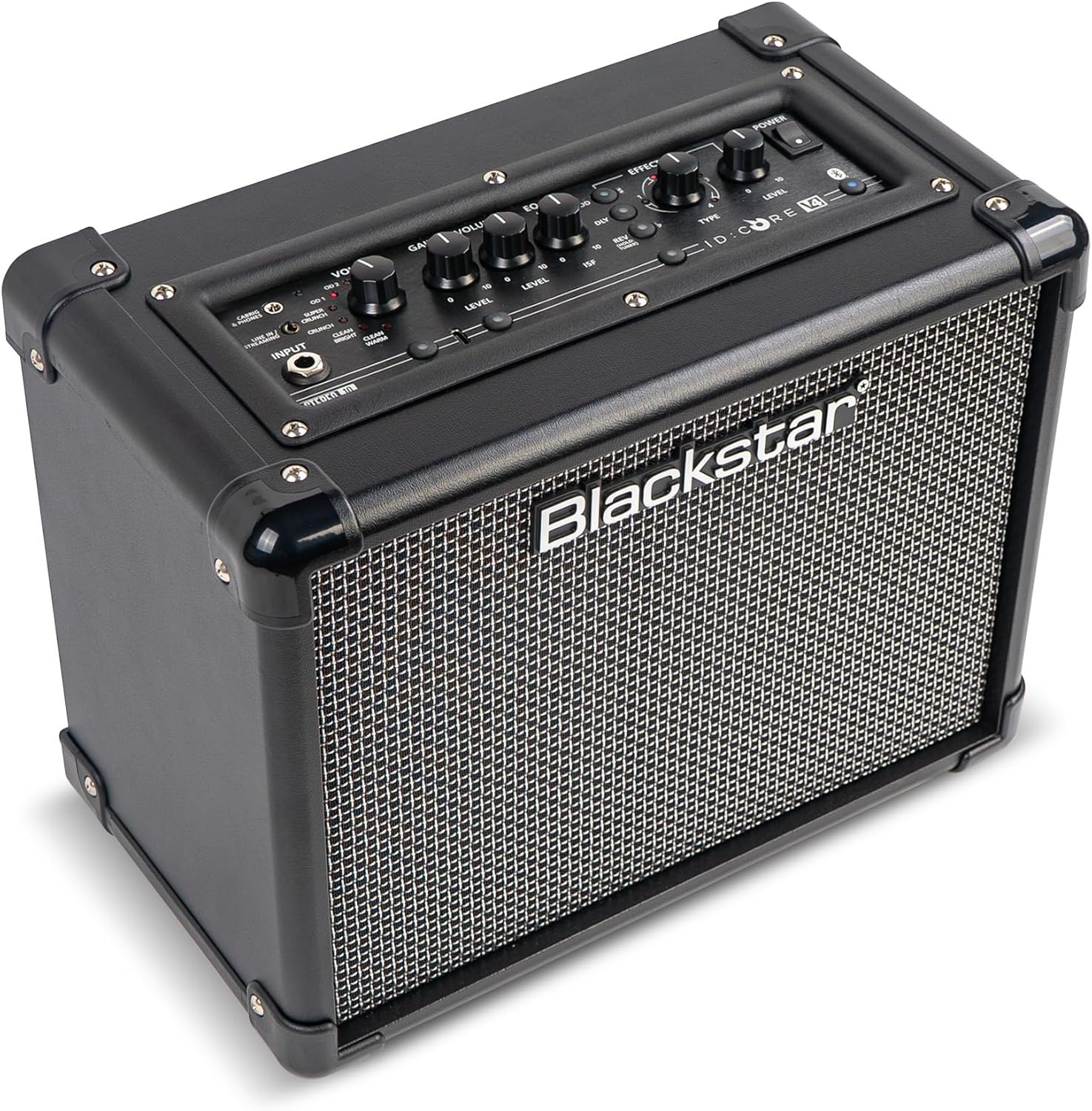
Сүрөт: алдыңкы view of the Blackstar ID:Core V4 Stereo 10 amplifier, highlighting the control layout and speaker grille.
- Киргизүү Джек: Гитараны бул жерге туташтырыңыз.
- Voice Selector: Rotary switch to select between six distinct amp voices: Clean Warm, Clean Bright, Crunch, Super Crunch, OD1, and OD2.
- Көзөмөлдү алуу: Ашыкча жүктөө же бурмалоо көлөмүн тууралайт.
- Үндү көзөмөлдөө: Жалпы чыгаруу көлөмүн тууралайт.
- EQ (ISF) Control: Blackstar's patented Infinite Shape Feature (ISF) control allows you to sweep between a 'British' and 'American' amplifier tone.
- Эффекттер бөлүмү: Includes controls for Modulation (Type, Level), Delay (Type, Level), and Reverb (Type, Level).
- Tap Button: Used to set the tempo for delay and modulation effects.
- Кубат которгучу: бурат ampөмүрдү күйгүзүү же өчүрүү.
- Bluetooth баскычы: Bluetooth жупташтыруу режимин иштетет.
- Line In / Streaming Input: 3.5mm jack for connecting external audio devices or streaming.
- CabRig & Phones Output: 3.5mm jack for headphones or direct recording with CabRig Lite emulation.
- USB-C порту: For direct recording to a computer and connection to Blackstar Architect software.
- Кол менен баскыч: Saves current settings or recalls manual mode.
- 1W/10W Power Reduction: Button to switch between 1-watt and 10-watt output for practice at different volume levels.
Арткы панелдик байланыштар
The rear panel houses the power input and product information.

Сүрөт: Арткы view of the Blackstar ID:Core V4 Stereo 10 amplifier, displaying the DC power input and regulatory labels.
- DC киргизүү: Connect the supplied 16V DC power adapter here.
4. Орнотуу
- Пакеттен чыгаруу: Кылдаттык менен алып салуу amplifier from its packaging. Retain the packaging for future transport or storage.
- Кубат туташуу: Connect the supplied 16V DC power adapter to the DC Input on the rear panel of the amplifier. Plug the other end into a suitable power outlet.
- Гитара туташуу: Plug your guitar into the Input Jack on the front panel using a standard 1/4-inch instrument cable.
- Баштапкы күйгүзүү: Ensure all volume controls are set to a low level. Press the Power Switch to turn on the ampкубат индикаторунун LED жарыгы күйөт.
5. Иштөө нускамалары
5.1 Негизги операция
- Selecting a Voice: Rotate the Voice selector knob to choose from the six available amp voices. Experiment with each to find the desired tone.
- Adjusting Gain and Volume: Use the Gain control to adjust the amount of drive, and the Volume control for the overall output level.
- Using the ISF Control: Turn the ISF knob clockwise for a more 'American' sound with a tight bottom end and aggressive mids, or counter-clockwise for a 'British' sound with a woody, less aggressive response.
- Эффекттерди колдонуу: Select the desired effect type (Modulation, Delay, Reverb) and adjust its Level. Use the Tap button to set the tempo for time-based effects.
- Кубатты азайтуу: Press the 1W/10W button to switch between full 10-watt output for louder playing or 1-watt output for quiet practice sessions.
5.2 Bluetooth байланышы
The ID:Core V4 Stereo 10 features Bluetooth for wireless audio streaming.
- камсыз кылуу ampкөтөргүч күйгүзүлгөн.
- Press and hold the Bluetooth button on the front panel until the Bluetooth indicator LED begins to flash. This indicates pairing mode.
- On your audio device (smartphone, tablet, computer), navigate to Bluetooth settings and select 'Blackstar ID:Core V4' from the list of available devices.
- Once paired, the Bluetooth indicator LED on the amplifier will glow solid. You can now stream audio wirelessly to the ampөмүрлүү.
5.3 USB-C Recording
The USB-C port allows for direct, high-quality recording to your computer.

Сүрөт: деталдуу view -ныкы amplifier's control panel, highlighting the USB-C port for recording and software connectivity.
- Connect a USB-C cable from the amplifier's USB-C port to your computer.
- The amplifier will be recognized as an audio interface.
- Utilize your preferred Digital Audio Workstation (DAW) to record the 4-channel output, which typically includes stereo emulated output and dry guitar signal.
5.4 Blackstar Architect Software
The Blackstar Architect software provides advanced control over your ampкөтөргүчтүн жөндөөлөрү.
- Download and install the Blackstar Architect software from the official Blackstar webсайт.
- Сиздин байланышты amplifier to your computer via the USB-C port.
- The software allows for deep patch editing, creating custom presets, and sharing your tones with other users.
5.5 CabRig Lite Emulated Output
The CabRig Lite feature provides realistic cabinet and microphone emulation for direct recording or headphone use.
- Connect headphones or a recording device to the CabRig & Phones output.
- Use the Blackstar Architect software to customize cabinet types, microphone models, and microphone placement for a tailored emulated sound.
6. Техникалык тейлөө
- Тазалоо: Сыртын тазалоо үчүн жумшак, кургак чүпүрөктү колдонуңуз ampкөтөргүч. Абразивдүү тазалагычтарды же эриткичтерди колдонбоңуз.
- Сактагыч: Узак мөөнөткө колдонулбаганда, сактаңыз amplifier in a dry, cool place, away from direct sunlight and extreme temperatures.
- Транспорт: ташып баратканда amplifier, ensure it is securely packed to prevent damage.
7. Кыйынчылыктарды
| Көйгөй | Мүмкүн себеп | Чечим |
|---|---|---|
| Үн жок ampөмүрлүү |
|
|
| Bluetooth жупташкан жок |
|
|
| USB-C recording issues |
|
|
8. Техникалык шарттар
| Өзгөчөлүк | Деталь |
|---|---|
| Модел | IDCORE10V4BT |
| Чыгуу Wattage | 10 Watts (switchable to 1 Watt) |
| Баяндамачылар | 2 x 3 дюйм |
| Элемент Салмагы | 8.15 фунт (3.7 кг) |
| Продукциянын өлчөмдөрү | 7.24"D x 10.51"W x 13.19"H (18.4 x 26.7 x 33.5 см) |
| Шайкеш түзмөктөр | Гитара |
| Туташтыргыч түрү | 3.5mm Jack (Line In/Streaming, CabRig & Phones), USB-C |
| Power Source | Электр зымдары (16V DC) |
| Өзгөчөлүктөрү | 6 Amp Voices, ISF Control, Built-in Effects, Bluetooth, 4-channel USB-C Output, CabRig Lite, Architect Software Compatibility |
9. Кепилдик жана колдоо
Blackstar products are manufactured to high standards and are covered by a limited warranty. For detailed warranty information, registration, and technical support, please visit the official Blackstar Ampжашоо website. You can also find FAQs, software downloads, and contact information for customer service.
Онлайн ресурстар: For the latest software updates, additional guides, and community forums, please refer to the Blackstar Ampжашоо webсайт.


