Introduction
Бул колдонмодо VEKOOTO AHD 10.36 дюймдук BSD капталы үчүн кеңири көрсөтмөлөр берилген. View Vertical Monitor and Right Car Camera System. This system is designed to enhance vehicle safety by offering a clear, wide-angle view of the right side of your truck or bus, featuring a touch screen display, loop recording capabilities, and a Blind Spot Detection (BSD) voice alarm. Please read this manual thoroughly before installation and operation to ensure proper use and optimal performance.
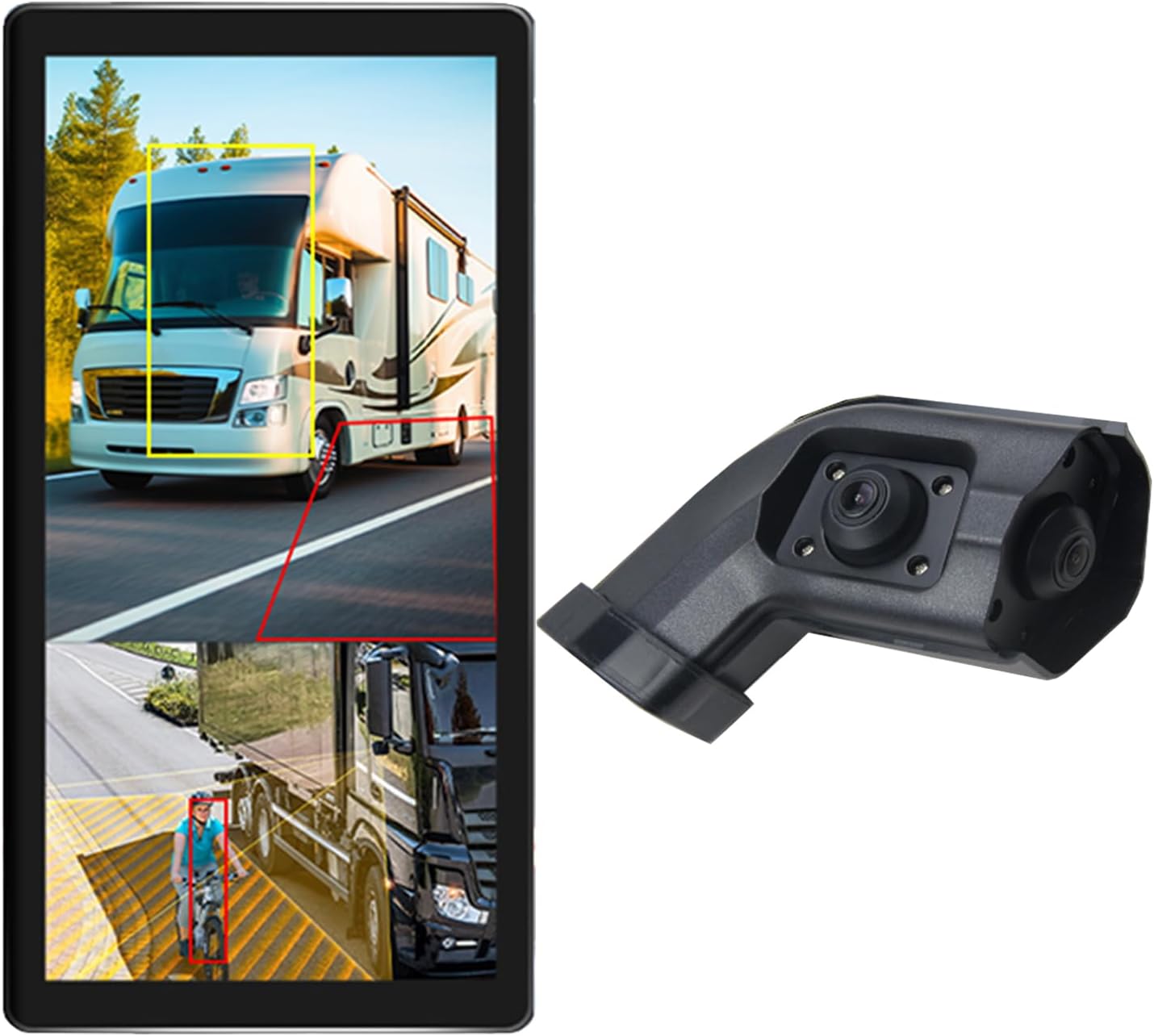
Image: The VEKOOTO 10.36-inch vertical monitor and the right side camera unit, illustrating the primary components of the system.
Кутуда эмне бар
Пакетти ачканда бардык компоненттердин бар экенин жана жакшы абалда экенин текшериңиз:
- 10.36-inch Touch Screen Monitor
- Integrated dual camera (for right side view)
- Электр кабели
- Камера кабели
- кашаа
Негизги өзгөчөлүктөрү
- Дисплей: 10.36-inch IPS touch screen with 2-channel split screen display capability.
- Камераны колдоо: Compatible with AHD720P cameras, offering enhanced image clarity, advanced bright color separation, signal filtering, and 3D noise reduction technology.
- Сокур Тактарды Аныктоо (BSD): Features a voice alarm system. The alarm area, volume, and sensitivity are adjustable.
- Сүрөттү башкаруу: Supports camera image screen mirroring function for flexible viewing.
- Дисплей ыңгайлаштыруу: Allows adjustment of display time, date, brightness, and screen color.
- Кубаттуулугу: Кеңири томду колдойтtag9V-36V диапазону.
- Көп тилдүү колдоо: Available in English, Korean, Japanese, and Chinese.
- Орнотуу: Designed for installation on the right side rearview унаанын күзгүсү.

Image: The monitor interface highlighting features such as image adjustment, BSD voice alarm, and customizable detection areas, shown with various driving scenarios including night, rain, and blind spots.
Орнотуу жана орнотуу
Proper installation is crucial for the system's performance. It is recommended to have this system installed by a qualified professional.
1. Компоненттерди жайгаштыруу
- Mount the 10.36-inch vertical monitor securely inside the vehicle, ensuring it does not obstruct the driver's view.
- Install the integrated dual camera unit on the right side rearview mirror of your vehicle. Ensure the camera has a clear, unobstructed view.

Image: The vertical monitor installed inside a vehicle, providing a clear view of the right side, simulating a truck's perspective.
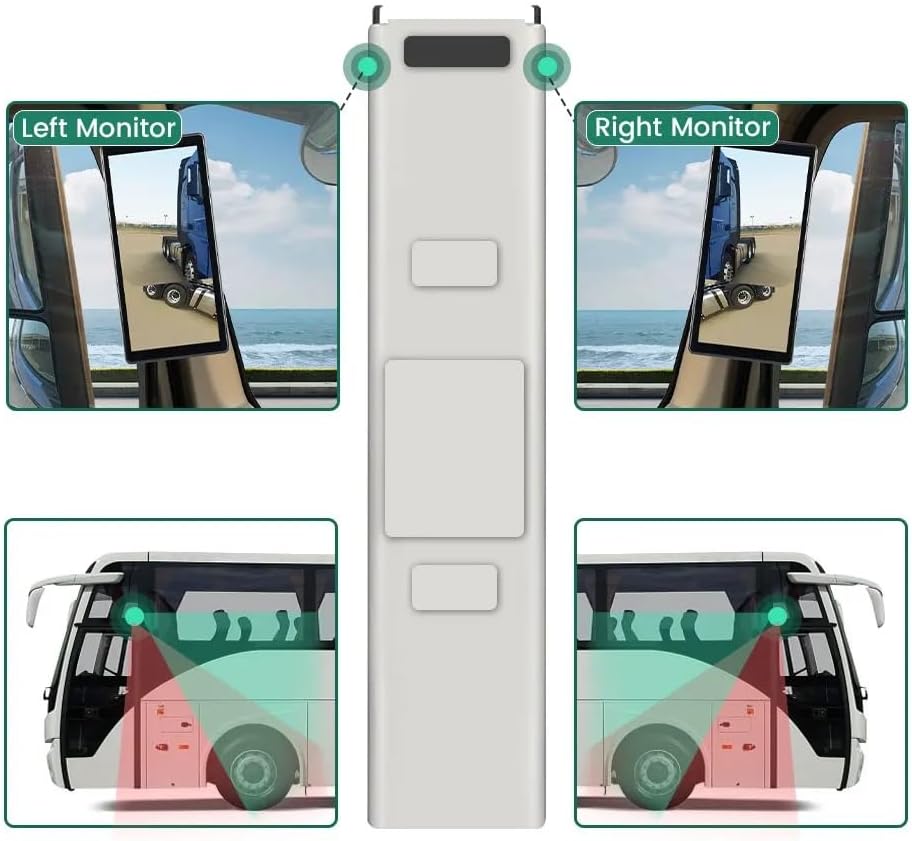
Image: A diagram illustrating the recommended placement of the right monitor and the camera's field of view for comprehensive side coverage on a bus.
2. Зымдарды туташтыруу
Refer to the wiring diagram below for correct connections. The system supports 9V-36V wide voltage киргизүү.

Image: Detailed wiring diagram showing connections for the monitor, integrated dual camera, ACC power supply (+), Ground (-), and Battery Power (+3A). Channel 1 (CH1) and Channel 2 (CH2) inputs are indicated for the camera cables.
- туташтыруу ACC Power Supply (+) wire (red) to a switched ignition source.
- туташтыруу Жер (-) wire (black) to a suitable chassis ground point.
- туташтыруу Battery Power (+) (3A) wire (yellow) to a constant 12V/24V power source.
- Connect the camera cable(s) to the corresponding CH1 and CH2 inputs on the monitor.
- Кыска туташуунун алдын алуу үчүн бардык туташуулардын коопсуз жана туура изоляцияланганын текшериңиз.
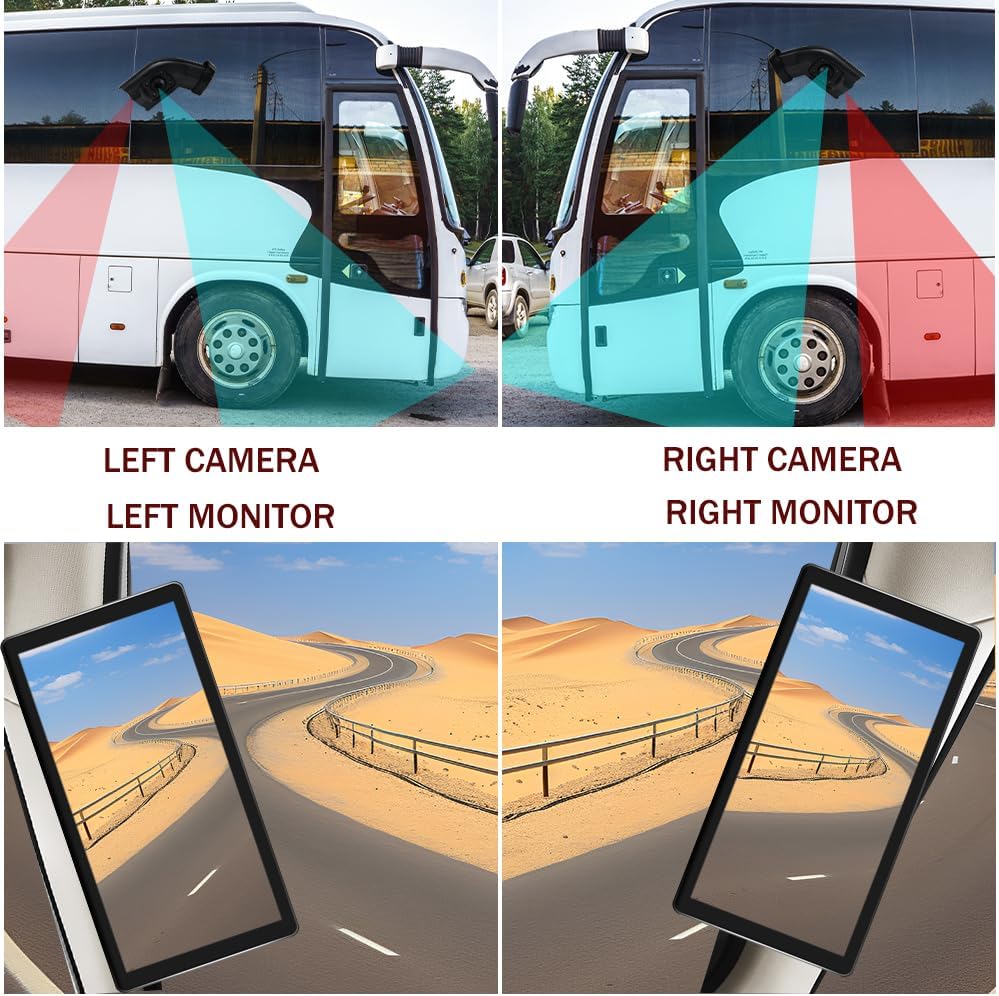
Image: A visual comparison demonstrating the coverage areas for left and right camera installations, along with the corresponding monitor views. This system is for the Right Camera/Monitor.
Иштөө нускамалары
1. Күйгүзүү/өчүрүү
The monitor will power on automatically when the vehicle's ignition is turned on (if connected to ACC power) and power off when the ignition is turned off.
2. Сенсордук экран навигациясы
Navigate through the monitor's menus and settings using the touch screen interface. Tap icons or options to select them.
3. Бөлүнгөн экран дисплей
The monitor supports a 2-channel split screen display. Access the display settings to configure how the camera feeds are shown on the screen.
4. BSD Voice Alarm
- Access the BSD settings menu on the touch screen.
- Adjust Alarm Area: Define the specific zones where the BSD system will detect objects and trigger an alarm.
- Control Alarm Volume: Set the desired volume level for the voice alerts.
- Сезгичтикти коюу: Adjust the sensitivity of the detection system to suit your driving conditions and preferences.
5. Image Mirroring
If needed, enable the camera image mirroring function through the display settings to flip the camera view туурасынан.
6. Дисплей орнотуулары
Customize the display by adjusting brightness, screen color, and setting the current time and date through the monitor's settings menu.
7. Loop жаздыруу
The system supports loop recording. Ensure a compatible memory card is inserted (if required, check product specifications for card type and capacity). The system will continuously record video, overwriting the oldest fileэстутум картасы толгондо.

Image: The monitor screen showing a video playback interface, indicating support for video recording with a timeline illustrating different recording times throughout the day.
Техникалык тейлөө
- Мониторду тазалоо: Монитордун экранын тазалоо үчүн жумшак, кургак чүпүрөктү колдонуңуз. өжөр тактар үчүн, жеңил гampчүпүрөккө суу же экранды тазалоочу каражат. Катуу химиялык заттардан алыс болуңуз.
- Камераны тазалоо: Periodically check and clean the camera lens to ensure a clear view. Use a soft cloth and lens cleaner if necessary.
- Байланыштарды текшерүү: Бардык зымдардын туташууларынын бекем жана дат баспагандыгын же бузулбагандыгын текшерүү үчүн аларды үзгүлтүксүз текшерип туруңуз.
- Программалык камсыздоо жаңыртуулары: Өндүрүүчүнү текшериңиз webтутумуңуз үчүн жеткиликтүү микропрограмма же программалык камсыздоо жаңыртуулары үчүн сайт.
Проблемаларды чечүү
| Көйгөй | Мүмкүн себеп | Чечим |
|---|---|---|
| Монитордо сүрөт жок |
|
|
| Distorted or unclear image |
|
|
| BSD alarm not working |
|
|
| Loop recording not functioning |
|
|
Техникалык шарттар
| Өзгөчөлүк | Деталь |
|---|---|
| Продукциянын өлчөмдөрү | Узундугу 10.3" x Туурасы 2" x Бийиктиги 8" (Монитор) |
| Элемент Салмагы | 4.4 фунт |
| Модель номери | Туура |
| Дисплей технологиясы | LCD |
| Башка дисплей өзгөчөлүктөрү | Зымсыз |
| Өндүрүүчү | VEKOOTO |
| Бренд | VEKOOTO |
| Screen Size | 10.36 дюйм |
| Шайкеш түзмөктөр | Монитор |
| Орнотуу түрү | Surface Mount |
| Тtage | 9-36 Volts (Wide Voltage Support) |
| Оптикалык сенсор технологиясы | CMOS |
| Линзанын түрү | Wide Angle |
| Туташтыргыч түрү | Зымсыз |
| Оптикалык сенсордун өлчөмү | 1/3 дюйм |

Image: Diagram illustrating the physical dimensions of the 10.36-inch vertical monitor (27cm/10.63inch height, 13cm/5.12inch width) and the camera unit (14.6cm/5.75inch height, 7.8cm/3.07inch width, 6.4cm/2.52inch depth).
Кепилдик жана колдоо
For warranty information, please refer to the documentation included with your purchase or contact VEKOOTO customer support directly. Support contact details can typically be found on the manufacturer's official webсайт же сатып алуу пункту аркылуу.
Always ensure you are using genuine VEKOOTO parts and accessories for optimal performance and to maintain warranty validity.


