1. Коопсуздук маалыматы
Please read all instructions carefully before installation and operation. Retain this manual for future reference. Improper installation or use may result in damage to the product or vehicle, and could void the warranty.
- Ensure all connections are secure and correctly wired to prevent electrical shorts or malfunctions.
- Do not attempt to disassemble or modify the device. This may cause damage and will void the warranty.
- Operate the monitor and camera system only within the specified voltage диапазону (9V-36V).
- Always prioritize safe driving. Do not operate the device in a manner that distracts from driving.
- Clean the screen and camera lenses with a soft, dry cloth. Avoid using harsh chemicals or abrasive materials.
2. Продукт бүтүп калдыview
The VEKOOTO 10.36-inch IPS touch screen monitor with integrated DVR and BSD (Blind Spot Detection) system is designed to enhance safety for trucks and buses. It provides a clear, wide-angle view of the vehicle's surroundings, particularly the left side blind spot, and records footage for security and incident analysis.
Негизги өзгөчөлүктөрү:
- 10.36 дюймдук IPS сенсордук экраны: Offers excellent 178° full-view display technology with wider viewing angles, faster response times, and superior color/contrast.
- 2-Channel Display: Supports split-screen viewing for simultaneous display of two camera feeds.
- AHD720P Camera Support: Provides clear images with advanced bright color separation, signal filtering, and 3D noise reduction technology.
- BSD Voice Alarm: Features adjustable alarm areas, volume, and sensitivity for blind spot detection.
- DVR циклдик жаздыруу: Supports continuous recording with real-time video viewing. Compatible with TF cards up to 256GB.
- Camera Image Mirroring: Allows for screen mirroring of camera images.
- Жөнгө салынуучу дисплей: Time, date, brightness, and screen color can be adjusted.
- Wide Voltage Колдоо: Operates on 9V-36V power systems.
- Көп тилдүү колдоо: Includes English, Korean, Japanese, and Chinese menu languages.
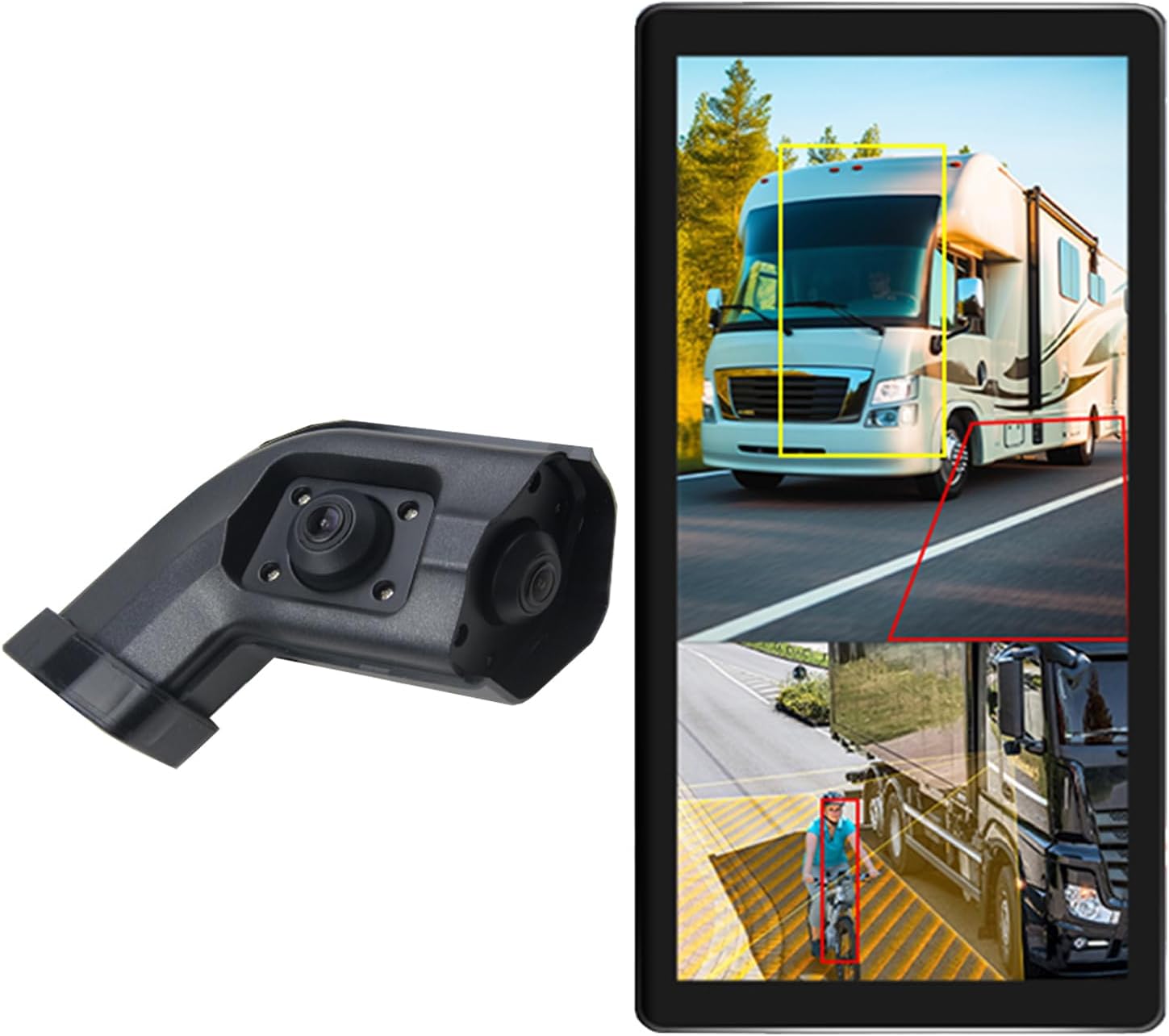
Image 2.1: The VEKOOTO 10.36-inch monitor and the left-side camera unit.
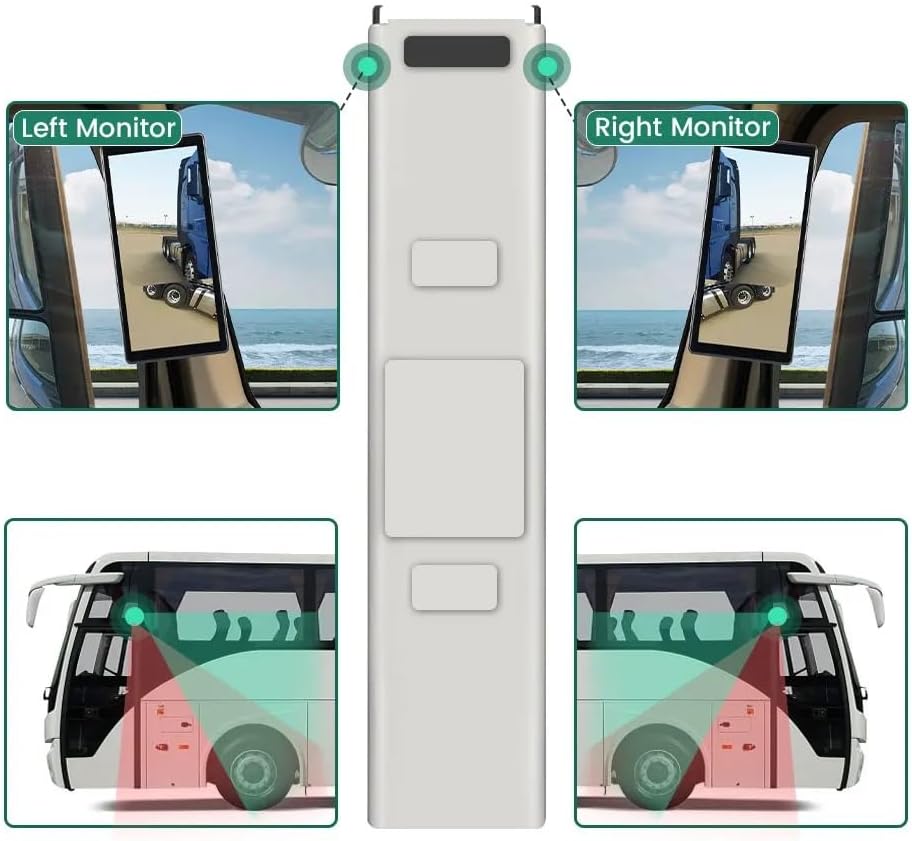
Image 2.2: The monitor displaying a split screen view, highlighting the BSD detection zones around a truck and a cyclist.
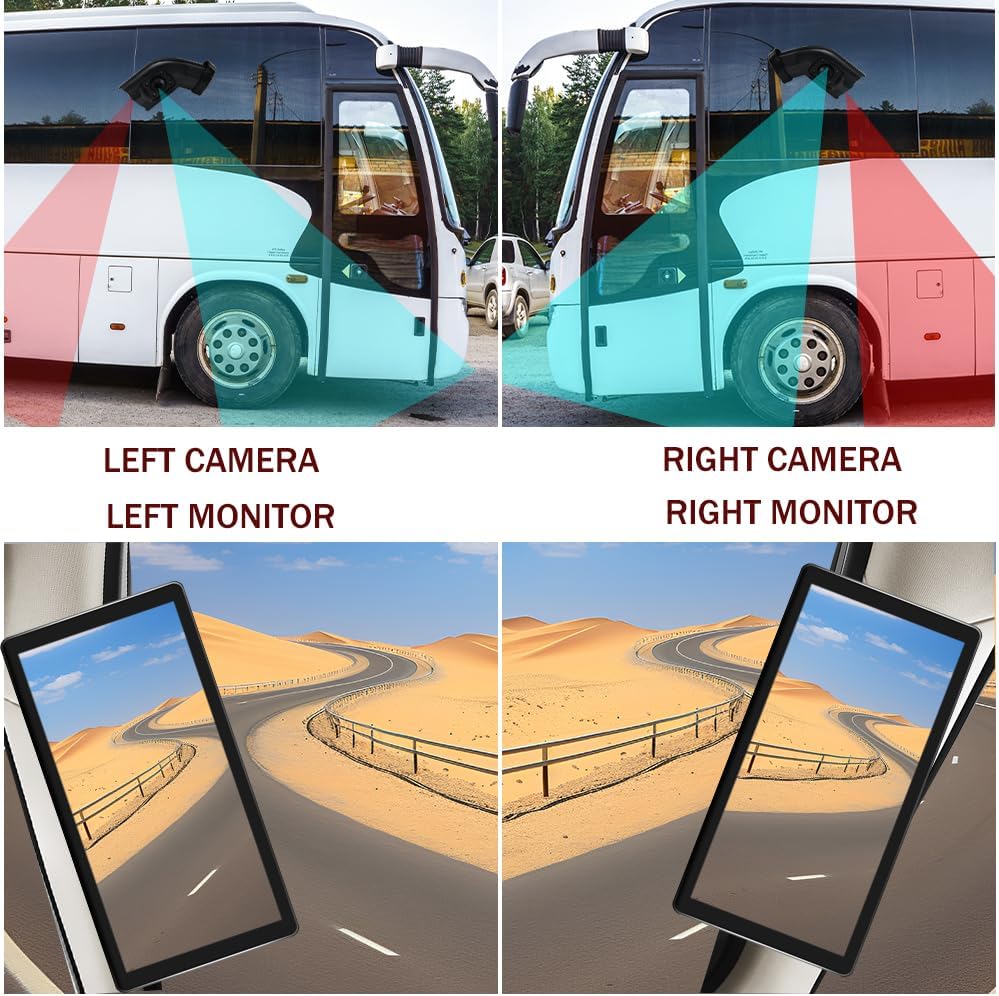
Image 2.3: A diagram illustrating the coverage areas of the left and right cameras on a bus, and how their views are displayed on the respective monitors.
3. Кутуда эмне бар
Таңгактан чыгарганда бардык компоненттер бар экенин жана жакшы абалда экендигин текшериңиз.
- 10.36 дюймдук сенсордук экран монитору
- Integrated dual camera (Left side specific)
- Электр кабели
- Камера кабели
- кашаа
4. Орнотуу жана орнотуу
This section provides general guidelines for installation. Professional installation is recommended for optimal performance and safety.
4.1. Мониторду орнотуу
- Attach the provided bracket to the monitor.
- Securely mount the monitor in a location that provides clear visibility without obstructing the driver's view жолдун.
4.2. Камераны орнотуу
- The camera is designed for installation on the left side rearview күзгү транспорт каражатын.
- Ensure the camera is positioned to provide an optimal view of the blind spot area.
- Secure the camera firmly to prevent movement during vehicle operation.
4.3. Зымдарды туташтыруу
Refer to the wiring diagram below for proper connections. Ensure the vehicle's power is off before making any electrical connections.
- ACC Power Supply (+): Connect to a switched 9V-36V power source that turns on with the vehicle's ignition.
- Жер (-): Унаанын шассисинин ишенимдүү жерге туташтыруучу чекитине туташтырыңыз.
- Battery Power (+) (3A): Connect to a constant 9V-36V power source (e.g., directly to the battery with an inline 3A fuse) for DVR functionality.
- CH1/CH2: Connect the camera cables to the corresponding input channels on the monitor.

Image 4.1: Detailed wiring diagram showing connections for ACC power, ground, battery power, and camera inputs (CH1, CH2).
5. Иштөө нускамалары
5.1. Күйгүзүү / Өчүрүү
The monitor will typically power on automatically when the vehicle's ignition is turned on (if connected to ACC power). To manually power off, press and hold the power button (if available) or turn off the vehicle's ignition.
5.2. Негизги навигация
The system features an IPS touch screen for intuitive navigation. Tap icons or menu options to select functions. Use swipe gestures for scrolling through lists or pages.
5.3. Бөлүнгөн экран дисплей
Access the display settings to enable or disable the 2-channel split screen view. This allows simultaneous monitoring of both camera feeds.
5.4. BSD (Blind Spot Detection) Settings
- Navigate to the BSD settings menu.
- Сигнализация аймагын тууралоо: Define the specific zones where the BSD system will detect objects.
- Сигнализациянын үнүн башкаруу: Set the desired volume level for voice alarms.
- Сезгичтикти тууралоо: Modify the detection sensitivity to suit driving conditions and preferences.
5.5. DVR Recording and Playback
- Insert a TF card (up to 256GB, not included) into the designated slot for loop recording.
- The system will automatically begin loop recording when powered on.
- үчүн view recorded video, access the DVR playback menu. You can browse and play back footage directly on the monitor.

Image 5.1: The monitor interface showing support for video recording and a timeline indicating recorded events.
5.6. Сүрөттү тууралоо
In the display settings, you can adjust parameters such as brightness, contrast, and color saturation to optimize the image quality for various lighting conditions.

Image 5.2: The monitor displaying different driving conditions (night, rain, blind spot) and icons for image adjustment, BSD voice alarm, and adjustable area settings.
6. Техникалык тейлөө
Regular maintenance ensures the longevity and optimal performance of your VEKOOTO system.
- Тазалоо: Use a soft, lint-free cloth to clean the monitor screen and camera lenses. For stubborn smudges, slightly dampen the cloth with water. Avoid alcohol-based cleaners or abrasive materials.
- Кабелдик текшерүү: Periodically check all cables and connections for wear, damage, or looseness. Secure any loose connections.
- Программалык камсыздоо жаңыртуулары: Өндүрүүчүнү текшериңиз webсистемаңызда эң акыркы функциялар жана каталарды оңдоо бар экенине ынануу үчүн жеткиликтүү болгон микропрограммалык камсыздоонун жаңыртуулары үчүн сайт.
- Курчап турган чөйрөнү коргоо: Avoid exposing the monitor and camera to extreme temperatures, direct sunlight for prolonged periods, or excessive moisture.
7. Кыйынчылыктарды
If you encounter issues with your VEKOOTO system, refer to the following common troubleshooting steps:
- Кубат жок:
- Check all power cable connections (ACC, Battery, Ground).
- Ensure the vehicle's ignition is on if connected to ACC power.
- Verify the fuse on the battery power line (if applicable) is intact.
- No Camera Signal:
- Ensure the camera cable is securely connected to both the camera and the monitor (CH1/CH2).
- Check for any damage to the camera cable.
- Verify the camera itself is receiving power.
- Сүрөттүн сапаты көйгөйлөрү (бүдөмүк, бурмаланган):
- Clean the camera lens and monitor screen.
- Adjust the image settings (brightness, contrast, color) on the monitor.
- Камеранын бекем орнотулганын жана титиребегенин текшериңиз.
- BSD Alarm Not Functioning:
- Check BSD settings for alarm area, volume, and sensitivity.
- Камераны камсыз кылыңыз view ачык-айкын жана тоскоолдуксуз.
- DVR жаздырылбай жатат:
- Шайкеш келген TF картасы салынып, туура форматталганын текшериңиз.
- Check if the TF card is full; the system should loop record, but a full card might cause issues if not properly configured.
- Verify the battery power connection for continuous recording.
If these steps do not resolve the issue, please contact VEKOOTO customer support for further assistance.
8. Техникалык шарттар
| Өзгөчөлүк | Спецификация |
|---|---|
| Бренд | VEKOOTO |
| Модель номери | Солго |
| Screen Size | 10.36 дюйм |
| Дисплей технологиясы | IPS LCD |
| Камеранын чечилиши | AHD720P |
| Тtage Колдоо | 9V-36V |
| DVR сактагыч | Max 256GB TF Card |
| Элемент Салмагы | 4.4 фунт |
| Продукциянын өлчөмдөрү | Узундугу 10.3" x Туурасы 2" x Бийиктиги 8" (Монитор) |
| Орнотуу түрү | Surface Mount |

Image 8.1: Dimensions of the 10.36-inch monitor and the camera unit in centimeters and inches.

Сүрөт 8.2: Бир нече views of the monitor, showcasing its front, side, and rear with the attached mounting bracket.
9. Кепилдик жана колдоо
For warranty information, product support, or technical assistance, please contact VEKOOTO customer service through the retailer where the product was purchased or visit the official VEKOOTO webсайт. Колдоо кызматына кайрылганда продуктуңуздун моделинин номерин жана сатып алынган күнүн жазып коюңуз.


