1. Киришүү
Thank you for choosing the CLABEL 221B Inkless Label Printer. This portable thermal printer is designed for versatile labeling needs across various applications, including small businesses, retail, and office organization. It offers convenient connectivity via Bluetooth for mobile devices and USB for computers, supporting a wide range of label types without the need for ink. This manual provides essential information for setting up, operating, maintaining, and troubleshooting your device.

Image 1.1: The CLABEL 221B Inkless Label Printer, shown in grey, alongside examples of printed labels such as a name tag with a barcode, a product information label, and a 'Thank you' sticker. A roll of thermal labels is also visible.
2. Коопсуздук маалыматы
Коопсуз жана туура иштешин камсыз кылуу үчүн, түзмөктү колдонуудан мурун бардык коопсуздук көрсөтмөлөрүн кунт коюп окуп чыгыңыз.
- Do not disassemble, repair, or modify the printer yourself. This may cause electric shock, fire, or damage to the device.
- Принтерди суудан, нымдуулуктан жана түз күн нурунан алыс кармаңыз.
- Use only the recommended power adapter and USB cable.
- Ensure the printer is placed on a stable, flat surface during operation.
- Басып чыгаргандан кийин дароо басып чыгаруучу башты кармабаңыз, анткени ал ысык болушу мүмкүн.
3. Пакеттин мазмуну
Пакетте бардык буюмдар бар экенин текшериңиз:
- CLABEL 221B Inkless Label Printer
- USB кабели
- Roll of Labels (starter roll)
- User Manual
4. Продукт бүтүп калдыview
The CLABEL 221B is a compact and portable thermal label printer. It features a simple design with a power button, status indicator light, and a label output slot. The device uses direct thermal technology, eliminating the need for ink cartridges.

Image 4.1: This image highlights key features of the CLABEL 221B, including its lightweight and portable design (8.4 oz), fast charging, ABS material for long service life, high-quality print head for clearer prints, inkless thermal printing, and up to 4 hours of continuous printing.

Image 4.2: An illustration detailing the layered structure of high-quality thermal paper, emphasizing properties such as water resistance, oil proofing, high temperature resistance, tear resistance, and wear resistance. Layers include protective, thermosensitive, base, isolation, and adhesive layers.
5. Орнотуу
5.1 Алгачкы заряддоо
Before first use, fully charge the printer using the provided USB cable and a compatible power adapter (not included). The status indicator light will show charging status.
5.2 этикеткаларды жүктөө
Термикалык этикеткаларды принтериңизге туура жүктөө үчүн төмөнкү кадамдарды аткарыңыз:
- Press both sides of the printer to open the cover.
- Set the jam protection to the 'OPEN' position.
- Insert the label roll, ensuring it is fixed to the left side.
- Pull out some of the labels and close the cover.

Image 5.1: A visual guide demonstrating the four steps for installing labels: 1. Press sides to open cover. 2. Set jam protection to 'OPEN'. 3. Insert label roll, fix to the left. 4. Pull out labels and close cover.
5.3 App Installation and Connection (Phone)
To print from your smartphone or tablet:
- Download the 'Clabel trade' app from your device's app store (App Store for iOS, Google Play for Android).
- Телефонуңузда Bluetooth'ду күйгүзүңүз.
- Open the 'Clabel trade' app and connect to the printer. The app will typically detect nearby CLABEL printers.

Image 5.2: A three-step guide showing how to connect the printer to a phone: 1. Download the 'Clabel trade' app. 2. Turn on Bluetooth on the phone. 3. Connect the printer within the 'Clabel trade' app.
5.4 Компьютерге туташуу
Компьютериңизден басып чыгаруу үчүн:
- Turn on the printer and connect it to your computer via the provided USB cable.
- Download the 'Clabel trade' software from the official CLABEL webсайт.
- Open the software, tap 'New' to create a label.
- Select the 'Clabel-CT221B' printer and click 'Print'.

Image 5.3: A four-step guide illustrating PC printing: 1. Turn on printer and connect via USB. 2. Download 'Clabel trade' software. 3. Create a new label. 4. Select printer and print.
6. Принтерди иштетүү
6.1 Негизги басып чыгаруу
Once connected via Bluetooth or USB, you can design and print labels using the 'Clabel trade' app or PC software. The app provides a user-friendly interface for creating various label types.

Image 6.1: The CLABEL 221B printer demonstrating its dual connectivity options, showing it connected to a laptop via a USB cable and wirelessly to a smartphone via Bluetooth. Both devices are displaying label design interfaces.
6.2 Колдонмонун өзгөчөлүктөрү
The 'Clabel trade' app offers extensive customization options:
- Free APP & No Privacy Need: The app is free to use and does not require login or privacy permissions.
- Бир нече шаблондор: Access a wide array of free icons, fonts, and frames.
- Content Types: Print text, barcodes, QR codes, tables, images, and logos.
- Advanced Printing Options: Utilize batch printing, scan printing, and PDF printing options.
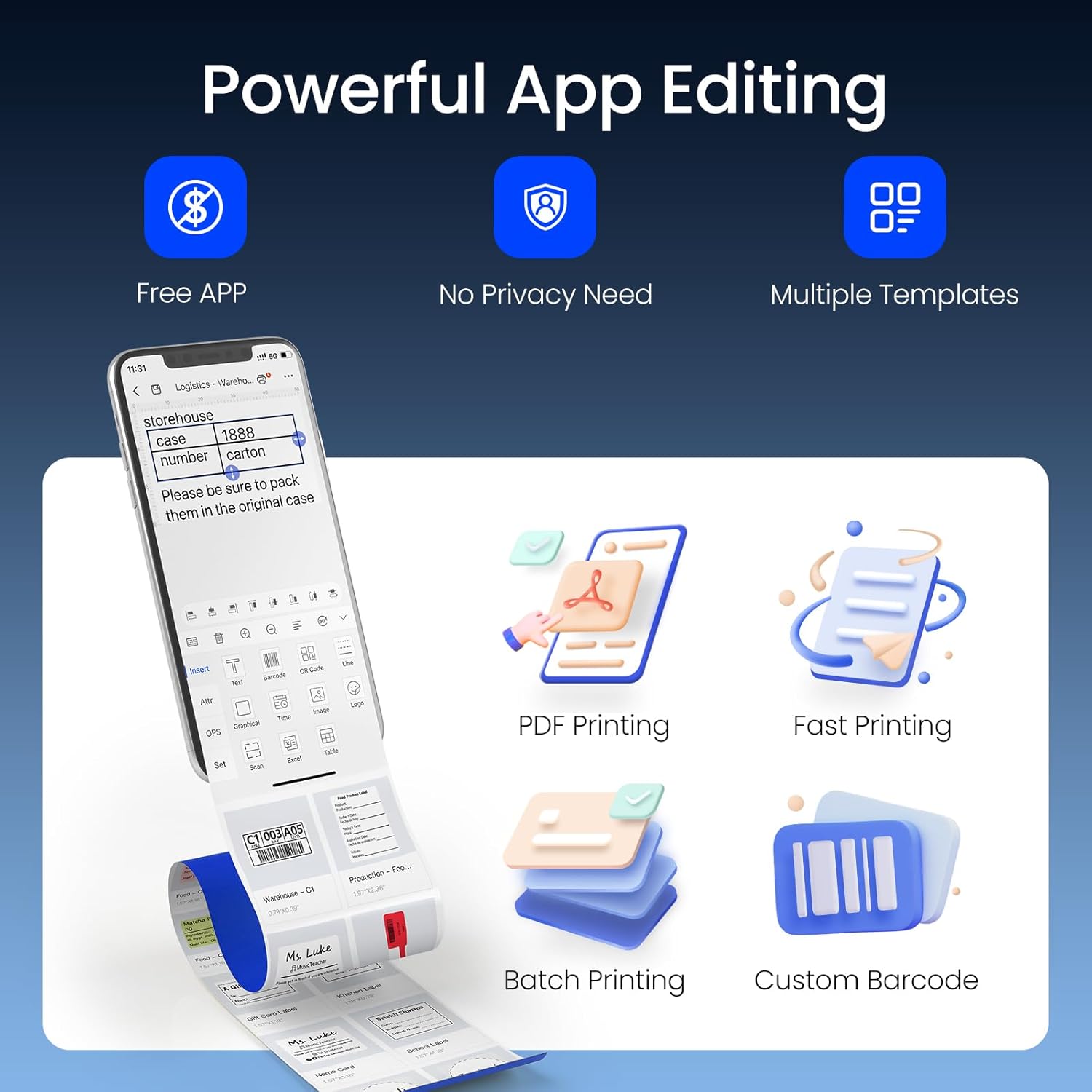
Image 6.2: A visual representation of the 'Clabel trade' app's capabilities, including PDF printing, fast printing, batch printing, and custom barcode generation. The app interface on a smartphone shows options for text, images, barcodes, and templates.
6.3 Этикетканын шайкештиги
The CLABEL 221B supports thermal labels with a width of 0.78 inches (20mm) to 2 inches (50mm) and a maximum length of 3.93 inches (100mm). It is compatible with third-party thermal paper, offering flexibility and cost savings.

Image 6.3: The CLABEL 221B printer with its cover open, illustrating how different label roll sizes (25x78mm, 30x70mm, 40x30mm, 50x80mm) can be loaded, highlighting its support for 0.78"-2" width labels.
6.4 Тиркемелер
The versatility of the CLABEL 221B allows for a wide range of applications:
- Чакан ишканалар: Labeling for clothing, crafts, retail, jewelry, etc.
- Продукт этикеткасы: Address, barcode, QR code, price, date, ingredients.
- Уюм: File racks, seasoning jars, storage boxes.

Сүрөт 6.4: Мисamples of label applications: labels on jewelry, handmade dessert packaging, florist bouquets, envelopes, cheese products, and wine bottles, demonstrating the printer's versatility.

Image 6.5: Further examples of label applications: labels for baked goods, address labels on packages, labels for file rack organization, labels on seasoning jars, and classification labels for storage containers.
7. Техникалык тейлөө
Принтериңиздин үзгүлтүксүз техникалык тейлөөсү анын оптималдуу иштешин камсыздайт жана анын иштөө мөөнөтүн узартат.
- Басып чыгаруу башын тазалоо: If print quality degrades, gently wipe the thermal print head with an alcohol swab. Ensure the printer is off and cooled down before cleaning.
- Тышкы тазалоо: Use a soft, dry cloth to clean the exterior of the printer. Do not use abrasive cleaners or solvents.
- Сактагыч: Принтерди салкын, кургак жерде, тике күндүн нурунан жана экстремалдык температурадан алыс сактаңыз.
8. Кыйынчылыктарды
If you encounter issues with your CLABEL 221B printer, refer to the following common problems and solutions:
| Көйгөй | Мүмкүн себеп | Чечим |
|---|---|---|
| Принтер күйбөйт | Батарея аз; Кубат кабели туташтырылган эмес | Charge the printer; Ensure power cable is securely connected. |
| Bluetooth аркылуу туташуу мүмкүн эмес | Bluetooth off on phone; Printer not discoverable; App issue | Ensure phone Bluetooth is on; Restart printer and app; Re-pair device in app settings. |
| Басып чыгаруу сапаты начар (алсыз/сызыктар пайда болот) | Print head dirty; Incorrect label type; Low battery | Clean the print head; Use high-quality thermal labels; Charge the printer. |
| Labels not feeding correctly/jamming | Labels incorrectly loaded; Label roll too wide/narrow | Re-load labels according to instructions (Image 5.1); Ensure label width is within 0.78"-2". |
| Принтерди компьютер тааныган жок | USB cable issue; Driver not installed; Printer off | Try a different USB port/cable; Install 'Clabel trade' software/drivers; Ensure printer is on. |
9. Техникалык шарттар
| Өзгөчөлүк | Деталь |
|---|---|
| Модель аты | CT221B-Gray |
| Продукциянын өлчөмдөрү | 2.4"D x 3.4"W x 4.8"H |
| Элемент Салмагы | 8.4 унция |
| Басма технологиясы | Термикалык |
| Принтердин сыя түрү | Сыясыз |
| Байланыш технологиясы | Bluetooth, USB |
| Шайкеш түзмөктөр | Android, iOS, Windows, MAC |
| Максималдуу медиа өлчөмү | 2" x 3.93" (50 мм x 100 мм) |
| Колдоого алынган энбелгилердин туурасы | 0.78" - 2" (20 мм - 50 мм) |
| Максималдуу кара жана ак басып чыгаруу чечими | 203 DPI |
| Макс басып чыгаруу ылдамдыгы монохромдуу | 35 промилле |
| Башкаруу ыкмасы | Колдонмо |
| Өзгөчө өзгөчөлүк | Жеңил, портативдик |
10. Кепилдик жана колдоо
The CLABEL 221B Inkless Label Printer comes with a Limited Warranty. For specific warranty terms and conditions, please refer to the documentation included with your purchase or visit the official CLABEL webсайт.
For technical support, troubleshooting assistance, or inquiries regarding your product, please contact CLABEL customer service through their official channels. Details can typically be found on the CLABEL webсайтында же продуктунун таңгагында.


