Introduction
Thank you for choosing the Aiwa Satori AW-SSB240 Soundbar. This 2.1 channel sound system with a 6.5-inch subwoofer delivers 240W of powerful audio output, designed to enhance your home entertainment experience. This manual provides essential information for setting up, operating, and maintaining your soundbar to ensure optimal performance.
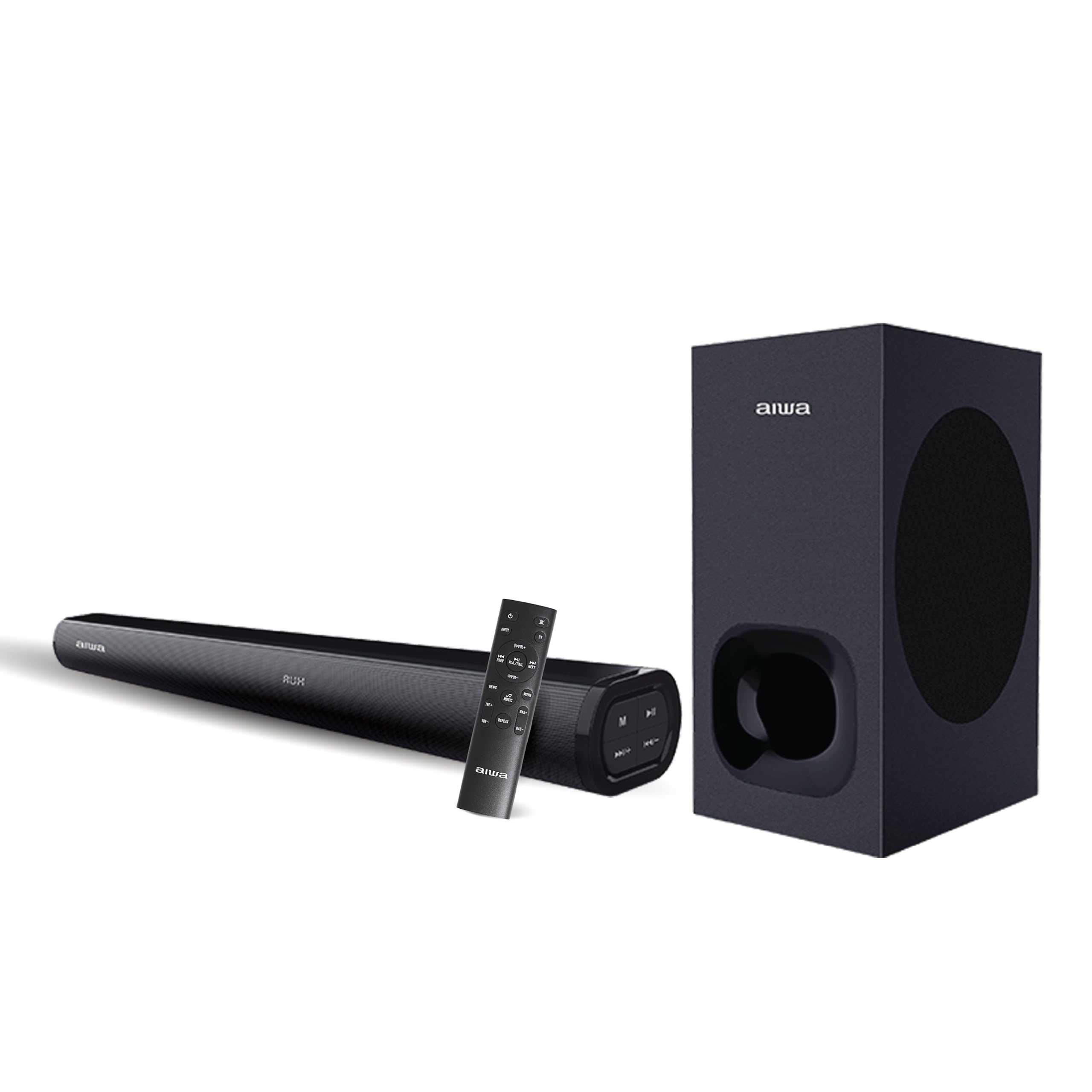
Кутуда эмне бар
Carefully unpack your Aiwa Satori AW-SSB240 Soundbar package and ensure all items are present:
- 1N Woofer (Wired)
- 1N Soundbar
- 1N алыстан башкаруу
- 1N Колдонуучунун колдонмосу
- 1N 3.5 мм аудио кабель
- 1N электр кабели

Жайгашуу
1. Жайгаштыруу
- Place the soundbar centrally below your television or display for optimal stereo imaging.
- Position the wired subwoofer on the floor, ideally near the soundbar, to enhance bass response. Ensure it has adequate ventilation.
2. Байланыштар
- Сабвуфер туташуу: Connect the wired subwoofer to the soundbar using the dedicated subwoofer output port.
- Кубат туташуу: Connect the power cable to the soundbar's power input and then to a suitable power outlet.
- Аудио булагы туташуу: Аудио булагын туташтыруу үчүн төмөнкү ыкмалардын бирин тандаңыз:
- HDMI (ARC): For the best audio quality and control, connect an HDMI cable from the soundbar's HDMI ARC port to your TV's HDMI ARC port.
- Оптикалык: Саундбардын оптикалык киришинен сыналгыңыздын оптикалык чыгышына оптикалык кабелди туташтырыңыз.
- AUX: Use the provided 3.5mm audio cable to connect your device to the soundbar's AUX input.
- USB/SD карта: Insert a USB drive or SD card into the respective ports for direct media playback.
Иштөө нускамалары
1. Күйгүзүү/өчүрүү
Түзмөктү күйгүзүү же өчүрүү үчүн саундбардагы же пульттагы Кубат баскычын басыңыз.
2. Киргизүүнү тандоо
Press the 'Mode' button on the soundbar or the remote control to cycle through available input sources: Bluetooth, HDMI (ARC), Optical, AUX, USB, and SD Card.
3. Үндү башкаруу
Use the Volume Up (+) and Volume Down (-) buttons on the soundbar or remote control to adjust the master volume.
4. Bluetooth Жупташтыруу
- Select Bluetooth mode on the soundbar. The LED indicator will flash, indicating it's in pairing mode.
- Түзмөгүңүздө (смартфон, планшет ж.б.) Bluetooth иштетиңиз жана жеткиликтүү түзмөктөрдү издеңиз.
- Select "AW-SSB240" from the list. Once connected, the LED indicator will stop flashing.
5. Алыстан башкаруу функциялары
The included remote control provides full functionality for your soundbar, including:
- Күйгүзүү/өчүрүү
- Киргизүү режимин тандоо
- Үнүн жогорулатуу/төмөндөтүү
- Play/Pause, Next/Previous Track (for USB/SD Card/Bluetooth modes)
- EQ режимдери: Select from 3 preset equalizer modes to optimize audio for different content (e.g., Music, Movie, News).
- Bass & Treble Controls: Adjust bass and treble levels independently to customize your sound preference.

Байланыш өзгөчөлүктөрү
The Aiwa Satori AW-SSB240 Soundbar offers a wide range of connectivity options to integrate seamlessly with your devices:
- Bluetooth V5.3: For wireless audio streaming from smartphones, tablets, and other Bluetooth-enabled devices.
- HDMI (ARC): Audio Return Channel for simplified connection and control with compatible televisions.
- Оптикалык киргизүү: High-quality digital audio connection for TVs and other optical-enabled devices.
- AUX киргизүү: Standard 3.5mm audio jack for connecting a wide range of analog audio sources.
- USB ойнотуу: Аудио ойнотуу үчүн fileтүздөн-түз USB флэш-дискинен.
- SD картаны ойнотуу: Аудио ойнотуу үчүн files түздөн-түз SD эстутум картасынан.

Техникалык шарттар
| Өзгөчөлүк | Description |
|---|---|
| Модель аты | AW-SSB240-SATORI |
| Динамик түрү | Саундбар |
| Монтаж түрү | Кабат туруктуу |
| Көлөмдүү үн каналынын конфигурациясы | 2.1 |
| Динамиктин максималдуу чыгаруу күчү | 240 Ватт |
| Сабвуфердин диаметри | 6.5 дюйм |
| Динамик өлчөмү | 6.6 дюйм |
| Frequency Response | 20 Гц |
| Зымсыз байланыш технологиясы | Bluetooth V5.3 |
| Байланыш технологиясы | Көмөкчү, Bluetooth, HDMI (ARC), USB, оптикалык |
| Аудио чыгаруу режими | Стерео |
| Башкаруу ыкмасы | Алыстан |
| Шайкеш түзмөктөр | Desktop, Home Theater, Smartphone, Tablet, Television |
| Продукциянын өлчөмдөрү | 88.9D x 22.9W x 48.3H Сантиметр |
| Элемент Салмагы | 6 килограмм |
| Power Source | Электр зымдары |
| Түс | SATORI - 240 (Black) |
| Өзгөчө өзгөчөлүк | Japanese Technology |
| Келип чыккан өлкө | Индия |

Проблемаларды чечүү
If you encounter any issues with your Aiwa Satori AW-SSB240 Soundbar, please refer to the following common solutions:
- Кубат жок: Кубат кабелинин саундбарга жана иштеп жаткан розеткага бекем туташтырылганын текшериңиз.
- Үн жок: Check that the correct input source is selected. Verify all audio cables are properly connected. Adjust the volume on both the soundbar and your connected device.
- Bluetooth жупташтыруу маселелери: Make sure the soundbar is in Bluetooth pairing mode. Disable and re-enable Bluetooth on your device, then try pairing again. Ensure no other devices are currently connected to the soundbar.
- Бурмаланган үн: Reduce the volume. Check audio source quality. Ensure cables are not damaged or loose.
- Алыстан башкаруу иштебейт: Пульттун батареясын текшериңиз. Пульт менен саундбардын ортосунда эч кандай тоскоолдук жок экенин текшериңиз.
Техникалык тейлөө
Саундбарыңыздын узак иштөөсүн жана оптималдуу иштешин камсыз кылуу үчүн төмөнкү тейлөө көрсөтмөлөрүн аткарыңыз:
- Тазалоо: Саундбардын жана сабвуфердин беттерин тазалоо үчүн жумшак, кургак чүпүрөктү колдонуңуз. Суюк тазалагычтарды же абразивдүү материалдарды колдонбоңуз.
- Вентиляция: Ensure adequate airflow around the soundbar and subwoofer to prevent overheating. Do not block ventilation openings.
- Сактагыч: Аппаратты узак убакытка сактасаңыз, аны электр кубатынан ажыратып, күн тийбеген жана өтө температурадан алыс салкын, кургак жерде сактаңыз.
Кепилдик жана колдоо
Your Aiwa Satori AW-SSB240 Soundbar comes with a 1 жылдык кепилдик from the date of purchase, covering manufacturing defects. Please retain your purchase receipt for warranty claims.
For technical support, service, or further inquiries, please contact Aiwa India Sales & Services Pvt. Ltd. at:
- Дарек: 2E/26, Jhandewalan Extn, New Delhi -110055
- Байланыш: 1800-120-5619
- Электрондук почта: getintouch@aiwaindia.com