1. Продукт бүтүп калдыview
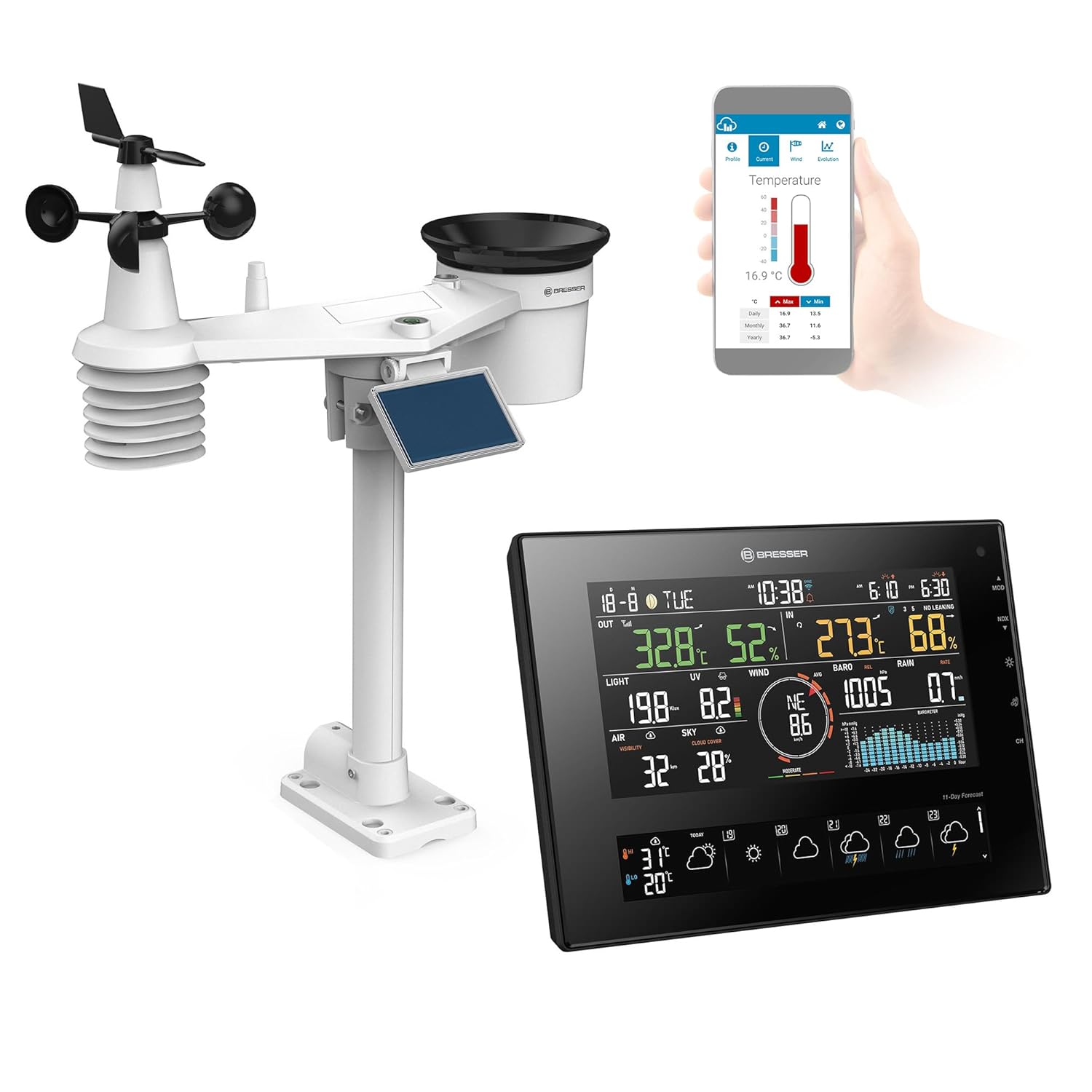
The Bresser Solar 7-in-1 Weather Station 4Cast CV provides comprehensive weather data and forecasts. It includes a solar-powered 7-in-1 outdoor sensor and an indoor base station with an integrated thermo-hygrometer. Data can be accessed via the station's display, the ProWeatherLive application, or a web браузер.
Негизги өзгөчөлүктөр төмөнкүлөрдү камтыйт:
- Detailed 11-day and 24-hour weather forecasts, including maximum, minimum, and average temperatures, and rain probability.
- 7-in-1 outdoor sensor measures temperature, humidity, wind speed, wind direction, precipitation, UV level, and light intensity.
- Environmentally friendly operation of the outdoor sensor via a large solar panel, with AA batteries as backup during low sunlight.
- Easy access to weather data through the display, ProWeatherLive app, or web браузер.
- Compatibility with optional sensors for ambient climate, soil, pool, and air quality (sold separately).
2. Орнотуу нускамалары
2.1 Пакеттен чыгаруу жана компоненттерди текшерүү
Carefully unpack all components and verify that all parts are present:
- Негизги дисплей бирдиги
- 7-бирде сырткы сенсор
- Монтаждоочу жабдык
- Instruction Manual
2.2 Сырткы сенсорлорду орнотуу
The 7-in-1 outdoor sensor is designed for solar power operation. For optimal performance, ensure it receives at least 4 hours of direct sunlight (100,000 lux) daily. Insert 3 AA batteries (not included) into the sensor's battery compartment as a backup power source for periods of low sunlight.
- Жайгашкан жерди тандаңыз: Select an open area free from obstructions (trees, buildings) that could block wind, rain, or sunlight. The sensor should be mounted at a height that allows accurate readings.
- Монтаждоо: Use the provided mounting hardware. You will need to supply your own mounting pole or system. Ensure the sensor is level for accurate rain and wind measurements. Proper alignment of the tilt may require additional tools or adjustments.
- Батарея орнотуу: Open the battery compartment on the outdoor sensor and insert 3 AA batteries, observing polarity. Close the compartment securely.

2.3 Main Display Unit Setup
Place the main display unit indoors in a central location, away from direct sunlight or heat sources, to ensure accurate indoor temperature and humidity readings.
2.4 Wi-Fi жана тиркеме туташуусу
Connecting the weather station to your Wi-Fi network and the ProWeatherLive app is crucial for accessing advanced features and remote monitoring. This process can be intricate; follow the instructions carefully.
- Колдонмону жүктөп алыңыз: Download the ProWeatherLive app from your device's app store.
- Каттоо эсебин түзүү: Register for an account on the ProWeatherLive platform via the app or web браузер.
- Wi-Fi'га туташуу: Follow the in-app instructions to connect your main display unit to your home Wi-Fi network. This typically involves putting the display unit into a pairing mode and using the app to transfer network credentials.
- Sensor Synchronization: Once the main unit is connected, it will automatically attempt to synchronize with the 7-in-1 outdoor sensor. Ensure both units are within range.
Note: If you encounter difficulties with Wi-Fi setup, refer to the troubleshooting section or the detailed manual provided with the product for specific steps.
3. Иштөө нускамалары
3.1 Негизги дисплей бирдиги
The main display unit provides a clear overview of current weather conditions and forecasts.

Дисплейде адатта төмөнкүлөр көрсөтүлөт:
- Сырткы маалыматтар: Temperature, humidity, wind speed, wind direction, precipitation, UV index, light intensity.
- Ички маалыматтар: Температура жана нымдуулук.
- Forecasts: 24-hour and 11-day weather forecasts with icons for sun, clouds, rain, thunderstorms, etc.
- Барометрдик басым: Current pressure and historical graph.
- Убакыт жана дата: Automatically synchronized via Wi-Fi.
3.2 ProWeatherLive App and Web Интерфейс
The ProWeatherLive platform allows you to view your weather data remotely and access additional features.
- Реалдуу убакыттагы маалыматтар: Access current and historical weather data from your outdoor sensor and indoor unit.
- Эскертмелер: Set up alerts for specific weather parameters (e.g., high wind, low temperature, high indoor humidity).
- Маалыматтарды экспорттоо: Some platforms allow for data export for personal analysis.
- Optional Sensors: If additional sensors are connected, their data will also be available here.
3.3 Indoor Climate Monitoring
The base station's integrated thermo-hygrometer monitors your indoor climate. The display often features a gradient graph showing the development of indoor temperature and humidity, which is useful for preventing excessively dry air or mold growth. Adjust ventilation or use a humidifier/dehumidifier as needed based on these readings.
4. Техникалык тейлөө
4.1 Сырткы сенсор
- Күн панели: Periodically clean the solar panel with a soft, damp cloth to ensure efficient charging. Dust, dirt, or debris can reduce its effectiveness.
- Батареяны алмаштыруу: The 3 AA backup batteries in the outdoor sensor should be checked and replaced annually or when the low battery indicator appears on the display.
- Жамгыр жыйноочу: Ensure the rain collector funnel is free of leaves, insects, or other debris that could obstruct water flow.
- Анемометр/Шамал флюгери: Check for any obstructions or damage to the rotating cups and wind vane. Keep them clear for accurate wind measurements.
4.2 Негизги дисплей бирдиги
- Тазалоо: Clean the display unit with a soft, dry cloth. Avoid abrasive cleaners or solvents.
- Күч: Ensure the unit has a stable power supply.
5. Кыйынчылыктарды
5.1 No Data from Outdoor Sensor
- Батареяларды текшерүү: Ensure the 3 AA batteries in the outdoor sensor are fresh and correctly installed.
- Күн панели: Verify the solar panel is clean and receiving sufficient sunlight.
- Диапазон: Ensure the outdoor sensor is within the wireless range of the main display unit. Obstacles like thick walls can reduce range.
- Re-synchronize: Try re-synchronizing the outdoor sensor with the main unit by following the pairing instructions in the full manual.
5.2 Wi-Fi туташуу маселелери
- Network Credentials: Wi-Fi тармагыңыздын аталышын (SSID) жана сырсөзүңүздү эки жолу текшериңиз.
- Маршрутизатордун жакындыгы: Ensure the main display unit is within range of your Wi-Fi router.
- Маршрутизатор орнотуулары: Verify your router is operating on a 2.4 GHz band, as many smart devices do not support 5 GHz.
- Кайра баштоо: Restart both your Wi-Fi router and the weather station display unit.
- Колдонмо көрсөтмөлөрү: Carefully re-follow the Wi-Fi setup steps in the ProWeatherLive app.
5.3 Туура эмес окуулар
- Сенсордун жайгашуусу: Ensure the outdoor sensor is correctly mounted and level, away from heat sources or obstructions.
- Жамгыр жыйноочу: Check for blockages in the rain collector.
- App vs. Display: Minor discrepancies between app data and display data can occur due to data transmission or processing. If significant, ensure both are updated and synchronized.
6. Техникалык шарттар
| Өзгөчөлүк | Деталь |
|---|---|
| Модель номери | 7003240 |
| Бренд | БРЕССЕР |
| Өлчөмдөрү (L x W x Y) | 15.2 x 21.7 x 2.3 cm (Main Unit); 547 grams |
| Power Source | Battery powered (3 AA batteries required for outdoor sensor backup) |
| Байланыш технологиясы | Wi-Fi |
| Материал | Пластик |
| Түс | Кара |
| Өзгөчөлүктөр | Day of week display, Automatic, Ice warning, Online connectivity, Alarm function, Weather index, Sunrise/Sunset, Max/Min value memory, Moon phases, Weather platforms, Rain probability, Internet time, Sunburn time, Wi-Fi, Visibility conditions, Cloud cover, Multi-color display |
| Сунушталган колдонуу | Garden, Weather Forecasts |
7. Кепилдик жана колдоо
7.1 Кепилдик маалыматы
Warranty details for the Bresser Solar 7-in-1 Weather Station 4Cast CV are typically provided with the product packaging or can be found on the official Bresser webсайт. Кепилдик дооматтары үчүн сатып алганыңыздын далилин сактап коюңуз.
7.2 Кардарларды колдоо
For technical assistance, troubleshooting beyond this manual, or warranty inquiries, please contact Bresser customer support through their official webсайт же продукт документациясында көрсөтүлгөн байланыш маалыматы.


