1. Продукт бүтүп калдыview
The TECPHILE Keyboard Case is designed to enhance the functionality and protection of your compatible tablet. It features a magnetically detachable Bluetooth keyboard with a precision trackpad, RGB backlighting, and a protective folio case with a built-in pen holder and multiple viewбурчтар.
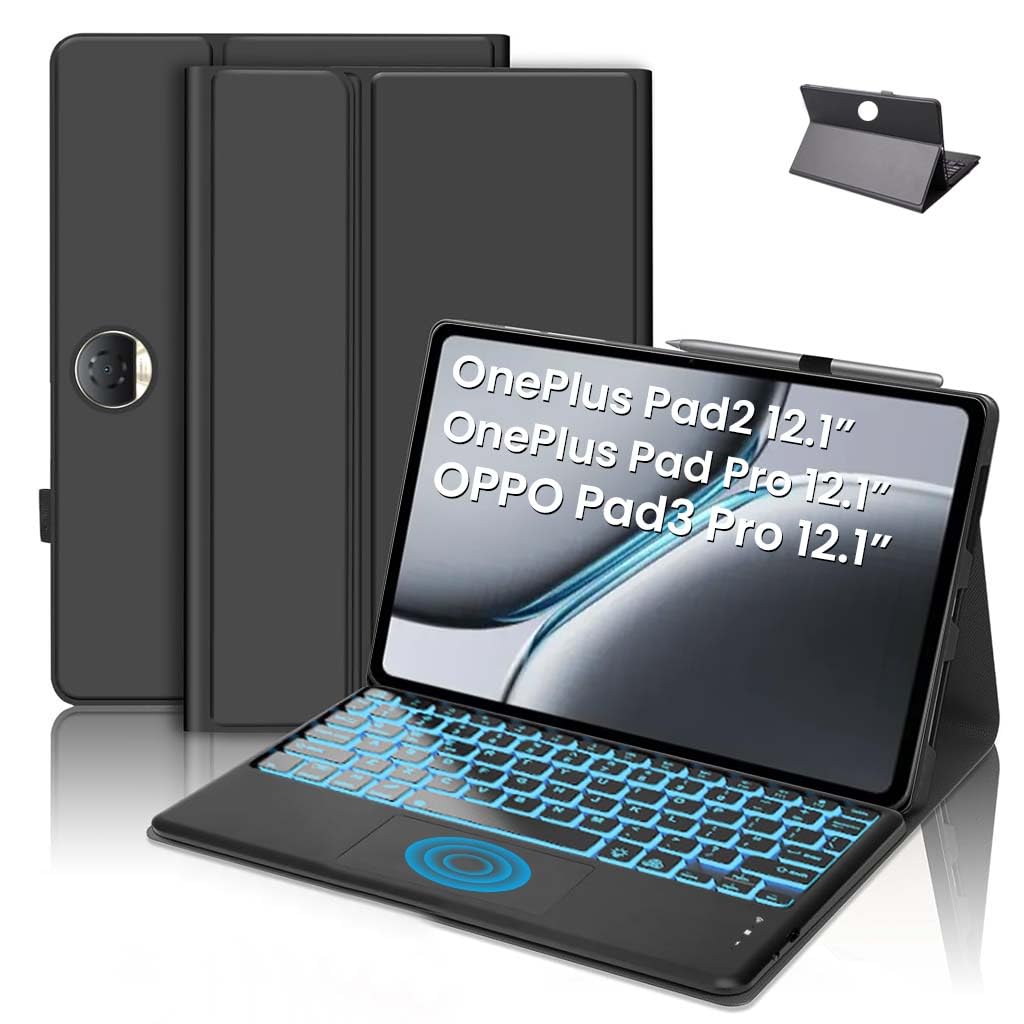
Image: TECPHILE Keyboard Case with a tablet inserted, showcasing the backlit keyboard and pen holder.
2. Пакеттин мазмуну
Сураныч, төмөнкү нерселер үчүн кутучаны белгилеңиз:
- 1 x TECPHILE Keyboard Case
- 1 х USB-C кубаттоо кабели
- 1 х Колдонуучунун колдонмосу (бул документ)
3. Шайкештик
This keyboard case is compatible with the following 12.1-inch tablet models (2024 models):
- OnePlus Pad 2
- OnePlus Pad Pro (Model OPD2404)
- Oppo Pad 3 Pro (Model OPD2401)
Маанилүү: Please verify your tablet model number in your tablet settings (e.g., "SM-Xxxx") to ensure a perfect fit. This case is not compatible with other tablet models.

Image: Visual representation of compatible tablet models: OnePlus Pad 2 12.1 inch 2024, OnePlus Pad Pro 12.1 inch 2024 (Model OPD2404), Oppo Pad 3 Pro 12.1 inch 2024 (Model OPD2401).
4. Орнотуу нускамалары
4.1. Баскычтопту заряддоо
Before initial use, fully charge the keyboard. Connect the provided USB-C charging cable to the keyboard's charging port and a suitable USB power adapter (not included). The charging indicator light will show the charging status.
- Заряддоо убактысы: Толук кубаттоо үчүн болжол менен 2-3 саат.
- Батареянын иштөө мөөнөтү: Up to 80 hours of continuous use without backlighting; 5 hours with backlighting enabled.
- Күтүү убактысы: 100 күнгө чейин.
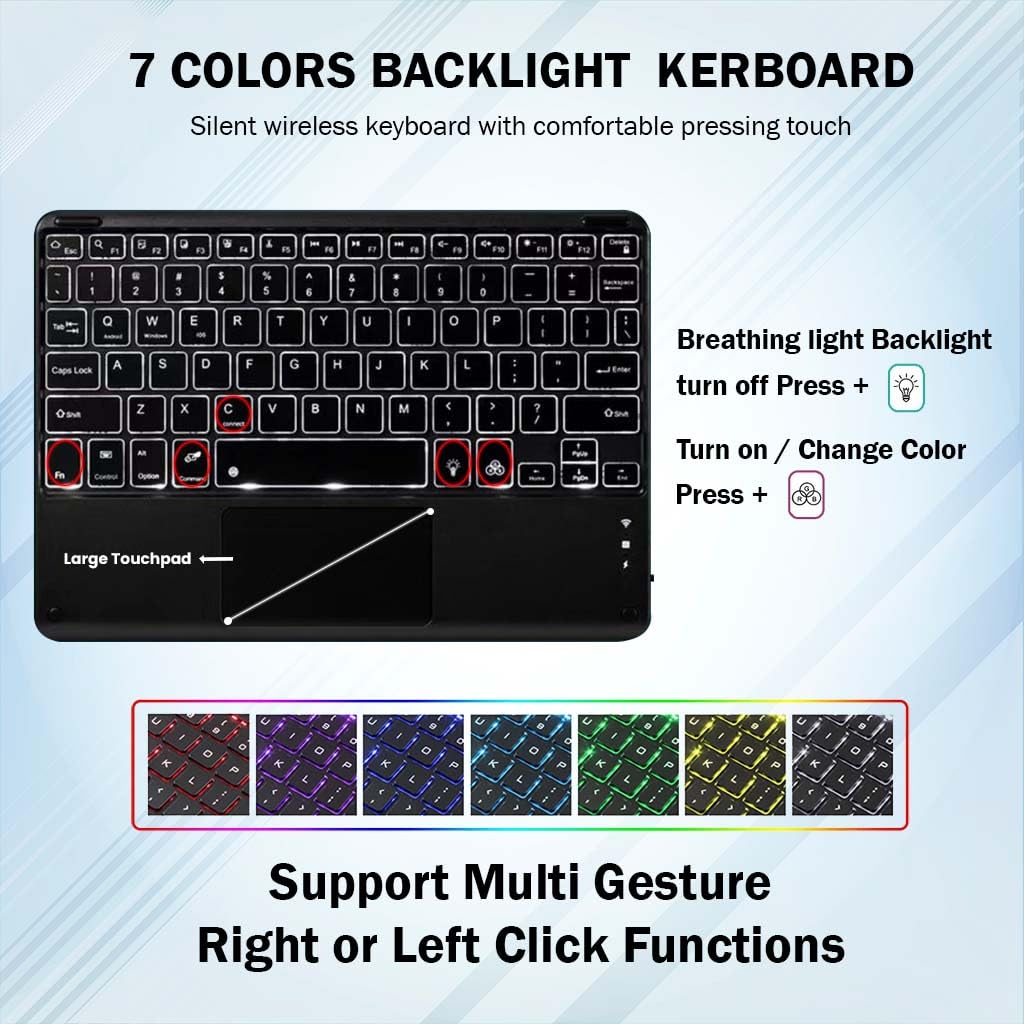
Image: Close-up of the keyboard's USB-C charging port and battery specifications.
4.2. Connecting the Keyboard via Bluetooth
- Баскычтоп кубатталып, күйгүзүлгөнүн текшериңиз.
- басыңыз Fn + C keys simultaneously on the keyboard. The Bluetooth indicator light will start blinking blue, indicating it's in pairing mode.
- Планшетиңизден төмөнкүгө өтүңүз Орнотуулар > Bluetooth.
- Bluetooth'ду күйгүзүп, жеткиликтүү түзмөктөрдү издеңиз.
- Select "Bluetooth Keyboard" (or similar name) from the list of found devices to connect.
- Once connected, the Bluetooth indicator light on the keyboard will stop blinking.

Image: The detachable Bluetooth keyboard, highlighting its magnetic attachment and scissor-key structure.
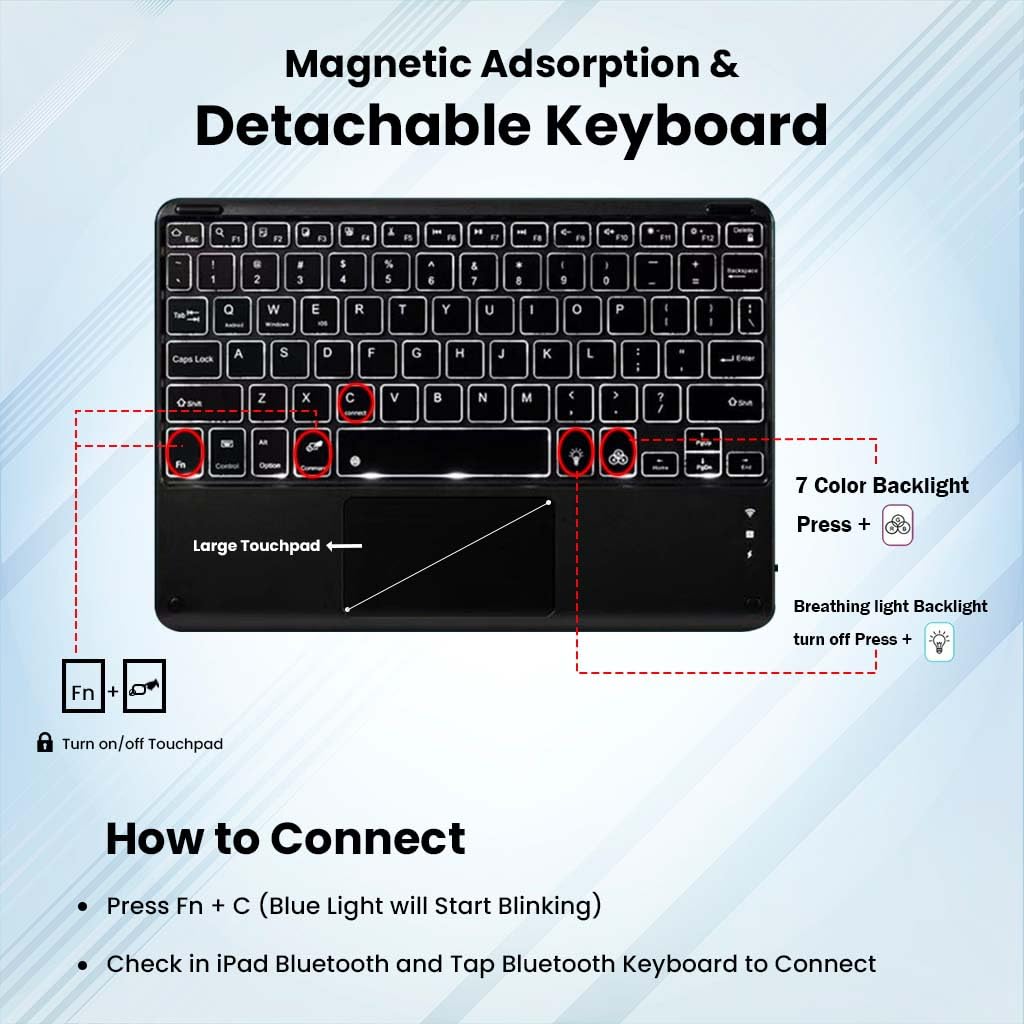
Image: Diagram showing how to connect the keyboard via Bluetooth (Fn+C) and controls for backlight and trackpad.
5. Иштөө нускамалары
5.1. Баскычтоптун функциялары
- Hotkeys and Media Keys: The keyboard includes dedicated hotkeys and media keys for quick access to functions like volume control, playback, and screen brightness. Refer to the key labels for specific functions.
- Авто Уйку/Ойготуу: To conserve battery, the keyboard will automatically enter sleep mode after 10 minutes of inactivity. Press any key to wake it up.
5.2. Сенсордук панелди колдонуу
The integrated trackpad supports smart gestures for intuitive navigation and control.
- Негизги навигация: Use single-finger gestures for pointing and clicking.
- Multi-Gesture Support: The trackpad supports various multi-finger gestures for scrolling, zooming, and other tablet functions. Refer to your tablet's operating system for specific gesture controls.
- Turn On/Off Trackpad: Басыңыз Fn + Боштук (or the designated trackpad icon key) to enable or disable the trackpad.
5.3. Арткы жарыкты башкаруу
The keyboard features 7-color RGB backlighting with adjustable brightness levels.
- Арткы жарыкты күйгүзүү/өчүрүү: басыңыз light bulb icon key арткы жарыкты күйгүзүү же өчүрүү үчүн.
- Жарыктыкты жөндөө: басыңыз light bulb icon key repeatedly to cycle through 3 brightness levels.
- Арткы жарыктын түсүн өзгөртүү: Басыңыз Fn + light bulb icon key жеткиликтүү болгон 7 арткы жарык түстөрүн карап чыгуу үчүн.
- Дем алуу жарык режими: Some models may feature a breathing light effect. Press Fn + light bulb icon key (or a dedicated breathing light key) to activate or deactivate this mode.

Image: Keyboard layout showing backlight color options and trackpad functionality.

Image: Dynamic display of the keyboard's 7-color backlight switching feature.
5.4. Case Features
- Multi-Angle Tri-Fold Stand: The case features a built-in anti-slip design that supports three viewing angles. Adjust the stand to your preferred angle for typing, viewing, reading, or sketching.
- Built-in Pen Holder: A dedicated holder is integrated into the case to securely store your stylus pen.
- Так кесүү: The case provides precise cutouts for all ports, sensors, speakers, and buttons, ensuring full access without removing the case.
- Коргоочу дизайн: Crafted from premium soft silicone and microfiber leather, the case offers protection against drops, bumps, and scratches.

Сүрөт: деталдуу view of the case's precise cutouts for tablet features and raised edges for protection.
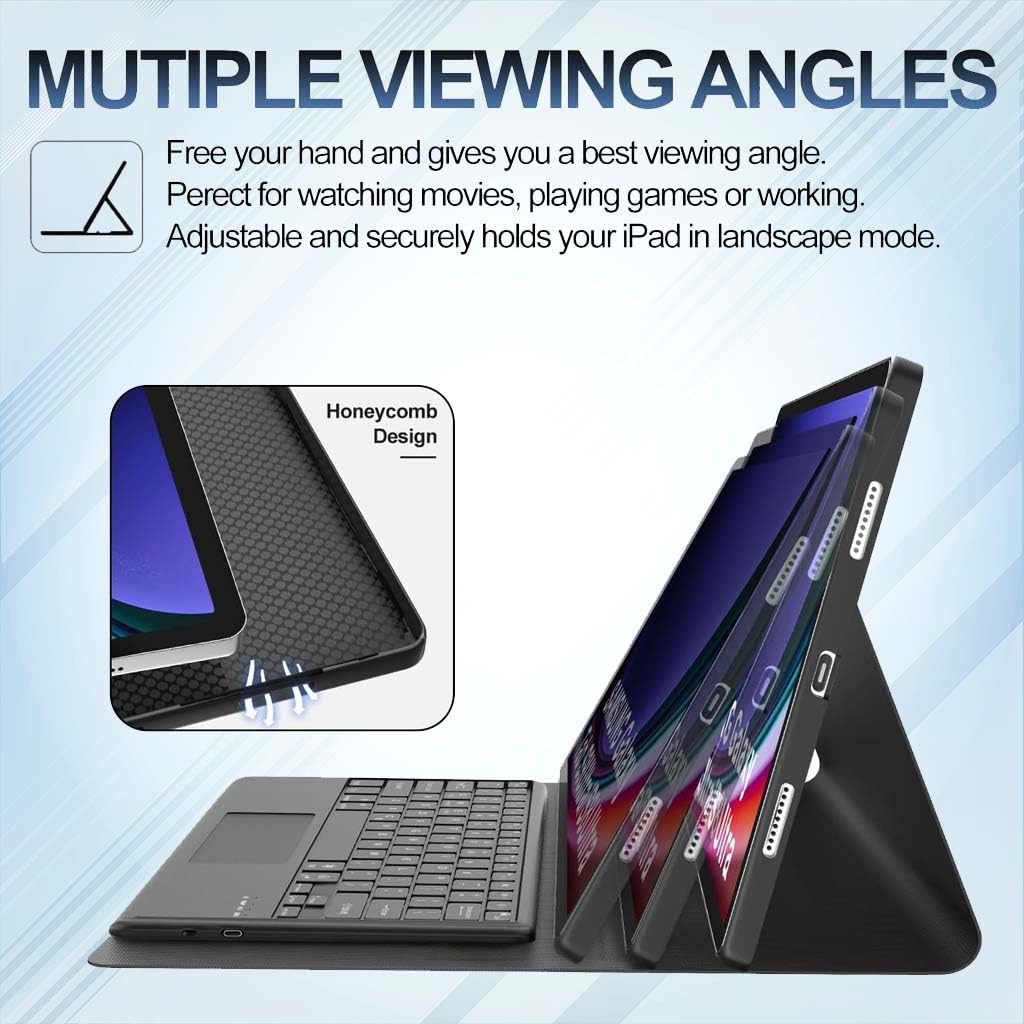
Image: Illustration of the case supporting various viewing angles for different activities.
6. Техникалык тейлөө
To ensure the longevity and optimal performance of your TECPHILE Keyboard Case, follow these maintenance guidelines:
- Тазалоо: Клавиатураны жана корпусту тазалоо үчүн жумшак, кургак, мамыксыз чүпүрөктү колдонуңуз. Өтө кир болсо, бир аз сүртүңүз.ampчүпүрөктү суу же жумшак, абразивдүү тазалагыч менен жууп салыңыз. Ашыкча нымдуулуктан сактаныңыз.
- Сактагыч: Колдонулбаган учурда, клавиатура корпусун күн тийбеген жана өтө температурадан алыс, салкын, кургак жерде сактаңыз.
- Суюктуктардан алыс болуңуз: Do not expose the keyboard to liquids. While the case offers some protection, the keyboard itself is not waterproof.
- Этияттык менен мамиле кылуу: Avoid dropping the case or applying excessive force to the keyboard keys or trackpad.
7. Кыйынчылыктарды
If you encounter issues with your TECPHILE Keyboard Case, refer to the following common solutions:
- Баскычтоп туташпай жатат:
- Баскычтоп кубатталып, күйгүзүлгөнүн текшериңиз.
- Планшетиңизде Bluetooth иштетилгенин текшериңиз.
- Re-enter pairing mode on the keyboard (Fn + C) and re-scan for devices on your tablet.
- Планшетиңиздин Bluetooth жөндөөлөрүнөн түзмөктү унутуп, кайра жупташтырып көрүңүз.
- Ачкычтар жооп бербейт:
- Баскычтоптун Bluetooth аркылуу туташканын текшериңиз.
- Баскычтоптун батареясы түгөнүп калбасын текшериңиз.
- Баскычтопту да, планшетиңизди да өчүрүп-күйгүзүңүз.
- Сенсордук панель иштебей жатат:
- Ensure the trackpad is enabled (Fn + Spacebar).
- Bluetooth байланышын текшериңиз.
- Трекпаддын бетин тазалаңыз.
- Backlight Not Working/Changing:
- Клавиатуранын күйгүзүлгөнүн жана кубатталганын текшериңиз.
- Use the correct key combinations (light bulb icon key for on/off/brightness, Fn + light bulb icon key for color).
- кубаттоо маселелери:
- Ensure the USB-C cable is securely connected to both the keyboard and the power source.
- Башка USB-C кабелин же кубат адаптерин колдонуп көрүңүз.
8. Техникалык шарттар
| Өзгөчөлүк | Спецификация |
|---|---|
| Бренд | ТЕХНИКАЛЫК |
| Модел | OP121 |
| Продукциянын өлчөмдөрү | 12 x 2 x 27 см |
| Элемент Салмагы | 675 г |
| Шайкеш түзмөктөр | OnePlus Pad 2, OnePlus Pad Pro (OPD2404), Oppo Pad 3 Pro (OPD2401) 12.1 inch |
| Байланыш технологиясы | Bluetooth |
| Power Source | Батарея менен иштейт |
| Батарея сыйымдуулугу | 500mAh |
| Заряддоо убактысы | 2-3 саат |
| Operating Time (No Backlight) | 80 саатка чейин |
| Operating Time (With Backlight) | 5 саатка чейин |
| Күтүү убактысы | 100 күнгө чейин |
| Өзгөчөлүктөр | Backlit, Hotkeys and Media Keys, Rechargeable, Trackpad, Magnetically Detachable |
| Материал | Plastic, Soft Silicone, Microfiber Leather |
| Келип чыккан өлкө | Кытай |
9. Кепилдик жана колдоо
For warranty information or technical support, please contact TECPHILE customer service. Details can typically be found on the product packaging or the official TECPHILE webсайт.
Өндүрүүчү/Импорттоочу Байланыш:
ТЕХНИКАЛЫК
A36 2nd Floor Naraina Industrial Area Phase-2,
Delhi 110028, India
Электрондук почта: customercare@conceptkart.com

