Introduction
Welcome to the user manual for your new boAt Stone 352 Pro Bluetooth Speaker. This guide provides detailed instructions on how to set up, operate, and maintain your speaker, ensuring you get the best audio experience. Please read this manual thoroughly before using the product.
Кутуда эмне бар
Upon unboxing your boAt Stone 352 Pro, you should find the following items:
- 1 x boAt Stone 352 Pro Bluetooth Speaker
- 1 x заряддоо кабели (Type-C)
- 1 х Колдонуучунун колдонмосу (бул документ)
- 1 x Кепилдик картасы
- 1 x Каталог

Image: The boAt Stone 352 Pro speaker, a USB Type-C charging cable, and the warranty card/user manual are shown, representing the contents of the product box.
Video: An unboxing demonstration of the boAt Stone 352 Pro Bluetooth Speaker, showing the speaker, charging cable, and documentation included in the package.
Продукт бүттүview
The boAt Stone 352 Pro is a portable Bluetooth speaker designed to deliver powerful audio with enhanced features. Key highlights include:
- 14 Вт кайыктын кол тамга үнү: Experience clear and powerful audio output.
- Dynamic RGB LEDs: Enhance your listening experience with vibrant lighting effects.
- Up to 12 Hours Playback: Бир кубаттоо менен узак убакыт бою музыка ойнотуңуз.
- TWS өзгөчөлүгү: Connect two Stone 352 Pro speakers for a stereo sound experience.
- Камтылган микрофон: Facilitates hands-free calling.
- Bluetooth v5.3: Зымсыз байланыштын туруктуу жана натыйжалуу иштешин камсыз кылат.
- IPX5 сууга туруктуулугу: Чачылышынан жана терден коргоону камсыз кылат.
- Бир нече туташуу режимдери: Supports Bluetooth, AUX, and TF Card playback.
- Type-C заряддоо: Заманбап жана ыңгайлуу кубаттоо интерфейси.

Image: A black boAt Stone 352 Pro speaker, showcasing its cylindrical design and the illuminated RGB LED strip on the front.
Башкаруу каражаттары жана көрсөткүчтөр
Familiarize yourself with the speaker's controls and indicators for optimal use.

Image: The side panel of the boAt Stone 352 Pro speaker, highlighting the power button, volume up/down buttons, and mode selection button.
- Кубат баскычы: Күйгүзүү/өчүрүү үчүн басып туруңуз. Музыканы ойнотуу/тындыруу үчүн кыска басыңыз.
- Үнүн жогорулатуу (+): Үнүн жогорулатуу үчүн кыска басыңыз. Кийинки трекке көпкө басыңыз.
- Үнүн төмөндөтүү (-): Үндү азайтуу үчүн кыска басыңыз. Мурунку трек үчүн көпкө басыңыз.
- Режим (M) баскычы: Bluetooth, AUX жана TF карта режимдеринин ортосунда которулуу үчүн кыска басыңыз.
- RGB LED Strip: Indicates power status, charging, and provides dynamic lighting effects.
Баштоо
Спикерди заряддоо
Before first use, fully charge your speaker. The boAt Stone 352 Pro features a Type-C charging port.
- Кубаттоочу кабелдин Type-C учун динамиктин кубаттоо портуна туташтырыңыз.
- Connect the USB-A end of the cable to a compatible USB power adapter (5V/1A recommended).
- The RGB LED strip will indicate charging status. It typically takes approximately 2 hours for a full charge.
- Толук заряддалгандан кийин, заряддоо кабелин ажыратыңыз.

Сүрөт: деталдуу view of the boAt Stone 352 Pro's side panel, illustrating the Type-C charging interface and the various connectivity ports (Bluetooth, AUX, TF Card).
Күйгүзүү/өчүрүү
- To power on, press and hold the Power button until you hear an audible prompt and the RGB LEDs illuminate.
- To power off, press and hold the Power button again until you hear an audible prompt and the RGB LEDs turn off.
Иштөө нускамалары
Bluetooth байланышы
- Ensure the speaker is powered on and in Bluetooth mode (indicated by a specific LED pattern or audible prompt).
- Смартфонуңузда же аудио түзмөгүңүздө Bluetooth'ду күйгүзүп, жеткиликтүү түзмөктөрдү издеңиз.
- Select "boAt Stone 352 Pro" from the list of devices.
- Once paired, you will hear a confirmation tone, and the speaker's LED will indicate a successful connection.
- Эгерде түзмөк жеткиликтүү диапазондо болсо, динамик күйгүзүлгөндө акыркы жупташтырылган түзмөккө автоматтык түрдө кайра туташат.
AUX режими
For wired connections, use the AUX port.
- Connect one end of a 3.5mm AUX cable (not included) to the speaker's AUX port.
- Connect the other end to your audio device's 3.5mm audio output.
- Press the 'M' (Mode) button on the speaker to switch to AUX mode.
- Эми аудио туташкан түзмөгүңүздөгү динамик аркылуу ойнотулат.
TF картасын ойнотуу
TF (microSD) картасынан түз музыка ойнотуңуз.
- MP3 аудиосу бар TF картасын салыңыз files into the speaker's TF card slot.
- Press the 'M' (Mode) button to switch to TF Card mode.
- The speaker will automatically begin playing music from the card.
TWS (Чыныгы Wireless Stereo) функциясы
Connect two boAt Stone 352 Pro speakers wirelessly for a true stereo sound experience.
- Эки динамиктин күйгүзүлгөнүн жана башка Bluetooth түзмөгүнө туташпаганын текшериңиз.
- On one speaker (this will be the primary speaker), long press the 'M' (Mode) button until you hear a TWS pairing prompt.
- The two speakers will automatically search and pair with each other. A confirmation tone will indicate successful TWS pairing.
- Now, connect your audio device to the primary speaker via Bluetooth as described above.
- Both speakers will play audio in stereo.

Image: Two boAt Stone 352 Pro speakers, one black and one blue, operating in TWS mode, demonstrating synchronized audio playback from a connected smartphone.
Hands-Free Чалуу
The built-in microphone allows for convenient hands-free calls when connected via Bluetooth.
- When an incoming call is received, press the Power button once to answer.
- To end a call, press the Power button once again.
- To reject an incoming call, long press the Power button.
RGB LED Functionality
The boAt Stone 352 Pro features dynamic RGB LEDs that add a visual element to your audio experience.

Сүрөт: жакын план view of the boAt Stone 352 Pro's RGB LED strip, displaying a gradient of colors from blue to green to orange, highlighting its dynamic lighting feature.
- The RGB LEDs automatically cycle through various colors, synchronizing with the music or providing ambient lighting.
- Specific button presses may allow for changing LED modes or turning them off (refer to product-specific quick start guide for advanced controls if available).
Техникалык тейлөө жана кам көрүү
- Тазалоо: Динамикти тазалоо үчүн жумшак, кургак чүпүрөктү колдонуңуз. Абразивдүү тазалагычтарды же эриткичтерди колдонбоңуз.
- Суу туруктуулугу (IPX5): The speaker is IPX5 rated, meaning it is protected against low-pressure water jets from any direction. It is not designed for submersion in water. Ensure the charging port cover is securely closed to maintain water resistance.
- Сактагыч: Динамикти түз күн нурунан жана өтө температурадан алыс салкын, кургак жерде сактаңыз.
- Батареяга кам көрүү: Батареянын иштөө мөөнөтүн узартуу үчүн динамикти бат-баттан толук кубаттап турбаңыз. Узак мөөнөткө колдонулбаса да, аны үзгүлтүксүз заряддаңыз.

Image: The boAt Stone 352 Pro speaker with water droplets on its surface, emphasizing its IPX5 splash and sweat resistance feature.
Проблемаларды чечүү
| Көйгөй | Мүмкүн чечим |
|---|---|
| Динамик күйбөйт. | Динамиктин кубатталганын текшериңиз. Аны кубат булагына туташтырып, кайра аракет кылыңыз. |
| Bluetooth аркылуу жупташтыруу мүмкүн эмес. |
|
| Үн жок же үнү төмөн. |
|
| TWS жупташтыруу ишке ашкан жок. |
|
| Чалуу сапаты начар. |
|
Техникалык шарттар
| Өзгөчөлүк | Деталь |
|---|---|
| Модель аты | Stone 352 Pro |
| Динамик түрү | Көчмө спикер |
| Динамик чыгаруу күчү | 14 Ватт |
| Bluetooth версиясы | v5.3 |
| Bluetooth диапазону | 10 метр |
| Батареянын орточо иштөө мөөнөтү | 12 саат |
| Заряддоо убактысы | 2 саат |
| Батарея сыйымдуулугу | 3600 миллионamp Саат |
| Суу каршылык | IPX5 |
| Байланыш технологиясы | Bluetooth, USB, Wi-Fi (Note: While Wi-Fi is listed, primary connectivity is Bluetooth, AUX, and TF Card as per product features.) |
| Башкаруу ыкмасы | Push Button |
| Продукциянын өлчөмдөрү | 15.8D x 9.4W x 9.4H Сантиметр |
| Элемент Салмагы | 20 грамм |
| Камтылган компоненттер | Speaker, Cable, User Manual, Warranty Card, Catalogue |
Кепилдик жана колдоо
Your boAt Stone 352 Pro Bluetooth Speaker comes with a standard brand warranty. Please refer to the included Warranty Card for specific terms and conditions.
- Кепилдик мөөнөтү: Адатта, сатып алынган күндөн тартып 1 жыл.
- Доо процесси: For warranty claims or technical support, please contact boAt customer service or visit their official website. Keep your purchase receipt and warranty card handy.
- Кепилдик узартылган: An optional 1 Year Extended Warranty by OneAssist is available for purchase.
Кошумча жардам алуу үчүн, сиз да кайрыла аласыз boAt Hearables App for additional user help guides and support resources.
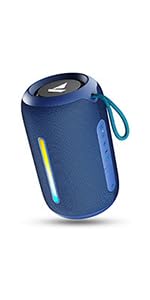
Image: A QR code for the boAt Hearables App, which provides additional support and features for the speaker.


