1. Киришүү жана Продукт бүттүview
The STRONG Powerline Wi-Fi Mini WiFi Kit is designed to extend your internet connection throughout your home using your existing electrical wiring. This kit includes two specialized adapters: the Powerline 1000 Mini and the Powerline Wi-Fi 1000 Mini. It provides high-speed data transfer rates of up to 1000 Mbps via powerline and extends Wi-Fi coverage up to 1200 Mbps, making it ideal for streaming, gaming, and general internet use in every corner of your house without the need for new cables.
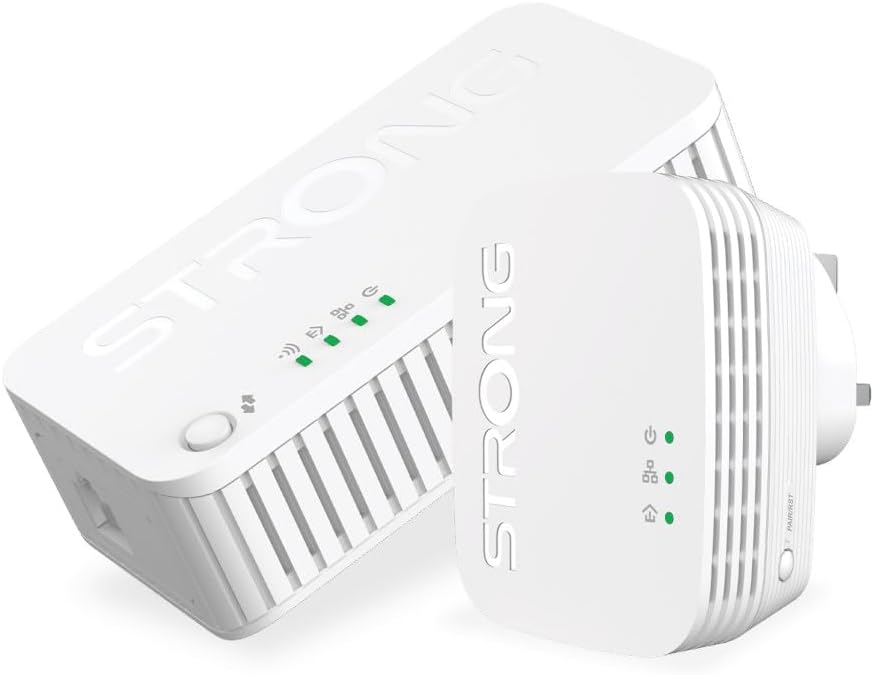
Figure 1: The STRONG Powerline Wi-Fi Mini WiFi Kit, featuring both the Powerline 1000 Mini and Powerline Wi-Fi 1000 Mini adapters.
2. Пакеттин мазмуну
Сураныч, таңгактын ичиндегисин кылдаттык менен текшериңиз. Эгерде кандайдыр бир буюм жок болсо же бузулуп калса, сатуучуга кайрылыңыз.
- 1 x Powerline 1000 Mini Adapter
- 1 x Powerline Wi-Fi 1000 Mini Adapter
- 1 х Ethernet кабели
- 1 x Ыкчам орнотуу колдонмосу
3. Продукциянын өзгөчөлүктөрү
- HomePlug AV2 Standard: High-speed data transfer rates of up to 1000 Mbps, supporting all your online needs.
- Gigabit Port: Provides secure wired networks for desktops, smart TVs, or game consoles.
- Plug and Play: Allows setup of your powerline network in minutes, so you can enjoy fast, seamless wired connections right away.
- Intelligent Power-Saving Design: Helps save up to 88% of power consumption when the devices are not in use.
- Туташуу жана коопсуздандыруу баскычы: For optimum network security and easy pairing.
- Wi-Fi түйүнү: The Powerline Wi-Fi 1000 Mini extends your existing Wi-Fi coverage with speeds up to 1200 Mbps.
4. Орнотуу колдонмосу
Setting up your STRONG Powerline Wi-Fi Mini WiFi Kit is a straightforward process. Follow these steps for a quick and easy installation.
4.1. Баштапкы байланыш
- Connect the Powerline 1000 Mini: Plug the Powerline 1000 Mini adapter into a power outlet near your internet router/modem. Use the provided Ethernet cable to connect the adapter's Ethernet port to an available LAN port on your router/modem.
- Plug in the Powerline Wi-Fi 1000 Mini: Plug the Powerline Wi-Fi 1000 Mini adapter into a power outlet in the room where you need Wi-Fi coverage. Ensure it is within the same electrical circuit as the first adapter.

Figure 2: Powerline 1000 Mini Adapter, typically connected to your router.
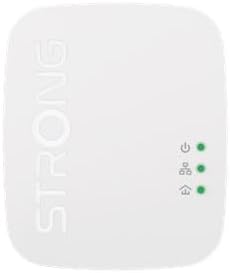
Figure 3: Powerline Wi-Fi 1000 Mini Adapter, used to extend Wi-Fi.
4.2. Pairing the Adapters (If not automatically paired)
The adapters should automatically pair. If they do not, or if you are adding more adapters, follow these steps:
- Press the "Pair" button on the Powerline 1000 Mini adapter for 1 second. The Power LED will start blinking.
- Within 2 minutes, press the "Pair" button on the Powerline Wi-Fi 1000 Mini adapter for 1 second. The Power LED will start blinking.
- Ийгиликтүү туташууну көрсөткөн Powerline LED индикатору жашыл түскө күйгөнчө күтө туруңуз.
Note: For optimal performance, plug the adapters directly into a wall outlet. Avoid power strips, surge protectors, or extension cords, as these can interfere with the powerline signal.
5. Иштөө нускамалары
5.1. Зымдуу туташуу
Once the adapters are paired, you can connect any Ethernet-enabled device (e.g., computer, smart TV, game console) to the Powerline Wi-Fi 1000 Mini adapter's Ethernet port using an Ethernet cable. This will provide a high-speed wired internet connection.
5.2. Wi-Fi туташуусу
The Powerline Wi-Fi 1000 Mini adapter broadcasts a Wi-Fi signal. You can connect your wireless devices (smartphones, tablets, laptops) to this network. The default Wi-Fi network name (SSID) and password are usually printed on a label on the adapter itself or on the Quick Installation Guide.
- Түзмөгүңүздүн Wi-Fi жөндөөлөрүнө өтүңүз.
- Select the Wi-Fi network name (SSID) of your Powerline Wi-Fi 1000 Mini.
- Суралганда Wi-Fi сырсөзүн киргизиңиз.
For enhanced security, it is recommended to change the default Wi-Fi network name and password after initial setup. Refer to the full user manual (available on the manufacturer's website) for instructions on how to do this.
6. Техникалык тейлөө
To ensure the longevity and optimal performance of your STRONG Powerline Wi-Fi Mini WiFi Kit, follow these maintenance guidelines:
- Тазалоо: Use a soft, dry cloth to clean the adapters. Do not use liquid or aerosol cleaners.
- Вентиляция: Ensure the adapters are placed in well-ventilated areas and their ventilation holes are not blocked.
- Курчап турган чөйрө: Түзмөктөрдү өтө жогорку температурага, нымдуулукка же түз күн нуруна дуушар кылбаңыз.
- Программалык камсыздоонун жаңыртуулары: Periodically check the STRONG official webэң жакшы иштөөнү жана коопсуздукту камсыз кылуу үчүн жеткиликтүү болгон микропрограммалык камсыздоонун жаңыртуулары үчүн сайт.
7. Кыйынчылыктарды
If you encounter issues with your Powerline Wi-Fi Mini WiFi Kit, refer to the following common problems and solutions:
| Көйгөй | Мүмкүн чечим |
|---|---|
| No Powerline Connection (Powerline LED off/red) |
|
| Жай Интернет ылдамдыгы |
|
| No Wi-Fi Signal from Powerline Wi-Fi 1000 Mini |
|
| Product description discrepancy (Ethernet vs. Wi-Fi) | The STRONG Powerline Wi-Fi Mini WiFi Kit provides экөө тең Powerline Ethernet connectivity and Wi-Fi extension. The Powerline 1000 Mini adapter connects to your router via Ethernet and transmits data over your electrical wiring. The Powerline Wi-Fi 1000 Mini adapter receives this data and provides both an Ethernet port for wired devices and broadcasts a Wi-Fi signal for wireless devices. Ensure you are using the correct adapter for your desired connection type. |
8. Техникалык шарттар
| Өзгөчөлүк | Деталь |
|---|---|
| Бренд | Күчтүү |
| Модел | Powerline Wi-Fi Mini WiFi Kit |
| Маалыматтарды өткөрүү ылдамдыгы (Powerline) | Up to 1000 Mbps (HomePlug AV2 Standard) |
| Маалыматтарды өткөрүү ылдамдыгы (Wi-Fi) | 1200 Мбит/сек чейин |
| Аппараттык интерфейс | Ethernet |
| Шайкеш түзмөктөр | Computers, Smartphones, Tablets, Smart TVs, Game Consoles, etc. |
| Power-үнөмдөө | Intelligent Power-Saving design (up to 88% power consumption reduction) |
| Өлчөмдөр | 17.5 x 15.2 x 8.2 см (Пакет) |
| Салмагы | 0.43 килограмм |
9. Кепилдик жана колдоо
For detailed warranty information, please refer to the warranty card included with your product or visit the official STRONG website. For technical support, frequently asked questions, and additional resources, please visit the STRONG support page or contact their customer service directly.
Официалдуу Webсайт: www.strong.tv


