1. Киришүү
This manual provides instructions for the safe and effective use of your SKYBASIC 2" IPS Screen 1000X Handheld Digital Microscope. Please read this manual thoroughly before operating the device and retain it for future reference.

Image: The SKYBASIC Handheld Digital Microscope, showing the main unit, USB cables, and a lanyard, alongside a monitor displaying a magnified leaf and a ladybug on leaves.
2. Продукт бүтүп калдыview
The SKYBASIC Handheld Digital Microscope is designed for exploring the microscopic world with ease. It features a 2-inch IPS color display, up to 1000X magnification, and adjustable LED illumination.
2.1 Негизги өзгөчөлүктөрү
- 2.0 Inch IPS Color Display: Provides a clear and intuitive real-time observation experience with vibrant colors.
- 1000X чоңойтуу: Suitable for observing various small objects and details.
- High Resolution & 8 LED Lights: Offers excellent detail and optimal clarity with adjustable illumination.
- Портативдик дизайн: Compact and lightweight, with a detachable screen decoration kit and lanyard for easy outdoor use.
- Сүрөт жана видео жаздыруу: Capture images and videos of observations. Built-in storage for up to 400 photos; TF memory card (not included) required for video recording.
- PC шайкештиги: Connects to a computer for a larger viewтажрыйбасы.
2.2 Компоненттер

Image: Illustration of the 2.0 Inch IPS Color Display, demonstrating how high-definition observation images are transmitted in real-time.

Image: Diagram showing the microscope's lens assembly with 8 adjustable LED lights and indicating 1000X magnification, with exampболушу мүмкүн болгон объектилердин аздыгы viewed (skin, insect, PCB, plant, coin, jewelry).
3. Орнотуу
Follow these steps to prepare your microscope for first use.
3.1 Пакеттен чыгаруу
Бардык компоненттерди таңгактан кылдаттык менен алып салыңыз. Төмөндө тизмеленген нерселердин бардыгы бар экендигин текшериңиз:
- SKYBASIC Handheld Digital Microscope
- USB заряддоо кабели (Type-C)
- Lanyard
- User Manual

Image: An illustration showing the microscope, manual, Type-C cable, and anti-lost rope (lanyard) as included package contents.
3.2 Аппаратты заряддоо
Before initial use, fully charge the microscope. Connect the provided USB Type-C cable to the microscope's charging port and the other end to a standard USB power adapter (not included) or a computer USB port. The charging indicator will show the charging status.
3.3 Inserting a TF Card (Optional for Video Recording)
The microscope has built-in storage for up to 400 photos. For video recording, a TF (microSD) memory card must be inserted (not included). Locate the TF card slot, gently insert the card until it clicks into place. Ensure the card is inserted in the correct orientation.
4. Иштөө нускамалары
4.1 Күйгүзүү/өчүрүү
- To power on, long press the power button located on the device.
- To power off, long press the power button again until the screen turns off.

Image: A visual guide demonstrating the four easy steps for using the microscope: 1. Turn on, 2. Rotate the focus wheel, 3. Observe details on the HD screen, 4. Connect to a computer for a larger view.
4.2 Фокустоо
After powering on, place the microscope over the object you wish to observe. Slowly rotate the focus wheel (typically located on the barrel of the microscope) until the image on the 2-inch IPS screen appears clear and sharp.
4.3 LED жарыктарды тууралоо
The microscope is equipped with 8 adjustable LED lights to illuminate your subject. Use the light adjustment buttons (refer to the device's physical buttons) to increase or decrease the brightness for optimal viewшарттар.
4.4 Сүрөт тартуу
With the desired image in focus on the screen, press the photo capture button (usually marked with a camera icon) once to take a still image. The image will be saved to the internal storage.

Image: The microscope's screen interface, illustrating the options for taking photos (with a leaf texture example) and recording videos (with an insect eye example). It notes built-in storage for photos and the requirement of a TF card for videos.
4.5 Видеолорду жаздыруу
To record video, ensure a TF memory card is inserted. Press the video recording button (usually marked with a video camera icon) once to start recording. Press it again to stop recording. Videos will be saved to the TF card.
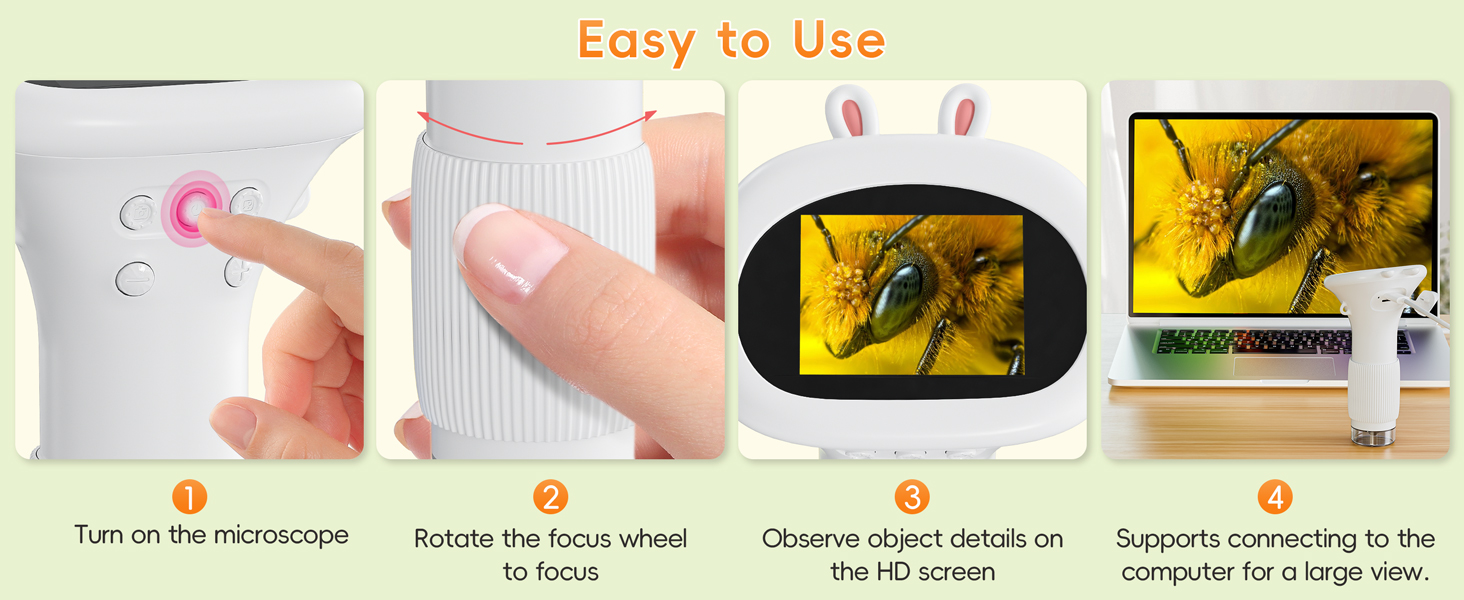
Image: A visual representation of the microscope's videography and photography capabilities, highlighting that built-in storage supports up to 400 photos, and a TF card is needed for video recording.
4.6 Компьютерге туташуу
Чоңураак үчүн viewing experience, you can connect the microscope to a computer. Use the provided USB cable to connect the microscope to your PC. The device is compatible with Windows Vista/XP/7/8/10/11 and MacOS x 11.0 or higher. Once connected, the microscope should be recognized as a webcam or storage device, allowing you to view live feed or access stored media.

Image: The microscope connected to a laptop via a USB cable, demonstrating its PC compatibility for a larger viewing experience on Windows and MacOS.
5. Техникалык тейлөө
Proper care ensures the longevity and optimal performance of your microscope.
- Тазалоо: Use a soft, dry cloth to clean the exterior of the microscope. For the lens and screen, use a specialized lens cleaning cloth and solution to avoid scratches.
- Сактагыч: Микроскопту күн нурунан жана экстремалдык температурадан алыс салкын, кургак жерде сактаңыз.
- Батареяга кам көрүү: Батареянын иштөө мөөнөтүн сактоо үчүн, батареяны тез-тез толук зарядсыздандырбаңыз. Түзмөктү көпкө чейин колдонулбаса дагы, үзгүлтүксүз кубаттап туруңуз.
- Таасирден качуу: Handle the microscope with care to prevent drops or impacts that could damage internal components.
6. Кыйынчылыктарды
If you encounter issues with your microscope, refer to the following common problems and solutions:
| Көйгөй | Мүмкүн себеп | Чечим |
|---|---|---|
| Түзмөк күйбөйт. | Батареянын заряды аз же түзмөк өчүк. | Charge the device fully. Long press the power button to turn on. |
| Сүрөт бүдөмүк. | Improper focus or insufficient lighting. | Rotate the focus wheel until the image is clear. Adjust the LED light brightness. |
| Сүрөткө тартуу же видео жазуу мүмкүн эмес. | Internal storage full (for photos) or no TF card inserted (for videos). | Delete old photos or transfer them to a PC. Insert a TF card for video recording. |
| Компьютерге туташуу мүмкүн эмес. | Faulty USB cable, incorrect port, or driver issue. | Try a different USB cable or port. Ensure your PC's operating system is compatible. |
7. Техникалык шарттар
| Өзгөчөлүк | Деталь |
|---|---|
| Модель номери | inskam372 |
| Бренд | SKYBASIC |
| Дисплей | 2.0 Inch IPS Color Screen |
| Чоңойтуу | 1000X чейин |
| Жарык булагы | 8 Жөнгө салынуучу LED чырактары |
| Сүрөт сактоо | Built-in, up to 400 photos |
| Видео сактагыч | Requires TF (microSD) card (not included) |
| PC шайкештиги | Windows Vista/XP/7/8/10/11, MacOS x 11.0+ |
| Power Source | Батарея менен иштейт (1 литий-иондук батарейка камтылган) |
| Материал | Пластик |
| Элемент Салмагы | 8.4 унция |
| Пакеттин өлчөмдөрү | 6.65 x 4.25 x 3.11 дюйм |
8. Кепилдик жана колдоо
For warranty information and customer support, please refer to the documentation included with your purchase or visit the official SKYBASIC website. If you experience any issues not covered in this manual, please contact SKYBASIC customer service for assistance.
Manufacturer: Shenzhen Sulang Technology Co.,ltd
Кошумча жардам алуу үчүн, сиз иш сапары менен болот SKYBASIC Store on Amazon.


