1. Киришүү
Thank you for choosing the Darmoshark N3PRO 8K Wireless Gaming Mouse. This manual provides detailed instructions for setting up, operating, and maintaining your new gaming mouse. Please read this manual thoroughly before use to ensure optimal performance and longevity of the product.
2. Пакеттин мазмуну
- Darmoshark N3PRO Wireless Gaming Mouse
- USB-Cден USB-Aга чейин кубаттоочу кабель
- 2.4G USB кабыл алгыч
- User Manual

Image: The Darmoshark N3PRO wireless gaming mouse shown with its accompanying 2.4G USB receiver.
3. Продукт бүтүп калдыview
The Darmoshark N3PRO features a lightweight, ergonomic design with multiple connectivity options and programmable buttons.
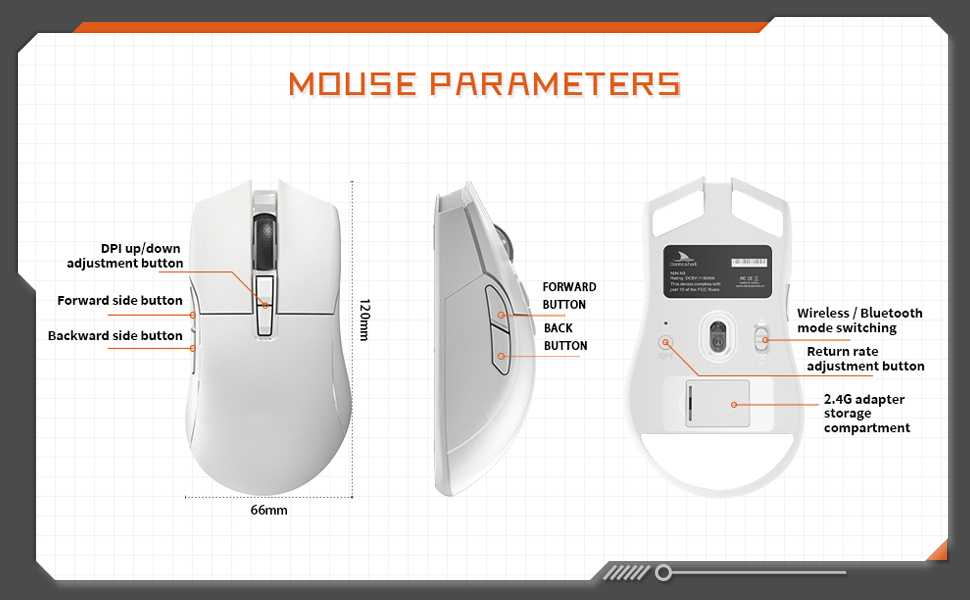
Image: A diagram illustrating the Darmoshark N3PRO mouse from top, side, and bottom views, with labels for buttons and dimensions. Key labels include DPI up/down adjustment button, forward side button, backward side button, forward button, back button, wireless/Bluetooth mode switching, return rate adjustment button, and 2.4G adapter storage compartment.
Баскыч функциялары:
- Сол чыкылдатуу баскычы: Стандарттык сол чычкан баскычы функциясы.
- Оң баскычты чыкылдатуу: Стандарттык оң чычкан баскычы функциясы.
- Жылдыруу дөңгөлөгү: Scroll up/down, and middle click function.
- DPI Up/Down Adjustment Buttons: Adjust the mouse's sensitivity (DPI) levels.
- Forward Side Button: Default function is 'Forward' in web browsers/applications.
- Backward Side Button: Default function is 'Back' in web browsers/applications.
- Mode Switch (Bottom): Toggles between 2.4G wireless and Bluetooth modes.
- Return Rate Adjustment Button (Bottom): Adjusts the polling rate.
4. Орнотуу
The Darmoshark N3PRO supports three connection modes: Wired (USB-C), 2.4G Wireless, and Bluetooth 5.0. You can connect up to 3 devices simultaneously.

Image: The Darmoshark N3PRO mouse connected to a laptop via a 2.4G receiver, to a device via USB-C cable, and wirelessly to a smartphone via Bluetooth 5.0, illustrating its tri-mode connectivity.
4.1 Зымдуу туташуу
- Заряддоо кабелинин USB-C учун чычканга туташтырыңыз.
- Заряддоо кабелинин USB-A учун компьютериңиздеги жеткиликтүү USB портуна туташтырыңыз.
- The mouse will be automatically detected and ready for use. This mode also charges the mouse.
4.2 2.4G зымсыз байланыш
- Locate the 2.4G USB receiver, typically stored in a compartment on the underside of the mouse.
- 2.4G USB ресиверди компьютериңиздеги жеткиликтүү USB портуна сайыңыз.
- Slide the mode switch on the bottom of the mouse to the 2.4G position.
- Чычкан автоматтык түрдө туташат.
4.3 Bluetooth байланышы
- Slide the mode switch on the bottom of the mouse to the Bluetooth position.
- Компьютериңизде же түзмөгүңүздө Bluetooth жөндөөлөрүн ачыңыз.
- Издөө new devices and select "Darmoshark N3PRO" from the list.
- Жупташтыруу процессин аяктоо үчүн экрандагы көрсөтмөлөрдү аткарыңыз.
5. Иштөө нускамалары
5.1 DPI жөндөө
The mouse features a PAW3395 optical sensor with adjustable DPI settings up to 26000 DPI. Use the dedicated DPI adjustment buttons on the top of the mouse to cycle through preset DPI levels. The current DPI level may be indicated by an LED color change or through the software.
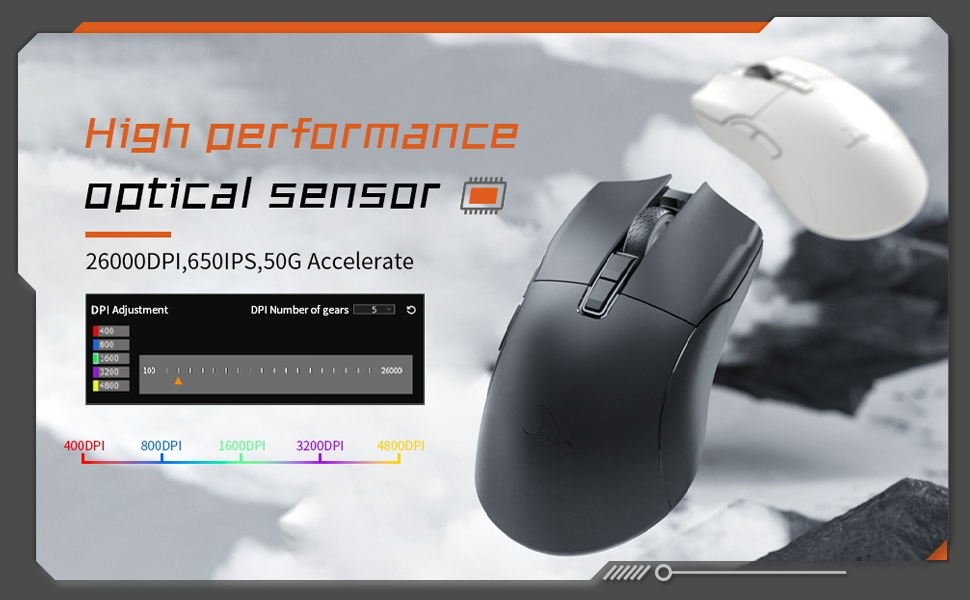
Image: The Darmoshark N3PRO mouse with a blue glowing light, highlighting its adjustable DPI (up to 26000) and IPS (650) settings for precision and speed.
5.2 Добуш берүү көрсөткүчүн тууралоо
The polling rate can be adjusted using the button on the underside of the mouse or through the customization software. The N3PRO supports polling rates up to 8000Hz for ultra-responsive tracking.
5.3 Программалануучу баскычтар жана программалык камсыздоону ыңгайлаштыруу
The Darmoshark N3PRO features 7 programmable buttons. To customize button functions, DPI settings, macros, and other advanced features, download the official Darmoshark software from the manufacturer's website. The software allows for personalized configurations to suit your preferences.
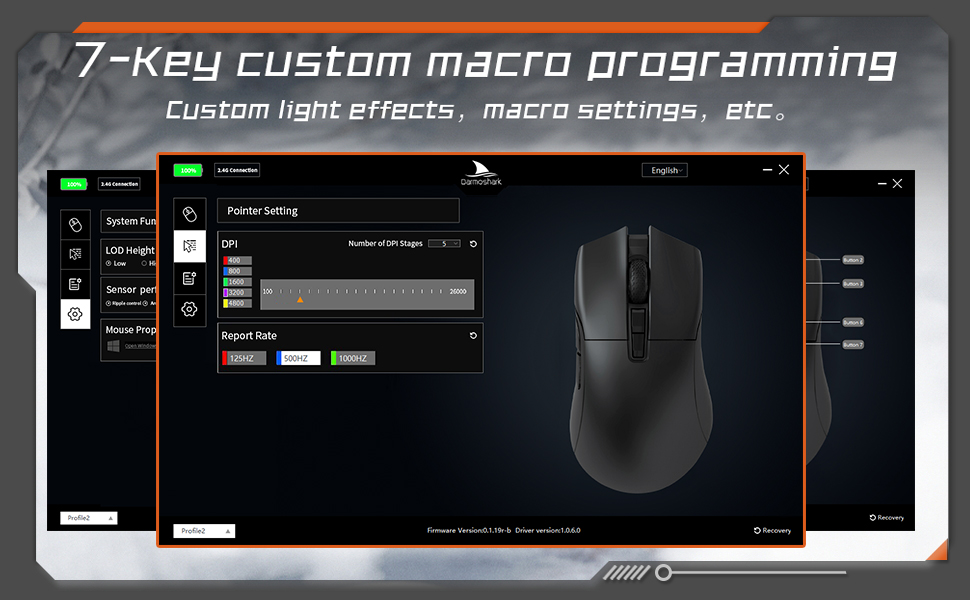
Image: A screenshot of the Darmoshark N3PRO customization software interface, showing options for DPI settings, polling rate, and button assignments, with a visual representation of the mouse.
5.4 Чычканды заряддоо
Connect the mouse to your computer using the provided USB-C cable. The mouse will charge automatically. A full charge provides approximately 80 hours of battery life (depending on usage and polling rate). The mouse is equipped with a 300mAh Lithium Ion battery.

Image: A close-up of the Darmoshark N3PRO mouse, indicating its 300mAh battery capacity.
6. Техникалык тейлөө
- Тазалоо: Чычканды тазалоо үчүн жумшак, кургак чүпүрөктү колдонуңуз. өжөр кир үчүн, бир аз гamp чычканга эч кандай суюктук кирбеши үчүн кездемени колдонсо болот.
- Сенсор: Так көзөмөлдөө үчүн чычкандын астыңкы жагындагы оптикалык сенсорду таза жана чаңдан же таштандылардан таза кармаңыз.
- Сактагыч: When not in use for extended periods, store the mouse in a dry, cool place.
- Батареяга кам көрүү: Avoid fully discharging the battery frequently. Charge the mouse when the battery indicator is low.
7. Кыйынчылыктарды
| Көйгөй | Чечим |
|---|---|
| Чычкан жооп бербей жатат (зымдуу) |
|
| Mouse not responding (2.4G Wireless) |
|
| Чычкан жооп бербей жатат (Bluetooth) |
|
| Так эмес көз салуу же курсордун артта калуусу |
|
| Баскычтар күтүлгөндөй иштебей жатат |
|
8. Техникалык шарттар
- Модел: N3PRO
- Байланыш: Tri-Mode (2.4G Wireless, Bluetooth 5.0, USB-C Wired)
- Сенсор: PAW3395 оптикалык сенсор
- DPI: 26000 XNUMX DPI чейин
- Көз салуу ылдамдыгы: 650IPS
- Ылдамдатуу: 50G
- Добуш берүү көрсөткүчү: Up to 8000Hz (wired/2.4G, depending on settings)
- Баскычтар: 7 Программалануучу баскычтар
- Салмагы: Болжол менен 64 г
- Өлчөмдөрү: 120mm x 66mm x 40mm (Length x Width x Height)
- Батарея: 300mAh Lithium Ion (Rechargeable)
- Баскыч басуунун иштөө мөөнөтү: 60 million clicks (approx.)
- Шайкештик: PC, Laptop, Windows, Linux (Bluetooth for various devices)
9. Кепилдик жана колдоо
Darmoshark products are designed for reliability and performance. For warranty information, technical support, or to download the latest software and drivers, please visit the official Darmoshark webсайтка же кардарларды тейлөөгө кайрылыңыз. Кепилдик дооматтар үчүн сатып алганыңыздын далилин сактаңыз.
Эскертүү: Продукциянын мүнөздөмөлөрү жана функциялары алдын ала эскертүүсүз өзгөртүлүшү мүмкүн.


