Introduction
This manual provides comprehensive instructions for the Machenike K500A-B84 75% Compact Mechanical Gaming Keyboard. It covers setup, operation, maintenance, and specifications to ensure optimal performance and user experience.

Image: The Machenike K500A-B84 keyboard, showcasing its compact 75% layout, rainbow LED backlighting, and the included red mechanical switches.
Продукт бүттүview жана өзгөчөлүктөрү
The Machenike K500A-B84 is a 75% compact mechanical gaming keyboard designed for both gaming and productivity. It features a durable construction and customizable options.
- Механикалык кызыл өчүргүчтөр: Provides a linear and smooth typing experience, ideal for gaming. The keyboard supports 3-pin hot-swappable switches, allowing for personalized switch changes.
- RGB арткы жарыгы: Features an adjustable LED backlit system with 11 different backlighting modes for a customizable visual experience.
- Эки жолу басылуучу PBT баскычтоптору: Constructed from double-shot PBT material, these keycaps offer excellent durability and resistance to fading and scratches.
- 75% Compact Layout (84-Key): This innovative layout retains essential function and number keys while saving approximately 20% of desktop space compared to traditional full-sized keyboards.
- Алынуучу USB-C кабели: Ensures a stable, lag-free wired connection and offers portability.
- Эргономикалык дизайн: Сtaggered key design (original equipment height) enhances hand comfort during extended use.
- Anti-Ghosting & N-Key Rollover: Guarantees that all key presses are registered accurately, even during rapid input.
- Adjustable Anti-Slip Feet: Provides stability and allows for height adjustment.

Image: A visual summary highlighting the key features of the Machenike K500A-B84 keyboard, such as its 84-key layout, PBT keycaps, and hot-swappable switches.

Image: This diagram visually compares the compact 75% form factor (84 keys) of the K500A-B84 with a traditional 104-key full-sized keyboard, demonstrating the space-saving design.
Жайгашуу
The Machenike K500A-B84 keyboard offers multiple connectivity options for versatile use.
Зымдуу туташуу
- Locate the detachable USB-C cable included with your keyboard.
- Connect the USB-C end of the cable to the port on the keyboard.
- Кабелдин USB-A учун компьютериңиздеги же оюн консолуңуздагы жеткиликтүү USB портуна туташтырыңыз.
- The keyboard should be automatically recognized and ready for use.

Image: The keyboard connected via its detachable USB-C cable, illustrating the wired setup for stable and lag-free performance.
Wireless Connection (2.4G and Bluetooth)
The K500A-B84 also supports 2.4G wireless and Bluetooth connectivity. Refer to the specific instructions provided in the keyboard's packaging for detailed pairing procedures for these modes, as they typically involve a switch on the keyboard and pairing steps on your device.
Иштөө нускамалары
Арткы жарыкты башкаруу
The keyboard features an adjustable LED backlight system with 11 different modes. Use the designated function keys (often combined with the 'Fn' key) to cycle through modes, adjust brightness, and change colors. Consult the keycap legends for specific combinations.

Сүрөт: деталдуу view of the keyboard's keys illuminated with colorful LED backlighting, demonstrating the visual effects.
Ыкчам алмаштыруучу которгучтар
The K500A-B84 supports 3-pin hot-swappable mechanical switches. This allows you to easily remove and replace switches without soldering, customizing the typing feel to your preference. To change a switch:
- Carefully remove the keycap using a keycap puller.
- Use a switch puller to gently extract the switch from the PCB.
- Жаңы 3-пиндүү которгучтун төөнөгүчтөрүн платадагы тешиктер менен тегиздеп, ал ордуна чыкылдаганча бекем басыңыз.
- Баскыч капкагын алмаштырыңыз.
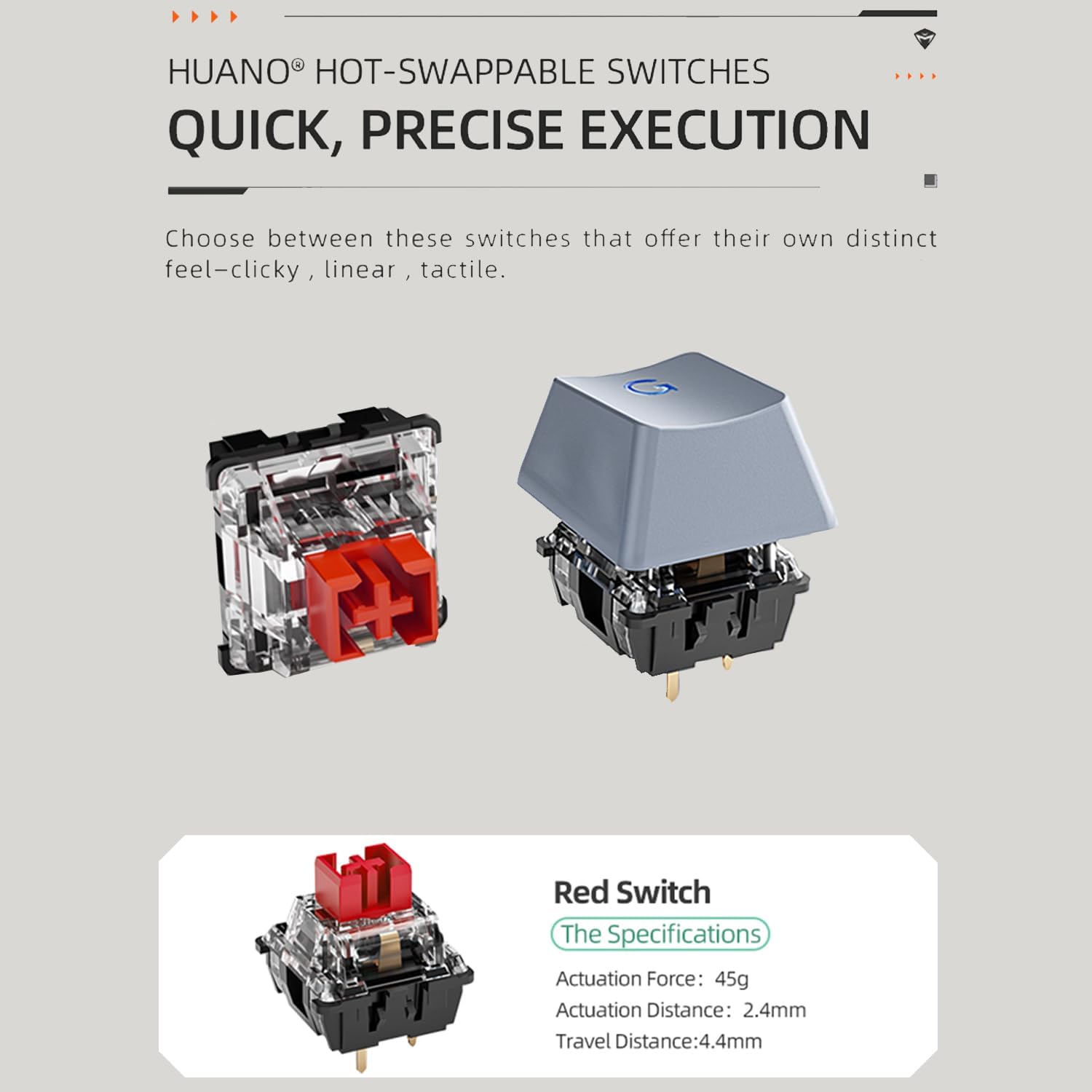
Image: A close-up of a red mechanical switch, demonstrating the modular design that allows for easy replacement and customization.
Customizable Features (Knob, Trigger, LED Screen)
The keyboard may include additional customizable elements such as a tactile knob for volume control, a customizable trigger button for specific functions (e.g., minimizing tasks), and an LED screen for displaying custom designs or presets. These features are typically managed through dedicated software available from the manufacturer's website. The software allows for extensive personalization of lighting effects, key assignments, and screen content.
Техникалык тейлөө
Туура тейлөө клавиатураңыздын узак иштөөсүн жана иштешин камсыз кылат.
- Клавиатураны тазалоо: Regularly remove keycaps using a keycap puller and clean them with a mild soap solution and a soft cloth. Ensure they are completely dry before reattaching.
- Баскычтоптун корпусун тазалоо: Клавиатуранын корпусун жумшак, кургак чүпүрөк менен сүртүңүз. Баскычтардын ортосундагы чаңды сүртүү үчүн кысылган абаны колдонуңуз.
- Switch Care: If switches feel inconsistent, they can be carefully removed and cleaned or replaced due to the hot-swappable design.
- Кабелдик башкаруу: Avoid sharp bends or excessive pulling on the detachable USB-C cable to prevent damage.
Проблемаларды чечүү
If you encounter issues with your Machenike K500A-B84 keyboard, consider the following common solutions:
- Баскычтоп жооп бербейт:
- USB-C кабели клавиатурага жана компьютерге бекем туташып турганын текшериңиз.
- If using wireless, check the battery level and ensure the 2.4G dongle or Bluetooth connection is properly established.
- Порт же система көйгөйлөрүн болтурбоо үчүн баскычтопту башка USB портуна же компьютерге туташтырууга аракет кылыңыз.
- Арткы жарык иштебейт:
- Check if the backlight is simply turned off. Use the designated function key combinations to toggle it on/off or adjust brightness.
- Ensure the keyboard's software (if installed) is not overriding the hardware controls.
- Ачкычтар катталбай жатат / эки жолу терүү:
- Due to the hot-swappable nature, a switch might be improperly seated. Carefully remove the keycap and switch, then re-insert the switch firmly.
- Clean around the affected switch to ensure no debris is interfering with its operation.
- Программалык камсыздоо маселелери:
- If experiencing issues with customization or advanced features, ensure you have the latest version of the Machenike keyboard software installed from their official webсайт.
- Компьютериңизди жана клавиатураңызды өчүрүп-күйгүзүңүз.
Техникалык шарттар
| Өзгөчөлүк | Деталь |
|---|---|
| Модель номери | K500A-B84 |
| Продукциянын өлчөмдөрү | 1.4 x 4.86 x 12.23 дюйм |
| Элемент Салмагы | 1.5 фунт |
| Өндүрүүчү | MACHENIKE |
| Байланыш технологиясы | USB (Wired), 2.4G Wireless, Bluetooth |
| Keyboard Description | Механикалык |
| Сунушталган Колдонуулар | Оюндар |
| Өзгөчө өзгөчөлүк | Backlit, Hot-Swappable Switches |
| Баскычтоптун арткы жарыктандыруу түсүн колдоо | RGB |
| Шайкеш түзмөктөр | Оюн консолу, ноутбук, компьютер |
| Кутуда эмне бар | USB Cable (and potentially other accessories like switch/keycap puller, extra switches, as per reviews) |
Кепилдик жана колдоо
For warranty information and technical support, please refer to the documentation included with your product or visit the official Machenike webсайт. Ар кандай кепилдик дооматтары үчүн сатып алганыңыздын далилин сактаңыз.


