1. Продукт бүтүп калдыview
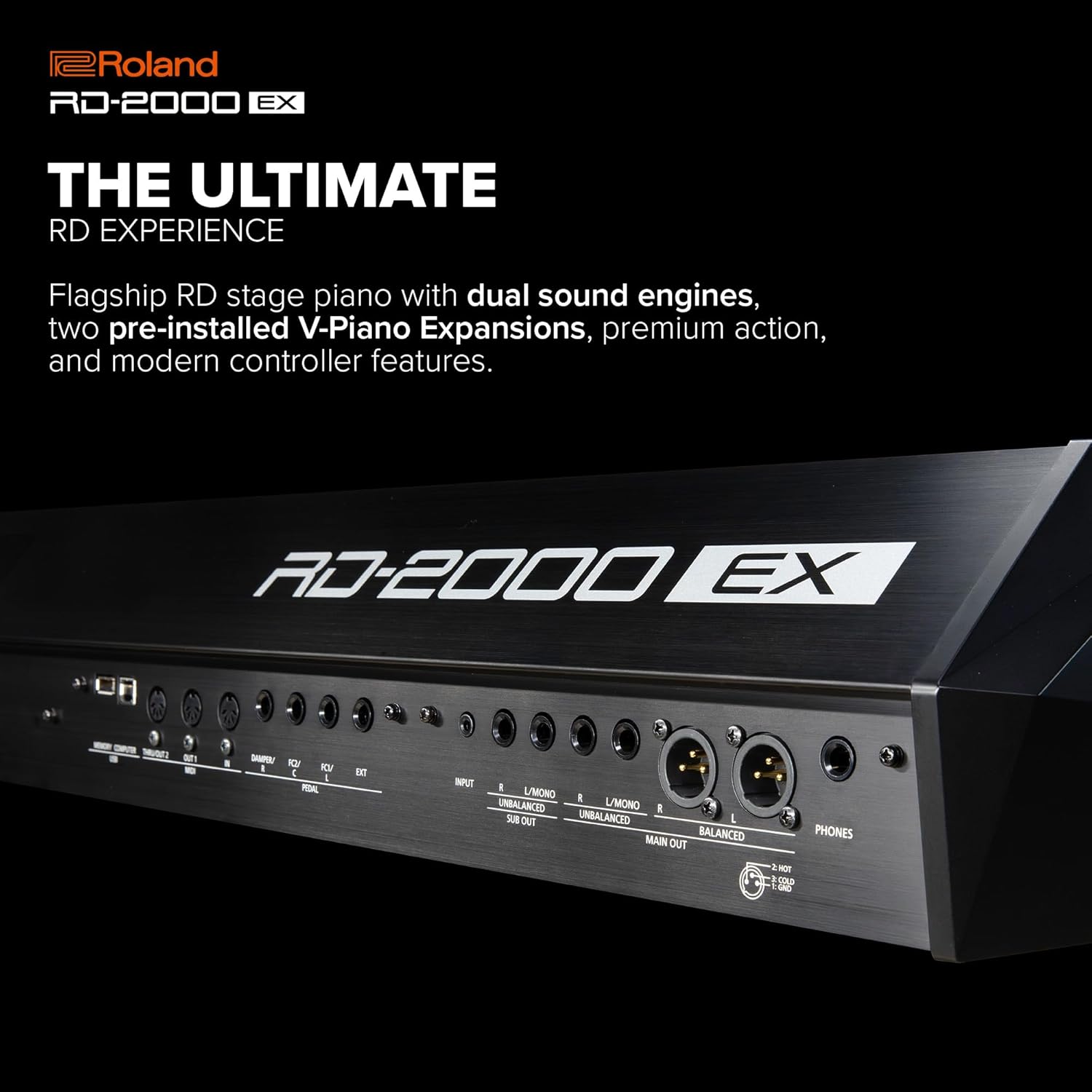
The Roland RD-2000 EX is a premium digital stage piano designed for professional musicians. It integrates Roland's advanced piano technologies with modern creative tools, offering a comprehensive solution for live performance and studio work. Key features include dual sound engines, pre-installed V-Piano Expansions, and advanced controller capabilities.

2. Баштапкы орнотуу
Before operating your RD-2000 EX, ensure proper setup to guarantee optimal performance and longevity.
2.1 Пакеттен чыгаруу жана жайгаштыруу
- Таңгактан бардык компоненттерди кылдаттык менен алып салыңыз. "Кутунун ичинде эмне бар" бөлүмүндө көрсөтүлгөн бардык буюмдардын бар экенин текшериңиз.
- Place the RD-2000 EX on a stable, flat surface or a compatible keyboard stand. Ensure adequate ventilation around the unit.

2.2 Кубат туташтыруу
- Connect the supplied AC adaptor to the DC IN jack on the rear panel of the RD-2000 EX.
- Электр шнурын стандарттуу AC розеткага сайыңыз.
2.3 Pedal and Audio Connections
- Connect the DP-10 dampD баскычына өтүүAMPER jack. The RD-2000 EX also supports the optional RPU-3 triple pedal for a grand piano experience.
- For audio output, connect the MAIN OUT (L/MONO, R) jacks to your amplifier, mixer, or powered speakers. Balanced XLR outputs are also available for professional setups.
- Use the PHONES jack for private practice with headphones.

3. Иштөө нускамалары
The RD-2000 EX offers a rich array of features for sound creation and performance control.
3.1 Күйгүзүү/өчүрүү
- Press the [POWER] button to turn the unit on. The display will illuminate.
- To turn off, press and hold the [POWER] button until the unit shuts down.
3.2 Sound Engines and V-Piano Expansions
The RD-2000 EX features two independent sound engines: the V-Piano Technology engine for acoustic pianos and the SuperNATURAL engine for electric pianos and other sounds. It comes with two V-Piano Expansion titles pre-installed: German Concert and Essential Upright.

3.3 Реалдуу убакыт режиминдеги башкаруу
The control panel is equipped with nine sliders and eight encoder knobs with LED status indicators for deep real-time control over various parameters.

3.4 Sound Demos and Performance
Explore the diverse sound capabilities of the RD-2000 EX through the official sound demos.
For additional sound demonstrations and performance examples, you may refer to videos featuring similar Roland digital pianos.
4. Техникалык тейлөө
Proper maintenance ensures the longevity and optimal performance of your RD-2000 EX.
4.1 Тазалоо
- Use a soft, dry cloth to wipe the surface of the instrument.
- өжөр кир үчүн, бир аз гampкездемени суу жана жумшак, абразивдүү эмес тазалоочу каражат менен сүртүп, андан кийин дароо кургатыңыз.
- Avoid using harsh chemicals, solvents, or abrasive materials as they can damage the finish.
4.2 Сактоо жана иштетүү
- Store the instrument in a stable environment, away from direct sunlight, extreme temperatures, and high humidity.
- When transporting, use a suitable case or cover to protect the instrument from physical damage.
5. Кыйынчылыктарды
This section addresses common issues you might encounter with your RD-2000 EX.
5.1 Күч жок
- Ensure the AC adaptor is securely connected to the instrument and the power outlet.
- Башка аспапка сайып, розетка иштеп жатканын текшериңиз.
5.2 Үн жок
- MASTER VOLUME баскычын текшерип, анын күйгүзүлгөнүн текшериңиз.
- Тышкы динамиктердин/amplifier are powered on and their volume is adjusted.
- Ensure audio cables are correctly connected to the MAIN OUT jacks and the input of your audio system.
- If using headphones, ensure they are properly plugged into the PHONES jack and no other audio output is active.
5.3 Күтүлбөгөн жүрүм-турум
- If the instrument behaves unexpectedly, try turning it off and then on again.
- Refer to the full user manual for detailed troubleshooting steps or to perform a factory reset if necessary.
6. Техникалык шарттар
Below are the key technical specifications for the Roland RD-2000 EX.
| Өзгөчөлүк | Спецификация |
|---|---|
| Модель аты | RD-2000 EX |
| Ачкычтардын саны | 88 |
| Баскычтоптун түрү | PHA-50 Keyboard (Progressive Hammer Action with Escapement and Ebony/Ivory Feel) |
| Үн кыймылдаткычтары | V-Piano Technology, SuperNATURAL |
| Полифония | V-Piano Technology: Full Polyphony; SuperNATURAL: 128 voices |
| Pre-installed V-Piano Expansions | German Concert, Essential Upright |
| Controls | 9 Sliders, 8 Encoder Knobs with LED indicators |
| Байланыш | MIDI (IN, OUT1, OUT2/THRU), USB (COMPUTER, MEMORY), MAIN OUT (L/MONO, R) jacks (1/4-inch phone type), MAIN OUT (L, R) jacks (XLR type), PEDAL (DAMPER, FC1, FC2) jacks, PHONES jack (Stereo 1/4-inch phone type), AC IN jack |
| Өлчөмдөрү (W x D x H) | 55.63 x 14.5 x 5.56 дюйм (1412 x 367 x 140 мм) |
| Салмагы | 62 фунт (28.1 кг) |
| Power Source | AC адаптер |
7. Кепилдик жана колдоо
Roland products are backed by a manufacturer's warranty. For specific warranty terms and conditions, please refer to the warranty card included with your product or visit the official Roland webсайт.
7.1 Техникалык колдоо
If you encounter any issues not covered in this manual or require further assistance, please contact Roland customer support. Support contact information can be found on the Roland webсайтында же продукт документациясында.
- Онлайн колдоо: Visit the Roland support website for FAQs, knowledge base articles, and software updates.
- Телефондук колдоо: Contact the dedicated support line for your region.
- Тейлөө борборлору: Locate authorized Roland service centers for repairs and maintenance.