1. Киришүү
This manual provides essential information for the safe and effective use of your Aufero Laser Engraver AL3-20A. This powerful 20W laser engraver and cutter is designed for precision work on a variety of materials, including wood, metal, acrylic, and leather. It features a large working area and comes equipped with a 40L air assist pump to enhance performance and safety.
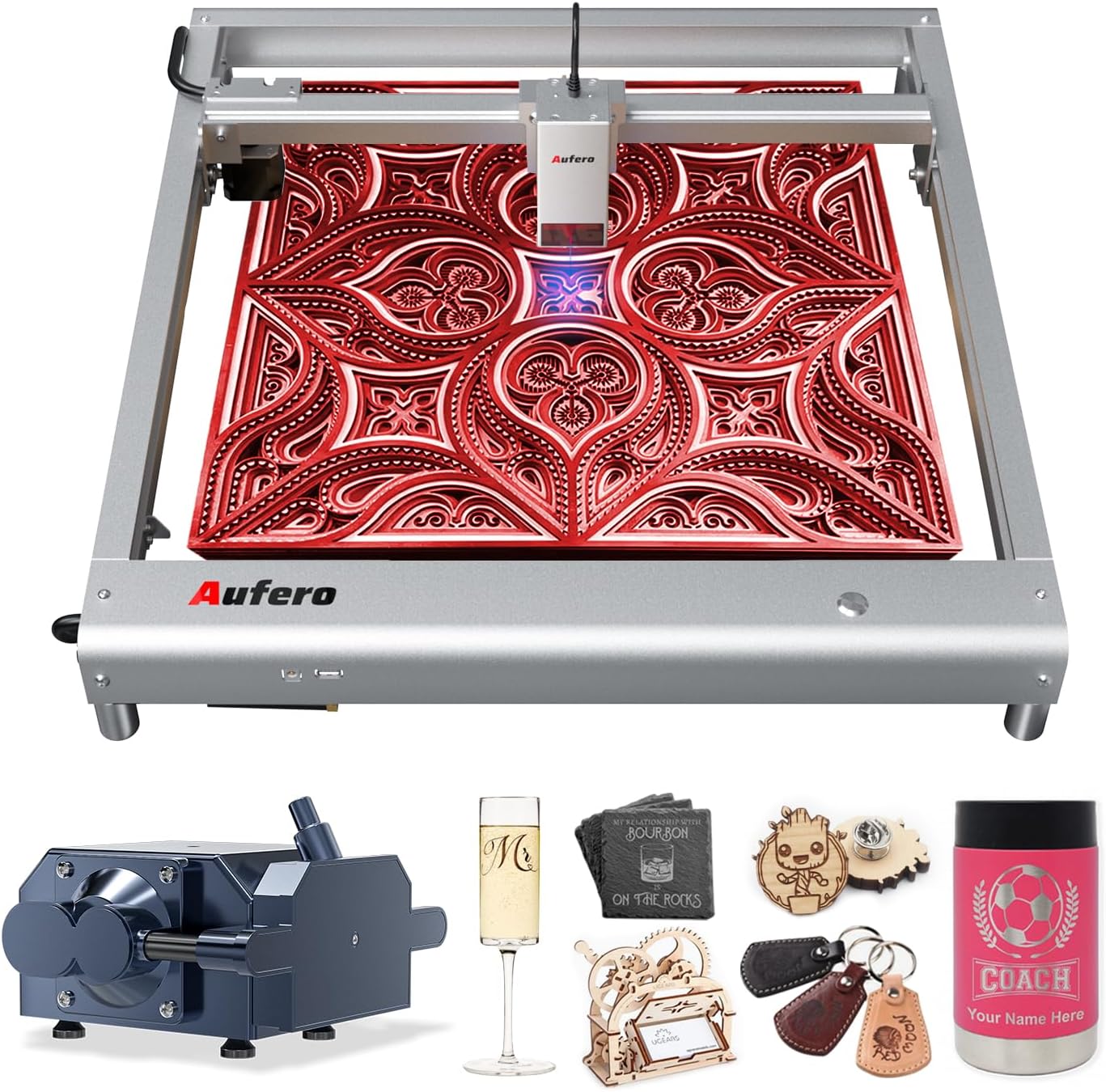
Figure 1.1: The Aufero Laser Engraver AL3-20A with exampгравировкаланган буюмдардын аз саны.
Please read this manual thoroughly before operating the machine to ensure proper setup, operation, and maintenance, and to understand all safety precautions.
2. Коопсуздук маалыматы
WARNING: This product is a Class 4 laser device. Direct exposure to the laser beam can cause severe eye damage and skin burns. Always wear appropriate laser safety goggles (OD6+) when operating the machine. Never look directly into the laser beam.
2.1 Жалпы коопсуздук чаралары
- Operate the machine in a well-ventilated area to dissipate fumes and smoke produced during engraving/cutting.
- Keep a fire extinguisher nearby. Materials can ignite during laser processing.
- Иш учурунда машинаны кароосуз калтырбаңыз.
- Жумуш аймагы күйүүчү материалдардан таза болушун камсыз кылыңыз.
- Балдарды жана үй жаныбарларын иштеп жаткан машинадан алыс кармаңыз.
- Кандайдыр бир оңдоолорду же оңдоолорду аткаруудан мурун электр кубатын өчүрүңүз.
2.2 Enhanced Safety Features
The Aufero AL3-20A incorporates six protective measures to enhance user safety:
- Motherboard Program Monitoring: Мониторлор томtage and current to prevent electrical issues.
- USB Connection Monitoring: Detects and alerts if the USB connection is interrupted during operation.
- Current and Voltage Мониторинг: Continuously checks power supply stability.
- Laser Exposure Monitoring: Filters 97% of ultraviolet rays and limits laser exposure duration for a secure working environment.
- Active Position Protection: Detects unexpected movement or tilting of the machine and stops laser output.
- Sloping Position Protection: Automatically halts operation if the machine is tilted beyond a safe angle.
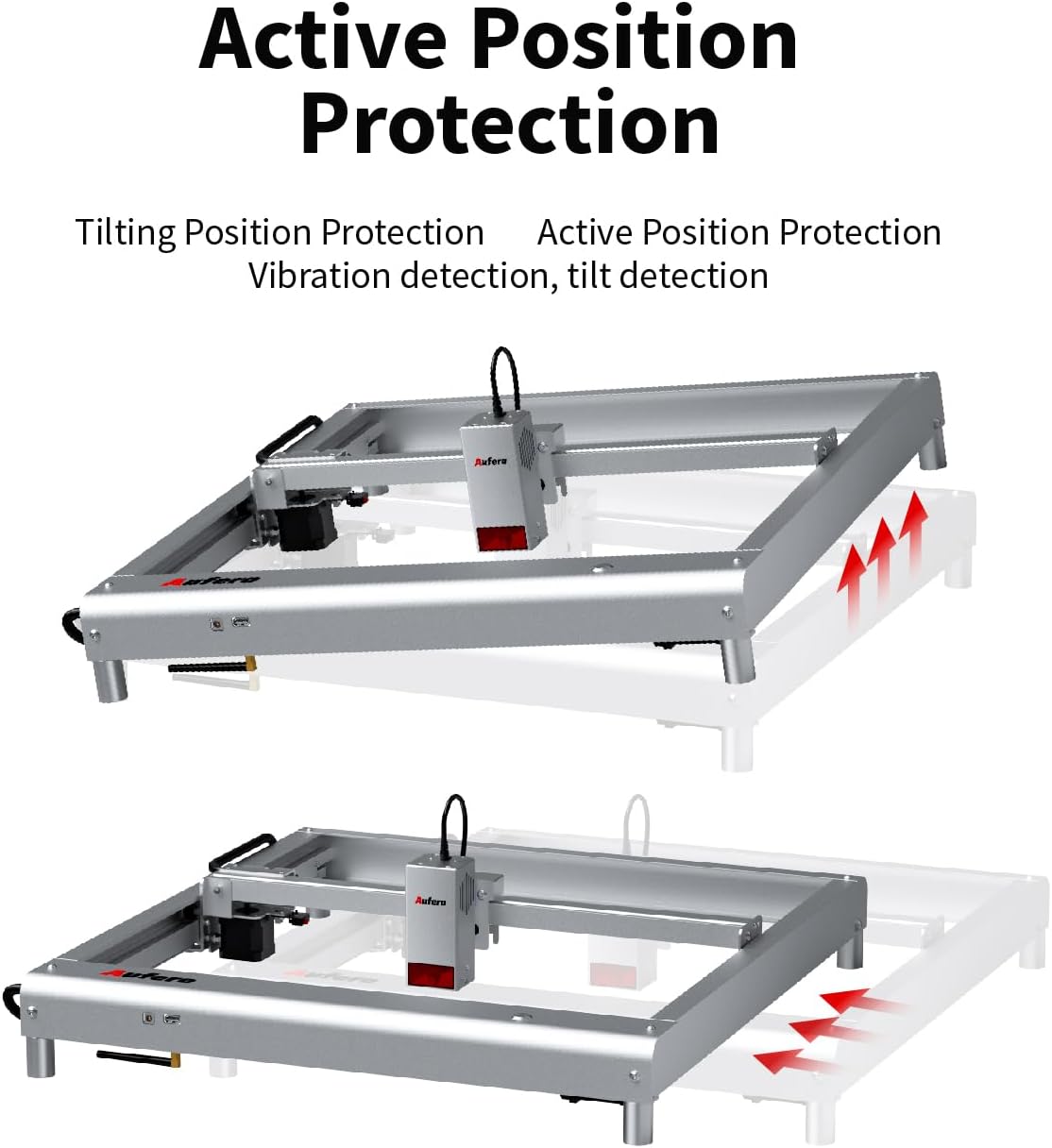
Figure 2.1: Active Position Protection mechanism, detecting and responding to tilting.

Figure 2.2: Laser Beam Safety Guard, featuring USB watchdog detection function.

Figure 2.3: Exposure Duration Detection and Limitation, ensuring a secure working environment.

Figure 2.4: Motherboard Program Monitoring, part of the voltage and current safety control system.
3. Продукциянын компоненттери
The Aufero AL3-20A laser engraver consists of the following main components:
- Laser Module (AL3-20A): The core component responsible for laser emission, featuring a 20W output power and a precise spot size of 0.08mm*0.18mm. It includes integrated fixed focus, dual fans for cooling, and supports air assist.
- Machine Frame: A uni-body frame design made of superior aluminum alloy, providing stability and durability.
- Башкаруу кеңеши: Manages the machine's operations, supporting high baud rates up to 921600.
- 40L Air Assist Pump: An adjustable air assist device that blows away fumes and cutting residues, significantly improving engraving and cutting performance and preventing material ignition.
- Кубаттуу адаптер: Supplies power to the machine.
- USB кабели: For connecting the engraver to a computer.
- Коопсуздук көз айнектери: Essential eye protection for operation.
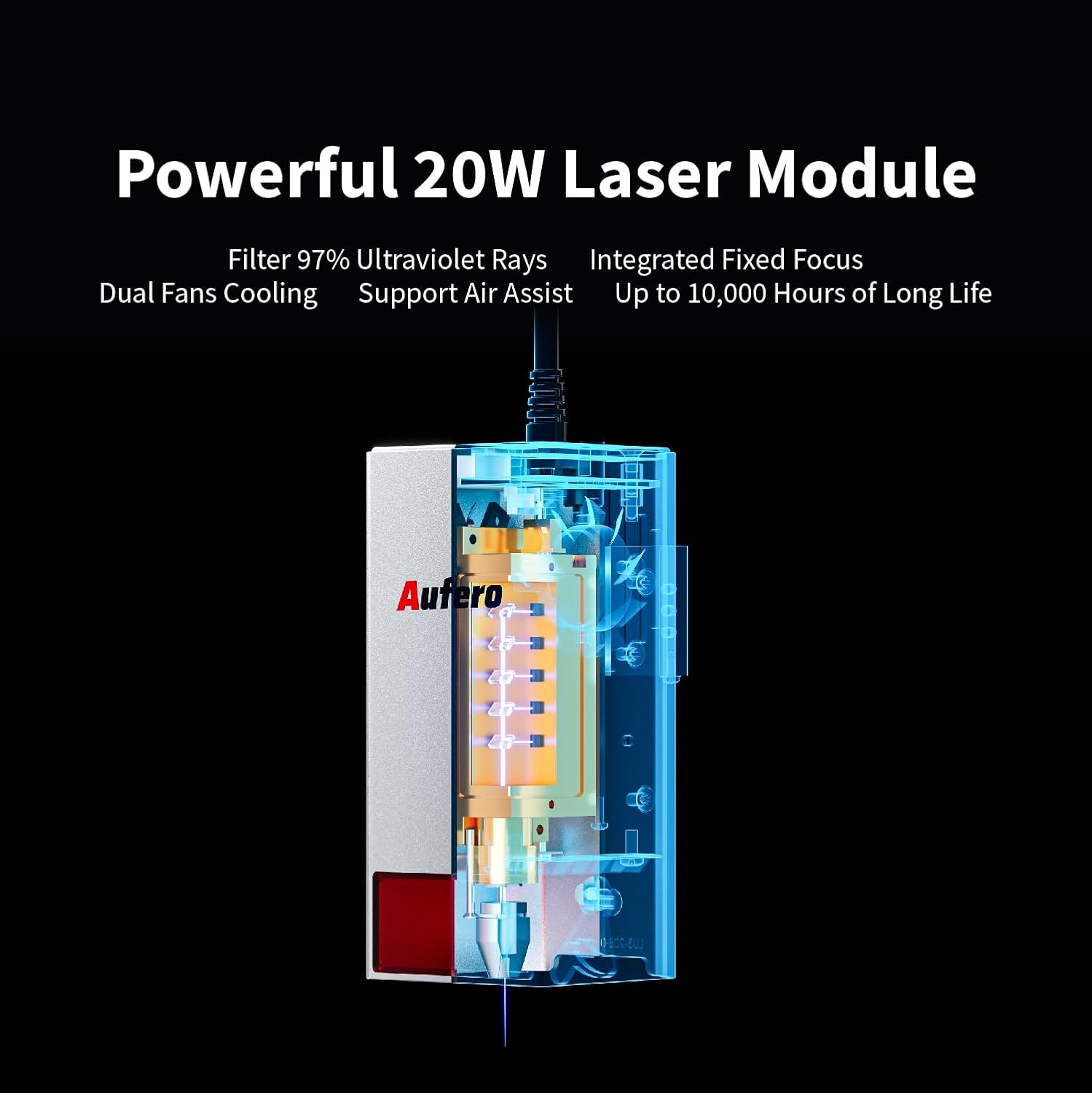
Figure 3.1: The powerful 20W Laser Module, featuring UV ray filtration, integrated fixed focus, dual fan cooling, and air assist support.

Figure 3.2: Comprehensive Air Assist Solution, demonstrating how the air assist pump improves engraving and cutting performance.
4. Орнотуу жана чогултуу
The Aufero AL3-20A is designed for easy installation. Follow these general steps for initial setup:
- Компоненттерди таңгактан чыгаруу: Таңгактан кылдаттык менен бардык бөлүктөрүн алып салыңыз. Таңгактоо тизмесинде саналган бардык компоненттер бар экенин текшериңиз.
- Рамканы чогултуу: The machine features a uni-body frame. If any minor assembly is required (e.g., attaching feet), follow the detailed instructions in the included quick start guide.
- Лазердик модулду орнотуу: Securely attach the laser module to the gantry according to the provided diagrams. Ensure it is firmly seated.
- Аба жардамчысын туташтыруу: Connect the 40L air assist pump to the designated port on the laser module and ensure the air hose is properly routed.
- Кубат туташуу: Кубат адаптерин машинага, андан кийин ылайыктуу розеткага туташтырыңыз.
- USB туташуу: Connect the engraver to your computer using the provided USB cable.
- Программалык камсыздоону орнотуу: Install the necessary engraving software (e.g., LaserGRBL, LightBurn, or Laser Explorer APP) on your computer or mobile device.

Figure 4.1: The Aufero AL3 20W Laser Engraver, ready for operation after assembly.
Refer to the detailed product installation guide included in your package for specific step-by-step instructions and diagrams.
5. Иштетүү үчүн колдонмо
5.1 Software Compatibility and Connection
The Aufero AL3-20A supports various professional engraving software, including LaserGRBL and LightBurn. It also offers its own Laser Explorer application. You can connect the machine via four convenient modes:
- WIFI: For wireless control and file өткөрүп берүү.
- APP: Control via the Laser Explorer mobile application.
- USB: Direct connection to a computer for real-time control.
- TF картасы: For offline engraving by loading G-code files directly onto the machine.

Figure 5.1: The Aufero engraver adapts to common software like Laser Explorer, LightBurn, and LaserGRBL.
5.2 Гравировка жана кесүү процесси
- Материалды даярдоо: Place the material to be engraved or cut on the working area. Ensure it is flat and securely positioned.
- Design and Load File: Create or load your design in the chosen software. Adjust parameters such as power, speed, and passes based on the material type and desired outcome.
- Позициялоо: Use the software to precisely position your design on the material. The machine supports automatic homing for consistent positioning.
- Start Air Assist: Ensure the 40L air assist pump is active, especially for cutting or engraving materials that produce significant smoke or residue.
- Гравюраны/кесүүнү баштоо: Initiate the process from the software. Monitor the operation closely.
5.3 Performance and Capabilities
- Тактык: With a spot size of only 0.08mm*0.18mm, the AL3-20A can achieve highly detailed and intricate engravings.
- Ылдамдыгы: The engraving speed can reach up to 20000 mm/min, significantly improving efficiency.
- Cutting Ability: The 20W laser module allows for excellent cutting capabilities, such as cutting 20mm pine board and 30mm acrylic.
- Материалдык шайкештик: Engrave and cut a wide range of materials including plywood, hardwood, metal, leather, glass, paper, dark acrylic, fabric, and more.
- Y-axis Rotation Engraving: Suitable for engraving cylindrical objects like mugs, wine bottles, and goblets (requires optional rotary attachment).

Figure 5.2: Precision Spot Size for Detailed Engraving, capturing intricate details.

Figure 5.3: Overall Speed Improvement, with maximum speed increased to 20,000 mm/min.

Figure 5.4: Automatic Homing, ensuring precise positioning and consistency.

Figure 5.5: Excellent Cutting Ability, demonstrating cuts through 20mm pine and 30mm acrylic.

Figure 5.6: Y-axis Rotation Engraving, suitable for cylindrical objects.
6. Техникалык тейлөө
Regular maintenance ensures the longevity and optimal performance of your Aufero laser engraver.
- Линзаны тазалоо: Periodically clean the laser lens with a specialized lens cleaning solution and a lint-free cloth. A dirty lens can reduce laser power and engraving quality.
- Машинаны тазалоо: Use a soft, dry cloth to wipe down the machine frame and gantry. Remove any dust, debris, or residue from the working area.
- Майлоо: Check the guide rails and moving parts for smooth operation. Apply a small amount of appropriate lubricant if necessary, as per the manufacturer's recommendations.
- Air Assist Pump Maintenance: Ensure the air assist pump is free from blockages and operating efficiently. Clean or replace filters if applicable.
- Программалык камсыздоонун жаңыртуулары: Check the official Aufero website for any available firmware updates to ensure your machine has the latest features and bug fixes.
Always disconnect the power supply before performing any cleaning or maintenance tasks.
7. Кыйынчылыктарды
This section addresses common issues you might encounter with your Aufero AL3-20A laser engraver.
| Көйгөй | Мүмкүн себеп | Чечим |
|---|---|---|
| Машина иштебей жатат | Power cable loose; Power adapter faulty; Outlet issue. | Check all power connections. Try a different outlet. Test power adapter if possible. |
| Лазер иштебейт же алсыз чыгаруу | Laser lens dirty; Incorrect power settings; Laser module faulty; Material too far from laser. | Clean the laser lens. Adjust power settings in software. Ensure material is at correct focal distance. Contact support if module is suspected faulty. |
| Engraving/Cutting quality is poor | Incorrect speed/power settings; Material not flat; Laser focus incorrect; Air assist not active. | Adjust speed and power settings. Ensure material is flat. Verify laser focus. Activate air assist for cleaner cuts. |
| Machine not connecting to software | USB cable faulty; Driver not installed; Incorrect COM port selected; WIFI/APP connection issues. | Try a different USB cable. Install necessary drivers. Select correct COM port in software. Check WIFI connection and APP settings. |
| Машина күтүлбөгөн жерден токтойт | Safety feature triggered (e.g., tilt, vibration); USB connection lost; Overheating. | Check for machine movement or tilting. Verify USB connection. Allow machine to cool down. Review safety feature alerts in software. |
If the problem persists after attempting these solutions, please contact Aufero customer support.
8. Техникалык шарттар
Key technical specifications for the Aufero Laser Engraver AL3-20A:
| Өзгөчөлүк | Спецификация |
|---|---|
| Модел | AL3-20A |
| Лазердик чыгаруу күчү | 20 Вт |
| Лазердик класс | 4-класс |
| Гравюра аянты | 15.7 x 15.7 дюйм (400 мм x 400 мм) |
| Гравюра ылдамдыгы | 20000 мм/мин чейин |
| Лазердик Spot өлчөмү | 0.08мм * 0.18мм |
| Аба жардам берүүчү насос | Adjustable 40L |
| Motherboard | Supports up to 921600 baud rate |
| Байланыш | WIFI, APP, USB, TF Card |
| Колдоого алынган программалык камсыздоо | LaserGRBL, LightBurn, Laser Explorer APP |
| Элемент Салмагы | 17.21 фунт |
| Пакеттин өлчөмдөрү | 31.4 x 9 x 8.1 дюйм |
9. Кепилдик жана колдоо
9.1 Кепилдик маалыматы
The Aufero Laser Engraver AL3-20A comes with a standard manufacturer's warranty. For detailed information regarding warranty terms, duration, and coverage, please refer to the warranty card included with your product packaging or visit the official Aufero webсайт.
9.2 Кардарларды колдоо
For technical assistance, troubleshooting, or any inquiries regarding your Aufero laser engraver, please contact Aufero customer support. You can typically find contact information on the official Aufero webсайтында же продукт документациясында.
Өндүрүүчү: Aufero
Онлайн ресурстар: Visit the official Aufero webКөп берилүүчү суроолор, программалык камсыздоону жүктөп алуу жана кошумча колдоо материалдары үчүн сайт.


