Introduction
This user manual provides comprehensive instructions for the SCSETC S8X Motorcycle Bluetooth Intercom Helmet Headset. It covers setup, operation, maintenance, and troubleshooting to ensure optimal performance and user experience. The S8X is designed for clear communication, music streaming, and GPS navigation for motorcyclists, offering robust features like long-distance intercom, hands-free calling, and IP67 waterproof protection.
Пакеттин мазмуну
Баштоодон мурун, таңгагыңызда бардык компоненттер бар экенин текшериңиз:
- S8X Bluetooth Intercom Unit
- Headset with Speakers
- Boom микрофону
- Жумшак сым микрофон
- Mounting Bracket (Clip-in)
- Жабыштыруучу тоо
- USB заряддоо кабели
- Колдонуучунун Колдонмосу (бул документ)
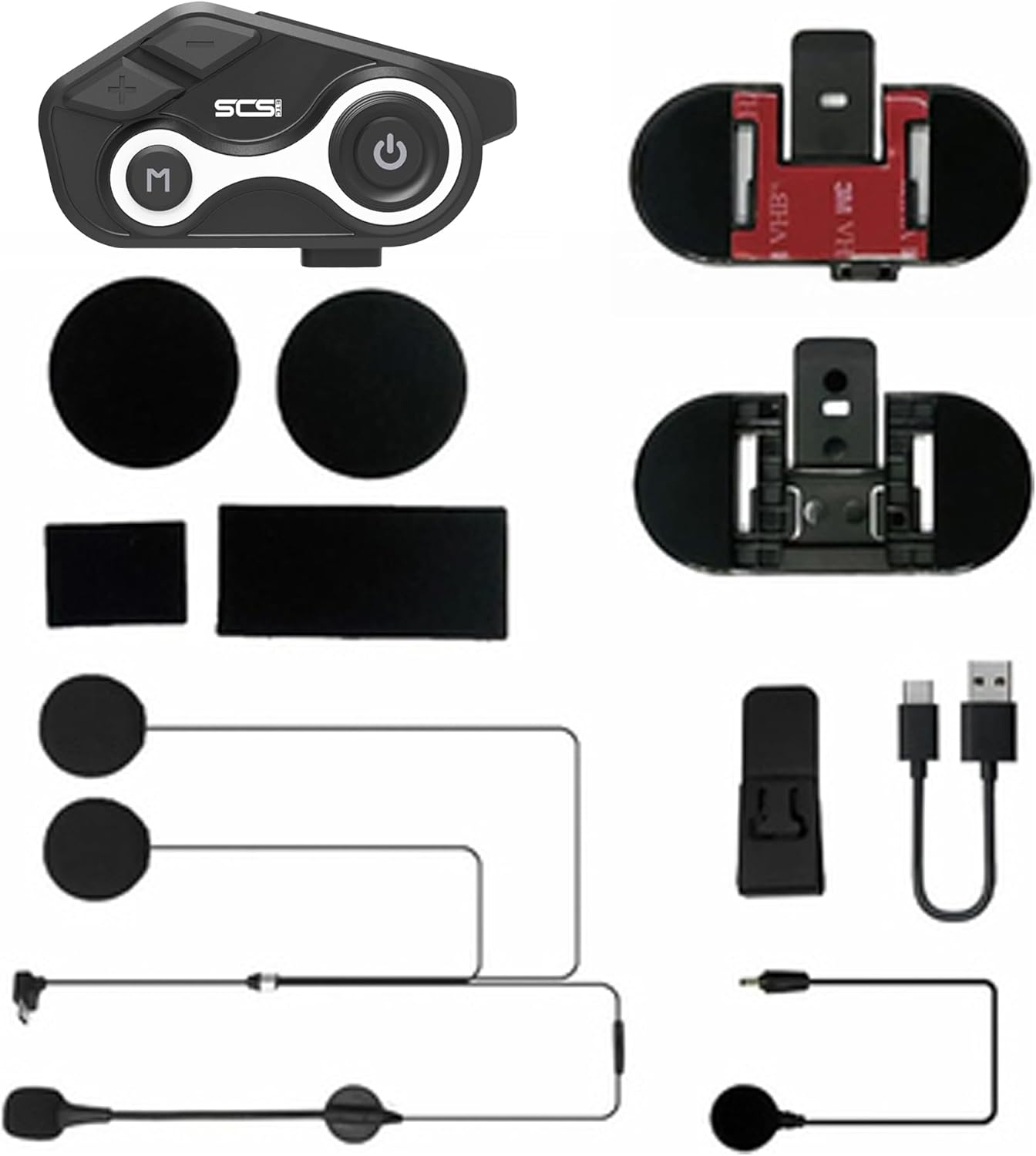
Сүрөт: бүттүview of the SCSETC S8X package contents, showing the main intercom unit, two types of microphones (boom and soft wire), speakers, mounting options (clip and adhesive), and a charging cable.
Орнотуу жана орнотуу
1. Аппаратты заряддоо
Before first use, fully charge the S8X unit. Connect the provided USB charging cable to the charging port on the intercom unit and a compatible USB power source. The charging indicator light will show the charging status. A full charge takes approximately 2 hours.
- • Батареянын кубаттуулугу: 650mAh
- • Charging Time: Approximately 2 hours
- • Talk/Music Time: Up to 10 hours
- • Standby Time: Up to 15 days

Image: Visual representation of the S8X's battery life and charging capabilities, highlighting its 650mAh battery, 2-hour charging time, and 15-day standby duration.
2. Домофон блогун орнотуу
The S8X offers two mounting options for your helmet:
- Clip-in Mount: Slide the clip-in bracket between the helmet shell and the inner padding. Ensure it is securely fastened.
- Жабышкак орнотуу: Clean the desired helmet surface thoroughly. Peel off the protective film from the adhesive mount and firmly press it onto the helmet for at least 30 seconds. Allow 24 hours for the adhesive to cure before attaching the intercom unit.
Once the bracket is installed, slide the S8X intercom unit onto the bracket until it clicks into place.
3. Динамиктерди жана микрофонду орнотуу
The S8X comes with two microphone options to suit different helmet types:
- Спикердин жайгашуусу: Attach the speakers to the helmet's ear pockets using the hook-and-loop fasteners. Ensure they are positioned directly over your ears for optimal sound quality.
- Microphone Selection & Placement:
- Бум микрофону: Ideal for open-face or modular helmets. Attach it to the inside of the helmet near your mouth, ensuring it is close but not touching.
- Жумшак зымдуу микрофон: Suitable for full-face helmets. Position it inside the chin bar, close to your mouth.
- Кабелдик башкаруу: Route all cables neatly under the helmet padding to prevent interference and ensure comfort. Connect the speaker/microphone cable to the corresponding port on the S8X unit.
Иштөө нускамалары

Image: The main control unit of the S8X intercom, featuring clearly labeled buttons for power, volume, and mode selection.
1. Күйгүзүү/өчүрүү
- Күйгүзүү: Press and hold the Power button (usually the large circular button with a power icon) for approximately 3 seconds until you hear an audible prompt.
- Өчүрүү: Үн чыккан сигнал чыкканга чейин Кубат баскычын болжол менен 3 секунд басып туруңуз.
2. Bluetooth Pairing (Phone)
To pair your S8X with a mobile phone:
- Ensure the S8X is powered off.
- Күйгүзүү баскычын индикатор жарыгы кызыл жана көк түстөр менен кезектешип күйүп-өчкөнгө чейин 5-7 секунд басып туруңуз, бул жупташтыруу режимин көрсөтөт.
- On your phone, enable Bluetooth and search for "S8X" in the list of available devices.
- Select "S8X" to connect. Once paired, the indicator light will flash blue slowly.
The S8X uses Bluetooth 5.1 technology for stable and efficient wireless connectivity.
3. Intercom Communication (Rider-to-Rider)
The S8X supports communication between two riders up to 1000 meters (0.6 miles) in open terrain.
- Ensure both S8X units are powered on and not connected to any other Bluetooth devices.
- On one unit, press and hold the Intercom button (often the 'M' button or a dedicated intercom button) for 3 seconds until the indicator light flashes red and blue rapidly.
- On the second unit, briefly press the Intercom button.
- The units will automatically search and pair. Once connected, the indicator lights will flash blue slowly, and you will hear a confirmation tone.

Image: Illustrates the 1000-meter intercom range of the S8X, showing two riders maintaining communication while on their motorcycles.
Video: A demonstration of the S8X walkie-talkie features, including sound quality, battery life, waterproof design, GPS navigation, and intercom capabilities.
4. Музыканы ойнотуу жана FM радиосу
- Музыка ойнотуу: Once paired with your phone, open your music app. Use the volume buttons (+/-) on the S8X to adjust volume. The main knob or 'M' button may control play/pause and track skipping (refer to quick start guide for specific button functions).
- FM радиосу: Press the Mode button (often the 'M' button) to switch to FM radio mode. Use the volume buttons (+/-) to scan for stations or adjust frequency.
The S8X delivers Hi-Fi stereo sound quality with 40mm speakers and features CVC technology for noise suppression, ensuring clear audio even at high speeds.

Image: Explains the audio technology of the S8X, including Hi-Fi stereo sound and DSP & CVC noise cancellation, demonstrating its effectiveness in reducing background noise.
5. Hands-Free Calling and GPS Navigation
- Hands Free Чалуу: When a call comes in, the S8X will announce it. Briefly press the Power button to answer, or press and hold to reject. During a call, use the volume buttons to adjust the call volume.
- GPS навигациясы: Once paired with your phone, GPS voice prompts from your navigation app will be transmitted through the S8X speakers.
Техникалык тейлөө
Proper maintenance ensures the longevity and performance of your S8X intercom.
- Тазалоо: Аппаратты жумшак менен сүртүңүз, гamp кездеме. Катуу химиялык заттарды же абразивдүү тазалагычтарды колдонбоңуз.
- Суу өткөрбөйт коргоо: The S8X has an IP67 waterproof rating, meaning it is protected against dust and can withstand immersion in water up to 1 meter for 30 minutes. While designed for all-weather use, avoid prolonged submersion or high-pressure water jets.
- Батареяга кам көрүү: To preserve battery life, avoid fully discharging the unit frequently. Charge it regularly, especially if storing for extended periods. Store in a cool, dry place.

Image: Demonstrates the S8X's IP67 waterproof protection, showing a rider confidently using the device in rainy conditions.
Проблемаларды чечүү
If you encounter issues with your S8X, please refer to the following common solutions:
| Көйгөй | Мүмкүн болгон себеп / Чечим |
|---|---|
| Түзмөк күйбөйт. | Battery is low or depleted. Charge the device fully. |
| Телефон/домофон менен жупташтырылбай жатат. | Ensure the device is in pairing mode (flashing red/blue). Make sure other Bluetooth devices are disconnected. Try restarting both devices. |
| Үн жок же үнү төмөн. | Check volume levels on both the S8X and your connected device. Ensure speakers are correctly positioned and connected. |
| Intercom range is shorter than expected. | Obstacles (buildings, dense trees) can reduce range. Ensure line of sight for optimal performance. |
| Poor sound quality / excessive noise. | Ensure microphone is positioned correctly and not obstructed. CVC noise reduction works best when the microphone is close to your mouth. Check for strong wind noise. |
If the issue persists, please contact SCSETC customer support for further assistance.
Техникалык шарттар
| Өзгөчөлүк | Деталь |
|---|---|
| Модель аты | S8X-S8XD |
| Bluetooth версиясы | 5.1 |
| Домофон диапазону | 1000 метрге чейин (0.6 миля) |
| Батарея сыйымдуулугу | 650 мАч литий полимери |
| Заряддоо убактысы | 2 саат |
| Сүйлөшүү/Музыка убактысы | 10 саатка чейин |
| Күтүү убактысы | 15 күнгө чейин |
| Сууга туруктуулук деңгээли | IP67 суу өткөрбөйт |
| Noise Control | CVC Technology, Built-in CSR chip |
| Жыштык диапазону | 20 Гц - 20 000 Гц |
| Өлчөмдөр | 3.53 x 1.56 x 0.6 дюйм |
| Элемент Салмагы | 8.8 унция (250 грамм) |
| Камтылган компоненттер | Headset, Intercom, GPS, FM Radio |
Кепилдик жана колдоо
For warranty information, technical support, or any inquiries regarding your SCSETC S8X Motorcycle Bluetooth Intercom Helmet Headset, please contact the manufacturer directly.
Өндүрүүчү: SCSETC
You can visit the official SCSETC store on Amazon for more information and support: SCSETC Amazon Store


