1. Киришүү
The LSC Smart Connect Solar IP Camera is designed to provide reliable outdoor surveillance with the convenience of solar power. This camera offers 1080p video recording, two-way audio, and night vision capabilities up to 10 meters. It integrates seamlessly with the LSC Smart Connect app, allowing for remote monitoring and control. Key features include a light and sound alarm, flash function, and privacy mode to enhance security.
This manual provides essential information for the proper setup, operation, and maintenance of your LSC Smart Connect Solar IP Camera, ensuring optimal performance and longevity.
2. Пакеттин мазмуну жана орнотуу
Before beginning installation, please ensure all components are present and undamaged.

Сүрөт 2.1: The LSC Smart Connect Solar IP Camera packaging, showing the camera, solar panel, and app interface. This image represents the complete product package as received.
2.1 Компоненттер бүттүview
The package typically includes the LSC Smart Connect Solar IP Camera unit, a solar panel for continuous power, and mounting accessories.
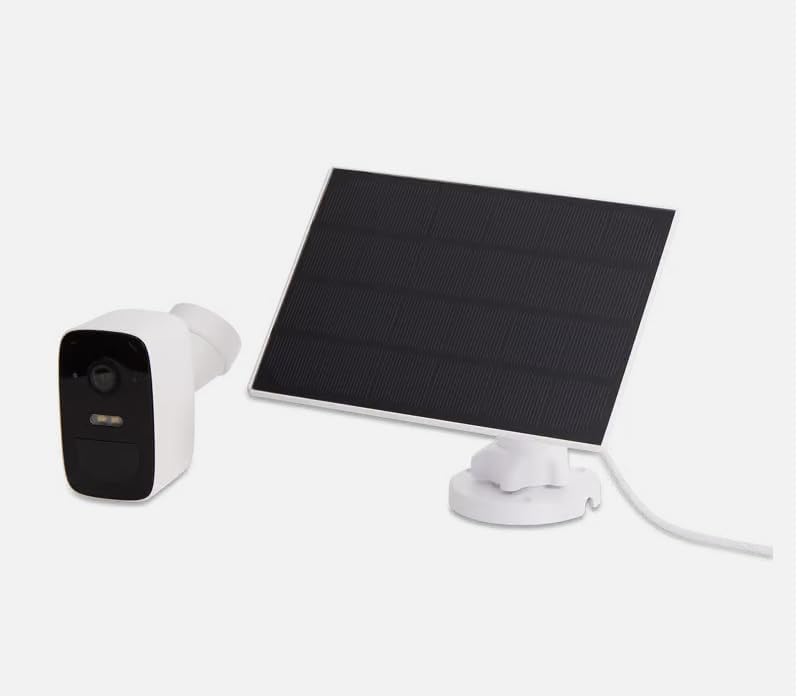
Сүрөт 2.2: The LSC Smart Connect Solar IP Camera shown alongside its separate solar panel. This illustrates the two main components of the surveillance system.
2.2 Баштапкы орнотуу кадамдары
- Колдонмону жүктөп алыңыз: Download the "LSC Smart Connect" app from your smartphone's app store (iOS or Android).
- Эсеп түзүү: Колдонмону ачып, жаңы аккаунтка катталыңыз же сизде мурунтан эле бар болсо кириңиз.
- Камераны күйгүзүү: Ensure the camera is charged or connected to the solar panel. The camera should enter pairing mode (indicated by an LED light).
- Түзмөк кошуу: In the app, select "Add Device" or the "+" icon. Follow the on-screen instructions to connect the camera to your 2.4GHz Wi-Fi network. Ensure your Wi-Fi signal is strong at the installation location.
- Монтаждоо: Choose a suitable outdoor location for the camera and solar panel. The solar panel should receive direct sunlight for most of the day. Use the provided screws and mounting brackets for secure installation. The camera supports wall mounting.
For detailed mounting instructions, refer to the quick start guide included in your product packaging.
3. Иштөө нускамалары
Once your camera is set up and connected, you can begin monitoring and utilizing its features through the LSC Smart Connect app.
- Live View: Колдонмону ачып, камераңызды тандаңыз view жандуу тоют.
- Эки тараптуу аудио: Use the microphone icon in the app to speak through the camera and the speaker icon to hear audio from the camera's vicinity.
- Түнкү көрүнүш: The camera automatically switches to night vision in low-light conditions, providing clear images up to 10 meters.
- Кыймылды аныктоо жана эскертүүлөр: Configure motion detection sensitivity and set up push notifications to receive alerts on your smartphone when activity is detected.
- Ойготкуч функциялары: Activate the light and sound alarm or flash function via the app to deter intruders.
- Жаздыруу жана ойнотуу: The camera supports local storage (e.g., microSD card, not included) or cloud storage (subscription may be required) for recording. Access recorded footagколдонмонун ойнотуу функциясы аркылуу.
- Купуялык режими: Utilize the privacy function to temporarily disable recording and live view for specific periods.
4. Техникалык тейлөө
Regular maintenance ensures the optimal performance and longevity of your LSC Smart Connect Solar IP Camera.
- Тазалоо: Мезгил-мезгили менен камеранын линзасын жана күн панелин жумшак, гamp чаңды, кирди жана таштандыларды кетирүү үчүн чүпүрөк колдонуңуз. Абразивдүү тазалоочу каражаттардан алыс болуңуз.
- Күн панелинин эффективдүүлүгү: Ensure the solar panel is free from obstructions (e.g., leaves, snow) that could block sunlight and reduce charging efficiency.
- Программалык камсыздоонун жаңыртуулары: Check the LSC Smart Connect app regularly for firmware updates. Keeping the camera's firmware updated ensures access to the latest features and security enhancements.
- Туташуу текшерүү: Periodically verify the Wi-Fi connection strength and camera status in the app.
5. Кыйынчылыктарды
If you encounter issues with your LSC Smart Connect Solar IP Camera, refer to the following common troubleshooting steps:
- Камера оффлайн:
- Камеранын жайгашкан жеринен Wi-Fi сигналынын күчүн текшериңиз.
- Ensure the camera is receiving adequate power from the solar panel or is sufficiently charged.
- Wi-Fi роутериңизди жана камераңызды өчүрүп күйгүзүңүз.
- Verify that the camera is connected to a 2.4GHz Wi-Fi network.
- Сүрөттүн сапаты начар:
- Камера линзасын тазалаңыз.
- Линзанын алдында эч кандай тоскоолдуктар жок экенин текшериңиз.
- Интернетке туташуу ылдамдыгын текшериңиз.
- Кыймылды аныктоо иштебей жатат:
- Verify motion detection settings in the app (sensitivity, detection zones).
- Ensure notifications are enabled on your smartphone and in the app.
- Батарея заряддалбай жатат:
- Күн панелинин таза болушун жана күн нурунун түз тийип турушун камсыз кылыңыз.
- Күн панели менен камеранын ортосундагы байланышты текшериңиз.
If issues persist, consult the LSC Smart Connect app's help section or the manufacturer's support resources.
6. Техникалык шарттар
| Өзгөчөлүк | Спецификация |
|---|---|
| Видео жаздыруу чечими | 1080p |
| Түс | Кара/Ак |
| Зымсыз байланыш технологиясы | Wi-Fi (2.4 ГГц) |
| Орнотуу түрү | Бурап бекитүү / Дубалга орнотуу |
| Түнкү көрүү диапазону | 10 метр |
| Элементтин өлчөмдөрү (L x W x Y) | 15 x 6 x 15 см |
| Өндүрүүчү | LSC |
| Модель номери | 3203968 |
| ASIN | B0D899HFXL |
| Сунушталган продукт колдонуу | Тышкы коопсуздук |
| Байланыш технологиясы | Зымсыз |
| Шайкеш түзмөктөр | Смартфон |
| Controller Type | SmartThings (via LSC Smart Connect App) |
| Ички/тышкы колдонуу | Сыртта |
7. Кепилдик жана колдоо
For warranty information, please refer to the documentation included with your purchase or contact the retailer/manufacturer directly. Typically, products come with a limited warranty covering manufacturing defects.
For technical support, frequently asked questions, or further assistance, please visit the official LSC Smart Connect website or utilize the support section within the LSC Smart Connect mobile application.
Онлайн ресурстар:
- LSC Smart Connect App (available on iOS App Store and Google Play Store)
- Manufacturer's Official Website (for product updates and support)


