1. Киришүү
This manual provides detailed instructions for the installation, operation, and maintenance of your Reobiux D20-1P 2K Outdoor Surveillance Camera. Please read this manual thoroughly before using the product to ensure proper functionality and safety.
2. Пакеттин мазмуну
Төмөндө тизмеленген нерселердин баары пакетиңизге камтылганын текшериңиз. Эгерде кандайдыр бир нерселер жок болсо же бузулса, кардарларды колдоо менен байланышыңыз.
- 1x Reobiux D20-1P Solar PTZ Camera
- 1x Solar Collector
- 1x Колдонуучунун колдонмосу
- 1x Монтаждык база
- 1x Power Supply (for initial charging)
- 1x Screws Bag (for installation)
- 1x Type-C Charging Line
3. Продукт бүтүп калдыview
The Reobiux D20-1P is a 2K outdoor surveillance camera designed for comprehensive home security. It features dual lenses, 360° Pan-Tilt-Zoom (PTZ) capabilities, and operates wirelessly via Wi-Fi. Key features include PIR motion detection, color night vision, two-way audio, and an IP66 weatherproof rating, powered by a solar panel and rechargeable battery.
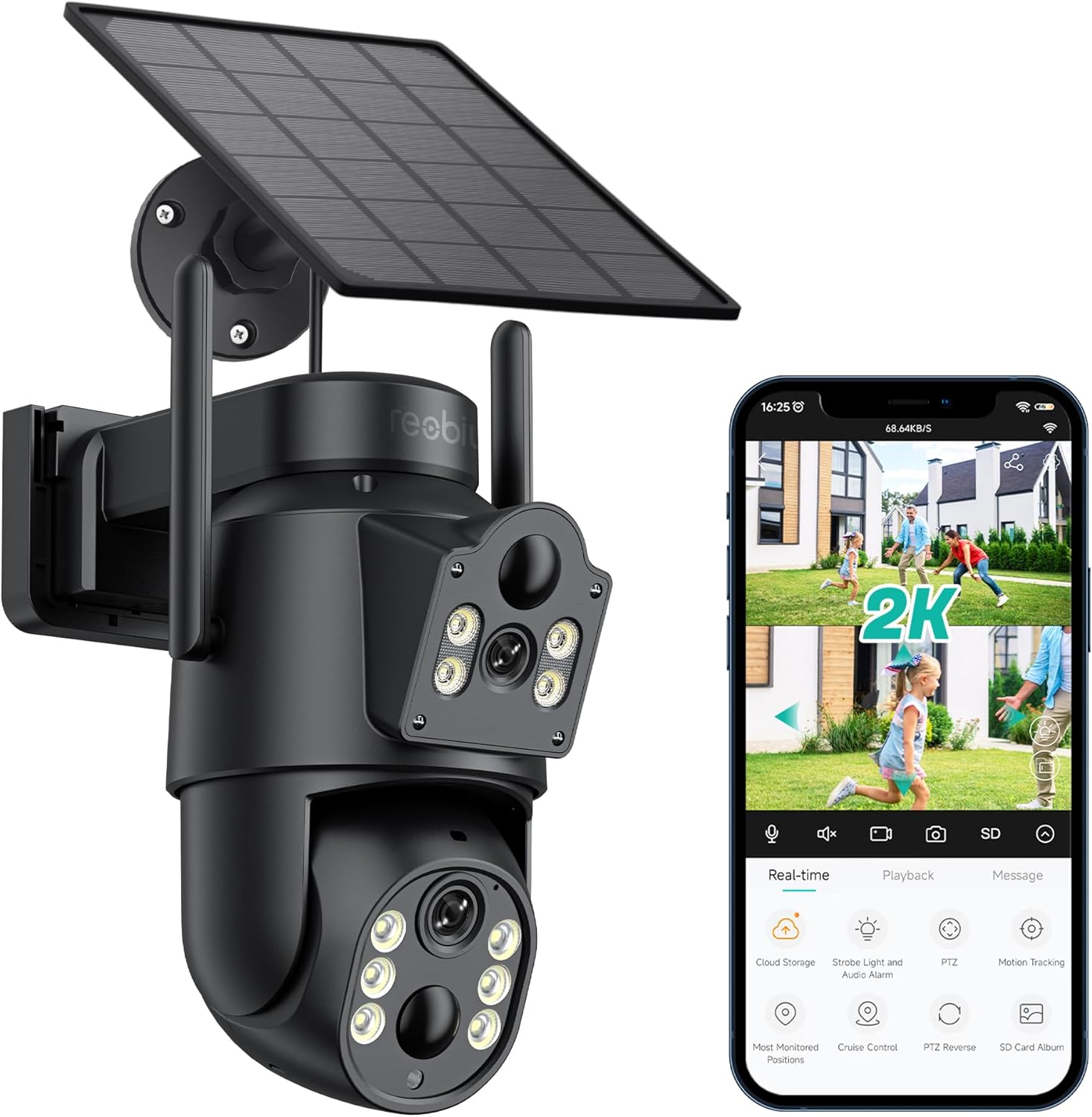
3.1-сүрөт: Reobiux D20-1P Solar PTZ Camera and its mobile application interface showing real-time monitoring, playback, and various control options.
Негизги өзгөчөлүктөрү:
- 2K QHD High Resolution: Так жана деталдуу видео foo камсыз кылатtage.
- Кош линзалуу дизайн: Combines a fixed lens with a rotating lens for comprehensive coverage.
- 360° PTZ Functionality: Allows remote control of pan, tilt, and zoom for flexible viewбурчтар.
- Solar Powered with Rechargeable Battery: Ensures continuous operation with minimal manual charging.
- PIR кыймылды аныктоо: Intelligently detects human movement to reduce false alarms.
- Түнкү көрүнүш: Offers full-color video even in low-light conditions, alongside infrared night vision.
- Эки тараптуу аудио: Enables communication with visitors or deterrence of intruders.
- IP66 аба ырайы: Ар кандай тышкы аба ырайынын шарттарына туруштук берүү үчүн иштелип чыккан.
- Wireless Wi-Fi Connectivity: Easy setup and remote access via smartphone.
4. Орнотуу колдонмосу
4.1 Алгачкы заряддоо
Before first use, fully charge the camera's internal battery using the provided Type-C charging line and power supply. This ensures the camera has sufficient power for initial setup and operation, especially if solar charging conditions are not optimal immediately after installation.
4.2 Колдонмону орнотуу жана аккаунт түзүү
- жүктөп алыңыз iCSee app from your smartphone's app store (iOS App Store or Google Play Store).
- Колдонмону орнотуп, аны ачыңыз.
- Жаңы аккаунт түзүү же эгер сизде мурунтан эле бар болсо, кирүү үчүн экрандагы көрсөтмөлөрдү аткарыңыз.
4.3 Camera Connection to Wi-Fi
- Камераңыз күйүп турганын текшериңиз.
- In the iCSee app, tap the "+" icon to add a new device.
- Select the option for "Wi-Fi Camera" or "Add Device by AP Hotspot" (refer to app for exact wording).
- Follow the app's instructions to connect the camera to your 2.4GHz Wi-Fi network. You may need to scan a QR code displayed on your phone with the camera, or listen for a sound prompt.
- Туташкандан кийин, камераңызга ат коюп, мониторингди баштасаңыз болот.
4.4 Камераны орнотуу
Choose a location that provides optimal surveillance coverage and receives direct sunlight for the solar panel. Ensure the camera is within range of your Wi-Fi network.
- Жайгашкан жерди тандоо: Identify a suitable wall or surface for mounting. Consider the camera's viewing angle (355° pan, 90° tilt) and the solar panel's exposure to sunlight.
- Бургулоо пункттарын белгилөө: Use the mounting base as a template to mark the screw holes on the wall.
- Бургулоо тешиктери: Белгиленген жерлерде тешиктерди бургулаңыз. Зарыл болсо, дубалга бекиткичтерди орнотуңуз.
- Монтаждык базаны бекитүү: Берилген бурамалар менен бекитүүчү негизди дубалга бекитиңиз.
- Камераны тиркөө: Камераны бекемделген негизге орнотуңуз.
- Күн панелин тууралоо: Position the solar panel to maximize sunlight exposure throughout the day.

4.1-сүрөт: Illustration of the camera mounted with its solar panel, highlighting the fixed and rotating lenses and the benefit of continuous solar power.
5. Иштөө нускамалары
5.1 Live View жана Ойнотуу
Open the iCSee app and select your camera to access the live viewБул жерден сиз:
- реалдуу убакыт мониторинг: View жандуу видео канал.
- PTZ башкаруу: Use the on-screen joystick to pan (355°) and tilt (90°) the camera.
- Digital Zoom: Pinch to zoom on the live feed.
- Ойнотуу: Жазылган footage stored on the SD card or cloud storage.

5.1-сүрөт: Demonstrates the superior clarity of 2K QHD resolution compared to 1080P, providing more details for monitoring.
5.2 Кыймылды аныктоо жана эскертүүлөр
The camera utilizes PIR (Passive Infrared) intelligent detection to identify human movement, minimizing false alarms from pets or swaying branches.
- Иштетүү/Өчүрүү: Activate or deactivate motion detection in the app settings.
- Сезимталдыкты жөндөө: Adjust the PIR sensor's sensitivity to suit your environment.
- Ойготкуч эскертмелери: Кыймыл аныкталганда смартфонуңузга заматта push эскертмелерин алыңыз.
- Үн жана жарык сигнализациясы: Configure the camera to trigger a strobe light and audible alarm upon detection.

5.2-сүрөт: The camera's PIR intelligent detection distinguishes human movement from other objects, reducing unnecessary alerts.

5.3-сүрөт: When motion is detected, the camera can send real-time push notifications and activate a sound and light alarm to deter intruders.
5.3 Түнкү көрүү режимдери
The camera offers two night vision modes for clear visibility in the dark:
- Spotlight Full Color Night Vision: Utilizes built-in spotlights to provide full-color video in low-light conditions.
- Spotlight Infrared Night Vision: Uses infrared LEDs for black-and-white video in complete darkness, with a range of up to 30 meters.
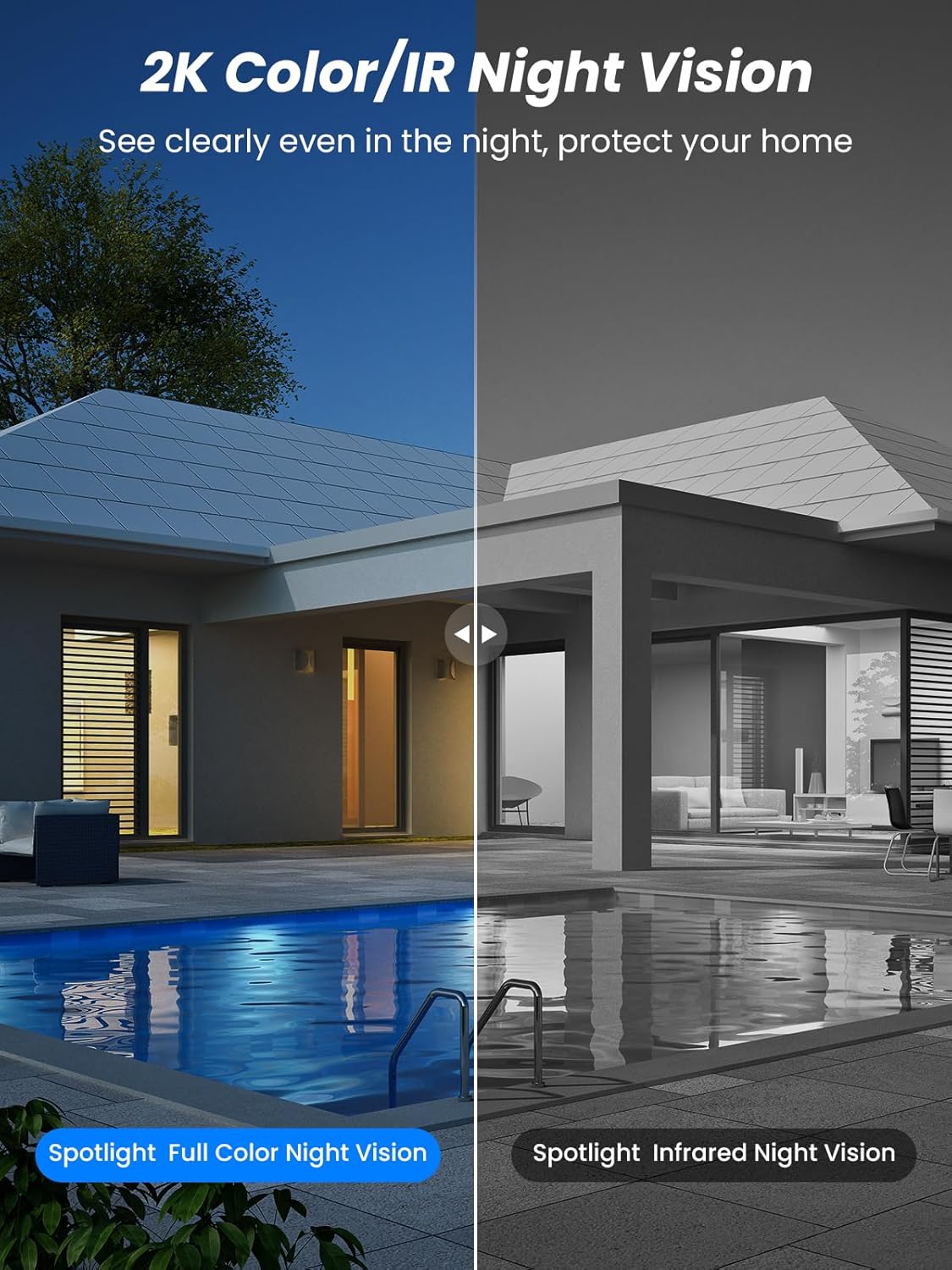
5.4-сүрөт: Illustrates the difference between full-color night vision, enabled by spotlights, and traditional infrared night vision.
5.4 Эки тараптуу аудио
The integrated microphone and speaker allow for two-way communication.
- Сүйлөө: Камеранын динамиги аркылуу сүйлөшүү үчүн колдонмодогу микрофон сүрөтчөсүн таптаңыз.
- Угуу: The camera's microphone captures audio from its surroundings.

5.5-сүрөт: The two-way audio function allows for direct communication through the camera, useful for interacting with visitors or delivery personnel.
6. Техникалык тейлөө
- Тазалоо: Мезгил-мезгили менен камеранын линзасын жана күн панелин жумшак, гamp cloth to ensure optimal performance and clear image quality. Avoid abrasive cleaners.
- Батареянын ден соолугу: While solar-powered, extreme weather or prolonged periods of low sunlight may require manual charging. Monitor battery levels via the app.
- Программалык камсыздоонун жаңыртуулары: Check the iCSee app regularly for available firmware updates to ensure your camera has the latest features and security enhancements.
- Аба ырайын коргоо: The camera is IP66 weatherproof, designed to withstand rain, snow, and sun. However, ensure all connections are secure to maintain water resistance.

6.1-сүрөт: The IP66 rating ensures the camera's durability and functionality in various outdoor weather conditions, including snow, rain, and direct sunlight.
7. Кыйынчылыктарды
- Камера Wi-Fi'га туташпай жатат:
- Ensure the camera is within range of your 2.4GHz Wi-Fi network. 5GHz networks are not supported.
- Wi-Fi сырсөзүңүздүн туура экенин текшериңиз.
- Роутериңизди жана камераңызды өчүрүп күйгүзүңүз.
- If issues persist, try resetting the camera (refer to app or product for reset button location).
- Battery not charging or draining quickly:
- Күн панелинин таза экенине жана күн сайын бир нече саат бою түз күн нуру тийип турганына ынаныңыз.
- Күн панели менен камеранын ортосундагы байланышты текшериңиз.
- If in a low-light environment, manually charge the camera using the Type-C cable.
- Кыймылды тез-тез аныктоо окуялары же түз эфир view streaming can consume battery faster. Adjust settings if needed.
- False motion detection alarms:
- Adjust the PIR motion detection sensitivity in the iCSee app.
- Ensure the camera is not pointed at areas with constant movement (e.g., busy roads, swaying trees) if not intended for monitoring.
- Сүрөттүн сапаты начар:
- Камера линзасын тазалаңыз.
- Оптималдуу сүрөт тартуу үчүн, айрыкча түнкүсүн жетиштүү жарыкты камсыз кылыңыз.
- Check your Wi-Fi signal strength; a weak signal can affect video streaming quality.
8. Техникалык шарттар
| Өзгөчөлүк | Деталь |
|---|---|
| Модель аты | D20-1P |
| Видео тартуунун резолюциясы | 2.5K |
| Натыйжалуу Video Resolution | 2K QHD |
| Зымсыз байланыш технологиясы | Wi-Fi (2.4 ГГц) |
| Форма фактору | Купол |
| Viewбурч | 355 градус (пан), 90 градус (көңүл) |
| Орнотуу түрү | Дубалга орнотулган |
| Түнкү көрүү диапазону | 30 метр |
| Frame Rate | 25 кадр/сек |
| Материал | Пластик |
| Тtage | 12 вольт (ток) |
| Ватtage | 5 ватт |
| Power Source | Батарея менен иштейт, күн энергиясы менен иштейт |
| Батареялар | 3 литий-иондук батарейкалар (кошумча) |
| Connectivity Protocol | Wi-Fi |
| Controller Type | iCSee колдонмосу |
| Өзгөчөлүктөр | Night Vision (Color/IR), PIR Motion Detection, Two-Way Audio, IP66 Weatherproof |
| Элемент Салмагы | 1.06 кг |
| Почталардын өлчөмдөрү | 21.7 x 19.5 x 13.8 см |
9. Кепилдик жана колдоо
Reobiux offers a 1 жылдык кепилдик for this product. For any issues or inquiries, please do not hesitate to reach out to our customer service. We provide 20 hours of online service to assist you.
For support, please refer to the contact information provided with your purchase or within the iCSee application.


