Introduction
This user manual provides comprehensive instructions for the setup, operation, and maintenance of your BirdDog X1 Ultra 4K PTZ Camera. Please read this manual thoroughly before using the product to ensure proper functionality and to prevent damage.
Коопсуздук маалыматы
- Ensure the camera is placed on a stable, level surface to prevent tipping.
- Камераны сууга, нымдуулукка же өтө жогорку температурага дуушар кылбаңыз.
- Use only the provided power supply and cables.
- Ашыкча ысып кетүүнүн алдын алуу үчүн вентиляция тешиктерин жабуудан качыңыз.
- Камераны өз алдынча бөлүүгө же оңдоого аракет кылбаңыз. Бардык тейлөөлөрдү квалификациялуу кызматкерлерге тапшырыңыз.
- Камераны күчтүү магниттик талаалардан алыс кармаңыз.
Пакеттин мазмуну
Төмөндө тизмеленген нерселердин баары пакетиңизге камтылганын текшериңиз:
- 1x BirdDog X1 Ultra 12x Zoom 4K PTZ Camera (White)
- 1x Алыстан башкаруу
- 1x 12 VDC Power Supply
- 1x High-Speed HDMI Cable with Ethernet
- 1x USB 2.0 Type-A Male to Type-B Male Cable
Продукт бүттүview

1-сүрөт: BirdDog X1 Ultra 4K PTZ Camera with included HDMI and USB cables. This image shows the camera from the front, highlighting its compact design and the two included cables.

2-сүрөт: Фронт view of the BirdDog X1 Ultra camera, showcasing the lens and the integrated 2.93" E-Ink display on the side, which provides essential camera information.
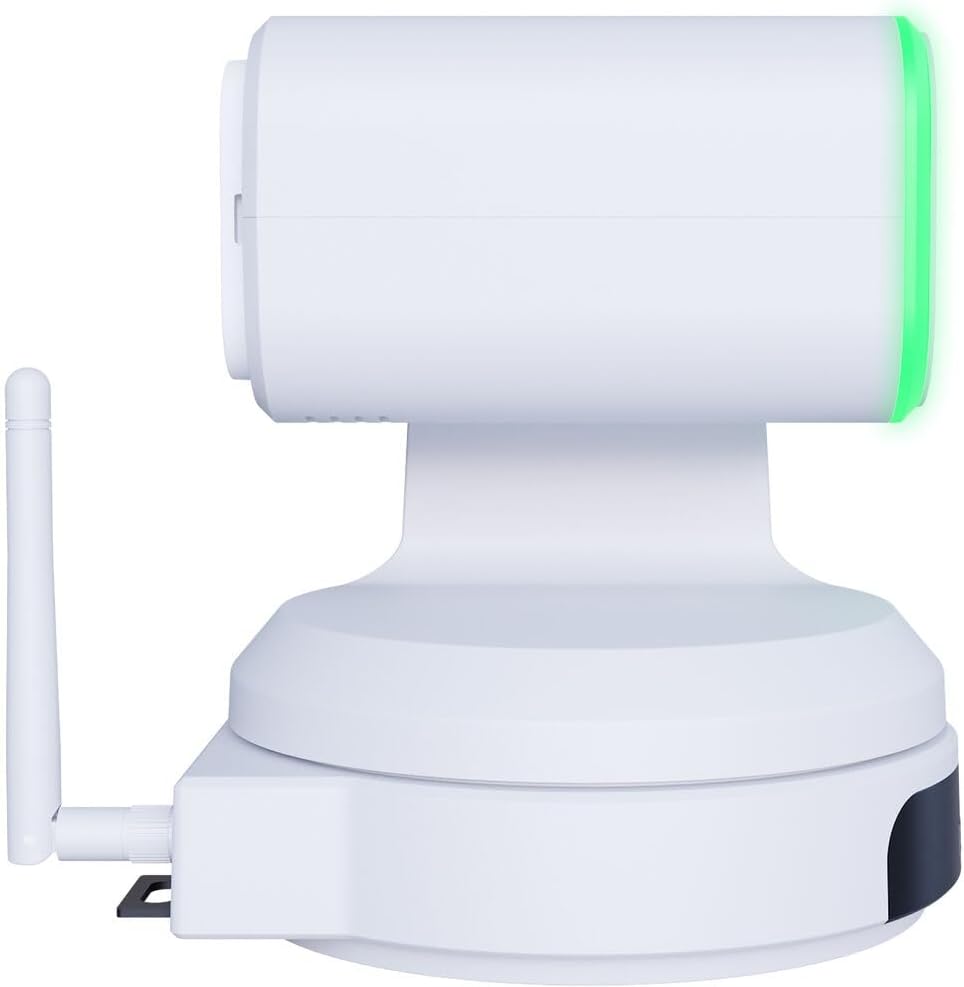
3-сүрөт: Side view of the BirdDog X1 Ultra camera, illustrating the antenna for wireless connectivity and the sleek profile аппараттын.

4-сүрөт: Арткы view of the BirdDog X1 Ultra camera, detailing the various connectivity ports including DC12V power input, RS232, USB3.0, HDMI, and PoE/LAN.
Негизги компоненттер:
- Объектив: 12x optical zoom lens for capturing UHD 4K30 resolution video.
- E-Ink Display: A 2.93" display providing real-time status and network information.
- Halo Tally: Built-in indicator for live production status.
- Антенна: For Wi-Fi 5 connectivity.
- Байланыш порттору: DC12V, RS232, USB3.0, HDMI, PoE/LAN.
Жайгашуу
1. Физикалык байланыш
- Кубат туташуу: Connect the included 12 VDC power supply to the DC12V port on the rear of the camera. Alternatively, if using Power over Ethernet (PoE), connect an Ethernet cable from a PoE-enabled switch to the PoE/LAN port.
- Видео чыгаруу:
- HDMI: Connect the included High-Speed HDMI Cable from the camera's HDMI output to your display or video switcher.
- USB/UVC: Connect the included USB 2.0 Type-A Male to Type-B Male Cable from the camera's USB3.0 port to your computer for direct connection to applications like Microsoft Teams or Zoom.
- Тармак туташуусу:
- Wired (LAN/PoE): Connect an Ethernet cable to the PoE/LAN port for network access and NDI|HX3 support.
- Зымсыз (Wi-Fi): Ensure the antenna is securely attached. The camera supports Wi-Fi 5. Refer to the operating section for Wi-Fi configuration.
2. Баштапкы күйгүзүү
Once all connections are made, the camera will power on automatically. The E-Ink display will show boot-up information and then display network details and current video resolution.
Иштеп жатат
1. Basic Camera Control
The camera can be controlled via the included remote control, a web interface, or compatible NDI software.
- Панорамалоо/Эңкейтүү/Масштабдоо (PTZ): Use the joystick on the remote control or the PTZ controls in the web interface to adjust the camera's pan, tilt, and zoom.
- Фокус: Adjust focus manually or use autofocus settings.
- Таасир: Control exposure settings including aperture, shutter speed, and gain. The camera features automatic exposure control.
- Ак баланс: Adjust color temperature for accurate color reproduction. The camera supports Kelvin control.
2. AI Auto Framing
The X1 Ultra features AI auto framing to automatically keep subjects in frame. This feature can be enabled and configured via the camera's web интерфейс.
3. NDI|HX3 and Network Configuration
The camera supports NDI|HX3 for low-latency, high-quality video transmission over IP networks.
- Кирүү Web Интерфейс:
- Компьютериңиз камера менен бир тармакта экенин текшериңиз.
- Locate the camera's IP address from the E-Ink display or by using BirdDog Central Lite software.
- ачуу а web браузерге өтүп, камеранын IP дарегин киргизиңиз.
- Log in using the default credentials (refer to the camera's documentation or the E-Ink display for initial login details).
- Wi-Fi конфигурациясы: ичинде web interface, navigate to the network settings to connect the camera to your Wi-Fi network.
- NDI Settings: Configure NDI stream settings, including resolution and bandwidth, within the web интерфейс.
4. USB/UVC Output
When connected via USB, the camera functions as a standard UVC (USB Video Class) device, compatible with most video conferencing applications like Microsoft Teams, Zoom, and OBS Studio. The USB output supports independent resolution from the HDMI/NDI outputs.
Техникалык тейлөө
- Тазалоо: Use a soft, dry cloth to clean the camera body. For the lens, use a lens cleaning cloth and specialized lens cleaning solution. Do not use abrasive cleaners or solvents.
- Сактагыч: When not in use for extended periods, store the camera in a cool, dry place, away from direct sunlight and dust.
- Программалык камсыздоонун жаңыртуулары: Мезгил-мезгили менен текшерип туруңуз BirdDog official webсайт for firmware updates to ensure optimal performance and access to new features.
Проблемаларды чечүү
| Көйгөй | Мүмкүн себеп | Чечим |
|---|---|---|
| Күч жок | Power cable not connected; PoE not active; faulty power supply. | Check power connections. Ensure PoE switch is active if using PoE. Try a different power outlet or power supply. |
| No video output (HDMI/USB) | Incorrect cable connection; incorrect input selected on display; driver issue (USB). | Verify HDMI/USB cable connections. Select correct input on your display/software. Reinstall USB drivers if necessary. |
| NDI stream not detected | Network issue; camera not on same subnet; NDI disabled. | Check network cables. Ensure camera and receiving device are on the same network. Verify NDI is enabled in camera's web интерфейс. |
| PTZ control unresponsive | Remote control battery low; IR sensor blocked; software issue. | Replace remote control batteries. Ensure clear line of sight to IR sensor. Restart camera. Check web interface controls. |
Техникалык шарттар
| Өзгөчөлүк | Деталь |
|---|---|
| Модель номери | BDX1UW |
| Video Resolution | UHD 4K30 (4K at 30fps), 1080p (USB) |
| Оптикалык масштаб | 12x |
| Байланыш | HDMI, USB3.0 (UVC), PoE/LAN, Wi-Fi 5, RS232 |
| Network протоколу | NDI|HX3 |
| Өзгөчөлүктөр | AI Auto Framing, Integrated 2.93" E-Ink Display, Built-In Halo Tally, Color Matrix, API & Kelvin Control, Low-Light Performance |
| Электр камсыздоо | 12 VDC or PoE |
| Түс | Ак |
Кепилдик жана колдоо
For warranty information and technical support, please refer to the official BirdDog webсайтка же түздөн-түз кардарларды тейлөөгө кайрылыңыз. Кепилдик дооматтар үчүн сатып алганыңыздын далилин сактаңыз.
Официалдуу Webсайт: https://birddog.tv


