1. Киришүү
The Flashpoint R2 Nano Remote is a compact and advanced wireless flash trigger designed for Panasonic and Olympus camera systems. It offers precise control over your flash settings through an intuitive touchscreen interface and OLED display, enhancing your photography experience with seamless integration and reliable performance.
Негизги өзгөчөлүктөр төмөнкүлөрдү камтыйт:
- Үзгүлтүксүз интеграция: Full TTL compatibility with Olympus/Panasonic cameras for optimal exposure.
- Ultimate Reliability: Stable 2.4 GHz radio frequency with 32 channels, ensuring consistent triggering up to 328 feet (100 meters).
- Жогорку ылдамдыктагы синхрондоштуруу (HSS): Achieve sync speeds up to 1/8000s for creative effects and motion freezing.
- Интуитивдик сенсордук башкаруу: Responsive interface for quick and easy adjustments.
- Versatile Group Control: Manage up to 16 groups (A-F, 0-9) independently for complex lighting setups.
2. Кутуда эмне бар
Upon unboxing your Flashpoint R2 Nano, please verify that all components are present:
- Flashpoint R2 Nano Remote
- USB-C заряддоо кабели
- Сактоочу баштык
- Колдонуучунун Колдонмосу (бул документ)
3. Продукт бүтүп калдыview
Familiarize yourself with the components and controls of your R2 Nano remote.
3.1-сүрөт: Алдыңкы жана каптал View of the R2 Nano with Key Components Labeled.
- Сенсордук экран: Main interface for settings and control.
- Терүүнү тандоо: For navigating menus and adjusting values.
- Кубат которгучу: Аппаратты күйгүзөт/өчүрөт.
- Сыноо баскычы: Сыноо жарыгын иштетет.
- Installing/Detaching Button: Releases the remote from the hotshoe.
- Монтаждоо оюгу: Connects to the camera's hotshoe.
- USB-C заряддоо порту: Батареяны заряддоо үчүн.

Figure 3.2: R2 Nano Touchscreen Interface Details.
- Канал (CH): Displays the current wireless channel (e.g., CH6).
- Group (A, B, C, etc.): Indicates the active flash groups.
- Чыгуу кубаттуулугу деңгээли: Shows the flash power setting (e.g., +0.0, 1/128).
- Parameters - / +: Touch controls for decreasinг/өсүшasing маанилери.
- Синхрондоштуруу режимдери: Icons indicating sync modes (e.g., HSS, front curtain, rear curtain).
- Моделдөө Л.amp: Icon for modeling lamp статусу.
- Батарея көрсөткүчү: Учурдагы батареянын деңгээлин көрсөтөт.
4. Орнотуу
4.1 Батареяны заряддоо
The R2 Nano is equipped with a built-in rechargeable lithium battery. Before first use, fully charge the device.
- Locate the USB-C charging port on the side of the R2 Nano.
- Connect the provided USB-C charging cable to the port.
- Кабелдин экинчи учун USB кубат адаптерине (кошумча эмес) же компьютердин USB портуна туташтырыңыз.
- The battery indicator on the screen will show charging status. A full charge from 0% to 100% typically takes approximately 2 hours.

Figure 4.1: Charging the R2 Nano via USB-C.
4.2 Камерага орнотуу
The R2 Nano features an easy-mounting, durable hotshoe design for secure attachment to your camera.
- Камераңыз өчүк экенин текшериңиз.
- Slide the R2 Nano's mounting slot onto your camera's hotshoe.
- Gently push until it clicks into place, ensuring a secure connection.
- To detach, press the Installing/Detaching Button and slide the remote off.

Figure 4.2: Mounting the R2 Nano on a Camera Hotshoe.
5. Иштөө нускамалары
5.1 Күйгүзүү/өчүрүү
- To power on, press and hold the Power Switch until the screen illuminates.
- To power off, press and hold the Power Switch until the screen turns off.
5.2 Сенсордук экран интерфейсинде навигация
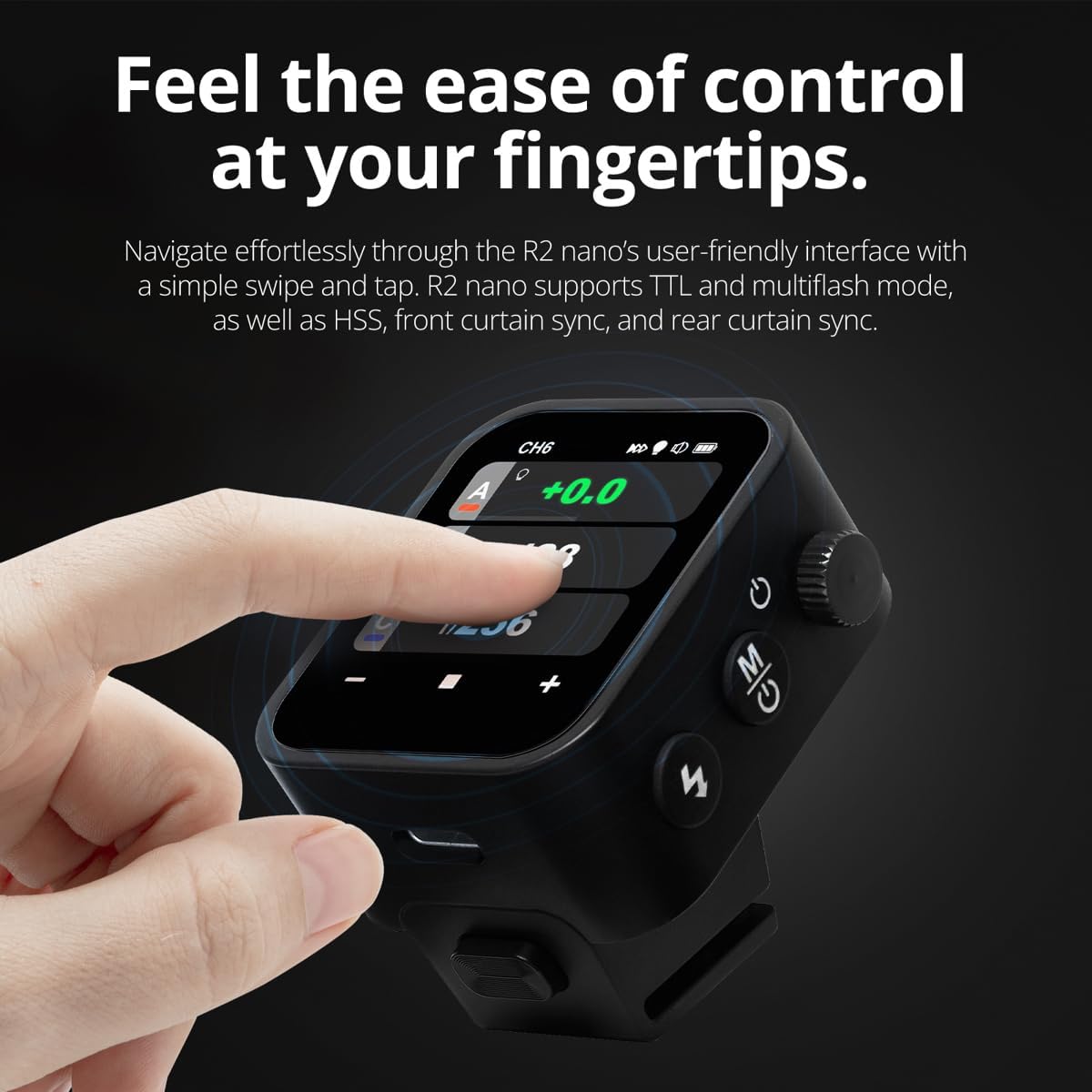
The R2 Nano features a responsive touchscreen and a select dial for intuitive control.

Figure 5.1: High Definition OLED Screen Interface.
- Touch Interaction: Tap on a group (A, B, C, etc.) to select it for adjustment. Tap on parameters like power level to modify them.
- Терүүнү тандоо: Rotate the dial to scroll through options or adjust values. Press the dial to confirm selections.
- Параметрди тууралоо: Use the on-screen '-' and '+' buttons or the Select Dial to change flash power, exposure compensation, or other settings.

Figure 5.2: Touchscreen Interaction for Settings Adjustment.
5.3 Setting Channels and Groups
To avoid interference and control multiple flashes, set appropriate channels and groups.
- Access the channel settings through the touchscreen menu. Select a channel from 1 to 32. Ensure your flash units are set to the same channel.
- Assign flash units to different groups (A-F, 0-9) to control them independently. The R2 Nano allows control of up to 16 groups.
5.4 Flash Modes (TTL, Manual, Multi-flash)
The R2 Nano supports various flash modes to suit different shooting scenarios.
- TTL (Объектив аркылуу): Automatically adjusts flash output for correct exposure. Ideal for fast-paced shooting where lighting conditions change frequently.
- Кол менен (M): Allows precise control over flash power output (e.g., 1/1 to 1/256). Suitable for consistent lighting setups and creative control.
- Multi-flash (Stroboscopic): Объекттин бир нече кыймылын тартуу үчүн бир экспозиция учурунда бир катар тез жарк этет.
5.5 Sync Modes (HSS, Front Curtain, Rear Curtain)
Select the appropriate sync mode based on your shutter speed and desired effect.
- HSS (Жогорку ылдамдыктагы синхрондоштуруу): Enables flash synchronization at shutter speeds faster than the camera's native sync speed (up to 1/8000s). Useful for overpowering ambient light or using wide apertures in bright conditions.
- Алдыңкы көшөгө синхрондоштуруу: The flash fires at the beginning of the exposure. This is the standard sync mode.
- Арткы көшөгө синхрондоштуруу: The flash fires just before the second curtain closes. This creates a streaking effect behind moving subjects, giving a sense of motion.
6. Техникалык тейлөө
Proper maintenance ensures the longevity and optimal performance of your R2 Nano remote.
- Тазалоо: Use a soft, dry cloth to clean the exterior of the device. For the touchscreen, use a microfiber cloth specifically designed for electronics. Avoid using harsh chemicals or abrasive materials.
- Сактагыч: When not in use, store the R2 Nano in its provided storage bag to protect it from dust and scratches. Store in a cool, dry place away from direct sunlight and extreme temperatures.
- Батареяга кам көрүү: To maintain battery health, avoid fully discharging the battery frequently. If storing for extended periods, charge the battery to approximately 50% every few months.
- Hotshoe байланыштары: Keep the hotshoe contacts clean and free of debris to ensure reliable communication with your camera.
7. Кыйынчылыктарды
If you encounter issues with your Flashpoint R2 Nano, refer to the following common problems and solutions.
| Көйгөй | Мүмкүн себеп | Чечим |
|---|---|---|
| Түзмөк күйбөйт. | Батарея түгөнүп калды. | USB-C кабели аркылуу аппаратты заряддаңыз. |
| Flash units not firing. | Incorrect channel or group settings. | Ensure the R2 Nano and flash units are set to the same channel and correct groups. |
| Flash units not firing. | Remote not securely mounted. | Ensure the R2 Nano is fully seated in the camera's hotshoe. |
| Inconsistent flash triggering. | Айлана-чөйрөнүн кийлигишүүсү. | Change the wireless channel to one with less interference. Ensure no obstructions between remote and flash. |
| Сенсордук экран жооп бербейт. | Убактылуу программалык ката. | Power off the device, wait a few seconds, then power it back on. |
| HSS not working. | Camera or flash not set to HSS mode. | Verify HSS is enabled on both the R2 Nano and your compatible flash unit. Ensure camera shutter speed is above sync speed. |
8. Техникалык шарттар
| Өзгөчөлүк | Деталь |
|---|---|
| Модел | Flashpoint R2 Nano |
| Шайкештик | Panasonic and Olympus Cameras |
| Зымсыз жыштык | 2.4 ГГц |
| Каналдар | 32 |
| Топтор | 16 (AF, 0-9) |
| Зымсыз диапазон | 100 метрге чейин (328 фут) |
| Шайкештирүү ылдамдыгы | 1/8000сек чейин (HSS) |
| Дисплей | Touchscreen OLED |
| Батарея | Камтылган заряддалуучу литий аккумулятору |
| Заряддоо порту | USB-C |
| Продукциянын өлчөмдөрү | 5.25 x 4.25 x 2.5 дюйм |
| Элемент Салмагы | 6.4 унция |
| Өндүрүүчү | Flashpoint |
| Дата биринчи жеткиликтүү | 19-июнь, 2024-жыл |
9. Кепилдик жана колдоо
Flashpoint products are designed for reliability and performance. For warranty information, technical support, or service inquiries, please refer to the official Flashpoint webсайтка же ыйгарым укуктуу дилериңизге кайрылыңыз.
Сураныч, кепилдик дооматтар үчүн сатып алуу далилиңизди сактап коюңуз.


