1. Киришүү
This manual provides essential instructions for the proper setup, operation, and maintenance of your Azpen A1083 10.36-inch Android Tablet. Please read this manual thoroughly before using your device to ensure optimal performance and longevity.
2. Пакеттин мазмуну
Продукцияңыздын таңгагында бардык элементтер бар экенин текшериңиз:
- Azpen A1083 10.36-inch Android Tablet
- Surface Style Keyboard Folio Case
- Заряддоо кабели
- Кубаттуу адаптер
- Quick Start Guide

Image: The Azpen A1083 tablet and its accompanying keyboard folio, displayed alongside their retail packaging. This image illustrates the complete product set as it would appear upon unboxing.
3. Орнотуу
3.1 Алгачкы заряддоо
- Connect the charging cable to the tablet's USB-C port.
- Plug the other end of the cable into the power adapter.
- Кубат адаптерин розеткага кыстарыңыз.
- Allow the tablet to charge until the battery indicator shows a full charge (approximately 3-4 hours for the first charge).
3.2 Күйгүзүү/өчүрүү
- Күйгүзүү үчүн: Press and hold the Power button (located on the side of the tablet) until the Azpen logo appears on the screen.
- Өчүрүү үчүн: Меню пайда болгонго чейин Кубат баскычын басып, кармап туруңуз. "Өчүрүү" дегенди тандап, ырастаңыз.
- Кайра баштоо үчүн: Меню пайда болгонго чейин Кубат баскычын басып, кармап туруңуз. "Кайра баштоо" дегенди тандап, ырастаңыз.
3.3 Connecting the Keyboard Folio
The included keyboard folio connects via a Pogo Pin connector, requiring no Bluetooth pairing.
- Align the tablet with the Pogo Pin connectors on the keyboard folio.
- Gently press the tablet onto the connectors until it securely snaps into place.
- The keyboard will automatically activate.
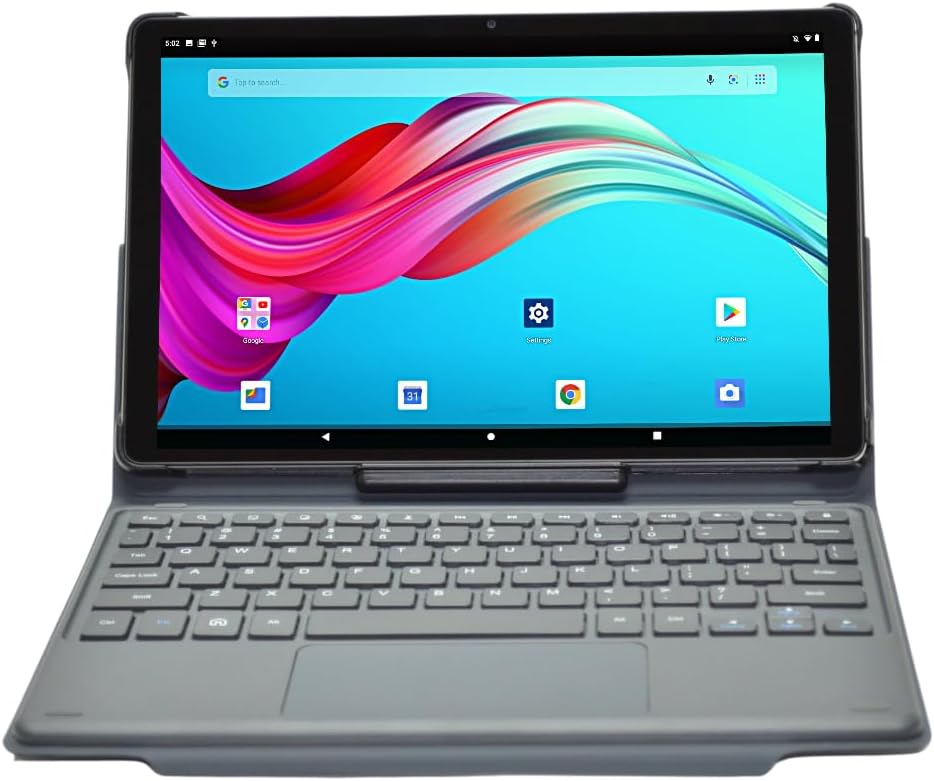
Image: The Azpen A1083 tablet securely attached to its Pogo Pin keyboard folio, displaying the Android home screen. This illustrates the tablet in its ready-to-use configuration.
4. Иштөө нускамалары
4.1 Basic Tablet Navigation
- Сенсордук экран: The tablet features a hypersensitive glass capacitive touchscreen for intuitive interaction.
- Серпүү: Swipe left, right, up, or down to navigate between screens, open notifications, or access quick settings.
- таптаңыз: Tap icons to open applications or select options.
- Чымчып-кичирейтүү: Сүрөттөрдү чоңойтуу же кичирейтүү үчүн эки манжаңызды колдонуңуз жана web барактар.

Image: An infographic highlighting key features of the Azpen A1083 tablet, including Android 13, 2K HD display, 6GB RAM, 128GB storage, Pogo Pin keyboard, and Google Assistant compatibility. This provides a visual summary of the tablet's capabilities.
4.2 Using the Keyboard Folio
The keyboard folio provides a physical keyboard and trackpad for enhanced productivity.
- Терүү: Use the physical keys for text input in documents, emails, and web серептөө.
- Trackpad: The integrated trackpad functions like a mouse, allowing for precise cursor control.
- Multi-Angle Case: The folio case allows for multiple viewing angles, providing flexibility for different tasks such as typing, viewing media, or drawing.
Сүрөт: Бир нече views of the Azpen A1083 tablet within its multi-angle keyboard case, demonstrating various adjustable positions for typing and viewing. This highlights the versatility of the case design.
4.3 Камеранын функциялары
Планшет 5 МП алдыңкы камера жана 8 МП арткы камера менен жабдылган.
- Open the 'Camera' application from the home screen or app drawer.
- Камераны которуштуруу сүрөтчөсүн колдонуп, алдыңкы жана арткы камераларды тандаңыз.
- Сүрөткө тартуу же видео жазууну баштоо/токтоо үчүн жапкыч баскычын таптаңыз.
4.4 Google Жардамчысы
The Azpen A1083 supports Google Assistant for voice commands and smart assistance.
- Иштетүү: Жардамчыны иштетүү үчүн "Hey Google" же "Ok Google" деп айтыңыз.
- Буйруктар: Use voice commands for tasks such as setting alarms, checking weather, playing music, or opening applications.
5. Техникалык тейлөө
5.1 Планшетиңизди тазалоо
- Планшеттин экранын жана корпусун тазалоо үчүн жумшак, түксүз чүпүрөктү колдонуңуз.
- өжөр тактар үчүн, жеңил гampчүпүрөктү суу же экранга арналган тазалоо эритмеси менен сүртүңүз. Катуу химиялык заттардан алыс болуңуз.
- Do not spray cleaning solutions directly onto the tablet.
5.2 Программалык камсыздоо жаңыртуулары
Regularly check for and install software updates to ensure your tablet has the latest features and security patches.
- Go to 'Settings' > 'System' > 'System update'.
- Бардык жеткиликтүү жаңыртууларды жүктөп алуу жана орнотуу үчүн экрандагы көрсөтмөлөрдү аткарыңыз.
5.3 Батареяга кам көрүү
The Azpen A1083 offers up to 8 hours of battery life under typical usage conditions.

Image: A graphic representation of a battery with the text "UP TO 8 HOURS BATTERY" prominently displayed, indicating the tablet's expected battery duration. This visually communicates the device's power autonomy.
- Ашыкча температурадан качыңыз, алар батареянын иштешин начарлатышы мүмкүн.
- Планшетти узак убакытка толук зарядсыз калтырбаңыз.
- For optimal battery health, avoid constantly charging the tablet to 100% and letting it drain to 0%.
6. Кыйынчылыктарды
| Көйгөй | Мүмкүн себеп | Чечим |
|---|---|---|
| Планшет күйбөйт | Аз батарея; Системанын бузулушу | Планшетті кеминде 30 мүнөт кубаттаңыз. Күйгүзүп кайра иштетүү үчүн Күйгүзүү баскычын 10-15 секунд басып туруңуз. |
| Баскычтоп жооп бербей жатат | Improper connection; Software glitch | Ensure the Pogo Pins are clean and securely connected. Detach and reattach the tablet to the keyboard. Restart the tablet. |
| Жай аткаруу | Too many apps running; Low storage | Керексиз тиркемелерди жабыңыз. Кэшти жана убактылуу тазалоо files. Uninstall unused apps. |
| Wi-Fi туташуу көйгөйлөрү | Router problem; Incorrect password | Restart your Wi-Fi router. Forget the network on the tablet and reconnect with the correct password. |
7. Техникалык шарттар

Сүрөт: арткы view of the Azpen A1083 tablet, clearly displaying the 'azpen' brand logo and 'Model: A1083' text. This image helps in identifying the specific model of the device.
| Өзгөчөлүк | Деталь |
|---|---|
| Модель номери | A1083 |
| Дисплей өлчөмү | 10.36 дюйм |
| Screen Resolution | 2000 x 1200 pixels (2K FHD IPS) |
| Процессор | Mediatek 8183 Octa Core CPU 2.0 GHz |
| RAM | 6 ГБ |
| Сактагыч | 128 ГБ |
| Операция системасы | Android 13 |
| Алдыңкы камера | 5MP |
| Арткы камера | 8MP |
| Зымсыз байланыш | 802.11ac |
| Элемент Салмагы | 3 фунт |
| Продукциянын өлчөмдөрү | 9.7 x 6.2 x 0.29 дюйм |
8. Кепилдик маалыматы
Azpen products typically come with a limited manufacturer's warranty. For detailed information regarding the warranty period, coverage, and terms and conditions for your Azpen A1083 tablet, please refer to the warranty card included in your product packaging or visit the official Azpen webсайт.
9. Кардарларды колдоо кызматы
If you encounter any issues not covered in this manual or require further assistance, please contact Azpen customer support:
- Webсайт: Visit the official Azpen webКөп берилүүчү суроолор, колдоо ресурстары жана байланыш параметрлери үчүн сайт.
- Интернет дүкөн: Azpen Store on Amazon


