Introduction
This manual provides detailed instructions for the safe and effective use of your SIRUI AM-MDP01 Carbon Fiber Monopod. Please read this manual thoroughly before operating the monopod to ensure optimal performance and longevity. Keep this manual for future reference.
Продукт бүттүview
Кутуда эмне бар
Таңгактан чыгаргандан кийин, төмөнкү нерселердин бардыгы камтылганын текшериңиз:
- 1 x SIRUI AM-MDP01 Carbon Fiber Monopod
- 1 x Смартфон Clamp
- 1 x Ташуу сумкасы
- 1 x 2.5мм Аллен ачкычы
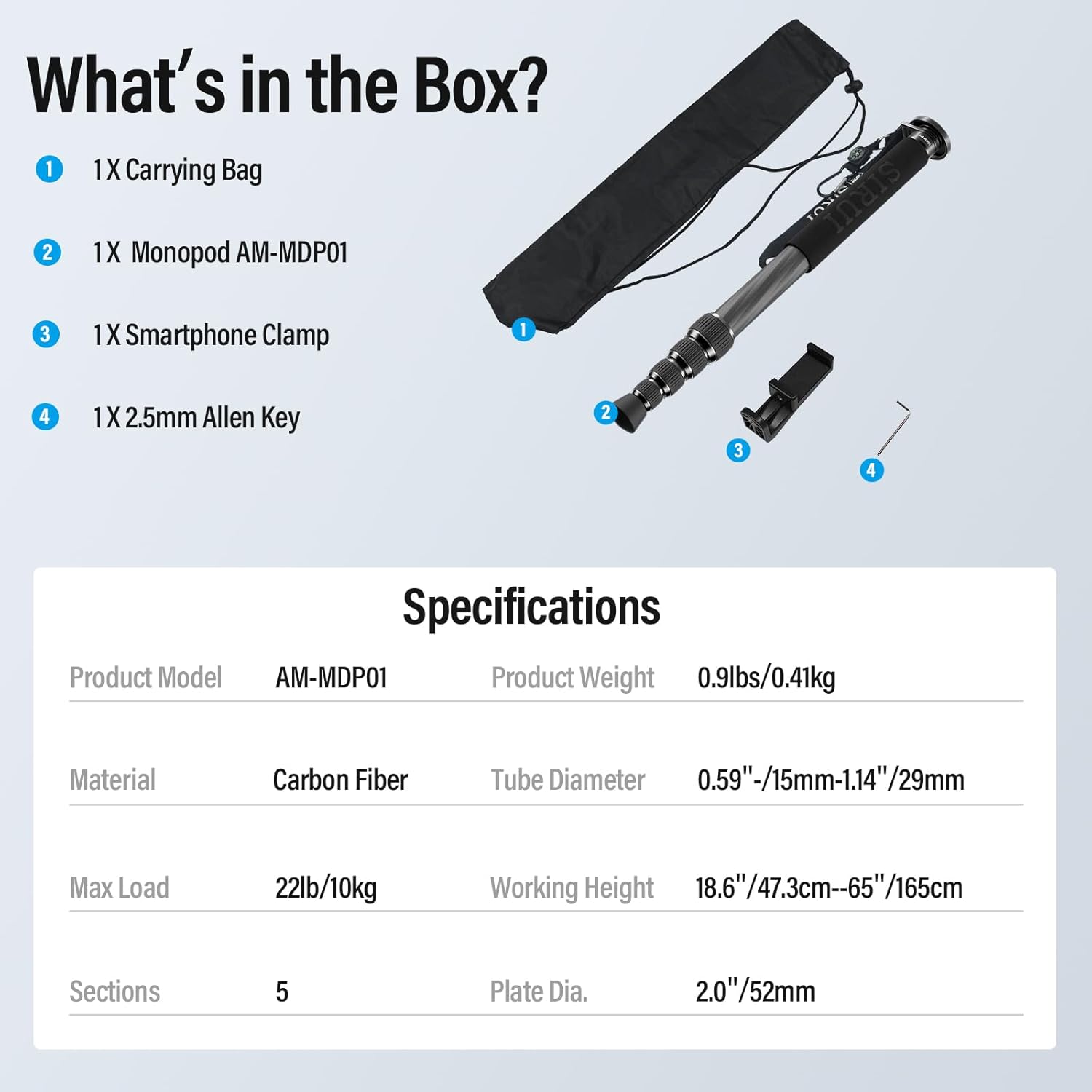
Image: Contents of the SIRUI AM-MDP01 Monopod package.
Негизги өзгөчөлүктөрү
- Ultra-Lightweight & Sturdy: Constructed from high-strength carbon fiber, weighing approximately 0.41kg (0.9lbs) with a maximum load capacity of 10kg (22lbs).
- Extendable Height Range: Features 5 sections, extending from a minimum height of 47.3cm (18.6") to a maximum height of 165cm (65").
- Quick Twist-Lock System: Ergonomic twist locks allow for rapid height adjustment and secure locking of each section.
- Integrated Phone Clamp: Includes a fully rotatable smartphone mount for seamless transitions between portrait and landscape orientations.
- Саякатка ылайыктуу дизайн: Compact retracted size of 18.5 inches, includes a carabiner clip for attachment, a mini compass, and a cold-resistant foam grip.
- Reversible Mounting Screw: Features a reversible 1/4" and 3/8" screw for wide compatibility with cameras, ball heads, video heads, and other accessories.

Image: SIRUI AM-MDP01 Monopod illustrating its compact and extended states.

Image: Detailed components of the monopod.
Жайгашуу
1. Attaching a Camera or Accessory
The monopod features a reversible mounting screw to accommodate both 1/4" and 3/8" threaded devices.
- Бураманын өлчөмүн аныктоо: Determine if your camera or accessory requires a 1/4" or 3/8" screw. The monopod comes with a 1/4" screw installed by default.
- Reverse Screw (if needed): If a 3/8" screw is required, use the provided Allen key to loosen the screw on the mounting platform. Carefully remove the screw, flip it, and reinsert it to expose the 3/8" thread. Tighten the screw with the Allen key.
- Түзмөктү орнотуу: Align your camera or accessory with the appropriate screw thread on the monopod's mounting platform. Rotate your device clockwise until it is securely fastened. Ensure it is tight enough to prevent movement but avoid over-tightening.

Image: Instructions for reversing the mounting screw.

Image: Reversible mounting thread detail.
2. Attaching the Smartphone Clamp
The included smartphone clamp can be directly mounted onto the 1/4" screw of the monopod.
- Ensure the monopod's mounting screw is set to 1/4".
- Screw the smartphone clamp onto the 1/4" thread until secure.
- cl ачыңызamp and insert your smartphone. The clamp is designed to hold various phone sizes securely.
Иштөө нускамалары
1. Adjusting Monopod Height
The monopod features 5 sections with twist-lock mechanisms for quick and secure height adjustments.
- Узартуу: Twist each section's lock counter-clockwise to loosen. Pull the section outwards to extend it to the desired length.
- Кулпу: Once the desired height is reached, twist the lock clockwise to secure the section firmly in place. Repeat for all sections.
- Баш тартуу: Twist each section's lock counter-clockwise, push the section inwards, and then twist clockwise to lock it in the retracted position.

Image: Twist lock mechanism and height adjustment examples.
2. Using the Smartphone Clamp
Смартфон clamp allows for flexible positioning of your phone.
- Once your phone is secured in the clamp, you can rotate it 360 degrees to switch between portrait and landscape modes without re-mounting.
- Clamp also has a 1/4" threaded hole for attaching additional accessories like a magic arm or external light.

Image: Smartphone clamp rotation feature.
3. Жалпы пайдалануу боюнча кеңештер
- Always ensure all sections are securely locked before placing a camera or device on the monopod.
- When using with a heavy camera, maintain a firm grip on the monopod for added stability.
- The monopod can also function as a hiking stick for support during outdoor activities.
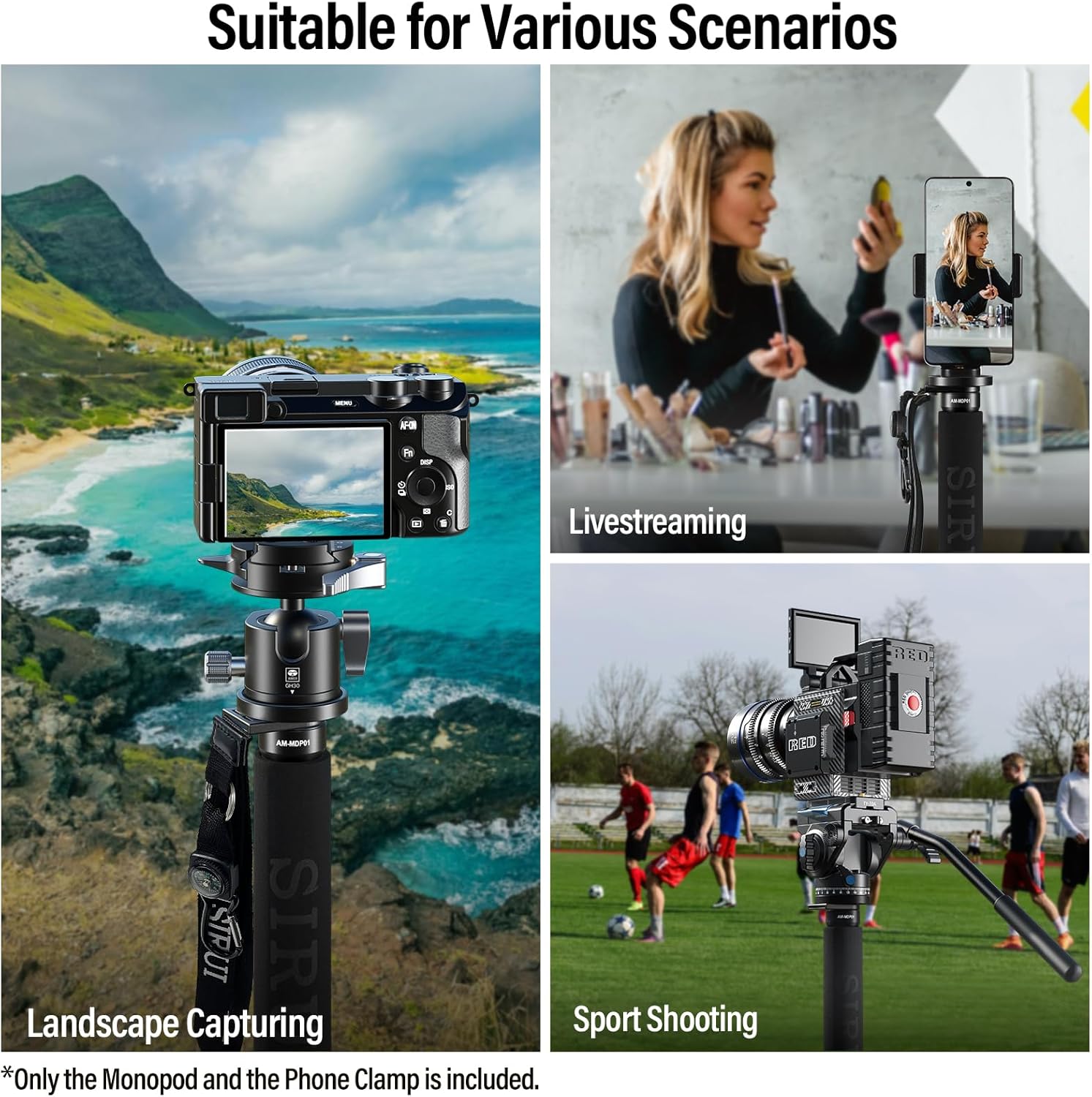
Image: Monopod in various usage scenarios.
Video: Demonstrates the SIRUI AM-MDP01 Monopod's lightweight design, height adjustment, and flexibility for camera and smartphone use.
Техникалык тейлөө
- Тазалоо: Wipe the monopod with a soft, dry cloth after each use to remove dust and dirt. For stubborn grime, use a slightly damp кездеме жана жумшак самын менен сүртүп, андан кийин жакшылап кургатыңыз. Күчтүү химиялык заттардан алыс болуңуз.
- Майлоо: The twist locks are designed for smooth operation. Avoid applying lubricants unless specifically instructed by SIRUI support, as this can attract dirt and affect performance.
- Сактагыч: Store the monopod in its carrying bag in a cool, dry place away from direct sunlight and extreme temperatures.
- Текшерүү: Periodically check all screws and connections to ensure they are tight. If any part appears damaged or loose, discontinue use and contact customer support.
Проблемаларды чечүү
- Monopod sections not locking securely: Ensure the twist locks are fully tightened clockwise. If the issue persists, check for any debris or foreign objects inside the locking mechanism. Clean as per maintenance instructions.
- Camera/accessory feels wobbly: Verify that the mounting screw is fully tightened to your device. Ensure the device itself is properly secured to the mounting plate.
- Смартфон clamp not holding phone: cl экенин текшериңизamp is fully extended to accommodate your phone's width and that the phone is centered within the clamp's jaws.
Техникалык шарттар
| Өзгөчөлүк | Спецификация |
|---|---|
| Продукт модели | AM-MDP01 |
| Материал | Carbon Fiber |
| Бөлүмдөр | 5 |
| Продукт Салмагы | 0.41 кг (0.9 фунт) |
| Max Load | 10 кг (22 фунт) |
| Working Height (Min) | 47.3 см (18.6 дюйм) |
| Жумуштун бийиктиги (макс.) | 165 см (65 дюйм) |
| Түтүк диаметри | 15mm - 29mm (0.59" - 1.14") |
| Пластинанын диаметри | 52мм (2.0 дюйм) |
Кепилдик жана колдоо
SIRUI products are manufactured to high-quality standards. For warranty information, technical support, or service inquiries, please refer to the official SIRUI webсайтка кайрылыңыз же жергиликтүү дистрибьютериңиз менен байланышыңыз. Сатып алганыңыздын далили катары сатып алуу дүмүрчөгүңүздү сактаңыз.


