1. Продукт бүтүп калдыview
The Navitel R385 is a 2K GPS Front Dash Cam designed to record your journeys with high-quality video. It features a 140-degree wide viewing angle, G-Sensor for emergency recording, Loop Recording, and a GPS Informer function to alert you to road hazards.
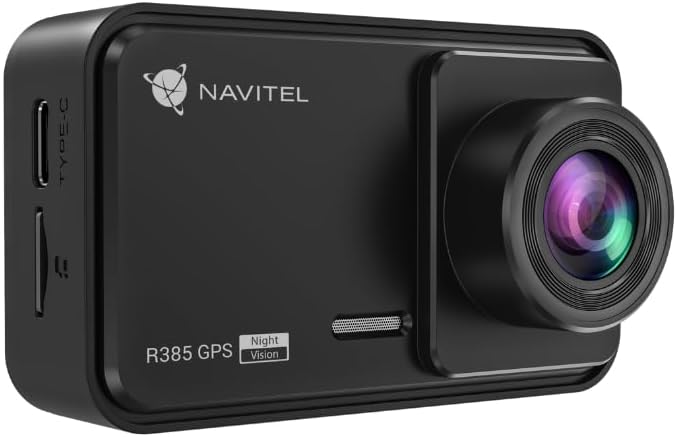
1.1-сүрөт: Фронт view of the Navitel R385 Dash Cam. This image displays the compact design of the dash cam, featuring the lens on the right side and the 'R385 GPS' branding on the front.
2. Пакеттин мазмуну
Орнотууну улантуудан мурун, бардык буюмдардын бар экендигин текшериңиз:
- Navitel R385 Dash Cam
- Алдынкы айнек тоосу
- Унаа заряддагыч
- User Manual
3. Орнотуу жана орнотуу
3.1 MicroSD картасын салуу
The Navitel R385 supports microSD cards up to 256GB. A microSD card is required for recording and is not included with the device.
- Locate the microSD card slot on the side of the dash cam.
- Insert the microSD card with the contacts facing the front of the camera until it clicks into place.
- Чыгаруу үчүн картаны акырын чыккыча түртүңүз.
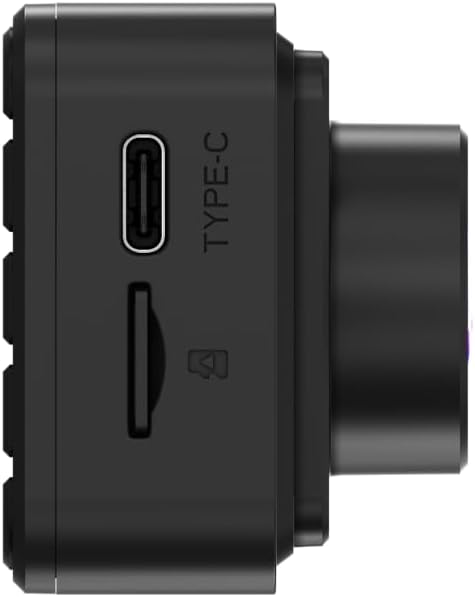
3.1-сүрөт: Side view of the Navitel R385 showing the Type-C power port and the microSD card slot. This image highlights the connectivity options for power and storage.
3.2 Камераны орнотуу
The dash cam is designed for windshield mounting.
- Күчтүү сордурууну камсыз кылуу үчүн алдыңкы айнегиңиздин тандалган жерин кылдаттык менен тазалаңыз.
- Attach the windshield mount to the dash cam.
- Press the suction cup firmly against the windshield and engage the locking mechanism (if applicable) to secure it.
- Тунук болушу үчүн камеранын бурчун тууралаңыз view Айдооңузга тоскоол болбостон, алдыдагы жолду view.

3.2-сүрөт: The Navitel R385 Dash Cam attached to its windshield suction cup mount. This image demonstrates how the device connects to the mount for in-vehicle placement.
3.3 Кубат туташтыруу
Берилген унаа кубаттагычын колдонуп, видеорегистраторду унааңыздын кубат булагына туташтырыңыз.
- Унааңыздын кубаттагычын унааңыздын 12 В кубаттоочу розеткасына (тамеки күйгүзгүчтүн розеткасы) сайыңыз.
- Connect the other end of the charger cable to the Type-C port on the dash cam.
- The dash cam will typically power on automatically when the vehicle's ignition is turned on.
4. Иштөө нускамалары
4.1 Негизги операция
Once powered on, the dash cam will typically begin recording automatically. The 2-inch IPS display will show the live view and recording status.
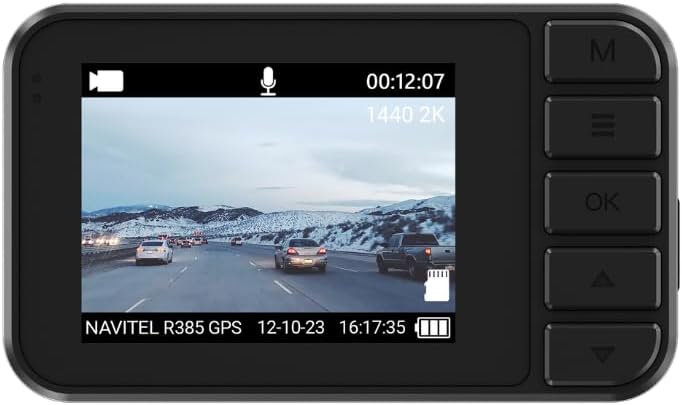
4.1-сүрөт: The 2-inch IPS display of the Navitel R385 showing a live recording view. The screen displays video footage, current time, date, and recording resolution (1440 2K).
4.2 Цикл жаздыруу
The Navitel R385 utilizes cyclic recording. When the microSD card reaches its capacity, the oldest unlocked files жаңы жаздыруулар менен автоматтык түрдө үстүнө жазылат. Бул кол менен кийлигишүүсүз үзгүлтүксүз жаздырууну камсыз кылат.
4.3 G-Sensor (Shock Sensor)
The built-in G-Sensor detects sudden movements, impacts, or rapid acceleration/deceleration. In such events, the current video segment is automatically locked and saved to a secure folder on the microSD card, preventing it from being overwritten by loop recording. The sensitivity of the G-Sensor can usually be adjusted in the device settings.
4.4 Паркинг режими
The R385 GPS can detect vibrations and initiate recording even when the vehicle is parked and the engine is off. This feature provides surveillance when you are away from your vehicle. Ensure the dash cam has a continuous power supply for this function to operate effectively.
4.5 GPS Informer
The integrated GPS Informer function provides alerts for upcoming speed enforcement cameras, bus lanes, and other potential road hazards. When approaching a detected hazard, the device will emit an audible warning and display relevant information on the 2-inch screen. The GPS module also allows the device to display the vehicle's current speed.
5. Техникалык тейлөө
5.1 Аппаратты тазалоо
- Камера корпусун жана экранды тазалоо үчүн жумшак, кургак чүпүрөктү колдонуңуз.
- For the lens, use a specialized lens cleaning cloth to avoid scratches.
- Катуу химиялык заттарды же абразивдүү тазалоочу каражаттарды колдонбоңуз.
5.2 MicroSD картасына кам көрүү
- Regularly format the microSD card (e.g., once a month) within the dash cam's settings to maintain optimal performance and prevent data corruption.
- Use high-quality, reputable brand microSD cards designed for dash cam use (Class 10 or higher, U3 recommended).
6. Кыйынчылыктарды
6.1 Түзмөк күйбөй жатат
- Ensure the car charger is properly connected to both the dash cam and the vehicle's 12V power outlet.
- Унаанын 12V розеткасынын иштеп жатканын текшериңиз (мисалы, башка түзмөк менен сынап көрүү аркылуу).
- Try a different car charger if available.
6.2 Recording Issues (e.g., stops recording, corrupted files)
- Format the microSD card using the dash cam's menu.
- Ensure you are using a high-quality microSD card (Class 10, U3 recommended).
- Replace the microSD card if issues persist, as cards can wear out over time.
6.3 GPS Informer Not Working / Inaccurate Speed
- Камерада так бар экенин текшериңиз view of the sky to receive GPS signals. Avoid mounting it behind tinted areas or large obstructions.
- Allow sufficient time for the GPS to acquire a signal after powering on, especially in new locations.
7. Техникалык шарттар
| Модел | R385 |
| Video Resolution | 2560x1440p (2K) @ 30 FPS |
| Сенсор | GC4653 |
| Viewбурч | 140 градус |
| Линзанын түрү | 6-Layer Glass Lens |
| Дисплей | 2-Inch IPS Display |
| Сактагыч | 256 ГБ чейин MicroSD карта (киргизилген эмес) |
| Өзгөчөлүктөрү | G-Sensor, Loop Recording, Parking Mode, GPS Informer |
| Монтаж түрү | Алдынкы айнек тоосу |
| Продукциянын өлчөмдөрү | 2.76"D x 3.54"W x 5.51"H |
| Түс | Кара |
| Өндүрүүчү | Navitel |
8. Кепилдик жана колдоо
For warranty information and technical support, please refer to the documentation provided with your purchase or visit the official Navitel webсайт. Кепилдик дооматтар үчүн сатып алганыңыздын далилин сактаңыз.


