1. Киришүү
The CHOICEMMED Bluetooth Finger Pulse Oximeter MD300C1218R is a compact, non-invasive device designed for spot-checking and continuous monitoring of blood oxygen saturation (SpO2), pulse rate (PR), respiration rate (RR), and Perfusion Index (PI). This device is intended for sporting and aviation use only, not for medical diagnosis or treatment. It features Bluetooth connectivity for data management via a dedicated application.

Image 1.1: The CHOICEMMED Bluetooth Finger Pulse Oximeter shown with its carrying pouch, lanyard, and two AAA batteries.
2. Кутуда эмне бар
- CHOICEMMED Bluetooth Finger Pulse Oximeter
- Колдонуучунун инструкциясы
- 2 x AAA батареялары
- Lanyard
- Ташуу баштыгы
3. Продукциянын компоненттери
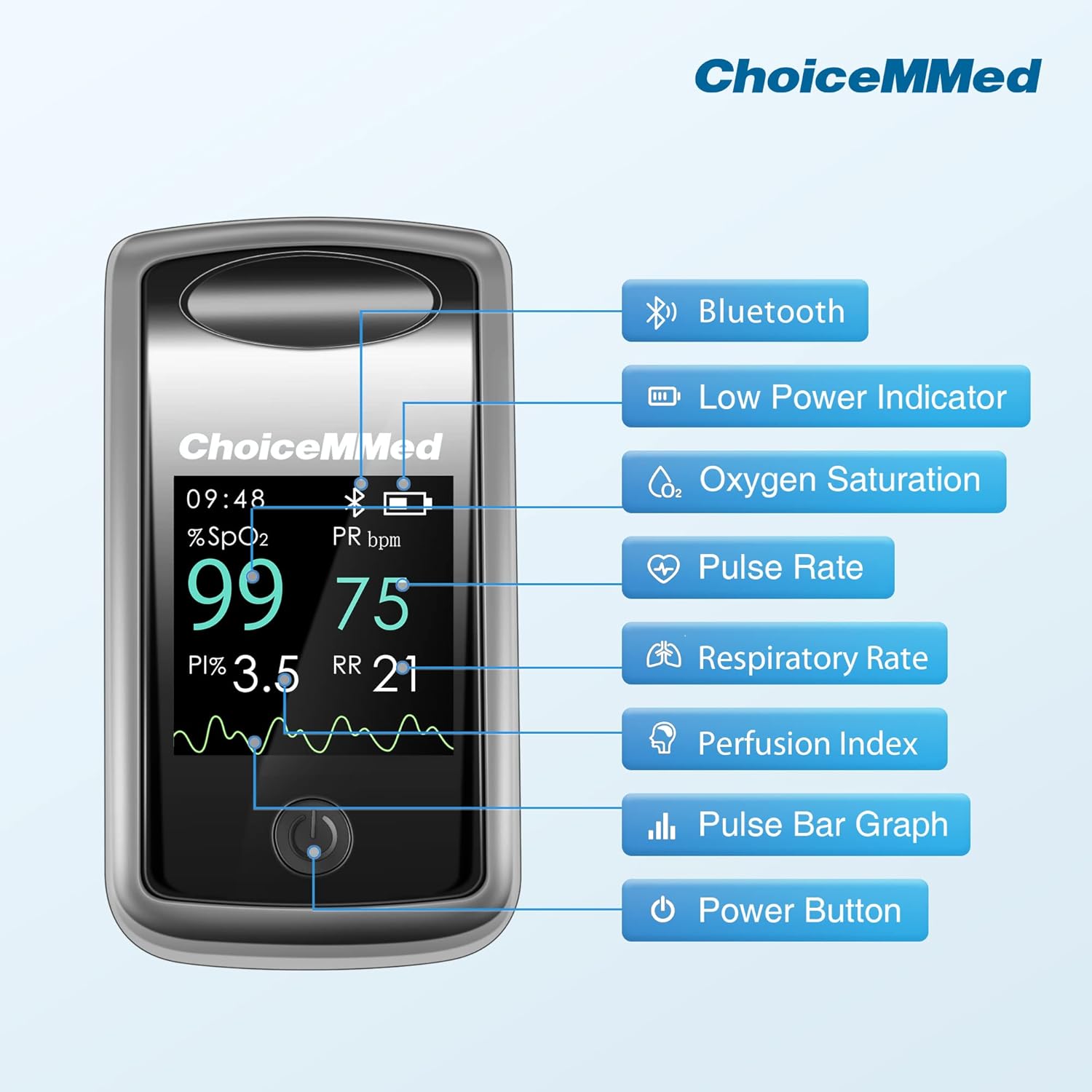
Image 3.1: Diagram illustrating the various display components of the pulse oximeter, including Bluetooth indicator, low power indicator, oxygen saturation (SpO2), pulse rate (PR), respiratory rate (RR), perfusion index (PI), pulse bar graph, and power button.
The device features a clear display showing:
- Bluetooth көрсөткүчү: Shows when Bluetooth is active and connected.
- Төмөн кубаттуулук көрсөткүчү: Батареяларды алмаштыруу керек болгондо эскертет.
- Кычкылтек менен каныккандык (SpO2): Персенtage of hemoglobin carrying oxygen.
- Pulse Rate (PR bpm): Heart rate in beats per minute.
- Дем алуу ылдамдыгы (RR): Breathing rate.
- Perfusion Index (PI): Indicates the strength of the pulse signal.
- Плетизмограф: A waveform representing blood flow.
- Кубат баскычы: Used to turn the device on and change display modes.
4. Орнотуу
4.1 Батареяны орнотуу
- Аппараттын арт жагында жайгашкан батарея бөлүкчөсүнүн капкагын ачыңыз.
- Эки AAA батарейкасын бөлүмдүн ичиндеги полярдуулук көрсөткүчтөрүнө (+/-) ылайык салыңыз.
- Батарея уясынын капкагын бекем жабыңыз.
4.2 Колдонмону орнотуу жана Bluetooth туташуу
- Download the official CHOICEMMED app from your smartphone's app store (iOS or Android).
- Смартфонуңузда Bluetooth иштетилгенин текшериңиз.
- Open the CHOICEMMED app and follow the on-screen instructions to pair your device. The oximeter will automatically attempt to connect when powered on.
- Once connected, the Bluetooth icon on the oximeter display will illuminate.
5. Иштөө нускамалары
5.1 Ченөө

Image 5.1: A visual guide demonstrating the four steps to take a measurement: 1. Open the oximeter, 2. Place your finger inside, 3. Press the power button, 4. Wait for results.
- cl ачыңызamp оксиметрдин.
- Insert one of your fingers (preferably the index finger) into the rubber opening of the oximeter, ensuring your fingertip is positioned correctly.
- clamp.
- Аппаратты күйгүзүү үчүн кубат баскычын бир жолу басыңыз.
- Keep your hand still. The measurement results (SpO2, PR, RR, PI) will appear on the display within a few seconds.
- Түзмөк болжол менен 8 секунд аракетсиз тургандан кийин автоматтык түрдө өчөт.
5.2 Дисплейди түшүнүү
The oximeter display provides real-time data:
- SpO2 (%): Your blood oxygen saturation level.
- PR (bpm): Your current pulse rate.
- RR (breaths/min): Your respiration rate.
- PI (%): Perfusion Index, indicating pulse strength.
- Плетизмограф: A graphical representation of your pulse.

Image 5.2: The oximeter display showing real-time Respiratory Rate (RR) and Perfusion Index (PI) values, alongside SpO2 and Pulse Rate.
5.3 Көп багыттуу дисплей
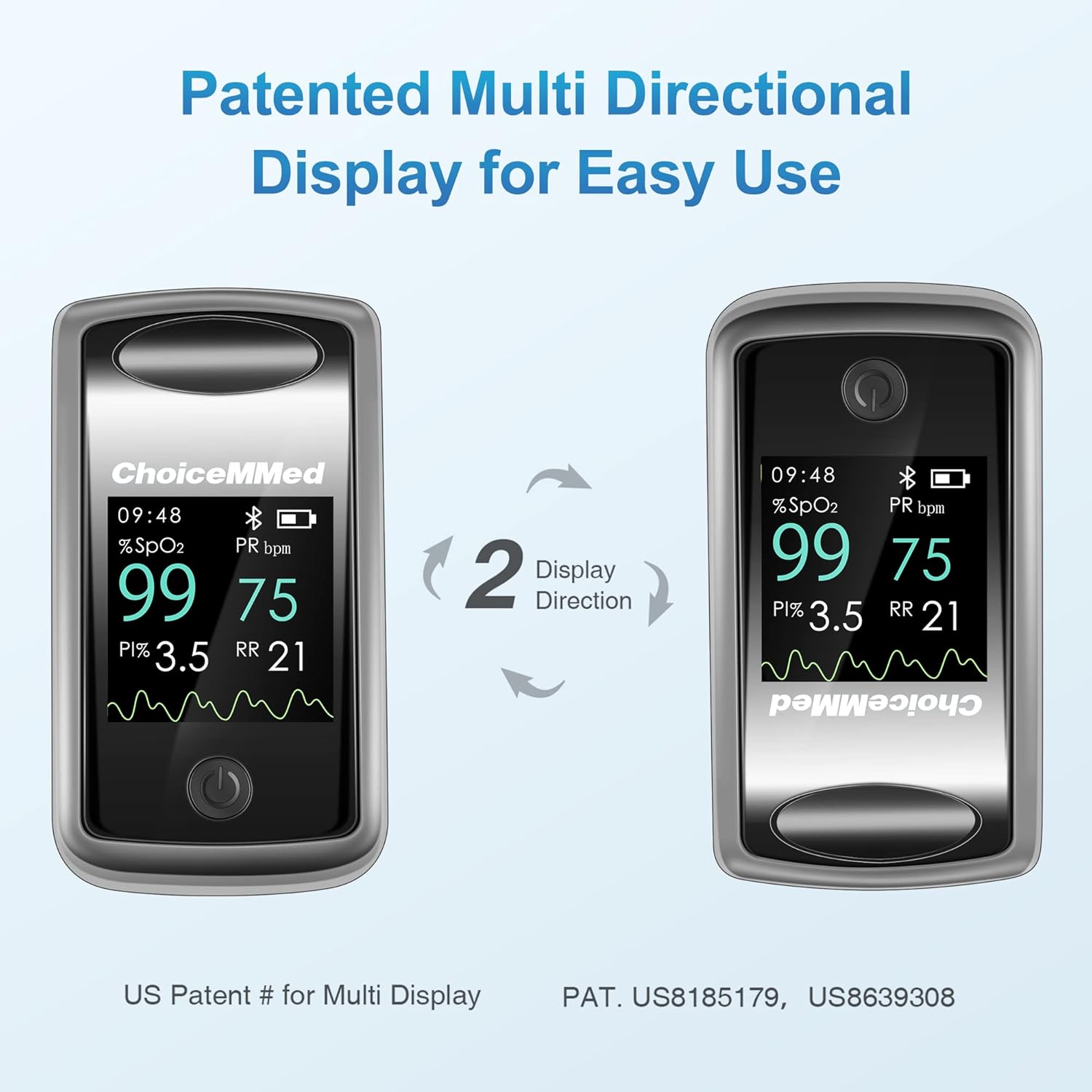
Image 5.3: Illustration of the oximeter's multi-directional display feature, allowing the screen orientation to rotate for easy viewар кандай бурчтардан.
The device features a patented multi-directional display. Briefly press the power button while the device is on to rotate the display orientation, allowing for easy viewing from various angles.
5.4 Data Management with App

Image 5.4: A smartphone screen displaying the CHOICEMMED app's 'Spot-check' interface, showing current SpO2, PR, RR, and PI readings received from the connected pulse oximeter.

Image 5.5: A smartphone screen displaying the CHOICEMMED app's 'Historical Trend' interface, showing graphs of SpO2, PR, and RR over time, with the pulse oximeter device visible next to it.
The CHOICEMMED app allows you to:
- View real-time measurements.
- Record and store data continuously over time.
- Analyze historical results and trends (daily, weekly, monthly, yearly).
- Manage data for up to 10 users, with individual profiles.
- Share data with others if desired.
6. Техникалык тейлөө
6.1 Тазалоо
- Оксиметрдин бетин жумшак чүпүрөк менен тазалаңыз dampened with a mild disinfectant (e.g., 70% isopropyl alcohol).
- Түзмөктү сууга же башка тазалоочу эритмеге салбаңыз.
- Кайра колдонуудан мурун, түзмөк толугу менен кургак экенин текшериңиз.
6.2 Сактоо
- Store the oximeter in a cool, dry place, away from direct sunlight and extreme temperatures.
- Аппарат узак убакыт бою колдонулбаса, агып кетпеш үчүн батарейкаларды алып салыңыз.
6.3 Туруктуулуктун өзгөчөлүктөрү

Image 6.1: Two images illustrating the durability of the oximeter: one showing it intact after a drop test from 3.2ft, and another showing it submerged in water, indicating its waterproof capability.
The MD300C1218R is designed for durability:
- It has undergone a 750,000 open-close cycle test for the sensor unit, maintaining normal measurements.
- It has passed a 10-minute waterproof test per IEC 60529 standard.
- It remained functional after 100 drops from 3.2ft onto a hard surface.
7. Кыйынчылыктарды
| Көйгөй | Мүмкүн себеп | Чечим |
|---|---|---|
| Күйгүзүлгөндөн кийин дисплей жок | Батареялар туура эмес орнотулган же түгөнгөн. | Батареянын полярдуулугун текшерүү; батареяларды алмаштыруу. |
| Display shows '---' or '?' | Finger not inserted properly; excessive movement; cold finger. | Reinsert finger, ensure it's warm and still; avoid bright light. |
| Bluetooth байланышы катасы | Bluetooth off on phone; app not open; device too far. | Ensure phone Bluetooth is on; open app; keep device within range. |
| Так эмес окуулар | Nail polish; artificial nails; poor circulation. | Remove nail polish; use another finger; warm hands. |
8. Техникалык шарттар
| Өзгөчөлүк | Деталь |
|---|---|
| Модель номери | MD300C1218R |
| Өлчөө тактыгы | +/- 1% |
| Measuring Range (SpO2) | 0% - 100% |
| Power Source | 2 x AAA батарейкалар (киргизилген) |
| Батареянын иштөө мөөнөтү | Болжол менен 30 саат үзгүлтүксүз иштөө |
| Дисплей түрү | Multi-directional OLED display |
| Байланыш | Bluetooth |
| Өлчөмдөр | 6 x 4 x 1 дюйм (Пакет) |
| Салмагы | 7.2 унция (пакет) |
9. Коопсуздук боюнча маанилүү маалымат
- This device is intended for sporting and aviation use only. It is not a medical device and should not be used for medical diagnosis or treatment.
- Consult a medical professional for any health concerns.
- Балдар жетпеген жерде сактаңыз.
- Аппаратты MRI же КТ чөйрөсүндө колдонбоңуз.
10. Кепилдик жана колдоо
For warranty information or technical support, please refer to the contact details provided with your product packaging or visit the official CHOICEMMED webсайт. Кепилдик боюнча дооматтар үчүн сатып алуу квитанцияңызды сактап коюңуз.


