1. Киришүү
This manual provides detailed instructions for the safe and effective use of your pxton 666S two-way radio. Please read this manual thoroughly before operating the device and retain it for future reference. The pxton 666S is a reliable communication device designed for various applications, featuring 16 memory channels, privacy codes, and multiple functions such as VOX, noise reduction, and a flashlight.
FCC ID: 2AX68GTR8. This device complies with Part 15 of the FCC Rules. Operation is subject to the condition that this device does not cause harmful interference.

Image 1.1: A set of ten pxton 666S two-way radios, each with its charging dock and an earphone, illustrating the complete package.
2. Пакеттин мазмуну
Пакетиңизде бардык буюмдар бар экенин текшериңиз:
- 10 x pxton 666S Two-Way Radios
- 10 x USB Charging Docks
- 10 x 1500mAh литий батарейкалары
- 10 x Белдик клиптер
- 10 х Наушник
- 5 x User Manuals

Image 2.1: An illustration of the individual components included in the pxton 666S package: the radio unit, charging dock, battery, belt clip, earphone, and user manual.
3. Продукт бүтүп калдыview
3.1 Негизги өзгөчөлүктөрү
- 16 эс тутум каналдары
- 165 Купуялык коддору (50 CTCSS / 210 DCS)
- 5 Levels of VOX Sensitivity Adjustment
- Тайм-Аут Таймери (TOT)
- Өзгөчө Ойготкуч
- Noise Reduction
- Автоматтык өчүрүү
- Батареянын аздыгы жөнүндө эскертүү
- Энергияны үнөмдөө режими
- Скандоо функциясы
- Мониторинг функциясы
- LED фонарик
- Durable PC+ABS material construction
3.2 Радио компоненттери
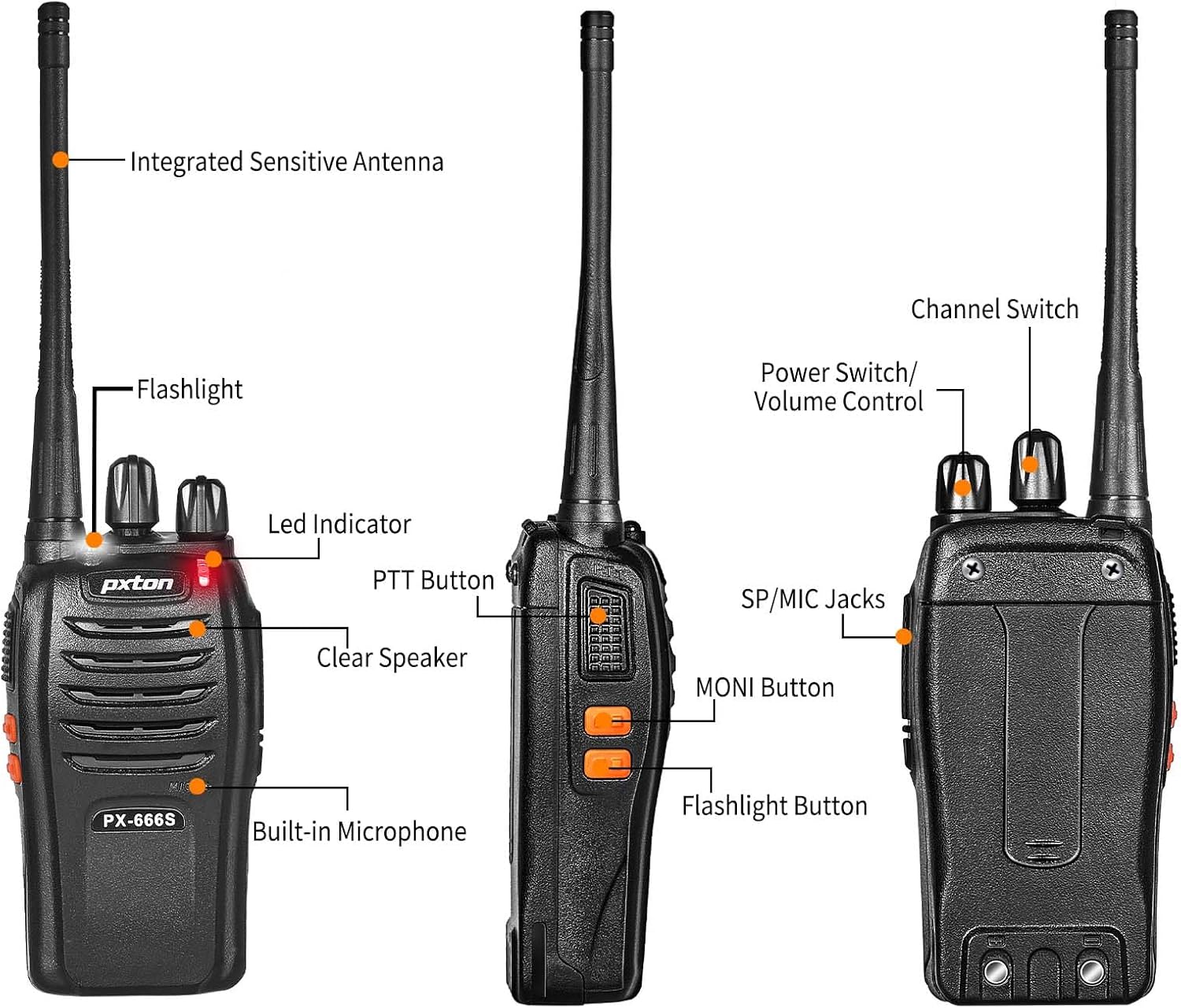
Image 3.1: Detailed diagram labeling the external components of the pxton 666S radio, including the integrated sensitive antenna, flashlight, LED indicator, PTT button, clear speaker, built-in microphone, SP/MIC jacks, MONI button, flashlight button, channel switch, and power switch/volume control.
- Integrated Sensitive Antenna: Сигналдарды берүү жана кабыл алуу үчүн.
- Кол чырак: жарыктандырууну камсыз кылат.
- LED көрсөткүчү: Displays status (e.g., transmitting, receiving, low battery).
- PTT баскычы (баскыч менен сүйлөшүү): Press to transmit, release to receive.
- Clear Speaker: Аудио чыгаруу үчүн.
- Камтылган микрофон: Аудио киргизүү үчүн.
- SP/MIC Jacks: For connecting external earphones or microphones.
- MONI Button (Monitor): Temporarily disables squelch to hear weak signals.
- Кол чырак баскычы: LED кол чырагын иштетет.
- Каналды которуштуруу: Rotates to select desired communication channel.
- Кубатты которгуч/Үнү башкаруу: Радиону күйгүзүү/өчүрүү жана үнүн тууралоо үчүн айланат.

Image 3.2: The pxton 666S radio resting on rocks, emphasizing its rugged PC+ABS durable material, anti-fall, and anti-vibration design for extended service life.
4. Орнотуу
4.1 Батареяны орнотуу
- Батарея блогун радионун арткы жагындагы оюктар менен тегиздеңиз.
- Батарея блогун ордуна чыкылдаган үн чыкканча өйдө жылдырыңыз.
- To remove, press the release latch (if present) and slide the battery downwards.
4.2 Батареяны заряддоо
The pxton 666S uses a 1500mAh Li-ion battery. A full charge takes approximately 3-4 hours.
- Connect the USB charging dock to a power source.
- Place the radio (with battery installed) into the charging dock.
- The LED indicator on the radio or charger will show charging status (e.g., red for charging, green for fully charged).

Image 4.1: Two pxton 666S radios placed in their respective charging docks, with earphones connected, demonstrating the charging setup.
4.3 Кур кыстыргычты бекитүү
Secure the belt clip to the back of the radio using the provided screws for convenient carrying.
4.4 Connecting Earphones
Insert the earphone plug into the SP/MIC jacks on the side of the radio. Ensure it is fully inserted for proper audio transmission and reception.
5. Иштөө нускамалары
5.1 Күйгүзүү/өчүрүү жана үндү башкаруу
- Радиону күйгүзүү үчүн Кубат которуштуруу/Үндү башкаруу knob clockwise. You will hear a "click" and a tone.
- To turn off the radio, rotate the knob counter-clockwise until you hear a "click".
- To adjust the volume, rotate the Кубат которуштуруу/Үндү башкаруу үндү катуулатуу үчүн баскычты саат жебеси боюнча, ал эми азайтуу үчүн саат жебесине каршы басыңыз.
5.2 Канал тандоо
айлантыңыз Channel Switch knob to select one of the 16 available channels. Ensure all radios in your group are set to the same channel for communication.
5.3 Берүү жана кабыл алуу
- Өткөрүш үчүн басып, кармап туруңуз PTT баскычы. Speak clearly into the microphone. The LED indicator will typically glow red.
- To receive, release the PTT баскычы. The LED indicator will typically glow green when receiving a signal.
5.4 VOX Function (Voice Operated Transmission)
The VOX function allows hands-free operation. When activated, the radio will automatically transmit when it detects your voice, without needing to press the PTT button. The pxton 666S offers 5 levels of VOX sensitivity adjustment.

Image 5.1: A security guard using the pxton 666S radio, illustrating the VOX/Handsfree function for clear and bright sound quality, allowing hands-free communication.
5.5 Фонар
басыңыз Кол чырак баскычы to turn the LED flashlight on or off. This feature is useful in low-light conditions.

Image 5.2: The pxton 666S radio's flashlight feature in use, illuminating a campsite at night, demonstrating its utility in dark environments.
5.6 Мониторинг функциясы
басып, кармап туруңуз MONI Button to temporarily disable the squelch function. This allows you to hear very weak signals that might otherwise be blocked by the squelch, or to check if a channel is clear before transmitting.
5.7 Скандоо функциясы
The scanning function allows the radio to automatically scan through all programmed channels to detect activity. Refer to the full user manual (if provided separately) for specific instructions on activating and managing the scanning feature.
5.8 Башка өзгөчөлүктөр
- Ызы-чууну азайтуу: Фондогу ызы-чууну азайтуу аркылуу аудионун ачыктыгын жакшыртат.
- Шашылыш сигнализация: Activates an audible alarm to signal for help.
- Тайм-Аут Таймери (TOT): Prevents accidental prolonged transmissions by limiting the duration of each transmission.
- Энергияны үнөмдөө режими: Automatically reduces power consumption when no activity is detected, extending battery life.
- Батареянын аздыгы жөнүндө эскертүү: Provides an audible or visual warning when the battery level is low, indicating it's time to recharge.
6. Байланыш диапазону
The actual communication range of the pxton 666S can vary significantly based on environmental factors, terrain, and obstructions. General estimates are:
- Open Areas (flat terrain, mountain peaks): 3 мильге чейин.
- Suburban/Countryside Areas: Approximately 1.2 miles.
- City Limits (with buildings and obstructions): Around 0.6 miles.

Image 6.1: Visual representation of the pxton 666S communication range, indicating up to 1-3 miles in open areas, 1.2 miles in rural settings, and 0.6 miles in urban environments.
7. Батарея маалыматы
The pxton 666S is powered by a rechargeable 1500mAh Lithium-Ion battery (Model: BL-1, 5.55Wh, Voltage: 3.7V).
- Типтүү колдонуу: Up to 12 hours of continuous talk time.
- Күтүү убактысы: Up to 120 hours (5-7 days).
- Толук кубаттоо убактысы: Болжол менен 3-4 саат.
Important Battery Safety Information:
- Батареяны ажыратпаңыз.
- отко таштабаңыз.
- Белгиленген заряддагычты гана колдонуңуз.
- Терминалдарды кыска туташтырбаңыз.
- Салкын, кургак жерде сактаңыз.

Image 7.1: The pxton 666S radio alongside its 1500mAh Li-ion battery, detailing battery model (BL-1), capacity (1500mAh), voltage (3.7V), and safety warnings.
8. Техникалык шарттар
| Өзгөчөлүк | Спецификация |
|---|---|
| Модель номери | PX-666S-0004 |
| Бренд | pxton |
| Каналдардын саны | 16 |
| Жыштык диапазону | UHF |
| Сүйлөшүү диапазону максималдуу | 3 Miles (line of sight) |
| Батарея түрү | 1500mAh литий-ион (кошулган) |
| Тtage | 3.7 вольт |
| Элемент Салмагы | 7.05 фунт (10 пакет үчүн) |
| Продукциянын өлчөмдөрү | 9.9 x 11 x 6.9 дюйм (пакет өлчөмдөрү) |
| Сууга туруктуулук деңгээли | Сууга чыдамдуу |
| Өзгөчөлүктөр | Automatic Squelch, Battery Saver Mode, Long Range, Rechargeable, Voice Operated Transmission (VOX) |

Image 8.1: A size comparison of the pxton 666S radio next to a smartphone (iPhone 14 Pro), illustrating its compact dimensions for portability.
9. Кыйынчылыктарды
If you encounter issues with your pxton 666S radio, please refer to the following common problems and solutions:
| Көйгөй | Мүмкүн себеп | Чечим |
|---|---|---|
| Күч жок | Батарея туура орнотулган эмес же заряды түгөнгөн. | Ensure battery is properly seated. Charge the battery fully. |
| Өткөрүп же кабыл албайт | Incorrect channel, out of range, low battery, squelch too high. | Verify all radios are on the same channel. Move closer to other radios. Recharge battery. Press MONI button to check for weak signals. |
| Аудио сапаты начар / Статикалык | Weak signal, interference, radio too far apart. | Move to an area with fewer obstructions. Adjust volume. Ensure antenna is clear. |
| VOX иштебей жатат | VOX sensitivity too low, feature disabled. | Adjust VOX sensitivity to a higher level. Ensure VOX is enabled (refer to full manual for programming). |
| Батареянын иштөө мөөнөтү кыска | Frequent transmission, battery degradation, power-saving mode off. | Reduce transmission time. Ensure power-saving mode is active. Consider replacing old batteries. |
For further assistance, please contact pxton customer support.
10. Техникалык тейлөө
- Тазалоо: жумшак колдонуу, damp радионун сыртын тазалоо үчүн чүпүрөк. Катуу химиялык заттарды же абразивдүү тазалагычтарды колдонбоңуз.
- Сактагыч: When not in use for extended periods, remove the battery and store the radio in a cool, dry place.
- Батареяга кам көрүү: Fully charge batteries before long-term storage and recharge them every 3-6 months to maintain optimal performance.
- Антенна: Антеннаны ийбеңиз же өзгөртпөңүз, анткени бул анын иштешине таасир этиши мүмкүн.
- Суу каршылык: While water-resistant, avoid submerging the radio in water. Ensure all covers (e.g., earphone jack cover) are securely closed.
11. Кепилдик жана колдоо
pxton offers a 30-day no-questions-asked replacement and refund policy from the date of purchase. Additionally, the product comes with өмүр бою сатуудан кийинки тейлөө.
If you encounter any issues or require support, please contact pxton customer service. They are committed to assisting you with any concerns.
Шайкештик Эскертүү: The pxton 666S walkie talkie is compatible with PX-888S, PX-777S, and PX-888S Pro models. They can utilize the same programming tools and cables (programming cable sold separately).


