1. Киришүү
Thank you for choosing the MageGee MK-Storm Mechanical Gaming Keyboard. This 104-key wired keyboard is designed for an enhanced typing and gaming experience, featuring durable brown switches, blue backlighting, and anti-ghosting technology. This manual provides essential information for setup, operation, and maintenance to ensure optimal performance.
2. Негизги өзгөчөлүктөрү
- Blue Backlit Gaming Keyboard: Features 20 different backlit modes, 5 brightness levels, and 5 speed adjustments. The backlight can be easily turned off.
- Mechanical Brown Switches: Offers moderate trigger key travel and force, suitable for both typing and gaming. Provides tactile feedback with a slight sound.
- Anti-Ghosting Keyboard: All 104 keys have individual switches with full N-key rollover, ensuring faster response and simultaneous key presses without conflict.
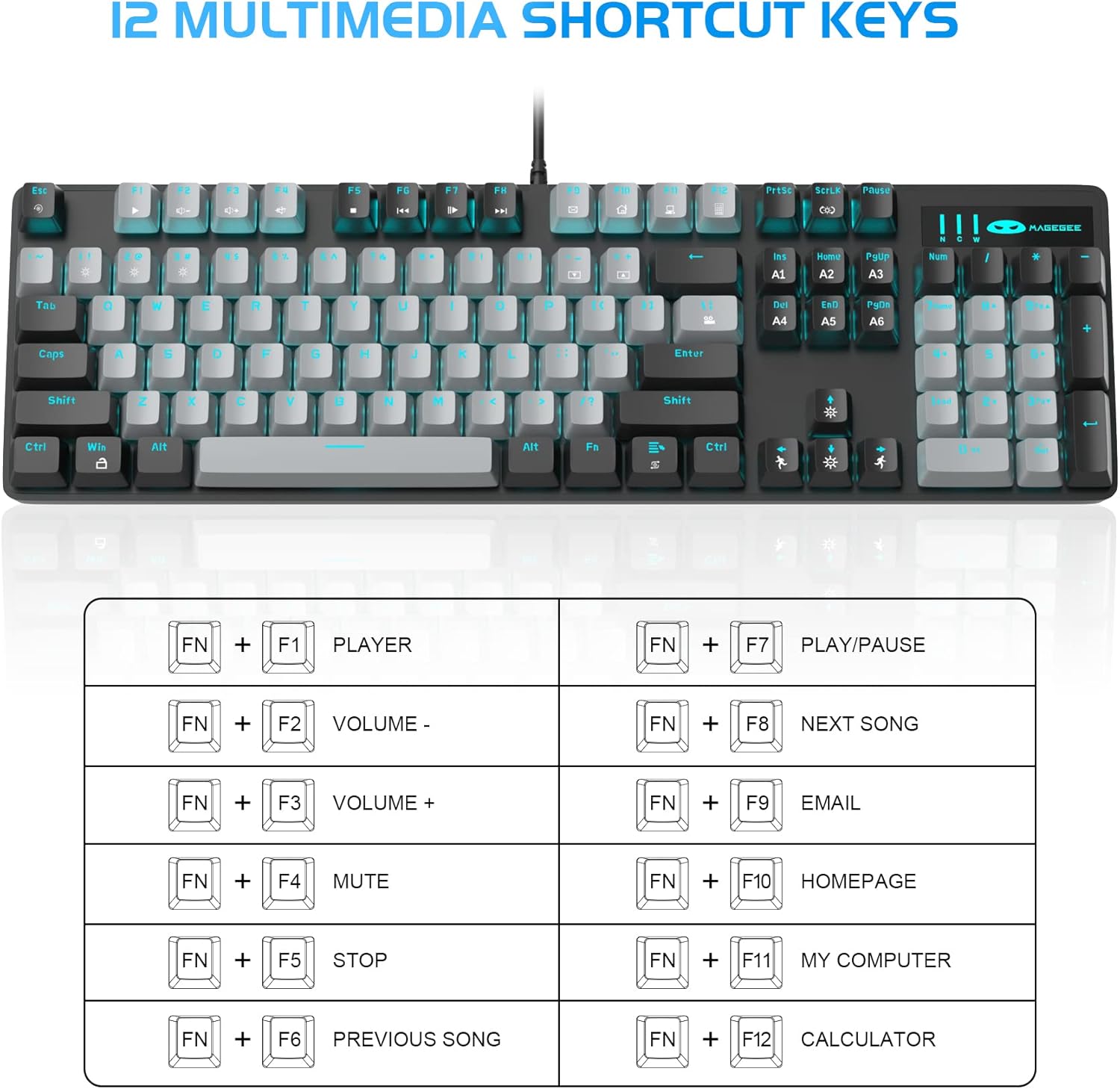
- 12 Multimedia Combination Keys: Quick operations via FN+ F1~F12 for media control and office functions.
- Эргономикалык дизайн: Premium metal panel construction for stability. Ergonomic key layout and two-step adjustable feet for comfortable typing angles.
- Кеңири шайкештик: USB wired connection compatible with Windows 2000/Vista/Win7/Win8/Win10/MAC/Linux.

3. Пакеттин мазмуну
The MageGee MK-Storm Mechanical Gaming Keyboard package includes the following items:
- MageGee Mechanical Gaming Keyboard (MK-Storm)
- USB Wired Cable (attached to keyboard)
- Баскыч капкагын тартуу куралы
- 16 Extra Keycaps (color scheme varies by keyboard variant)
- User Manual
4. Орнотуу
- Баскычтопту туташтыруу: Plug the USB connector of the keyboard cable into an available USB port on your computer (PC, laptop, or desktop).
- Драйверди орнотуу: The keyboard is plug-and-play. Your operating system should automatically detect and install the necessary drivers. No additional software installation is typically required for basic functionality.
- Баскычтоптун бурчун тууралоо: Flip out the two-step feet on the underside of the keyboard to adjust the typing angle to your preference.

5. Иштөө нускамалары
5.1 Жарыкты башкаруу
The MK-Storm keyboard features a single blue backlight with multiple modes and adjustable settings.
- Арткы жарык режимин өзгөртүү: Басыңыз FN + INS to cycle through 20 different backlight modes.
- Жарыктыкты жөндөө: Басыңыз FN + ↑ (Up Arrow) to increase brightness (5 levels). Press FN + ↓ (Төмөн жебе) жарыкты азайтуу үчүн.
- Ылдамдыкты жөндөө: Басыңыз FN + ← (Left Arrow) to decrease animation speed (5 levels). Press FN + → (Right Arrow) to increase animation speed.
- Turn Off Backlight: The backlight can be turned off by cycling through the brightness levels until it is off, or by selecting a mode that has no illumination.

5.2 Мультимедиа баскычтары
Access multimedia and system functions quickly using the FN key in combination with the F1-F12 keys.
| Ачкыч айкалышы | Функция |
|---|---|
| FN + F1 | Оюнчу |
| FN + F2 | Көлөмү - |
| FN + F3 | Көлөм + |
| FN + F4 | Үнсүз |
| FN + F5 | Токто |
| FN + F6 | Мурунку ыр |
| FN + F7 | Ойнотуу/Тыныгуу |
| FN + F8 | Кийинки ыр |
| FN + F9 | |
| FN + F10 | Башкы бет |
| FN + F11 | Менин компьютерим |
| FN + F12 | Калькулятор |
5.3 Custom Profiles (If applicable)
The keyboard supports custom lighting profiles. Refer to the manufacturer's website or included software (if any) for detailed instructions on programming and saving custom lighting zones or key assignments. Once programmed, these profiles can often be accessed directly from the keyboard using FN key combinations (e.g., FN+1, FN+2, FN+3 for different profileс).
6. Ыңгайлаштыруу
The MageGee MK-Storm keyboard allows for customization of keycaps and switches.
- Клавиатураны алмаштыруу: Use the included keycap puller tool to carefully remove existing keycaps. Align the new keycap with the switch stem and press down gently until it clicks into place.
- Которуу алмаштыруу: The keyboard comes with extra brown switches. To replace a switch, first remove the keycap. Then, use a switch puller (not included, but often similar to a keycap puller) to gently extract the switch from the PCB. Insert the new switch, ensuring the pins align correctly, and press firmly until it seats properly.


7. Техникалык тейлөө
- Тазалоо: The floating keys design makes cleaning easier. Use a soft brush or compressed air to remove dust and debris from between the keycaps. For stubborn dirt, remove keycaps using the provided tool and wipe the keyboard surface with a slightly damp cloth. Ensure the keyboard is disconnected before cleaning.
- Сактагыч: Клавиатураны кургак, салкын жерде, күндүн түз тийген нурларынан жана өтө жогорку температурадан алыс сактаңыз.
- Кабельге кам көрүү: USB кабелин зыянга учуратпоо үчүн өтө ийилип же бурулбаңыз.
8. Кыйынчылыктарды
- Баскычтоп жооп бербейт:
- USB кабели клавиатурага жана компьютерге бекем сайылганын текшериңиз.
- Баскычтопту компьютериңиздин башка USB портуна сайып көрүңүз.
- Компьютериңизди өчүрүп күйгүзүңүз.
- Системага тиешелүү маселени болтурбоо үчүн баскычтопту башка компьютерде сынап көрүңүз.
- Арткы жарык иштебей жатат/туура эмес:
- Ensure the backlight is not turned off (FN + ↓ to increase brightness).
- Cycle through backlight modes using FN + INS.
- Check if any specific software is interfering with the lighting settings.
- Катталбаган ачкычтар:
- Clean around the affected key to ensure no debris is obstructing the switch.
- If a specific switch is faulty, consider replacing it with one of the spare switches provided, following the customization instructions.
9. Техникалык шарттар
| Өзгөчөлүк | Деталь |
|---|---|
| Бренд | MageGee |
| Модель номери | MK-Storm |
| Баскычтардын жайгашуусу | 104 ачкыч (толук өлчөм) |
| Которуу түрү | Mechanical Brown Switches |
| Арткы жарык | Blue Backlit (20 modes, 5 brightness, 5 speed) |
| Байланыш | USB Wired |
| Anti-Ghosting | Толук N-Key Rollover |
| Мультимедиа ачкычтары | 12 (FN + F1-F12) |
| Материал | Metal Panel Construction |
| Шайкеш түзмөктөр | Ноутбук, компьютер |
| Операциялык системалар | Windows 2000/Vista/Win7/Win8/Win10/MAC/Linux |
| Элемент Салмагы | 2.77 фунт |
| Пакеттин өлчөмдөрү | 17.63 x 12.36 x 1.89 дюйм |

10. Кепилдик жана колдоо
For warranty information, technical support, or any product-related inquiries, please contact MageGee customer service through the retailer where the product was purchased or visit the official MageGee webсайт. Кепилдик дооматтары үчүн сатып алуу дүмүрчөгүңүздү сактаңыз.


