Introduction
The Coolfire Vibrating Alarm Clock Sweatband offers a silent and effective way to wake up without disturbing others. Designed for comfort and ease of use, this wristband utilizes strong vibrations to alert you, making it ideal for couples, students, shift workers, and individuals with hearing impairment. Its app-controlled features allow for personalized alarm settings and vibration intensity adjustments.

Продукт өзгөчөлүктөрү
- Silent Vibration Alarm: Wakes the user with strong vibrations on the wrist, eliminating disruptive sounds or bright lights.
- Колдонмого ыңгайлуу башкаруу: Easily set multiple alarms, customize alarm days, and adjust vibration intensity via a smartphone application. The device retains settings even when disconnected from the phone.
- Ыңгайлуу дизайн: Features a soft, washable sweatband material that ensures a snug and comfortable fit for extended wear.
- Арткы жарыктуу санарип дисплей: A large, backlit LCD screen provides clear visibility of time and battery level, even in low light conditions.
- Батареянын узак иштөө мөөнөтү: Powered by a rechargeable lithium battery, offering 4-6 weeks of use on a single 4-hour charge.
- Durable Charging Port: Equipped with a sweat-proof charging port featuring stainless steel, gold-coated pins for corrosion and rust resistance.

Орнотуу колдонмосу
1. Аппаратты заряддоо
Before initial use, fully charge your Coolfire Vibrating Alarm Clock Sweatband. A USB charging cable is provided. An external USB adapter (not included) is required.
- Connect the provided USB cable to the charging port on the watch module.
- Plug the USB cable into any compatible USB adapter (e.g., phone charger, computer USB port).
- Allow approximately 4 hours for a full charge. The battery indicator on the display will show charging status.

2. Колдонмону орнотуу жана жупташтыруу
The Coolfire device is controlled via a dedicated smartphone application. Издөө the "Coolfire" app in your device's app store (iOS App Store or Google Play Store) and install it.
- Download and install the "Coolfire" application on your smartphone.
- Смартфонуңузда Bluetooth иштетилгенин текшериңиз.
- Open the Coolfire app and follow the on-screen instructions to pair your device. The app will guide you through the connection process.
3. Wearing the Sweatband
The sweatband is designed for comfortable wear on your wrist. Ensure the watch module is securely placed within the sweatband.
- Slide the watch module into the designated pocket within the sweatband.
- Place the sweatband on your wrist, ensuring a snug but comfortable fit. The sweatband is stretchy and designed to accommodate wrist sizes from 6.7 inches (170mm) to 8.5 inches (215mm).

Иштөө нускамалары
1. Сигналдарды коюу
All alarm settings are managed through the Coolfire smartphone application.
- Open the Coolfire app on your paired smartphone.
- Navigate to the alarm section within the app.
- Add new alarms, set specific times, and select the days of the week for each alarm to be active.
- Toggle individual alarms on or off as needed. The device will store these settings and operate independently of the phone once configured.
2. Adjusting Vibration Intensity
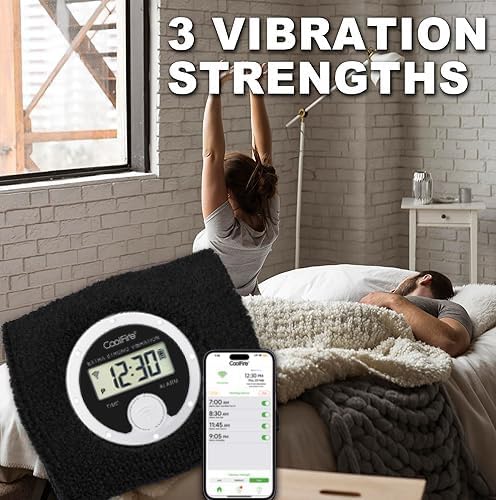
The Coolfire device offers three vibration strengths: Low, Medium, and High. These can be adjusted via the app to suit your preference.
- Within the Coolfire app, locate the vibration intensity settings.
- Select your desired vibration strength (Low, Medium, or High).
3. Snooze and Turning Off Alarm
When an alarm activates, you can snooze it or turn it off directly from the device.
- Чырым: Briefly press the main button on the watch module when the alarm vibrates. This will activate a 5-minute snooze period.
- Өчүрүү: Press and hold the main button on the watch module for a few seconds to completely turn off the active alarm.
Техникалык тейлөө
1. Cleaning the Sweatband
The sweatband is washable to maintain hygiene and comfort.
- Carefully remove the watch module from the sweatband.
- Hand wash the sweatband with mild soap and water.
- Rinse thoroughly and allow the sweatband to air dry completely before reinserting the watch module.

2. Батареяга кам көрүү
To maximize battery life and device longevity:
- Charge the device fully when the battery level is low.
- Аппаратты экстремалдык температурага тийгизүүдөн сактаңыз.
- Берилген USB кубаттоо кабелин гана колдонуңуз.
Проблемаларды чечүү
If you encounter issues with your Coolfire Vibrating Alarm Clock Sweatband, consider the following common solutions:
- Device Not Vibrating:
- Аппараттын заряддалганын текшериңиз.
- Check alarm settings in the app to confirm alarms are active and vibration intensity is set.
- Verify the watch module is securely seated in the sweatband.
- Difficulty Pairing with App:
- Смартфонуңузда Bluetooth иштетилгенин текшериңиз.
- Restart both the device (if possible, by letting battery drain and recharging or checking for a reset option) and your smartphone.
- Колдонмонун акыркы версиясына жаңыртылганын текшериңиз.
- Убакытты так эмес көрсөтүү:
- Connect the device to the app to synchronize the time.
For further assistance, refer to the official Coolfire support channels or webсайт.
Техникалык шарттар
| Атрибут | Деталь |
|---|---|
| Бренд | Coolfire |
| Модель номери | BT-SBBK |
| Түс | Кара |
| Дисплей түрү | Санарип |
| Өзгөчө өзгөчөлүк | Vibration Alarm |
| Продукциянын өлчөмдөрү | 0.25"W x 1.5"H |
| Power Source | Батарея менен иштейт (1 литий-иондук батарейка камтылган) |
| Батареянын иштөө мөөнөтү | 4-6 weeks on a single charge |
| Заряддоо убактысы | Болжол менен Толук заряддоо үчүн 4 саат |
| Frame Material | Stainless Steel (for watch module) |
| Монтаж түрү | Билерик |
| Wearing Size Range | 6.7 дюймдан (170 мм) 8.5 дюймга (215 мм) чейин |
| Элемент Салмагы | 3.52 унция |
| Өндүрүүчү | TimeChant |
Кепилдик жана колдоо
Кепилдик маалымат
The Coolfire Vibrating Alarm Clock Sweatband comes with a Limited Warranty. For specific terms and conditions, please refer to the warranty documentation included with your product packaging or contact Coolfire customer support.
Кардарларды колдоо
For technical support, product inquiries, or warranty claims, please visit the official Coolfire website or contact their customer service department. Contact information is typically available on the product packaging or the brand's official online presence.


