1. Киришүү
Thank you for choosing the ErGear EGESD8 Electric Standing Desk. This manual provides essential information for the safe and efficient assembly, operation, and maintenance of your new desk. Please read these instructions carefully before use and retain them for future reference. This electric standing desk is designed to offer ergonomic flexibility, allowing you to easily switch between sitting and standing positions, promoting a healthier work environment.

ErGear Electric Туруктуу үстөл, showcasing its sleek design and spacious desktop in a contemporary workspace.
2. Коопсуздук нускамалары
Коопсуз иштөөнү камсыз кылуу жана зыяндын алдын алуу үчүн төмөнкүлөрдү сактаңыз:
- Үстөлдү иштетүүдөн мурун бардык туташуулар коопсуз экенин текшериңиз.
- Иш учурунда балдарды жана үй жаныбарларын столдон алыс кармаңыз.
- Do not place hands or other body parts near moving parts to avoid injury.
- Do not overload the desk. The maximum weight capacity is 80 кг.
- Суюктуктарды түздөн-түз башкаруу панелине же электрдик тетиктердин жанына коюудан алыс болуңуз.
- If the desk makes unusual noises or movements, discontinue use and consult the troubleshooting section or contact support.
- Берилген кубат адаптерин жана кабелдерди гана колдонуңуз.

This image highlights the robust construction of the ErGear Electric Standing Desk, capable of supporting up to 80 kg, ensuring stability even under significant load.
3. Пакеттин мазмуну
Сураныч, бардык компоненттер бар экенин жана бузулбаганын текшериңиз:
- Desktop Panels (assembled)
- Үстөлдүн буттары (2)
- Бут жаздыкчалары (2)
- Каптал кашаалар (2)
- Кайчылаш тилке
- Transmission Rod
- Башкаруу панели
- Кубат адаптери жана кабель
- Cable Grommets (2)
- Кулакчын илгичтери (2)
- Монтаждоо жабдыктары (буроолор, Аллен ачкычы)
- User Manual
4. Монтаждоо боюнча нускамалар
ErGear электрдик туруп иштөөчү үстөлүңүздү чогултуу үчүн төмөнкү кадамдарды аткарыңыз. Чогултуу үчүн эки адам болушу сунушталат.
Official assembly video for the ErGear Electric Standing Desk, demonstrating step-by-step installation.
1-кадам: кадрды чогултуу
- Attach the side brackets to the desk legs using the provided screws and Allen wrench.
- Secure the foot pads to the bottom of each leg.
- Connect the two leg assemblies with the crossbar, ensuring all screws are tightened.
Step 2: Fix the Transmission Rod
- Insert the transmission rod into the designated openings on both desk legs.
- Ensure the rod is properly seated and secured with the retaining clips or screws.
Step 3: Assemble the Desktop Panel
- Lay the desktop panels face down on a soft, clean surface.
- Align the panels and secure them together using the provided connectors and screws.
Step 4: Attach the Frame to the Desktop
- Carefully place the assembled desk frame onto the underside of the desktop.
- Align the pre-drilled holes and secure the frame to the desktop using the appropriate screws.
- Attach the control panel to the underside of the desktop in a convenient location using the provided screws.
- Install the headphone hooks to the underside of the desktop as desired.
5-кадам: Кабелдерди туташтырыңыз
- Connect the motor cables from the legs to the control box.
- Башкаруу панелинин кабелин башкаруу кутучасына туташтырыңыз.
- Кубат адаптерин башкаруу кутусуна, андан кийин розеткага туташтырыңыз.
Step 6: Fix the Cable Grommets
- Insert the cable grommets into the pre-cut holes on the desktop to manage cables.
5. Иштөө нускамалары
Your ErGear Electric Standing Desk features an intuitive control panel for easy height adjustment.
Кыска видео көрсөтүүasing key features of the ErGear Electric Standing Desk, including height adjustment and stability.
Башкаруу панелиview

The desk's intelligent control panel features an LED display showing current height in centimeters, along with up/down arrows and four memory preset buttons for quick adjustments.
- Up/Down Arrows (▲ / ▼): Press and hold to adjust the desk height manually.
- LED дисплей: Shows the current height of the desk in centimeters.
- Memory Presets (1, 2, 3, 4): Store and recall preferred height settings.
Бийиктикти тууралоо
The desk can be adjusted between 72 см жана 118 см.
- Кол менен тууралоо: Press and hold the up (▲) or down (▼) arrow button until the desk reaches your desired height.
- Using Memory Presets: Press the corresponding memory button (1, 2, 3, or 4) to automatically move the desk to the saved height.
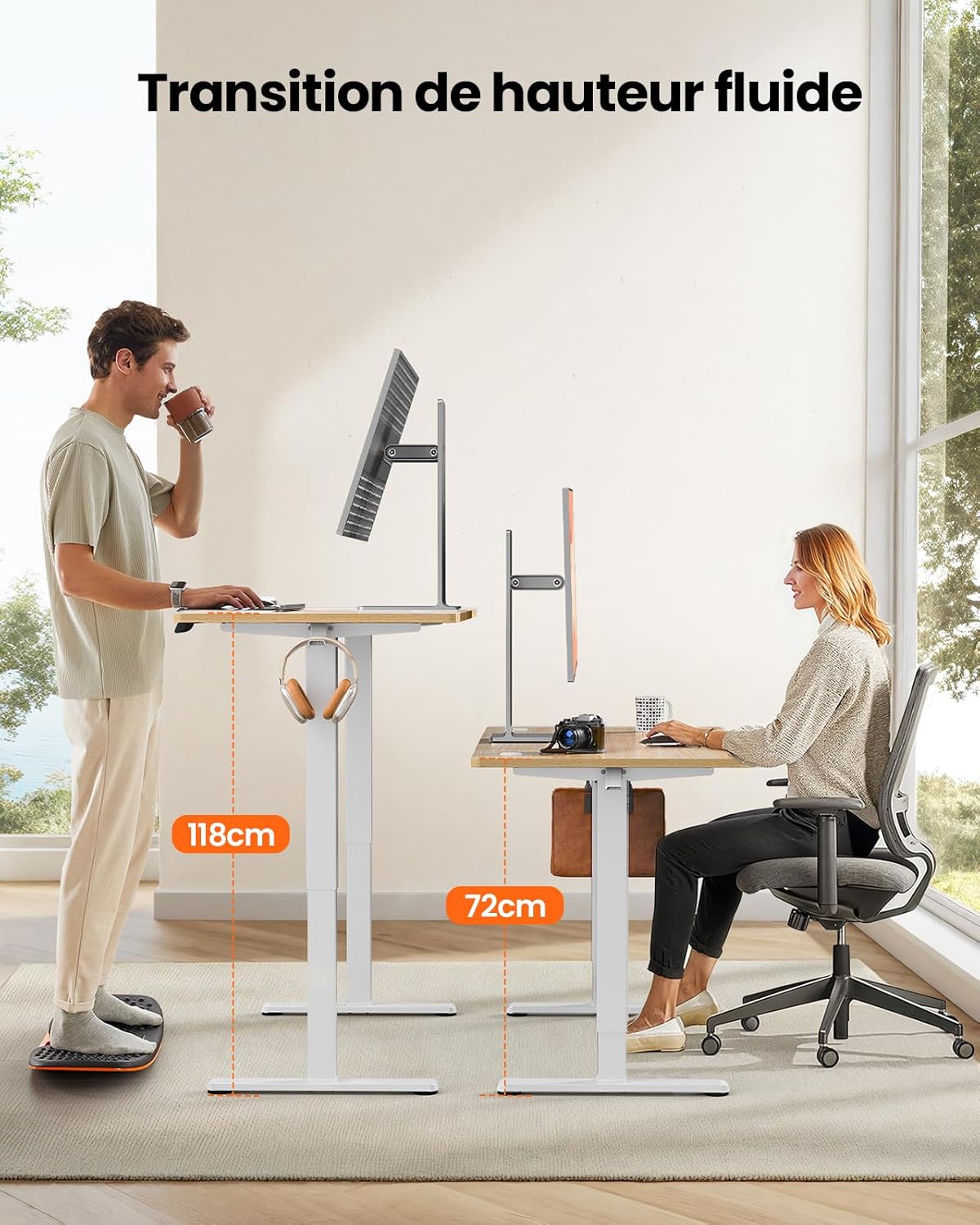
This image demonstrates the adjustable height range of the ErGear Electric Standing Desk, showing a user sitting at 72cm and standing at 118cm, emphasizing ergonomic flexibility.
Эстутумдун алдын ала жөндөөлөрүн орнотуу
- Өйдө/төмөн жебелер менен үстөлдү каалаган бийиктикке тууралаңыз.
- Press the 'M' button (if available, or a 'Set' button) followed by the desired memory button (1, 2, 3, or 4). The display will typically flash or beep to confirm the setting is saved.
Тынч операция
The desk operates with a quiet motor, producing a noise level of ≤ 55 dB, ensuring a peaceful work environment.

Illustrates the ultra-quiet operation of the ErGear Electric Standing Desk, with a noise level of 55dB, ensuring a peaceful and undisturbed work environment.
6. Техникалык тейлөө
Үзгүлтүксүз тейлөө столуңуздун иштөө мөөнөтүн узартууга жардам берет:
- Тазалоо: Wipe the desk surface and legs with a soft, damp кездеме. Катуу химиялык заттардан же абразивдүү тазалагычтардан алыс болуңуз.
- Кабель башкаруу: Periodically check that all cables are neatly organized and not pinched or tangled. Utilize the integrated cable grommets and hooks.
- Screw Tightness: Occasionally check and tighten any loose screws on the frame or desktop connections.
- Текшерүү: Inspect the desk for any signs of wear or damage. If any issues are found, contact customer support.

Деталь view of the desk's integrated cable grommets and convenient hooks, designed to help maintain a tidy and organized workspace by managing cables and accessories.
7. Кыйынчылыктарды
Эгерде сиз столуңузда кандайдыр бир көйгөйлөргө туш болсоңуз, төмөнкү кеңири таралган көйгөйлөрдү жана чечимдерди караңыз:
| Көйгөй | Мүмкүн себеп | Чечим |
|---|---|---|
| Иш стол кыймылдабайт. | Электр кабели ажыратылган, мотор кабели бош, ашыкча жүк. | Бардык кубат берүүчү жана мотор туташууларын текшериңиз. Столдогу салмакты азайтыңыз. |
| Үстел бир калыпта эмес кыймылдайт. | Uneven load, loose screws, obstruction. | Distribute weight evenly. Check and tighten all assembly screws. Ensure no obstructions. |
| Жөндөө учурунда стол токтойт. | Overload protection activated, obstruction. | Remove some weight. Check for obstructions. Wait a few minutes before trying again. |
| Control panel not responding. | Control panel cable loose, power issue. | Check control panel cable connection. Verify power supply. |
If the problem persists after trying these solutions, please contact ErGear customer support.
8. Техникалык шарттар
| Өзгөчөлүк | Деталь |
|---|---|
| Бренд | ErGear |
| Модель номери | EGESD8 |
| Түс | Beige and Natural |
| Иш тактанын өлчөмдөрү (узундугу x туурасы) | 120 см х 60 см |
| Бийиктигин тууралоо диапазону | 72 см - 118 см |
| Материал | Wood (Desktop), Metal (Base) |
| Салмак сыйымдуулугу | 80 кг |
| Мотор ызы-чуунун деңгээли | ≤ 55 дБ |
| Өзгөчөлүктөр | Ergonomic, Electric, 4 Memory Presets, Cable Grommets, Headphone Hooks |
| Продукт Салмагы | 19.05 кг |

A clear diagram illustrating the overall dimensions of the ErGear Electric Standing Desk, including its 120cm x 60cm desktop and adjustable height range of 72cm to 118cm.
9. Кепилдик жана колдоо
ErGear products are designed for durability and performance. This product comes with a standard manufacturer's warranty. For specific warranty details, please refer to the warranty card included in your package or visit the official ErGear webсайт.
If you have any questions, require technical assistance, or need to report a missing or damaged part, please contact ErGear customer support through the retailer where you purchased the product or via the contact information provided on the official ErGear webсайт.
Please have your model number (EGESD8) and purchase information ready when contacting support.


