Introduction
Thank you for choosing the GOCHIFIX Laser Level with Tripod. This precision tool is designed to assist with various indoor projects, providing accurate horizontal and vertical lines for tasks such as picture hanging, tile installation, and construction. This manual provides essential information for safe operation, setup, maintenance, and troubleshooting to ensure optimal performance and longevity of your device.
Пакеттин мазмуну
Төмөндө тизмеленген нерселердин баары пакетиңизге камтылганын текшериңиз:
- Green Cross Laser Level
- Узарылуучу штатив
- Портативдик сактоо баштыгы
- 2 x AA батарейкалар
- User Manual

Image: Contents of the GOCHIFIX Laser Level package.
Продукт өзгөчөлүктөрү
- Green Laser Technology: Features a sharp 520 laser from Japan, offering twice the brightness of traditional red lasers. Working range up to 100ft with an accuracy of ±1/9 inch at 32.8 feet. Laser brightness is adjustable to two levels.
- Bonus Laser Level Tripod: The included tripod is adjustable in height from 8.34 inches to 23.6 inches, suitable for various needs. It features a stable pan head for tilt and multi-angle rotation, and a standard 1/4'' quick-release plate for easy setup.
- Self-Levelling Cross Line Laser Level: Automatically levels within ±4°. An alarm sounds if the tilt exceeds 4°.
- Кол режими: Allows for multi-angle lock line projection when self-leveling is not required.
- Узартылган иш убактысы: Powered by 2 AA batteries for seamless and continuous use, with easy battery replacement.
- Коопсуздукту коргоо дизайны: IP54 protection level ensures the device is waterproof, dustproof, and drop-proof. Features 80% large-area vinyl wrapping for enhanced durability.

Image: Demonstrating the sharp green laser diode and its working range.

Image: Illustrating the IP54 protection level of the laser level.
Жайгашуу
Батарея орнотуу
- Locate the battery compartment on the rear of the laser level.
- Open the battery cover by sliding it or pressing the latch.
- Бөлүмдүн ичинде көрсөтүлгөндөй туура полярдуулукту (+/-) камсыз кылып, 2 AA батарейкасын салыңыз.
- Батареянын капкагын бекем жабыңыз.

Image: Battery compartment and battery insertion.
Tripod жыйындысы
- Штативдин буттарын жазып, каалаган бийиктикке чейин сунуңуз. Буттардын кулпуларын бекитиңиз.
- Ensure the tripod head is level using the integrated bubble level indicator.
- Attach the laser level to the tripod's 1/4'' quick-release plate by screwing it into the threaded mount on the bottom of the laser level.
- Secure the quick-release plate to the tripod head.

Image: Tripod features and height adjustment.
Иштөө режимдери
Өзүн-өзү тегиздөө режими
This mode is ideal for applications requiring perfectly level or plumb lines. The device will automatically adjust itself within a ±4° range.
- Slide the ON/OFF switch to the "unlocked" position (usually indicated by an open padlock icon or a specific symbol).
- The laser will emit lines and self-level. If the device is tilted beyond ±4°, the laser lines will flash and an alarm may sound, indicating it is out of level. Adjust the device's position until the lines become stable and the alarm stops.
- Press the power button briefly to cycle through horizontal line, vertical line, or both.
Manual Mode
Use this mode when you need to project lines at a specific angle, such as for staircase railings or decorative patterns.
- Slide the ON/OFF switch to the "locked" position (usually indicated by a closed padlock icon or a specific symbol).
- Press and hold the power button for approximately 3 seconds to activate the laser.
- The laser lines will be locked, allowing you to tilt the device to any desired angle without triggering the out-of-level alarm.
- Press the power button briefly to cycle through horizontal line, vertical line, or both.
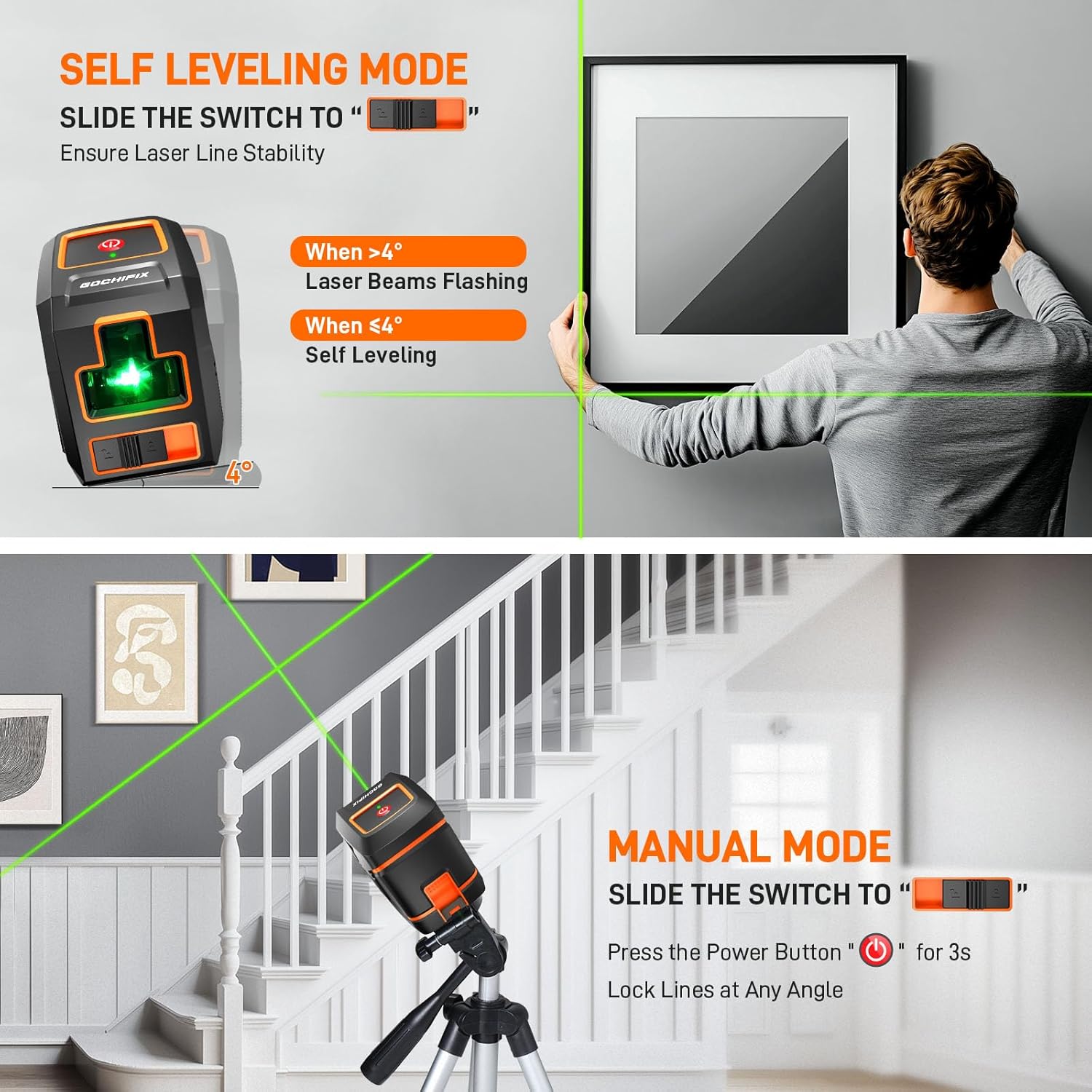
Image: Visual guide for Self-Leveling and Manual Modes.
Техникалык тейлөө
Proper maintenance ensures the longevity and accuracy of your laser level.
- Тазалоо: Аппаратты жумшак менен сүртүңүз, гamp cloth. Do not use abrasive cleaners or solvents. Keep the laser emission windows clean for optimal visibility.
- Сактагыч: When not in use, store the laser level in its portable storage bag in a dry, cool place, away from direct sunlight and extreme temperatures. Always ensure the pendulum is locked (switch in "locked" position) before storage or transport to prevent damage.
- Батареяга кам көрүү: Агып кетүүнү жана бузулууну алдын алуу үчүн аппарат узак убакыт бою колдонулбай турган болсо, батареяларды алып салыңыз.
- Калибрлөө текшерүү: Periodically check the calibration of your laser level by projecting lines against a known plumb or level surface. If significant deviation is observed, contact customer support.
Проблемаларды чечүү
If you encounter issues with your GOCHIFIX Laser Level, refer to the table below for common problems and solutions.
| Көйгөй | Мүмкүн себеп | Чечим |
|---|---|---|
| Laser lines are flashing/alarm sounds in Self-Leveling Mode. | Device is tilted beyond ±4° self-leveling range. | Place the device on a more level surface or adjust the tripod until the lines stabilize. |
| No laser lines emitted. | Batteries are dead or incorrectly installed. / Device is OFF. | Check battery polarity and replace if necessary. Ensure ON/OFF switch is in the correct position. |
| Laser lines are dim. | Low battery power. / Dirty laser emission window. | Replace batteries. Clean the laser emission window with a soft cloth. |
| Лазердик сызыктар түз же так эмес. | Device is not self-leveling correctly (if in self-leveling mode). / Internal component issue. | Ensure the device is within its ±4° self-leveling range. If the problem persists, contact customer support. |
Техникалык шарттар
| Спецификация | Деталь |
|---|---|
| Бренд | GOCHIFIX |
| Материал | ABS+TPU |
| Түс | Кара + Кызгылт сары |
| Стиль | Cross Line Laser |
| Иштөө режими | Self-Leveling Mode, Manual Mode |
| Элемент Салмагы | 1.92 фунт |
| Пакеттин өлчөмдөрү | 16 x 4.5 x 3.78 дюйм |
| Элемент моделинин номери | GOCHIFIX |
| Батареялар | 2 AA батарейка талап кылынат (кошулган) |
| Power Source | Батарея менен иштейт |
| Камтылган компоненттер | Батареялар |
| Батарея клеткасынын түрү | щелочтуу |
| Дата биринчи жеткиликтүү | 17-июль, 2024-жыл |
Кепилдик жана колдоо
GOCHIFIX stands behind the quality of its products. For warranty information, technical support, or any inquiries regarding your laser level, please refer to the contact information provided on the product packaging or visit the official GOCHIFIX webсайт. Кепилдик дооматтары үчүн сатып алганыңыздын далилин сактап коюңуз.
