1. Киришүү
Сатып алганыңыз үчүн рахматasing the TELLUR VOX 95 Bluetooth Headset. This manual provides detailed instructions for the proper use, setup, and maintenance of your new headset. The Vox 95 is designed for seamless communication on the go, offering comfort and convenience with advanced features like Bluetooth 5.3, multipoint connectivity, and Sound+ Voice Enhancement (SVE) technology.

Сүрөт 1.1: Алдыңкы view of the TELLUR VOX 95 Bluetooth Headset, showcasing its sleek design and main button.
2. Коопсуздук маалыматы
- Гарнитураны экстремалдык температурага, нымдуулукка же жегич заттардын таасирине тийгизбеңиз.
- Гарнитураны түшүрүүдөн же катуу таасирлерге дуушар кылуудан качыңыз.
- Do not attempt to disassemble or modify the headset. This will void the warranty and may cause damage.
- Гарнитураны балдардан жана үй жаныбарларынан алыс кармаңыз.
- Use only the provided USB-A to USB-C cable for charging.
- When driving, prioritize road safety. Use the headset responsibly and in accordance with local laws and regulations.
- Prolonged listening at high volume levels may cause hearing damage. Adjust volume to a comfortable level.
3. Пакеттин мазмуну
Сураныч, пакеттин мазмунун текшерип, бардык буюмдар бар экенин текшериңиз:
- 1 x TELLUR VOX 95 Bluetooth Headset
- 1 x USB-Aдан USB-C кубаттоо кабели
- 1 x Plastic ear hook
- 1 x Silicone ear hook
- 1 x Ear tip (Size M)
- 1 x Ear tip (Size S)
- 1 х Колдонуучунун колдонмосу (бул документ)
4. Продукт бүтүп калдыview
Familiarize yourself with the various parts of your TELLUR VOX 95 headset.

4.1-сүрөт: Арткы view of the headset showing the ear hook attachment point and ear tip.

Figure 4.2: The headset's USB-C charging port, located at the end of the device, with the charging cable connected.
Негизги компоненттер:
- Негизги баскыч: For power on/off, answering/ending calls, playing/pausing audio.
- Үн баскычтары: For adjusting volume up/down.
- USB-C заряддоо порту: Заряддоо кабелин туташтыруу үчүн.
- LED көрсөткүчү: Displays status (pairing, charging, low battery).
- Микрофон: For voice input during calls.
- Кулак учу: Provides in-ear comfort and sound delivery.
- Кулак илгич: Secures the headset over the ear.
5. Орнотуу
5.1 Гарнитураны заряддоо
Биринчи жолу колдонуудан мурун, гарнитураны толугу менен кубаттаңыз. Толук кубаттоо болжол менен 2 саатты талап кылат.
- Кубаттоочу кабелдин USB-A учун USB кубат адаптерине (кошулмада жок) же компьютердин USB портуна туташтырыңыз.
- Connect the USB-C end of the charging cable to the charging port on the headset.
- The LED indicator will show a specific color (refer to the LED indicator section in the manual, if available, or assume red for charging, blue/off for full).
- Толук заряддалгандан кийин, заряддоо кабелин ажыратыңыз.
Figure 5.1: Illustrates connecting the USB-C charging cable to the headset's charging port.
5.2 Гарнитураны тагынуу
The VOX 95 is designed for comfortable wear and can be adjusted for either the left or right ear.
- Choose the ear tip (S or M) that provides the best fit and comfort for your ear.
- Attach either the plastic or silicone ear hook to the headset. The 360° adjustable earpiece allows you to rotate the ear hook to fit perfectly in your left or right ear.
- Gently place the ear tip into your ear canal and position the ear hook over your ear for a secure fit.

Figure 5.2: A woman wearing the TELLUR VOX 95 headset, demonstrating its comfortable and discreet fit.

Figure 5.3: The headset being worn by a woman while driving, highlighting its hands-free convenience for safer communication.
5.3 Түзмөк менен жупташтыруу
The VOX 95 uses Bluetooth 5.3 for a stable connection up to 15 meters.
- Күйгүзүү: Press and hold the Main Button for approximately 3 seconds until the LED indicator flashes blue and red alternately, indicating it's in pairing mode.
- Bluetooth иштетүү: Смартфонуңузда, планшетиңизде же компьютериңизде Bluetooth функциясын иштетиңиз.
- Издөө Түзмөктөр: Түзмөгүңүздүн Bluetooth жөндөөлөрүнөн жеткиликтүү түзмөктөрдү издеңиз.
- Select "VOX 95": From the list of found devices, select "VOX 95".
- Байланышты ырастоо: Once connected, the LED indicator on the headset will flash blue slowly or turn off, depending on the model's specific behavior. You will also hear a confirmation tone.
Note: The headset supports multipoint connectivity, allowing it to be connected to two devices simultaneously (e.g., a phone and a tablet/laptop).

Figure 5.4: The headset positioned on a smartphone, symbolizing its readiness for Bluetooth pairing and connection.
6. Иштөө нускамалары
6.1 Күйгүзүү/өчүрүү
- Күйгүзүү: Press and hold the Main Button for approximately 3 seconds until the LED indicator flashes blue.
- Өчүрүү: Press and hold the Main Button for approximately 5 seconds until the LED indicator flashes red and then turns off.
6.2 Чалууларды башкаруу
- Чалууга жооп берүү/аяктоо: Press the Main Button once.
- Чакырууну четке кагуу: Press and hold the Main Button for 2 seconds.
- Акыркы номерди кайра терүү: Double-press the Main Button.
6.3 Үндү башкаруу
- Көлөмү: Үндү катуулатуу баскычын (+) басыңыз.
- Үнүн азайтуу: Үндү азайтуу баскычын (-) басыңыз.
6.4 Үн жардамчысын жандыруу
Access your device's voice assistant (Siri, Google Assistant) with a simple button press.
- Үн Жардамчысын жандыруу: Triple-press the Main Button.
Note: For iOS users, the headset also provides low battery notifications.
6.5 Көп чекиттүү туташуу
The VOX 95 can connect to two Bluetooth devices simultaneously, such as a smartphone and a laptop.
- Pair the headset with the first device (e.g., your smartphone) as described in Section 5.3.
- Биринчи түзмөктө Bluetooth'ду өчүрүңүз.
- Put the headset back into pairing mode.
- Pair the headset with the second device (e.g., your laptop).
- Once connected to the second device, re-enable Bluetooth on the first device. The headset should automatically reconnect to both devices.
The headset will intelligently switch between devices for calls or audio playback.

Figure 6.1: A user demonstrating multipoint connectivity, with the headset simultaneously linked to a laptop and a smartphone, indicated by blue lines.
6.6 SVE Technology for Voice Clarity
The Sound+ Voice Enhancement (SVE) technology in the VOX 95 is a passive noise reduction feature that uses advanced signal processing to improve the clarity of your voice during calls, especially in noisy environments. It helps distinguish your speech from background noise, ensuring clearer communication for the listener.
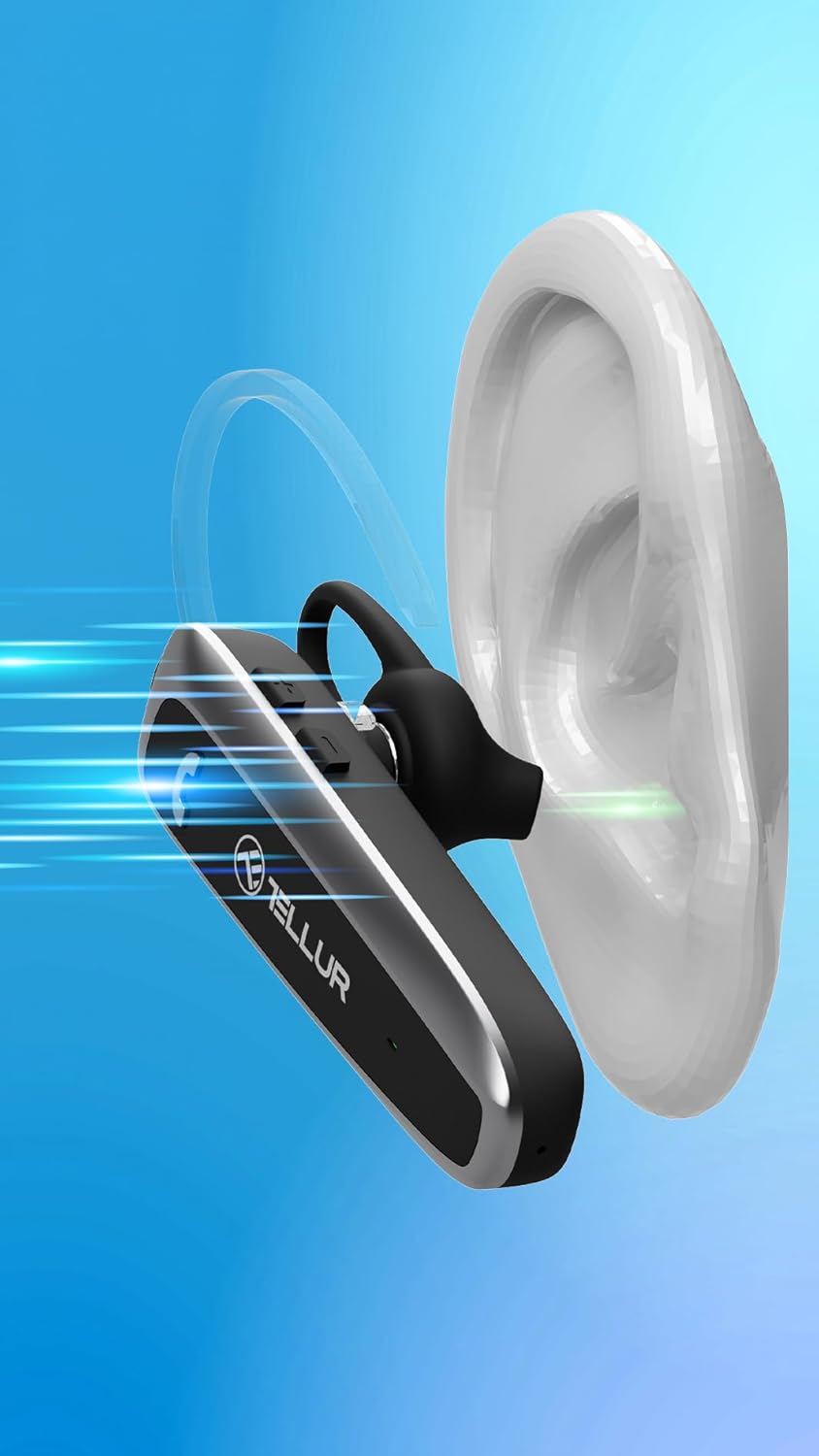
Figure 6.2: Visual representation of Sound+ Voice Enhancement (SVE) technology, showing sound waves being processed for clarity from the ear to the microphone.
7. Техникалык тейлөө
- Тазалоо: Гарнитураны тазалоо үчүн жумшак, кургак, мамыксыз чүпүрөктү колдонуңуз. Абразивдүү тазалоочу каражаттарды, спиртти же химиялык эриткичтерди колдонбоңуз.
- Кулак кеңештери: The ear tips can be removed and gently cleaned with a damp cloth and mild soap, then thoroughly dried before reattaching.
- Сактагыч: When not in use, store the headset in a cool, dry place, away from direct sunlight and extreme temperatures.
- Батареяга кам көрүү: To preserve battery life, charge the headset at least once every three months if not used regularly.
8. Кыйынчылыктарды
| Көйгөй | Мүмкүн себеп | Чечим |
|---|---|---|
| Гарнитура күйбөйт. | Батарея түгөнүп калды. | Гарнитураны толук заряддаңыз. |
| Гарнитураны түзмөк менен жупташтыруу мүмкүн эмес. | Гарнитура жупташтыруу режиминде эмес; түзмөктө Bluetooth өчүк; Түзмөк өтө алыс. | Ensure headset is in pairing mode (flashing blue/red). Turn on Bluetooth on your device. Move headset closer to the device (within 15m). |
| Үн жок же үнү төмөн. | Volume too low; Headset not connected; Audio output not set to headset. | Increase volume on both headset and connected device. Reconnect the headset. Check audio output settings on your device. |
| Чалуу сапаты начар. | Weak Bluetooth signal; Environmental noise. | Move closer to the connected device. Ensure microphone is not obstructed. SVE technology helps, but extreme noise may still affect quality. |
| Multipoint connection issues. | Incorrect pairing sequence; Device conflict. | Follow the multipoint pairing instructions carefully (Section 6.5). Disconnect and reconnect devices if necessary. |
9. Техникалык шарттар
| Өзгөчөлүк | Деталь |
|---|---|
| Модель аты | 95 |
| Байланыш технологиясы | Bluetooth |
| Bluetooth версиясы | 5.3 |
| Bluetooth диапазону | 15 метрге чейин (49 фут) |
| Батареянын иштөө мөөнөтү (сүйлөшүү убактысы) | 20 саатка чейин |
| Күтүү убактысы | 30 күнгө чейин |
| Заряддоо убактысы | Болжол менен 2 саат |
| Заряддоо порту | USB-C |
| Салмагы | 11.4 грамм (0.402 унция) |
| Noise Control | Passive Noise Cancellation (SVE Technology) |
| Наушник формасы | Ear Hook (360° adjustable) |
| Шайкеш түзмөктөр | Smartphones (iPhone, Android), Tablets (iPad, Android), Laptops, Smart TVs (Bluetooth enabled) |
| Камтылган компоненттер | Headset, USB-A to USB-C cable, Plastic ear hook, Silicone ear hook, Ear tip (M), Ear tip (S), User Manual |
10. Кепилдик жана колдоо
TELLUR products are manufactured to the highest quality standards. For detailed warranty information, please refer to the warranty card included in your package or visit the official TELLUR website. If you encounter any issues or have questions regarding your VOX 95 Bluetooth Headset, please contact TELLUR customer support through the contact information provided on the official webсайт же сатып алуу платформаңыз.
Кошумча жардам алуу үчүн, сиз иш сапары менен болот TELLUR Store on Amazon.


